
Dots vs Grok Bot vs Sonnet 5.5: Which AI Content Studio Would I Keep?
Your AI can write 100 posts. If you still have to rescue every draft, you just gave yourself 100 editing jobs. I gave three studios the same assignment: turn one AI product presentation into a
Article
Job breakdowns
Your AI can write 100 posts. If you still have to rescue every draft, you just gave yourself 100 editing jobs.
I gave three studios the same assignment: turn one AI product presentation into a complete content release.
OpenAI Dots. Grok Bot. A custom studio powered by Claude Sonnet 5.5.
Grok Bot made the strongest first impression. My own Sonnet studio gave me the most control. But the comparison changed when I corrected the brief and asked for another release.
Dots was the one I chose to keep.
The deciding factor was how much work came back to me before a package was ready to publish.
Here is the full setup, the reusable prompts, and the three rounds that explain that choice.
Part 1: Give All Three Studios the Same Job
The example is an AI creator account serving solo builders and small teams. Its readers want useful workflows, concrete examples, and something they can try.
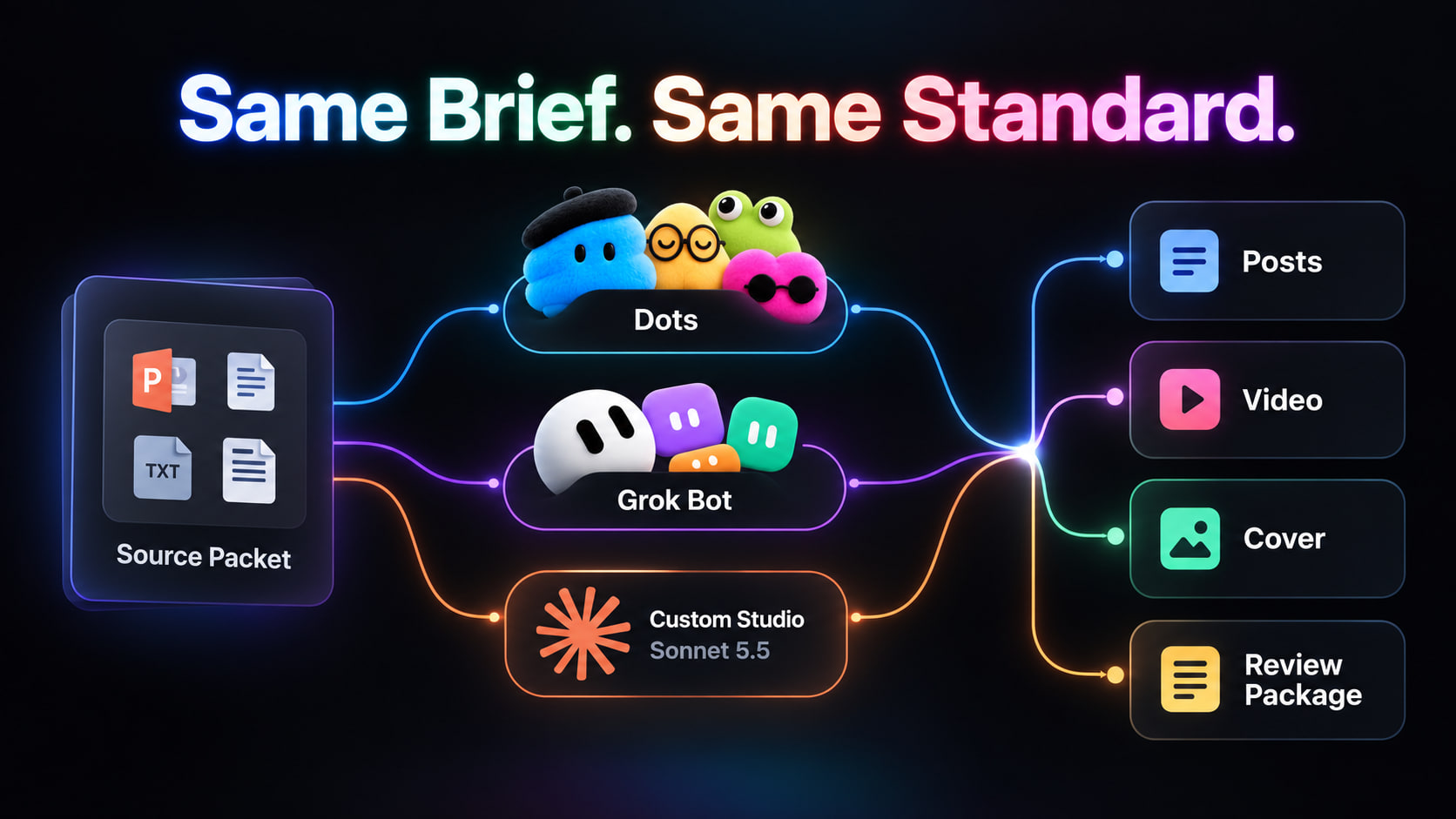
I supplied one product presentation, its timestamped transcript, a fact sheet, and the article the content should lead readers toward. Each studio received the same packet in a separate workspace.
Here is the release specification:
The video uses an authorized excerpt from the supplied presentation. It is an editing assignment with a concrete output, not a request for a script presented as a finished video.
For a later avatar-video round, supply the same avatar, voice, generator, credits, and output specification to every studio. Keep that round separate so access to a different generator does not decide the winner.
Copy this shared brief:
Part 2: Write the Rules Once
The studio needs a stable definition of my voice. Five approved posts are more useful than a paragraph asking for content that is “engaging and viral.”
My brand packet has four parts:
-
Audience: who the reader is and what they already understand.
-
Voice: direct English, short paragraphs, specific claims, varied hooks.
-
Examples: approved posts with notes explaining why they work.
-
Visuals: logo, colors, fonts, cover examples, and safe text margins.
The article is also part of the packet. An agent cannot write a meaningful transition to a guide it has never read.
The deliverable: one approved brand document used by every stage and every platform.
Part 3: Six Roles With Six Concrete Outputs
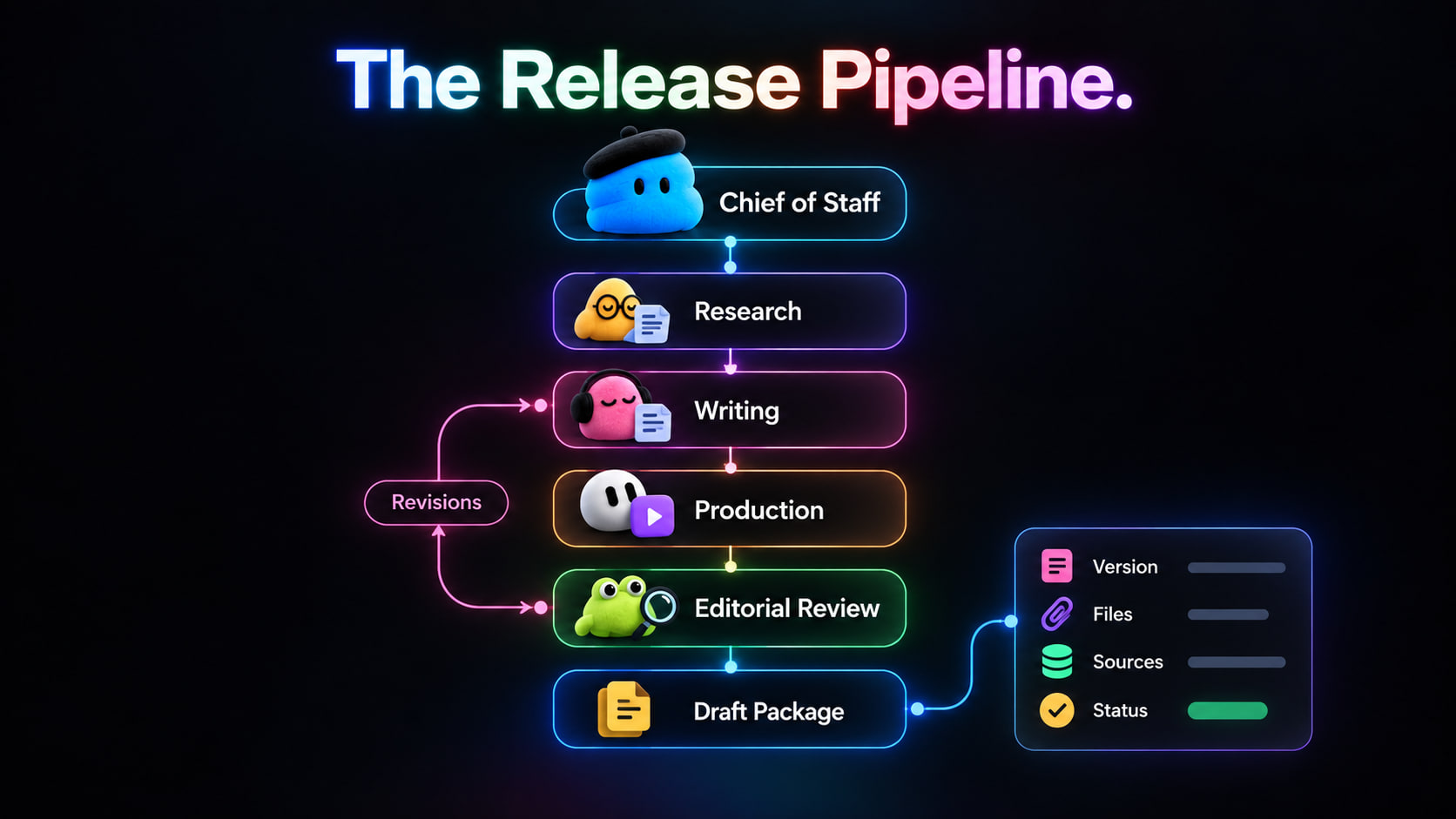
My design uses six responsibilities. Their implementation differs across platforms; a role is not automatically a separate persistent agent.
The Researcher and Writer can work from text. The Producer needs actual media tools. The Publisher needs a supported publishing integration only if the task includes creating drafts in that service.
Here are the role instructions to place after the shared brief:
Each handoff carries the release ID, revision number, file paths, unresolved issues, and the next owner's task. A message saying “done” is not a handoff.
Part 4: Set Up Dots as the Studio's Chief of Staff
I gave my dot one ongoing responsibility: turn an approved source packet into a complete release I could review.
Dots uses GPT-6 Astra and its own cloud computer. I configured one dot as the coordinator, with research, writing, production, editing, and packaging as distinct responsibilities. Those stages did not require claiming I had six independent Dots.
Start With a Role Contract
My setup started with five decisions: the outcome, the approved sources, the working method, the approval boundary, and the trigger.
I kept the permanent instructions in a project document and gave each release its own brief. That separated “how this studio works” from “what we are making today.”
Give the Work a Permanent Home
My project record contained five items:
A shared document or accessible project folder can hold this record. The important part is an agreed current version that the coordinator can read.
For example, changing “available to everyone” to “limited rollout” belongs in the fact sheet first. The manifest then identifies which assets need revision. This gives the coordinator something concrete to check.
Connect the Tools, Then Check Access
Create the dot on desktop web or in the desktop app. Connect the required supported apps and inspect its cloud computer from the profile.
For this assignment, I specified access to the source packet, project storage, and media-processing tools. Connecting an app did not establish that the video export would work.
My first instruction was an access check:
An expired session is a blocker to report. The workflow does not depend on a promise that browser sign-ins last forever.
Run One Release Before Scheduling the Next
I started with this assignment:
When delegation is used, I want the next task to receive its relevant inputs and return an inspectable file. Naming a specialist in a prompt does not prove a separate worker ran.
Make the Schedule Explicit
After the manual release, my recurring instruction was:
Scheduled work is managed through Scheduled in the dot's profile. I also use the profile's In progress and Completed views to inspect work.
For approvals, use the available Custom rules controls alongside the written brief. My publication rule remains explicit: prepare drafts; ask before releasing them.
The practical handoff is one message with the current files and the decision I need to make. That is what the coordinator is responsible for delivering.
Part 5: The Grok Bot Version
Grok Bot's documented model includes named Bots, a shared cloud computer, group conversations, and routines. Here the six roles can map to separate Bots.
I assigned the six roles to separate Bots and gave them a shared project folder and project conversation. The Chief of Staff owned the release manifest; each specialist had a specific output to return.
Shared access needs care: files and sign-ins on that computer are not isolated merely because the Bots have different names.
For the initial comparison, use the supplied packet rather than open-ended trend discovery. That removes one major variable: which story the system happened to find.
What this version must demonstrate: reliable handoffs between specialists without making me carry their context between conversations.
Part 6: The Custom Studio on Sonnet 5.5
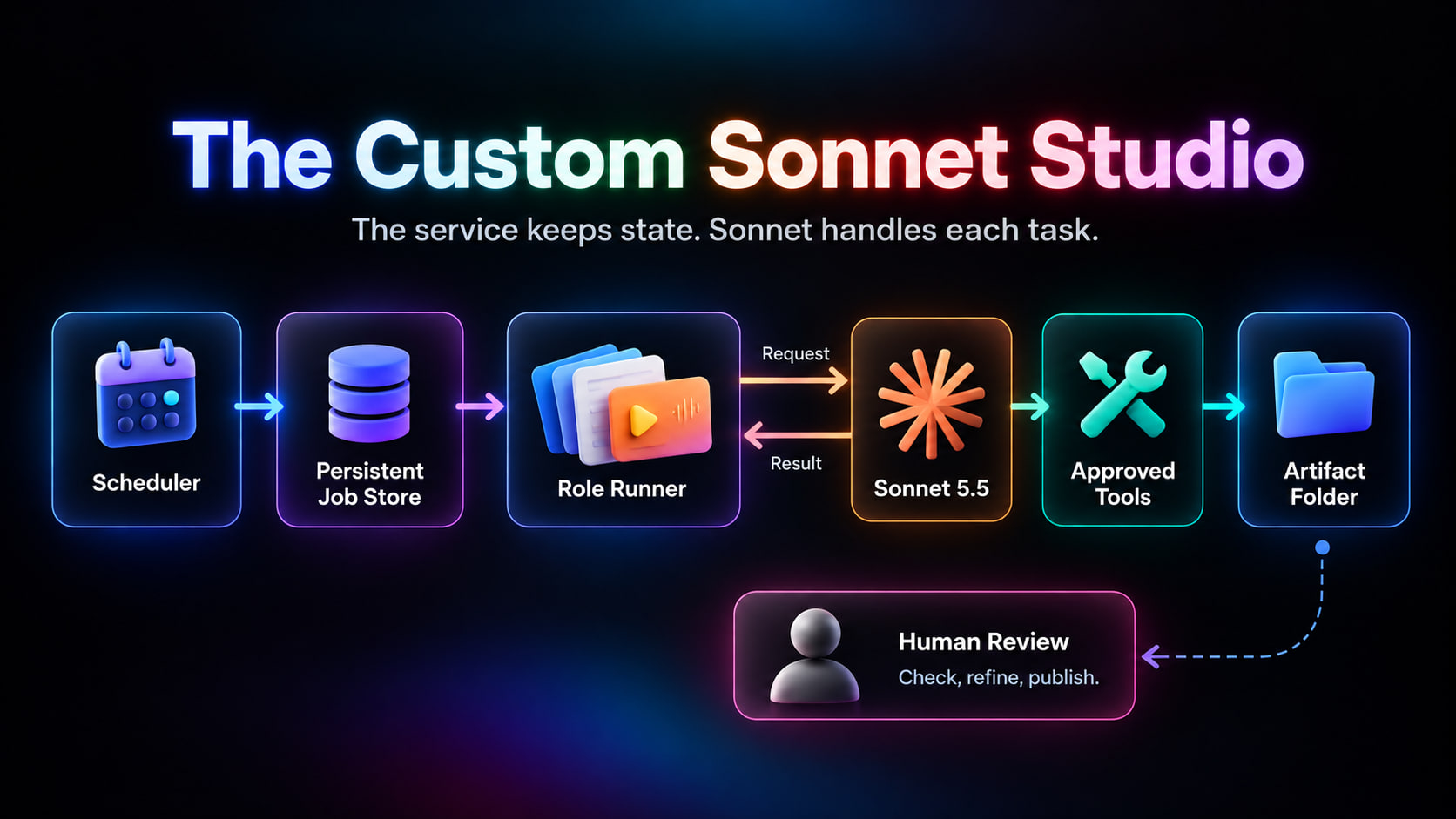
In the custom version, Sonnet 5.5 handles reasoning and tool requests through the Claude API. The application supplies the schedule, storage, execution, and recovery.
The model does not stay awake simply because a prompt tells it to work continuously.
For the custom studio, I used a small Python service, persistent storage, a scheduler, and explicitly allowed tools. The roles ran sequentially so I could trace each dependency and keep ownership of files clear.
Give your coding agent this build prompt:
The setup time belongs in the comparison. So do hosting, model calls, media tools, debugging, and maintenance. A low token bill is only one part of running a custom studio.
The design target: an executable service with documented setup, recoverable jobs, and a clear record of what each role produced.
Part 7: Round One Made Grok Bot Look Like the Winner
I started with identical source packets, output requirements, and permitted media tools. Each studio had its own workspace. The job ended at a review package; nothing was published automatically.
Grok Bot delivered the most convincing opening. The main post had a clear angle, the short posts explored different ideas, and the cover matched the copy. Its specialist structure made the package easy to follow.
Dots produced a more restrained release. I wanted a sharper first sentence, but the package was organized and its outstanding decisions were clear.
My Sonnet studio was the most predictable. Every stage returned the expected files. The writing, however, followed the template too closely. It needed another editorial pass to sound like me.
If I had stopped after the first draft, I would have picked Grok Bot.
But the first draft was only one part of the job. I still needed to know what happened when the input changed.
Part 8: One Correction Changed the Comparison
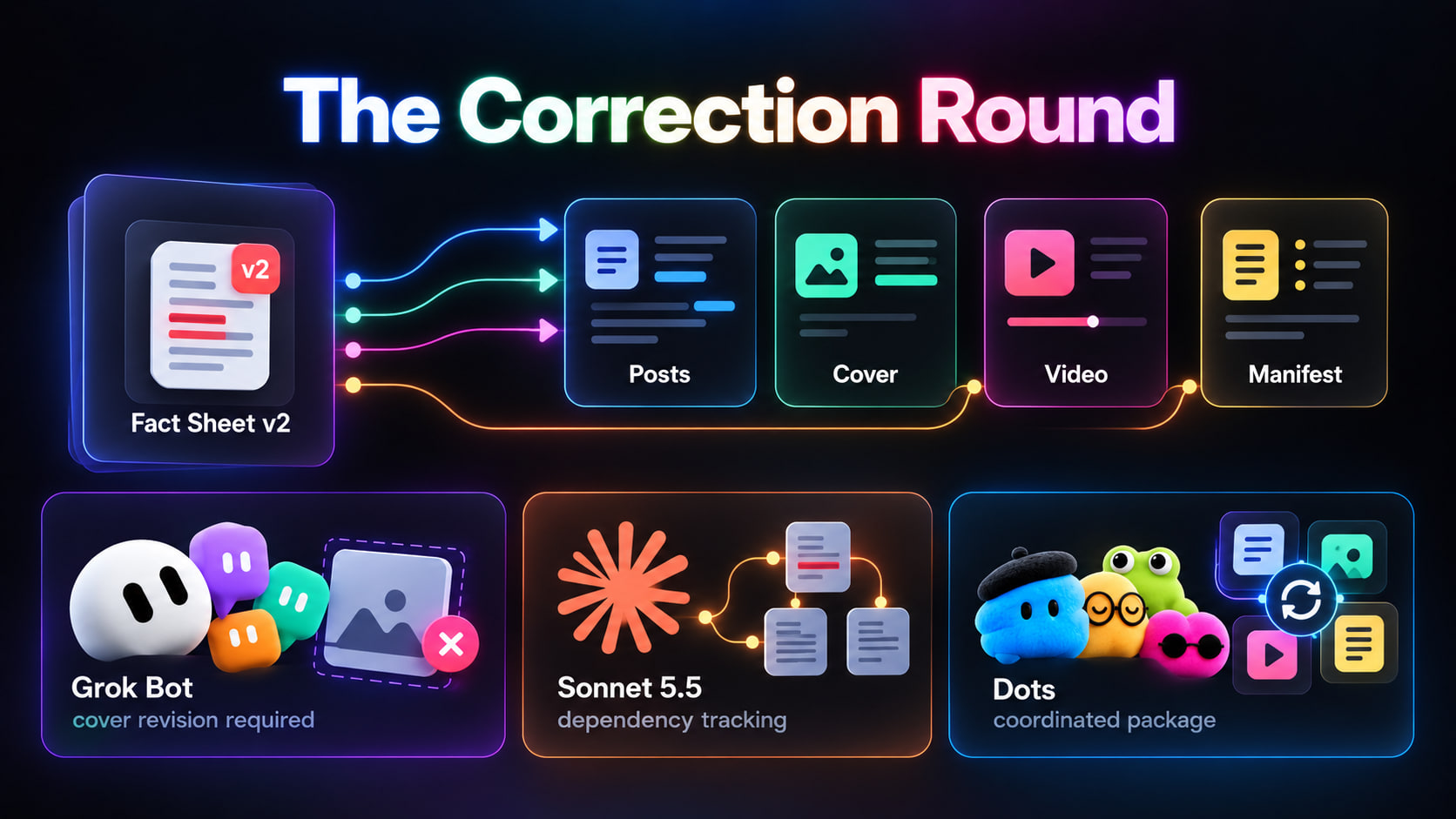
The original brief described a feature as generally available. I replaced it with a revised fact sheet: the feature was in a limited rollout.
That change affected the main post, one short post, the cover, and the video captions. I also asked for a practical opening instead of a broad claim about replacing an entire team.
All three studios received the same instruction:
Grok Bot corrected the written posts, but the old claim remained on the cover. The individual assignments moved forward; the final package still needed a consistency check. I sent it back for that repair.
My Sonnet studio tracked the changed claim through its dependent files. It handled the revision coherently, but I still needed to adjust the writing instructions to get the opening I wanted. The explicit workflow helped; maintaining that workflow remained my responsibility.
Dots returned a revised package with the affected assets accounted for and the older versions marked as superseded. It also flagged that the selected clip could imply broader availability than the corrected brief supported.
That was the useful interruption. I had a specific editorial decision to make rather than a folder of files to reconcile.
Dots took the lead on coordination. Sonnet remained strong on traceability. Grok Bot needed another package-level review.
Part 9: The Second Release Decided It
For the next issue, I supplied a different presentation and kept the approved editorial feedback from the first.
The question was simple: would I have to give the same corrections again?
Grok Bot again produced strong individual pieces. The opening was engaging, but the package needed another check for repeated angles and consistency between the copy and visuals.
My Sonnet studio carried the saved preferences into the new release. Its structure was dependable, and the text improved after the instruction changes. The tradeoff was the work I owned around it: configuration, tool failures, and the rules linking one stage to another.
Dots kept the revised opening style, used a fresh angle, and returned the release as one current package. Its writing still benefited from my final taste decisions. It left me with the smallest coordination burden across the complete exercise.
That distinction decided the outcome. I was choosing a studio for recurring production, and I valued fewer interventions more than having every internal setting under my control.
Two Releases. Twelve Assets. One Choice.
Each release contained 4 posts, 1 video, and 1 cover. The manifest was checked separately for completeness.
Delivery and correction times are elapsed time. My active time includes reviewing, editing, and directing the work across both releases and the correction round; it excludes setup and unattended processing.
Accepted without edits means the asset passed its first review against the brief. Assets needing changes were revised before final approval. Mandatory changes from the updated fact sheet were assessed in the separate correction round.
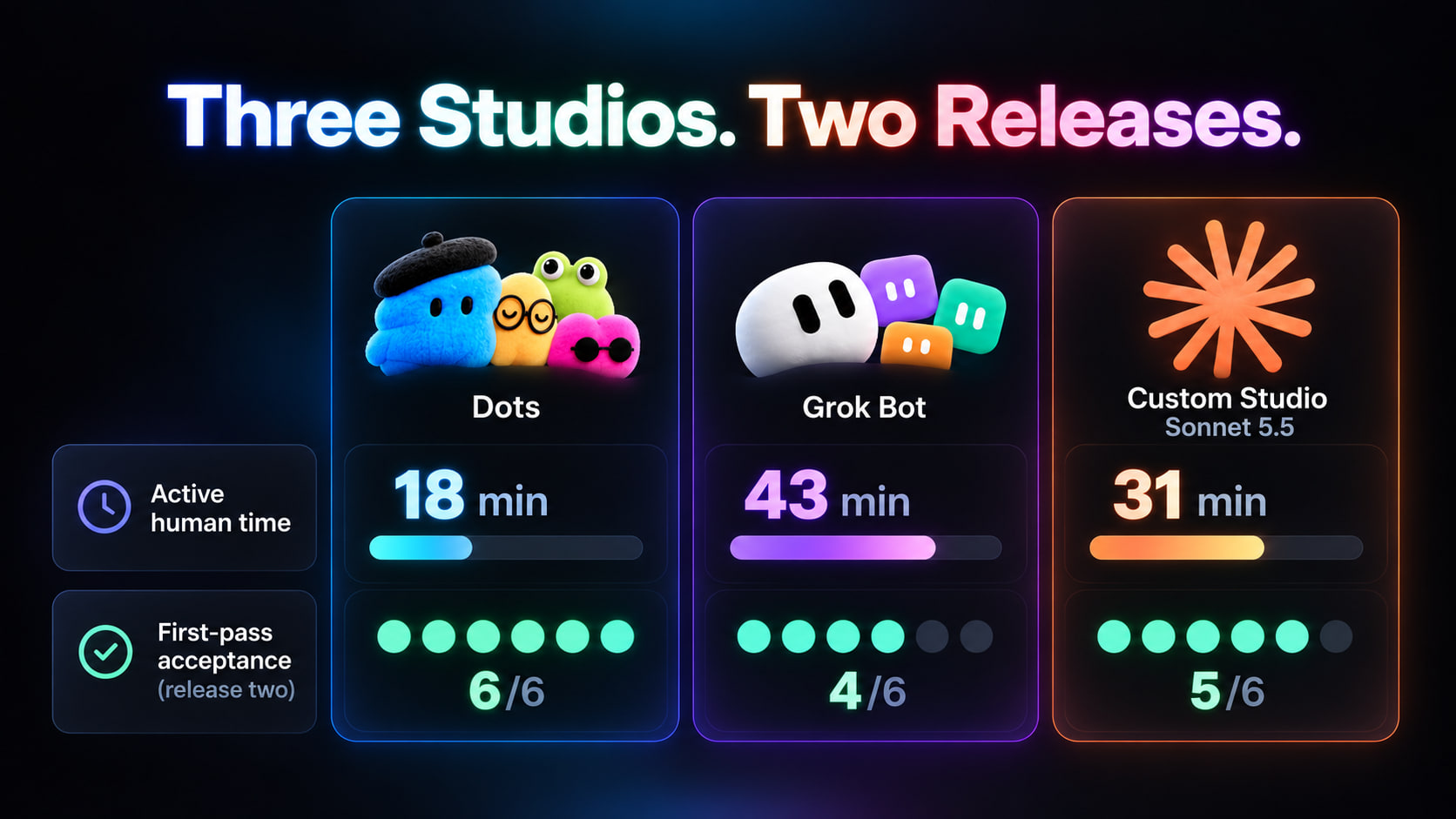
Grok Bot delivered the first package 16 minutes before Dots and had 5 of 6 assets ready without edits. That made its opening result the strongest.
The second release reversed the order. Dots returned all 6 assets ready for approval, compared with 5 for Sonnet and 4 for Grok Bot.
Across the complete exercise, Dots needed 18 minutes of my attention. Grok Bot needed 43. My custom studio needed 31.
Dots left me with 25 minutes less manual work than Grok Bot and 13 minutes less than my Sonnet studio.
That was the advantage I valued most for recurring production.
Part 10: What the Content Delivered
A studio also needs to produce content people want to read. I extended the comparison through an approval-and-publication stage, with a 72-hour observation window for each post.
Each studio contributed 8 posts across two releases. The video and cover were attached to those posts, not counted as additional publications. All versions received factual corrections before publication; a failed accuracy check never became an audience experiment.
For this distribution scenario, I assumed comparable audience sizes and posting windows, no paid promotion, and no unusually large external repost. Reach still varied with the creative treatment.
Impressions are summed post impressions, not unique readers. Interaction rate is the listed interactions divided by impressions. Article CTR is tracked link clicks divided by impressions; clicks are not unique visits or sales. Bookmarks are already included in the interaction total.
Grok Bot led the first release with 51,000 impressions. Its stronger opening gave it the early advantage.
Dots pulled ahead in the second release, reaching 63,000 impressions. Across both issues, its package produced 1,260 article clicks against Grok Bot's 864 and Sonnet's 902.
That put Dots 396 clicks ahead of Grok Bot, with 25 fewer minutes of my active work.
My Sonnet studio also had a useful result: less reach than Grok Bot, but a higher article CTR. More impressions did not automatically mean more readers reaching the guide.
The editorial logic was consistent with the production story. Grok Bot had the strongest initial hook; Dots carried the corrected angle through the second package; Sonnet became more effective after explicit voice adjustments.
Audience response also depends on distribution, timing, and topic. Two releases cannot isolate the effect of an agent platform. I treated the content figures as supporting context for the operating decision, rather than a guarantee that the same ranking would repeat.
Part 11: Why I Chose Dots
Grok Bot won the first draft. My Sonnet studio gave me the most control. Dots won the full comparison.
It carried the feedback into the next release, kept the package consistent, and left fewer loose ends for me to resolve.
The custom studio still made sense for work that demanded detailed control over storage, execution, and integrations. Grok Bot remained appealing for a visible team of specialists producing strong creative material.
For this assignment, my priority was the attention left over after the release was ready.
I wanted to choose an angle, review the work, and move on to the next idea. I did not want every correction to become another coordination task.
That is why Dots is the studio I would keep.
To apply the same standard to your own work, take the shared brief above and run one release through the system you already have. Change one important requirement. Then request the next issue.
The files you receive, the corrections you repeat, and the time you spend getting everything ready will tell you far more than the first impressive draft.
Published on grokbot.sh. Cite the public log, not a prompt pack.