
Your Other Bots Already Have That Login: The Operating Manual for a Shared-Computer Agent Fleet
Every writeup on Grok Bot right now covers the same three things in a different order. The Chief of Staff topology. The workspace persistence trick. The cost-per-job math. All three are real and all
Article
Job breakdowns
Every writeup on Grok Bot right now covers the same three things in a different order. The Chief of Staff topology. The workspace persistence trick. The cost-per-job math. All three are real and all three matter, but none of them answer the one question that decides whether this thing is safe to run: given that every Bot on your account shares one computer, what should you never hand it in the first place?
That question has a real answer, and nobody's written it down yet. This is the full picture, the parts everyone agrees on plus the one framework that's missing.
1. The confusion at the center of the launch
Grok Bot's own launch page and its own documentation, published the same day, describe two different products. The launch page's promise is that Bots have their own computer. The documentation says the opposite: all of your Bots use the same persistent cloud computer, isolated to your account, not to an individual Bot.
That's not a marketing simplification you can round off. It's the difference between a system with a contained blast radius and one without.
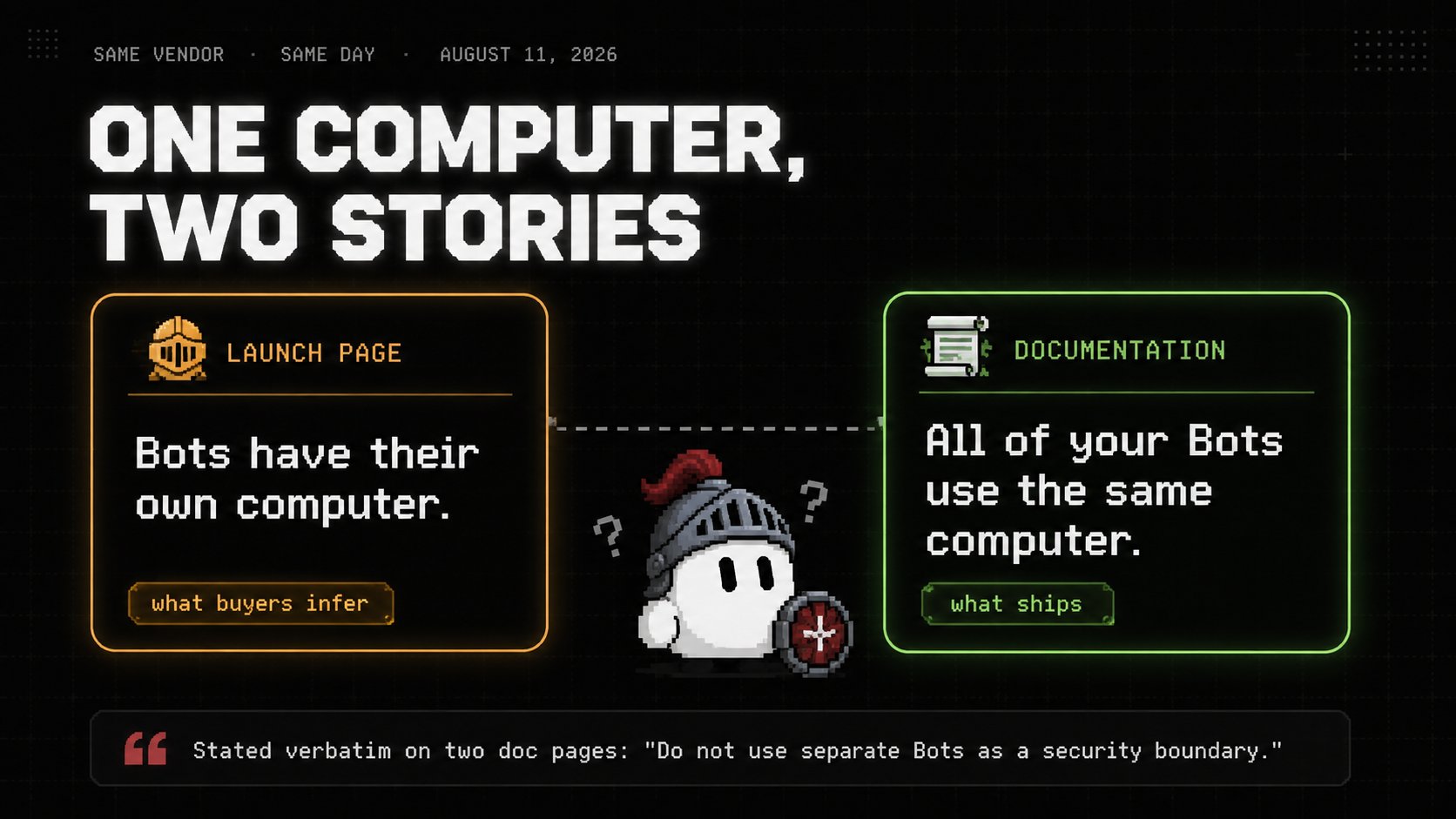
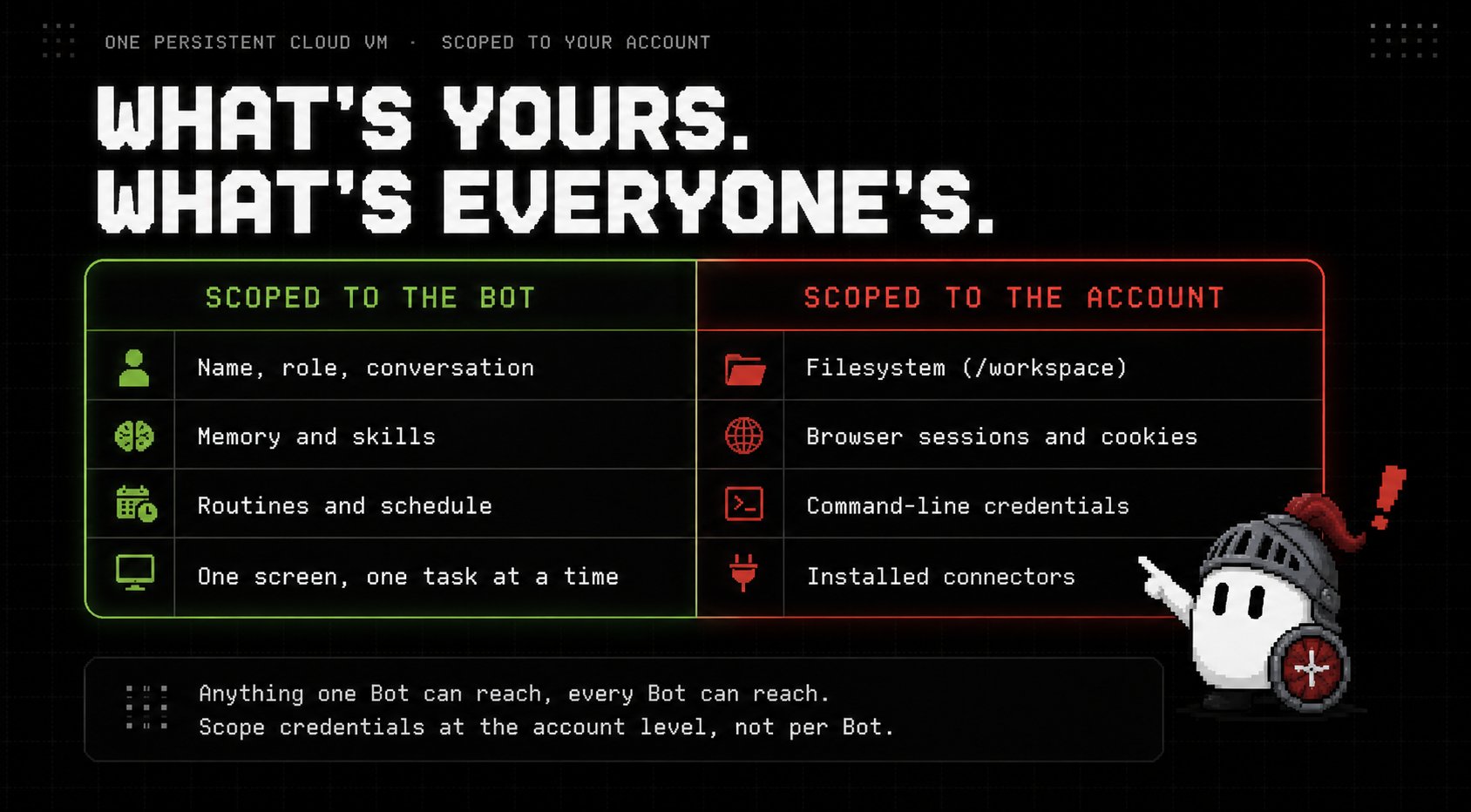
Here's what "own computer" actually means once you read the docs instead of the launch copy. Each Bot gets its own screen on one shared VM, so several Bots can drive browser and desktop tools at the same time, but they don't get separate security boundaries doing it. xAI states this outright, in the same nine words on both the FAQ and the security page: do not use separate Bots as a security boundary. Files, browser sessions, and command-line credentials on that computer are available across your entire Bot roster.
The intuitive model, give the bookkeeping bot accounting access, give the inbox bot email access, keep them separate, simply does not hold. Anything one Bot can reach, every Bot can reach. So you scope credentials at the account level, not the Bot level, and you write that reality directly into every charter:
One more thing the docs bury that changes how you offboard: deleting a Bot is soft deletion. It clears the Bot's profile, conversation, and routines, but because Bots share a computer, files and logins it left behind can remain. A credential a Bot established can outlive the Bot that created it, still reachable by the rest of the roster until you revoke it at the source. Offboarding is genuinely a two-step process, and the product only does step one. Step two happens outside the product entirely: sign out all sessions in each service the Bot touched, rotate any API key it was given, check the shared filesystem for anything it wrote.
Credit where it's due, the credential handling itself is well designed. For passwords, passkeys, two-factor codes, CAPTCHAs, and payment confirmations, the Bot hands you control of the computer, you complete the sensitive step yourself, then hand control back. Sign in once and the whole roster inherits the session. That part is genuinely better than the category norm. It just doesn't change the fact that the session, once established, belongs to the account, not the Bot that logged in.
2. The Chief of Staff topology
The single biggest mistake new users make is creating a dozen uncoordinated Bots and trying to manage each one by hand. That creates chat clutter and defeats the entire point of delegating in the first place.
The working structure instead is a Chief of Staff topology: one orchestrator at the top, a handful of specialists underneath it, each with a job nobody else owns.
HUMAN OPERATOR
A Bot's profile description is its entry in the org chart, and this is not a decorative detail. When Klaus receives a request, it scans the descriptions of every available Bot in the workspace. If Mara's description explicitly says she owns market research, prospect discovery, and competitor scraping, Klaus forwards research tasks to Mara without anyone telling it to. A blank description takes a Bot off the chart entirely: it can't hand work to others and others can't hand work to it, because the routing runs on what the descriptions say, and nothing else.
The description is the field people waste, because today's actual task goes in the message, not the description. The description holds the rules that stay true after you've forgotten writing them. Both good role cards close on a limit, not a capability: never contact a customer or change an account without approval, never change production settings.
A well-formed hire clears five tests before it deserves its own Bot instead of just being a task inside an existing one:
-
Goal: one area of ownership that belongs to nobody else
-
Sources: its own set of tools, apps, and files
-
Working style: a way of working that differs from the rest of the roster
-
Approval boundary: a named line where it stops and asks you
-
Schedule: the job repeats on a clock
A Talent Scout or an Expense Manager clears all five easily. A "General Helper" clears none of them, and the docs say so directly: a vague role gives the Bot less guidance and makes its saved context harder to reuse later.
3. Teaching a workflow instead of describing one
Explaining a multi-step UI workflow in text is tedious and gets misread constantly. If a task involves clicking specific filters, exporting a CSV, and pasting numbers into a doc, you demonstrate it once instead of writing paragraphs about it.
Open the Bot's Agent Computer view, click Teach a Task, perform the exact workflow manually on the cloud browser, click stop. Grok Bot reads the DOM events and the mouse actions and generates a reusable Skill file from the recording.
The docs are honest that what comes out is a draft, not a finished procedure. A single recording can't show what to do when a source goes missing or a price needs approval, so you add that by hand after:
The right order, according to the docs themselves, is five moves with the schedule last, not first: run one real task on a scope safe to get wrong, correct the result until it's something you'd actually approve, save the working process as a named skill, test it on a second input to confirm it generalizes, and only then turn it into a routine. A schedule only works because the four steps in front of it already ran. Automating a process you haven't stabilized just gives you unreliability on a clock instead of unreliability on demand.
4. The reversibility principle
An autonomous agent with a persistent computer and standing logins can create real damage fast if it's allowed to execute irreversible actions without anyone checking first. The rule that keeps this contained is simple to state and easy to skip: sort every action by whether it can be undone.
The boundary belongs in the charter itself, as a line the Bot cannot argue its way around: "You have full authority to research, summarize, and save email drafts. You must never click send or transmit an external email without explicit human review in this chat thread." One sentence like that lets a copywriter Bot draft fifty personalized emails overnight while guaranteeing zero of them leave your domain unreviewed.
5. The one folder that survives
Here's the detail almost every guide skips entirely, and it will quietly break your setup if you don't know it going in. Grok Bot's cloud VMs periodically update, rebuild, or reset their container image. When that happens, everything installed into the home directory or global system paths gets wiped: custom CLI tools, manually installed packages, unsaved browser state, all of it, gone.
One directory is documented to survive: /workspace. Anything your Bots depend on long-term needs to live there, structured cleanly:
A verified check on a live Grok Bot machine confirmed the account runs with full passwordless root: sudo -n id returns uid=0(root). That's a lot more power than the interface suggests, and it's also why a self-healing header at the top of every skill file matters, so a Bot can reinstall its own missing dependencies the moment a rebuild wipes them out:
You can prove the persistence boundary yourself in about five minutes: write a timestamp file to /workspace and another to your home directory, trigger an update, then check which one survived. Only one will.
6. What the roster actually costs
Five Bots running all week and one line on your subscription statement tells you nothing about whether it was worth it. The only honest way to price the roster is by counting what each one actually finished, the same way you'd evaluate a person.
A real week might look like this: a research Bot checks 214 companies against a buyer list and returns 38 that fit. A copywriter Bot turns those 38 into personalized letters and gets 9 replies. A design Bot produces 26 images for the resulting campaign. An inbox Bot answers 61 threads and escalates 4 that needed a human. One of those replies signs a contract.
Against a $200 monthly seat, a week's worth of that seat runs about $46, plus whatever on-demand usage the week burned past the included pool, say $142.80. Total cost for the week: $188.80. Against 339 finished pieces of work across the roster, that's roughly 56 cents per completed task, and it produced a signed contract worth far more than the week cost.
The meter moves on how much the roster has to look at, not just how much it does. Every screenshot a Bot takes is an image the model has to read before it can act, and workflows that scroll through UI and capture the screen at every step burn the weekly pool fast. Routing repetitive work through a proper connector instead of raw screen automation stops the pool from paying to look at pixels it doesn't need to see.
7. My addition: the Coffee Shop Test
Here's the piece none of the existing writeups connect, even though every one of them is circling it from a different angle. The shared-computer architecture, the reversibility principle, and the cost accounting are three separate concerns in every guide so far. They're actually one concern wearing three costumes, and the connecting question is this:
Would you let this task happen on a shared work computer that a stranger also has root access to?
That's the Coffee Shop Test, and it exists because "shared computer, not shared task" is an abstract security warning until you translate it into something you'd actually feel the wrongness of. If your Bot fleet is a shared machine where any Bot can, in principle, read what any other Bot left behind, the honest mental model isn't "my team of five employees." It's "five strangers sharing one laptop, and one of them just logged into your bank."
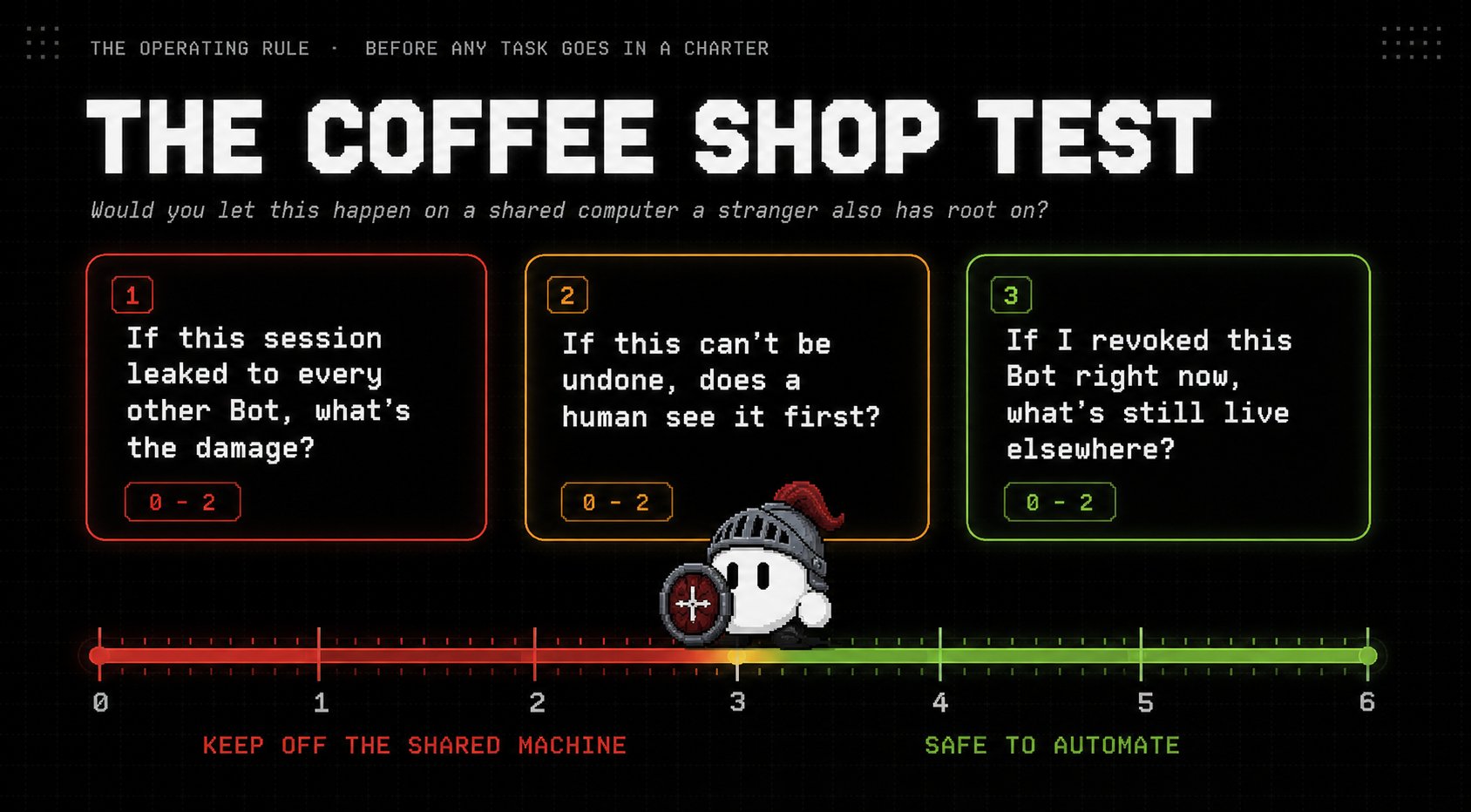
Run every task you're about to hand a Bot through three questions before it goes in a charter, not after something goes wrong:
-
If this session leaked to every other Bot on the account, what's the actual damage? Drafting blog copy: none. Signing into a payment processor: everything.
-
If this action can't be undone, does a human see it before it fires? Not "does the Bot know it's sensitive," but is there a literal stop in the charter that forces a pause.
-
If I revoked this Bot right now, what would still be live somewhere else on the shared machine? This is the offboarding question nobody asks until after they've already deleted the Bot and moved on.
Score each planned task 0, 1, or 2 on each question, where 2 is the safe answer. A task scoring 6 (fully reversible, fully approved, fully revocable with nothing left behind) is exactly the kind of thing the whole architecture is built for: research, drafting, scraping, organizing. A task scoring 2 or below, usually because it touches money, production systems, or a login nothing else on the roster should ever see, doesn't belong on a shared Bot fleet at all, no matter how convenient the automation would be. Give that one task a completely separate, isolated credential path, or don't automate it yet.
The uncomfortable implication is that the "hire a whole company of AI employees" framing, however useful for organizing your thinking, actively works against the Coffee Shop Test. A real employee has their own laptop and their own logins. This roster shares one of each. The metaphor sells the convenience and quietly omits the one fact that should change what you're willing to hand over.
8. Where this leaves you
None of this is a reason to avoid Grok Bot. It's a reason to evaluate the documented product instead of the advertised one, and to build your task list around what the shared-computer reality actually allows safely.
Scope every credential at the account level, not the Bot level. Pilot on reversible, auditable work first, research, drafting, filing, scraping, and keep payment rails and production access out of the pilot entirely while you learn the system's actual behavior. When you retire a Bot, revoke at the source, not just in the product. And before any task earns a spot in a charter, run it through the Coffee Shop Test. If you wouldn't want a stranger with root access anywhere near that task, don't put it on a machine where every Bot effectively has that access to everything else.
The Chief of Staff topology tells you how to organize the work. The reversibility principle tells you when to stop and ask. The Coffee Shop Test tells you which tasks should never have been on the shared machine to begin with, and that's the layer that was missing.
Published on grokbot.sh. Cite the public log, not a prompt pack.