
The Grok Bot Field Manual: How to Run an AI Team That Works While You Sleep
You open fifteen tabs before 9am. One for the inbox. One for the CRM. One for the spreadsheet nobody else updates. You copy a number from tab three, paste it into tab seven, and by the time you're
Article
Job breakdowns
You open fifteen tabs before 9am. One for the inbox. One for the CRM. One for the spreadsheet nobody else updates. You copy a number from tab three, paste it into tab seven, and by the time you're done reconciling, tab one has three new things waiting.
You are not managing a business. You are managing a relay race between browser tabs, and you are the only runner.
Every AI tool you've used so far made this marginally faster. It answered inside the tab. It never left the tab. The moment you closed your laptop, so did the work.
Grok Bot breaks that assumption. Each user gets a persistent cloud computer. Every Bot gets its own role, conversation and screen, while sharing the same computer, files and browser sessions with the other Bots. It signs into the tools you already use, clicks through them the way you would, and keeps going after you shut the lid. You stop prompting and start delegating. You stop being the relay runner and start being the coach.
I built out four of these over three weeks. The system below works — but it doesn't work because I got it right the first time. It works because bot number two almost sent a half-finished draft to a client before I'd written down where its authority stopped, and I had to learn the hard way that "draft only" needs to be said out loud, not assumed. Everything past this point is the version of the system after that mistake, not before it.
This is the complete field manual — the frameworks, the exact prompts, and the failure modes — for turning that into a working system instead of an expensive toy.
Why this is different from the chatbot you're used to
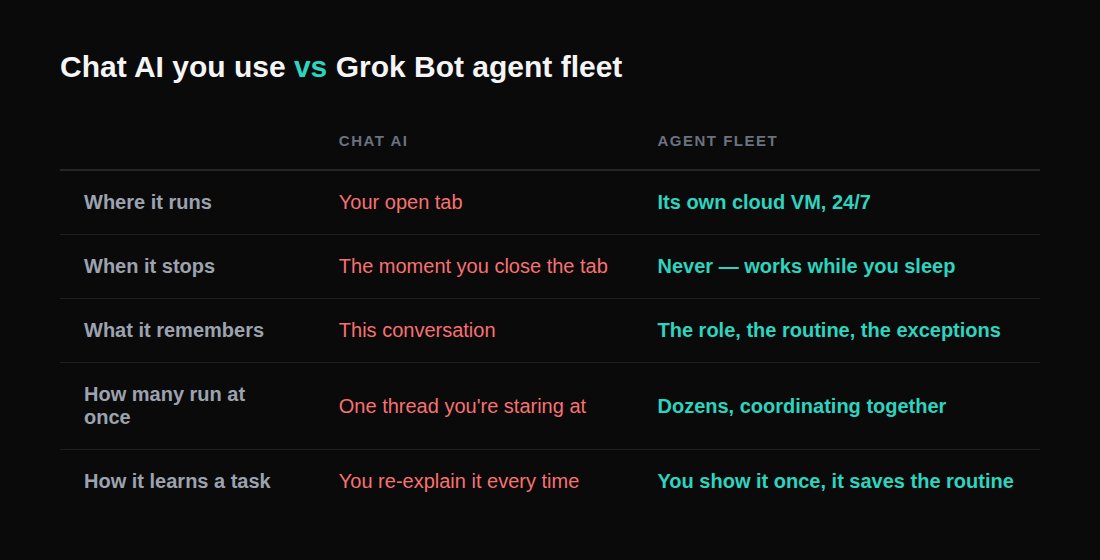
Look at that table again. The entire shift is in row two. A tool that stops the moment you look away is a faster typewriter. A tool that keeps running after you look away is an employee.
Step 1: Hire a role, not a prompt
The single biggest mistake people make is opening Grok Bot and typing a question, getting an answer, and closing it. That's using ten percent of it.
A prompt is a request. A bot is a role — it persists, it accumulates memory, and it gets better at one specific thing precisely because you keep coming back to the same thread instead of starting fresh every time.
So name it the way you'd name a job posting: Inbox Manager. Talent Scout. Sales Outbound. Expense Manager. Not "Assistant #3."
Then write its charter the way you'd brief a new hire on day one — what it owns, what good looks like, and the part almost everyone skips: what it must never do without asking you first. That last boundary isn't paperwork. It's what lets you walk away from your laptop, because you already decided in advance where its authority ends.
Give it something small and real to prove itself on before you hand it anything that matters. "Pull the five most recent invoices from my inbox and total them" is a thirty-second check. The entire rest of this system depends on you trusting the bot with progressively bigger jobs, and trust is built on the first job, not the tenth.
Step 2: Give the mission a finish line, not an activity
Most people brief their first bot like this: "Research my competitors every week."
That describes an activity. It does not describe what "done" looks like — which means the bot can't reliably tell when it's finished, and neither can you.
Compare it to this: "Every Friday at 4pm, deliver a verified competitor report containing the five most important pricing and positioning changes, the source behind every claim, and three recommended actions."
Now the bot knows what finished means, and so do you. Turn every mission into a contract with seven fields:
-
Outcome — what must exist when it's done
-
Inputs — which accounts and sources it may use
-
Output — the exact artifact it produces
-
Frequency — when it runs
-
Definition of Done — what makes the result acceptable, not just "good" or "professional" — those words can't be checked, so replace them with things that can: every claim has a source, every source has a date, duplicates are removed
-
Constraints — what must never happen
-
Approval Gates — which actions require you specifically
If the finish line can't be measured, the agent can't reliably reach it. This single rule fixes more broken automations than any prompt engineering trick.
Step 3: Show it once instead of explaining it twice
Here's the feature that actually changes how you work day to day: you can teach a bot a workflow by doing it once while it watches, and it saves the routine to run on its own next time.
The tasks that eat your week are almost always the ones that are tedious to describe and trivial to demonstrate. Writing out "take the numbers from this dashboard, cross-reference the ones that dropped, paste them into this doc under the right heading, and message the team if anything fell more than 15%" is a paragraph. Doing it once, on camera, takes forty seconds.
Pick your first recording carefully. The best candidate passes three tests at once: you do it at least weekly, it touches two or more tools, and the steps rarely change. Anything that clears all three is a routine waiting to be lifted off your plate.
Don't just show it the happy path. Show it what should happen when a source can't be verified, two documents disagree, or a tool goes down — because most automations don't fail on the expected sequence. They fail on the exception nobody demonstrated.
Step 4: Turn the routine into something that fires without you
A saved routine still needs a reason to run. There are two triggers, and you set both by talking, not by building a workflow diagram:
Schedule is the obvious one — every weekday at 7am, every Friday at 4pm, the first of the month.
Trigger is the more interesting one — a new email from an unfamiliar domain, an inbound Slack message matching a pattern, a document changing. Triggers are what make a bot feel present instead of just punctual.
You don't build the automation. You approve the one that just happened and ask for it again. That sentence is the entire design philosophy in one line.
Step 5: Hire specialists, put them in one graph, not five chat windows
Once you're running more than one bot, resist the urge to make a single generalist that does everything. A generalist juggling invoices, recruiting, and outreach is worse at all three and gives you no clean thread to check when something breaks.
Separate bots mean separate memory, separate context, and separate accountability. An Expense Manager that only ever thinks about receipts gets genuinely good at your receipts.
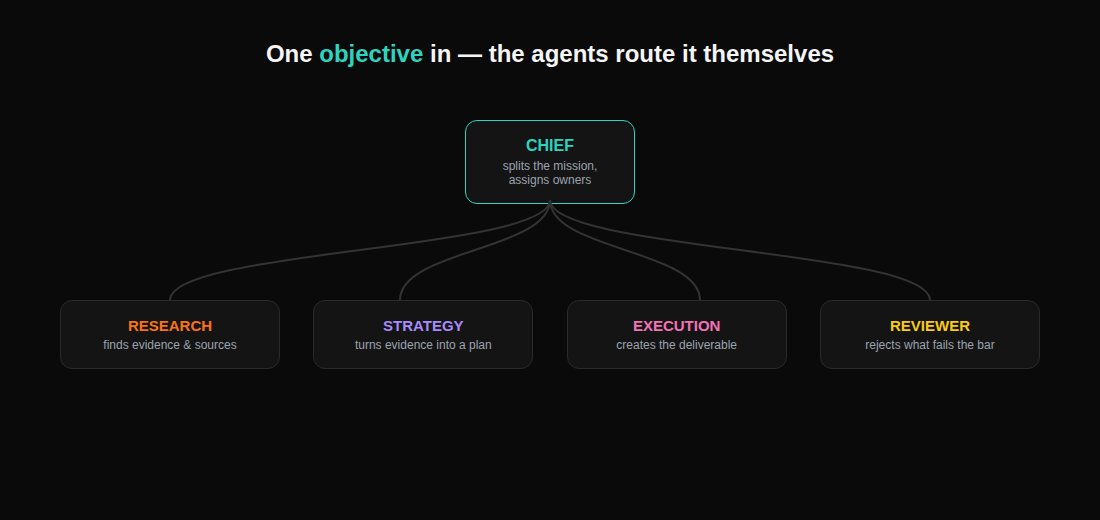
For most knowledge-work missions, four specialists are enough to start:
-
Research — finds evidence, records sources, separates facts from assumptions
-
Strategy — turns evidence into decisions and a plan
-
Execution — produces the actual deliverable
-
Reviewer — checks the deliverable against the mission's Definition of Done and rejects anything that fails
Put them in one shared thread and give the group an objective, not a task list. A task list means you already did the decomposition yourself — the bots are just executing your plan. An objective lets them split the work, decide who owns what, and pull you in only for the calls that actually need a human. That handoff — one bot deciding another is better suited and passing ownership — is the entire point of running more than one.
Every handoff between them should follow the same format, or the next agent ends up reconstructing context from scratch:
A handoff should never just say "here's what I found." It should say here's the artifact, here's what supports it, here's what's still uncertain, and here's exactly what happens next.
Step 6: Draw the line on what needs your approval
The entire premise of an always-on agent is that it finishes jobs end to end and comes back only when something needs you. That puts the burden on you to define what "needs approval" actually means — because the bot's default guess won't match yours.
The line that works isn't about how big the task is. It's about reversibility.
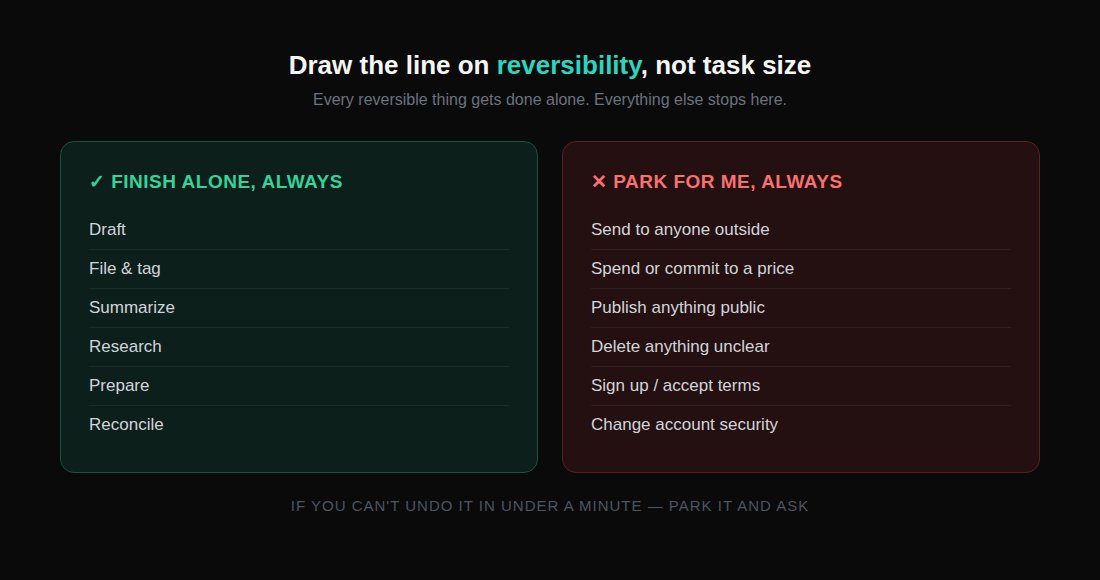
Anything the bot can undo — drafting, filing, tagging, summarizing, researching — it should finish alone. Anything the outside world sees, or that moves money, or that can't be taken back, gets parked for you. Autonomy should increase how fast reversible work happens, not increase the cost of your mistakes. Don't make yourself approve every action; make yourself approve only the irreversible ones.
The trick almost no guide mentions: build for the reset
Cloud agent environments periodically rebuild their underlying machine. When that happens, anything installed casually — a custom script, a one-off tool, a temporary login state — gets wiped, and your carefully built system quietly stops working the next morning with no warning.
The fix is boring but non-negotiable: treat exactly one directory as permanent, and put everything that matters inside it — your saved routines, your reusable skill files, your long-term state and logs. Everything else is temporary by design, and you should build like you know it.
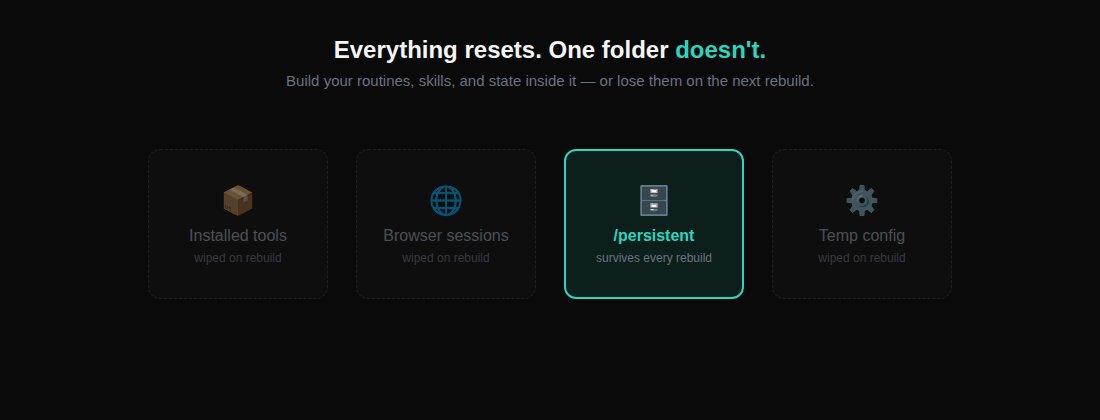
Add a self-checking header to your core routines so a bot notices a missing dependency after a reset and reinstalls it automatically instead of silently failing:
This single habit is the difference between a system that survives six months and one you have to rebuild from memory every time the platform updates.
Step 7: Review weekly, prune ruthlessly
Automation rots quietly. A site changes its layout, a routine starts producing garbage, and because the bot runs while you sleep, nobody notices for three weeks. This is the failure mode of every always-on system ever built, and it will find you too.
Put fifteen minutes on the calendar. For every routine, ask three questions: did it run, was the output actually right, and would I miss it if I killed it?
That third question matters more than it looks — the natural drift of a system like this is toward a pile of half-useful automations that nobody has the nerve to delete.
The best way to run this review is to ask the bots for it — they kept the threads, they can report on themselves. Then spot-check one output per routine by hand, because a bot reporting on its own work has the same blind spot you do.
The honest part
This system is not free and it is not effortless.
You're handing real logins to something running on infrastructure you don't control, and the trade-off deserves to be named plainly rather than glossed over: you get a session, never a password, and you should insist on that boundary with every tool you connect. Anything touching money, legal terms, or a stranger's inbox needs a human in the loop until the bot has earned otherwise — not because the technology can't do it, but because the cost of a wrong guess there isn't reversible.
Start with reversible, low-stakes work. Watch the first few runs of anything more closely than you think you need to. Only widen its authority once it's proven itself on the small stuff — the same way you'd trust any new hire.
Your first ten minutes
Don't read this twice and do nothing. Pick one task from this week that clears three bars: you do it at least weekly, it touches two or more tools, and the steps rarely change.
Open the tool. Create one bot. Give it a name someone could actually hold as a job title. Write its four-sentence charter — what it owns, what good looks like, where it stops. Show it the task once.
Walk away. Come back tomorrow morning.
The task ran without you.
That moment — the first time you return to finished work you didn't do — is the entire shift, from prompting to delegating, compressed into ten minutes.
If this saves you the afternoon it saved me, send it to the one person you keep meaning to hand this off to — they're still on tab three, copying the same number into tab seven.
Published on grokbot.sh. Cite the public log, not a prompt pack.