
How to Master Grok Bot in 17 Steps
On August 11, 2026, Elon Musk's xAI launched Grok Bot in early beta. In just a few weeks, it attracted massive attention. And not just because of the Grok name or its connection to xAI - the entire
Article
Job breakdowns
On August 11, 2026, Elon Musk's xAI launched Grok Bot in early beta.
In just a few weeks, it attracted massive attention. And not just because of the Grok name or its connection to xAI - the entire approach is different from the way we usually work with AI.
Instead of opening a new chat every time and explaining the task from scratch, you can gradually hand recurring work over to persistent agents.
Not just ask.
Delegate.
That is why Grok Bot feels less like another AI interface and more like an attempt to change how we use artificial intelligence in everyday work.
Below, we will go through Grok Bot in 18 steps - from creating your first agents and giving them access to teaching repeatable processes and eventually turning them into a working system.
1. Delegation Instead of Prompts
With traditional AI, the main question is often:
How do I write the perfect prompt?
With Grok Bot, the question changes:
What exactly do I want to delegate, what information does the agent need, and where do its permissions end?
That is much closer to assigning work to an employee than writing prompts.
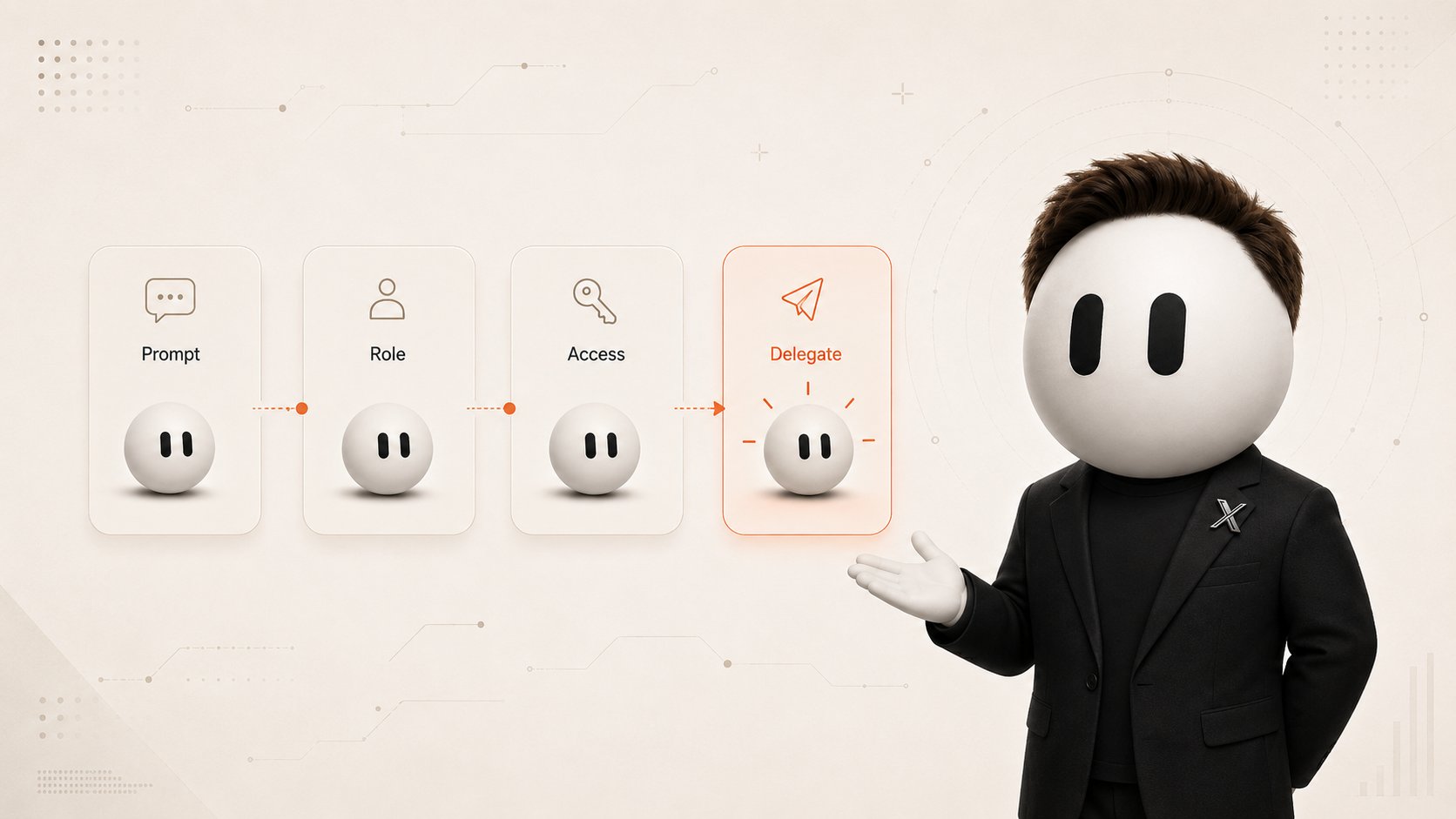
A good task should answer several questions:
-
what result should be delivered
-
where the bot should get its information
-
what it must not do on its own
-
what format the result should have
-
when it should stop and ask for approval
For example, instead of:
Check our analytics.
Use:
Compare new user activation this week with the previous four weeks. Find the biggest change, include links to the relevant charts, and prepare a short investigation plan. Do not change anything in the dashboard.
The difference seems small, but now the bot understands both what to do and what finished actually means.
2. A Bot as a Persistent Role
Grok Bot works best when every bot owns a specific area of responsibility.
Official xAI documentation uses examples such as Talent Scout, Expense Manager, and Bug Reproduction. A generic General Helper is usually less useful because it has no clear responsibility and its accumulated context becomes harder to reuse.
A separate bot makes sense when the work has:
-
its own goal
-
its own sources and tools
-
a different working style
-
its own approval boundaries
-
recurring tasks
For example, an Inbox Manager can focus entirely on incoming messages: reading them, classifying them, summarizing them, and preparing draft replies.
A Research Bot can focus entirely on finding and verifying information.
The role description is best used for permanent rules:
Never send messages to clients without approval.
The conversation itself should contain today's task:
Prepare draft replies for these 12 clients today.
The distinction is simple: the profile stores permanent rules, while messages contain current work.
3. Setup and Your First Bot
Grok Bot works on macOS, Windows, and iPhone. Linux desktop, Android, and iPad are currently not supported.
After access was expanded, Grok Bot became available through:
-
SuperGrok
-
SuperGrok Plus
-
SuperGrok Heavy
-
Cursor Pro
-
Cursor Pro+
-
Cursor Ultra
-
Cursor Teams Standard
-
Cursor Teams Premium
After installing the app, sign in with your Cursor account.
You can create your first bot through:
New -> Create new agent
or:
Cmd/Ctrl+N
Then give it a name, its main responsibility, and a description of how it should work.
Do not start with a bank account or a complicated automation.
Your first task should be as safe as possible. For example, attach a document and ask the bot to:
-
create a short summary
-
extract all important dates
-
list decisions that were made
-
identify open questions
-
provide sources for important conclusions
This lets you test how well the bot follows instructions before connecting real services.
4. The Persistent Cloud Computer
One of the most important Grok Bot features is its persistent cloud computer.
It has a browser, file system, terminal, and connected applications. That means the bot can do more than explain what you should do - it can open a website, find information, download a file, or perform work directly inside a service.
But there is one important detail.
All of your bots use the same computer.
They may have different roles, conversations, and accumulated context, but the working environment is shared.
That includes:
-
files
-
browser sessions
-
website logins
-
connected tools
If one bot signs into a service through the browser, another bot on the same computer may potentially use that same session.
So a separate bot should not be treated as a separate security container.
One account can have up to 50 bots and group chats combined.
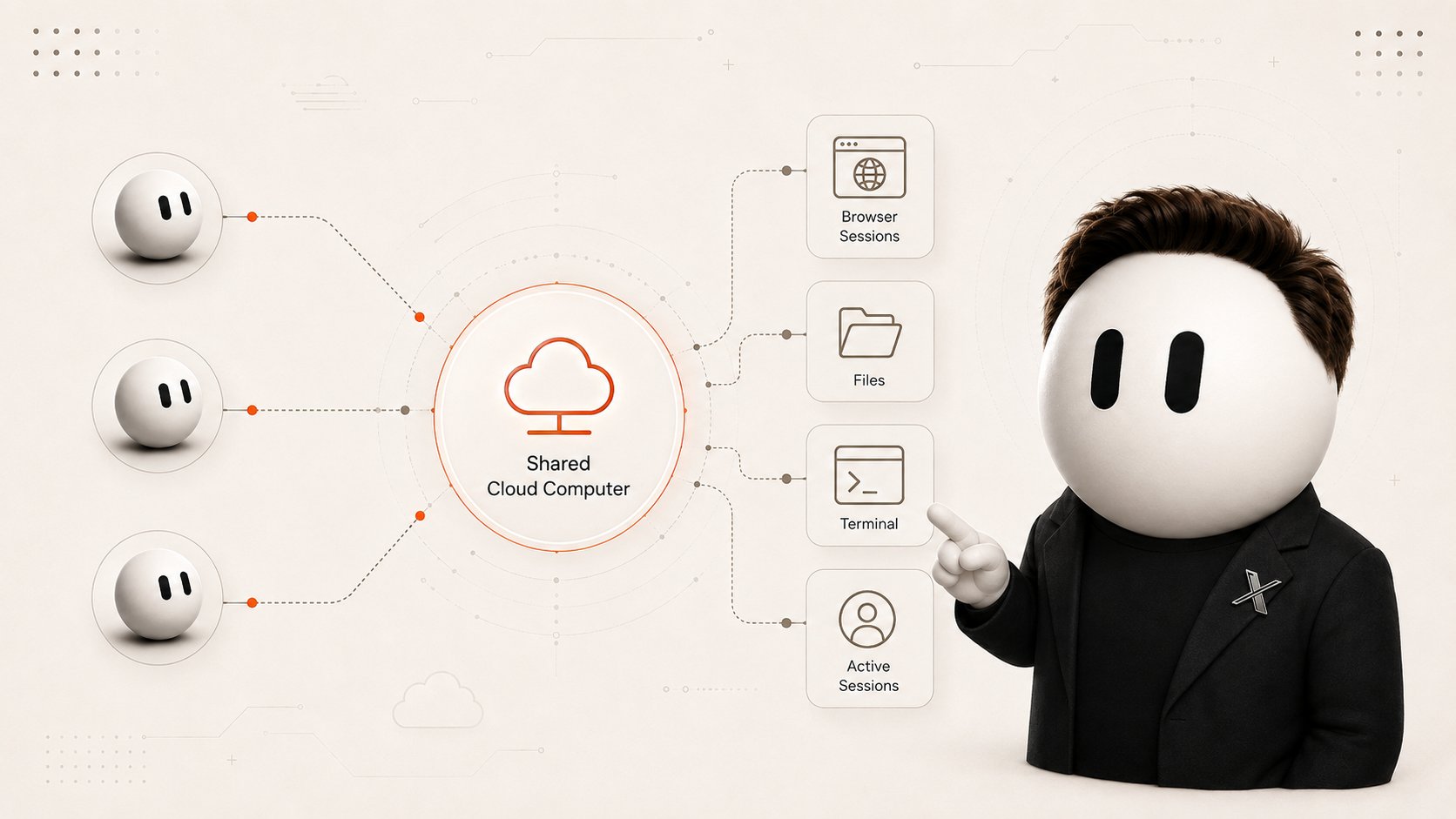
For files that need to move between agents, the shared workspace is especially useful. A Research Bot can save its findings, and a Writer Bot can immediately continue from the same material without manual copy-pasting.
5. Teach a Task - Show the Process Once
One of the most interesting Grok Bot features is Teach a task.
Instead of writing a long instruction describing every click, you can perform the process yourself once and show it to the agent.
When the feature is available:
-
Open a direct conversation with the bot
-
Open its computer
-
Choose Teach a task
-
Explain what result you are about to demonstrate
-
Perform the process yourself
-
Stop the recording
-
Review the skill created by the bot
Visible computer interaction can be recorded for up to 10 minutes. Your microphone is not recorded.
For example, you could demonstrate this workflow:
open dashboard -> find metrics -> compare with last week -> save the result in a document -> prepare a Slack message
After the demonstration, the bot converts the process into a draft reusable skill.
A draft is the important word here.
One successful demonstration does not teach the agent what to do if the website fails to load, the data is missing, or the interface changes.
You should also define what happens when:
-
a source is unavailable
-
required data is missing
-
two sources contradict each other
-
the interface changes
-
the action requires human approval
Teach a task is being rolled out gradually. If you do not have it yet, you can still create a skill from written instructions and an already completed task.
6. Skills
A skill is a saved way of completing a task.
For example, Weekly Account Health could define where to get the data, which metrics to check, what the final report should look like, and where the bot must stop for approval.
A good skill should explain:
-
When to use it
-
What data and access are required
-
The sequence of steps
-
How to verify the result
-
What format to return
-
Which actions require approval
This is an important difference from a normal prompt.
A prompt describes one task right now.
A skill turns a successful process into a procedure that can be reused.
Saved skills can be called with /, while @ can be used to attach bots, groups, routines, and available connectors.
7. Access Without Sharing Passwords
Sooner or later, the bot will reach a page that requires authentication.
You do not need to send your password in a normal message.
When Grok Bot reaches a sensitive step, you can open Agent Computer, take control, and complete the required action yourself:
-
enter a password
-
use a passkey
-
complete two-factor authentication
-
solve a CAPTCHA
-
confirm a payment or another human-only action
Then control returns to the bot, and it continues from the same page.
The browser session stays on the shared computer, so the next run may not require another login.
But remember: that session belongs to the shared account environment, not to one specific bot.
For services with ready-made integrations, you can use plugins and connectors instead of controlling the website through the browser.
They are connected through:
Settings -> Plugins
8. Permission Boundaries
The more tools you give a bot, the more important it becomes to define what it can do independently.
A practical way to think about this is to divide actions into three categories.
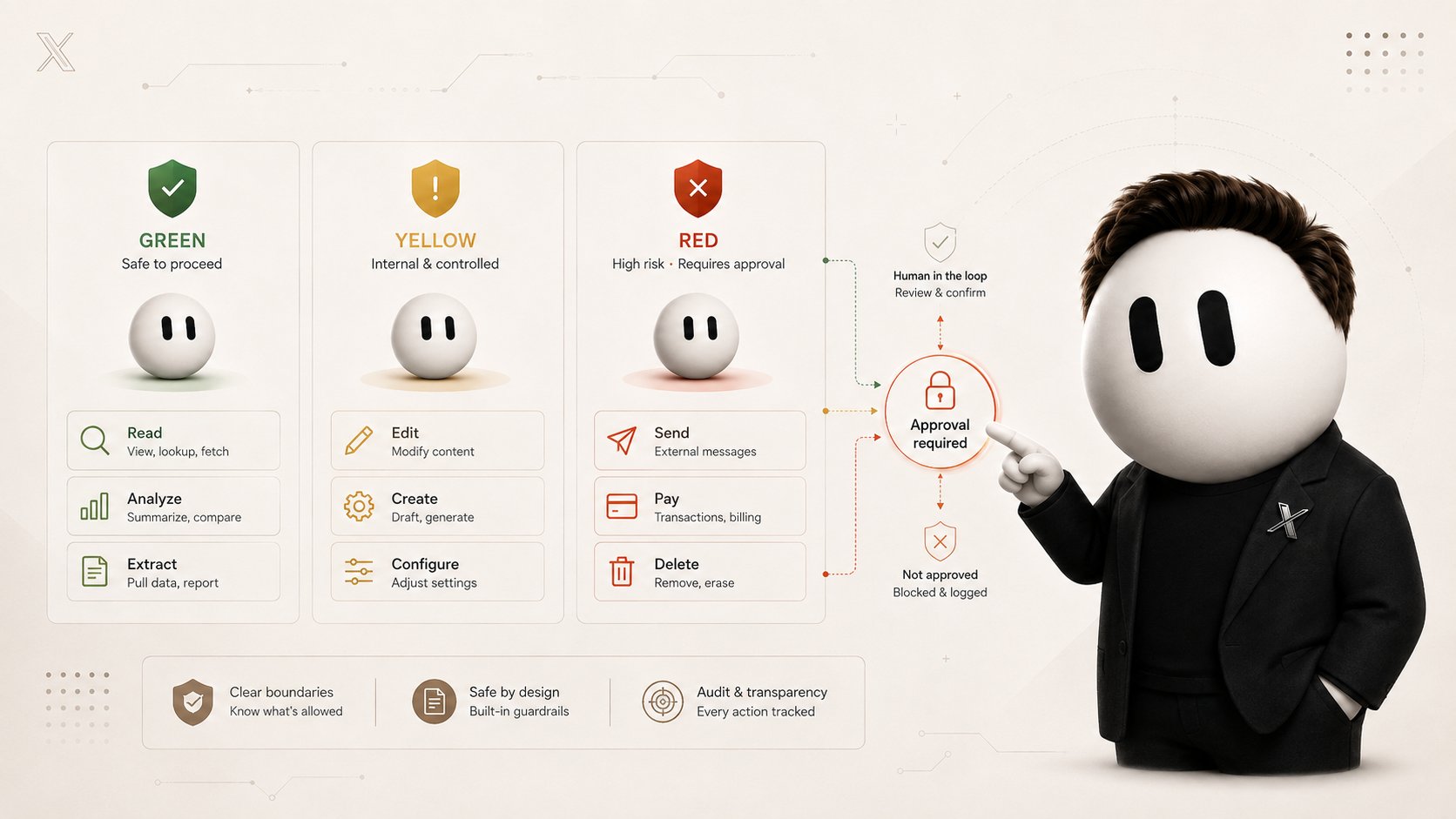
GREEN - can be done independently:
-
search
-
reading
-
analysis
-
comparison
-
calculations
-
research
-
organizing information
-
preparing drafts
YELLOW - can be done only inside a predefined area:
-
editing internal files
-
creating artifacts
-
updating approved internal data
-
running already tested processes
RED - should usually require human approval:
-
sending external messages
-
public publishing
-
purchases or money transfers
-
deleting important data
-
changing permissions
-
modifying production systems
-
accepting legal terms
GREEN, YELLOW, and RED are not official Grok Bot modes. They are simply a useful way to define boundaries.
Grok Bot itself supports approval mechanisms.
Require Approval forces the agent to stop before matching actions.
Always Allow lets matching actions run automatically unless another reason requires the bot to stop.
If the rules conflict, Require Approval takes priority.
The logic is simple:
The harder an action is to undo, the less sense it makes to let the bot perform it without a human.
IMAGE 3
9. Routines - When the Bot Starts Working on Its Own
A skill answers:
How should this task be done?
A routine answers:
When should it be done?
For example:
-
create a work briefing every morning at 8:00
-
check the client list every Friday
-
prepare a report once a week
-
start a process after a supported event
For some integrations, a routine can be triggered not only by time but also by an event, such as a new message or notification.
This is where Grok Bot starts to feel very different from a normal AI chat.
You no longer have to open a conversation and type the same command again. The bot starts at the right moment and performs the configured work.
A routine should define:
-
which bot owns it
-
schedule and timezone
-
data source
-
expected result
-
approval boundaries
-
what to do if the source is unavailable
Background routines can continue running even when your laptop is closed.
One bot can have up to 50 routines.
For each routine, the system keeps the 20 most recent runs, including successful and failed ones.
Always test an automation before enabling it, especially if the bot writes, sends, or changes something.
10. Bot Teams and Chief of Staff
The most interesting stage begins when you have more than one bot.
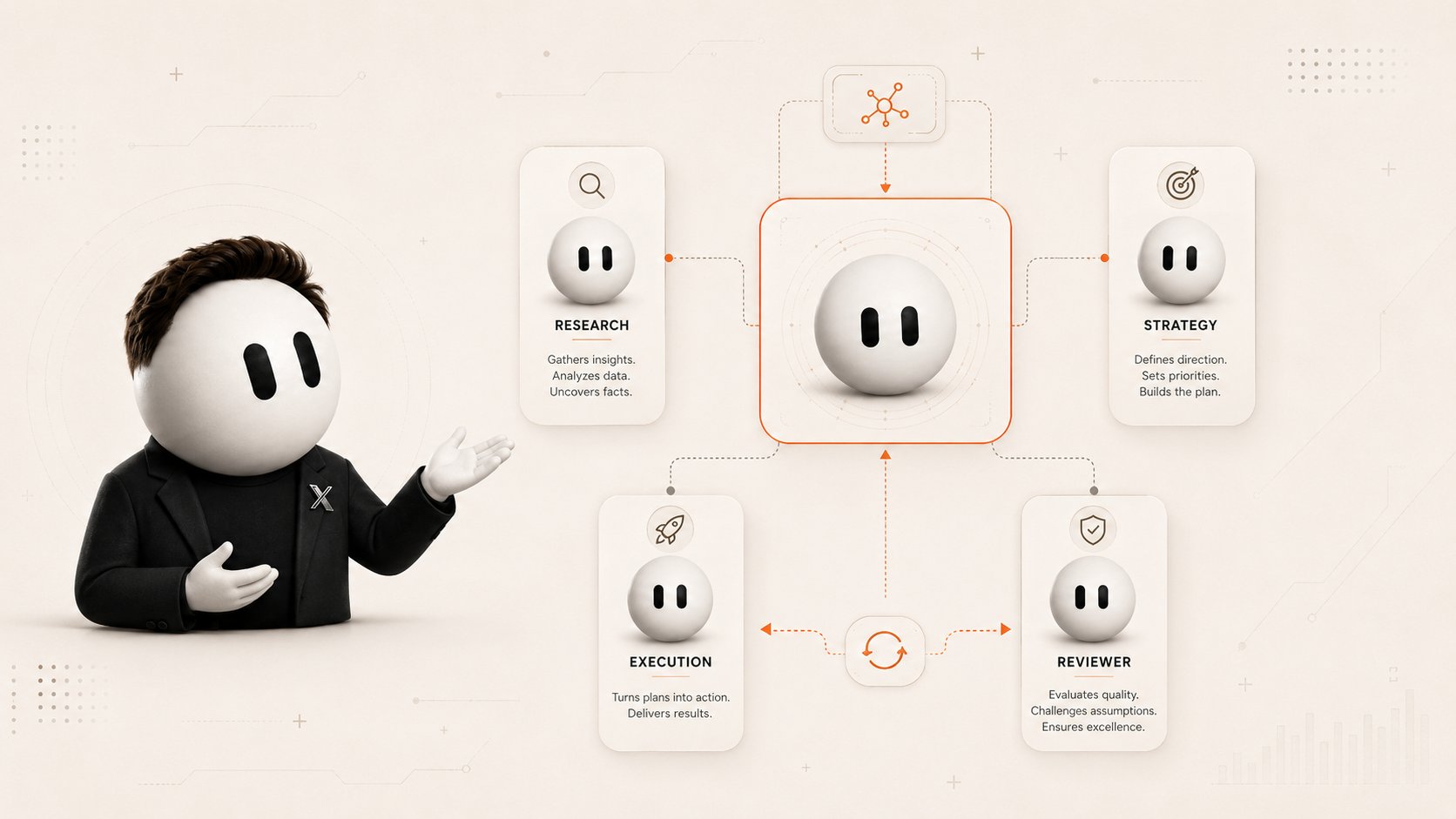
Grok Bot allows agents to pass context and work to each other. You no longer have to manually copy the Research Bot output into the Writer Bot and then move the finished draft into the Reviewer Bot.
A simple structure might look like this:
Chief of Staff Receives the main goal, breaks it into parts, delegates work, and assembles the final result.
Research Finds information, verifies facts, and saves sources.
Strategy Turns research into a decision or plan.
Execution Creates the final artifact: a document, analysis, article, table, or another deliverable.
Reviewer Checks the final work before it reaches the user.
Do not create ten agents on day one.
Start with the smallest useful team and add specialists only when there is recurring work that genuinely needs a dedicated owner.
Group Chats
A group chat can contain 2 to 6 bots.
You can give them a shared goal and let them distribute the work.
Or use @ to address a specific agent.
A strong handoff between bots looks something like this:
Here is the result. Here are the sources. Here is what could not be confirmed. Here is the exact next action.
That way, the next agent receives not just a file, but the context required to continue the work.
Duplicating a Bot
An already configured bot can be duplicated.
The copy keeps:
-
profile
-
settings
-
enabled skills
-
routines
-
avatar
It does not keep:
-
conversation history
-
accumulated memory
-
chat attachments
This is useful when the same role is needed across several projects or workstreams.
IMAGE 4
11. Explain What Finished Means
Complex tasks often fail not because the bot is not intelligent enough.
They fail because nobody explained what a finished result looks like.
Bad:
Research competitors every week.
That leaves too many questions. How many competitors? What counts as important? What should the bot return?
Better:
Every Friday, prepare the five most important competitor changes in product, pricing, and positioning. Include a source for each change, explain the likely impact, and recommend next actions. Do not publish anything externally.
For complex tasks, define:
-
outcome
-
sources
-
format
-
frequency
-
completion criteria
-
constraints
-
approval points
Words like good, high-quality, or professional are almost useless.
Replace them with testable conditions:
-
every fact has a source
-
the publication date is included
-
duplicates are removed
-
unverified information is clearly marked
-
the final result stays within the length limit
-
external actions happen only after approval
If the finish line cannot be checked, the bot cannot reliably know when the work is actually done.
12. Do Not Automate the First Successful Run
One of the most common mistakes is getting a good result once and immediately turning the process into a daily automation.
A safer path is:
-
Give the bot a real task
-
Review the result
-
Fix the process
-
Save it as a skill
-
Test the skill on different data
-
Define failures and retries
-
Only then create a routine
A bad process does not become good after automation.
It simply starts producing bad work on its own.
Before automating, check:
-
what happens if the source is unavailable
-
what happens if information is missing
-
whether work gets duplicated
-
whether approvals trigger correctly
-
whether the task can be safely rerun after a failure
13. Review Your Automations
An automation can work perfectly for a month and then break in one day.
A website changes its interface.
A connector changes its data format.
A document gets a new required field.
And the bot that previously returned perfect results suddenly starts producing incomplete work.
That is why routines have run history where you can inspect successful and failed executions, test the process, and change the instructions.
After a website, connector, or source format changes, test the automation again.
It is useful to periodically ask four questions:
-
did the routine run
-
was the result correct
-
did new errors appear
-
is this automation still useful
Persistent automation does not mean automation without oversight.
14. Useful Grok Bot Workflows
Morning Work Briefing
A Chief of Staff can check approved sources and return one short report:
-
what changed
-
what needs attention
-
which decisions need to be made
-
which tasks can be delegated further
Instead of opening several apps in the morning, you open one conversation.
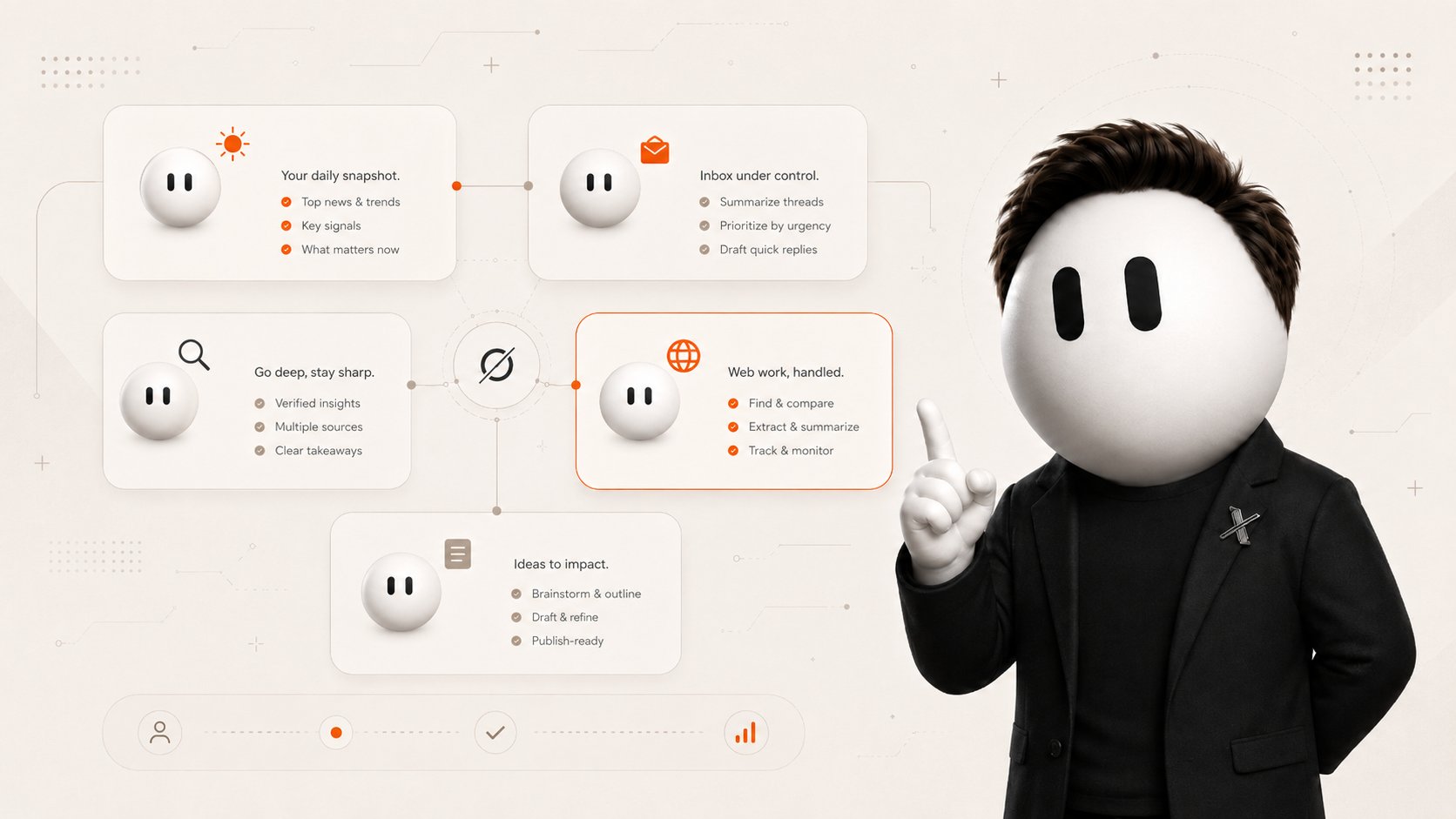
A bot can read accessible messages, classify them, summarize them, and prepare draft replies.
Sending can remain behind approval.
Research
A Research Bot can gather information from several sources, save links, and separate confirmed facts from assumptions.
Sales Outbound
A bot can research accounts, find relevant contacts, and prepare personalized outreach drafts.
The actual sending can remain with a human.
Browser Work
If a service has no convenient API or connector, Grok Bot can work through its own cloud browser.
A recurring process can later become a skill and then a routine.
Content Team
A simple structure:
Research -> Writer -> Reviewer
The first agent gathers information and sources.
The second creates the draft.
The third checks facts, formatting, and requirements.
The important part is not the number of bots. It is clear ownership.
IMAGE 5
15. Which Roles Should You Create First?
Do not start with an army of twenty agents.
Pick one real problem that repeatedly consumes your time.
Examples of roles:
-
Chief of Staff
-
Talent Scout
-
Expense Manager
-
Bug Reproduction
-
Sales Outbound
-
Account Health
-
Content Editor
-
Analytics Reviewer
A good question is:
Should this work have a permanent owner?
If the task happened once, it probably does not need its own bot.
If it comes back every week and uses roughly the same sources, a dedicated role starts to make sense.
16. Grok Bot Limitations
The ready-made infrastructure makes Grok Bot easy to start with, but it also creates several limitations.
Model Selection May Not Always Be Available
In most workflows, Grok Bot manages model selection and routing automatically.
Depending on the product version and feature availability, a Default Model setting may appear, so lack of manual model selection should not be treated as an absolute limitation for every account and every version of the interface.
Bots Are Not Isolated From Each Other
All bots for one user operate on the same shared cloud computer.
A separate bot is not a separate security container.
Work Happens in a Cloud Environment
Browser sessions, working files, and connected services exist inside the account's cloud computer.
Teach a Task Is Rolling Out Gradually
Some users may receive the feature later than others.
Browser Workflows Can Break
If a website changes its interface, a computer-use workflow may need to be tested again.
Stable connectors are preferable when they are available.
There Are Usage Limits
Grok Bot has its own usage limits, and the available amount depends on the subscription.
So the amount of work you can continuously delegate depends on both your plan and the type of tasks you run.
17. Checklist Before You Let It Run
Before leaving Grok Bot to work independently, check that:
-
the bot has one clear role
-
the task has a measurable outcome
-
information sources are defined
-
it is clear what the bot must not change
-
external messages require approval
-
purchases and payments require approval
-
dangerous deletion requires approval
-
passwords and 2FA codes are not sent through normal chat
-
only necessary access is connected
-
you remember that the computer is shared between your bots
-
the successful process has been saved as a skill
-
the skill has been tested on another input
-
failure behavior is defined
-
the routine has been tested before automatic execution
-
the process is tested again after website or connector changes
A useful way to start is:
read -> analyze -> prepare -> approval -> action
First let the agent read, analyze, and prepare.
Only after the quality becomes predictable should you gradually allow actions that change the outside world.
Official Resources
Grok Bot is still evolving quickly, so features, supported platforms, plans, and limits may change.
For current information, check the official xAI documentation.
Approvals, security and privacy https://docs.x.ai/grok-bot/approvals-security-and-privacy
Approvals, security and privacy https://docs.x.ai/grok-bot/approvals-security-and-privacy
Chat and collaboration https://docs.x.ai/grok-bot/chat-and-collaboration
Chat and collaboration https://docs.x.ai/grok-bot/chat-and-collaboration
Create and manage Bots https://docs.x.ai/grok-bot/bots
Create and manage Bots https://docs.x.ai/grok-bot/bots
FAQ https://docs.x.ai/grok-bot/faq
FAQ https://docs.x.ai/grok-bot/faq
Get started https://docs.x.ai/grok-bot/get-started
Get started https://docs.x.ai/grok-bot/get-started
Grok Bot https://docs.x.ai/grok-bot/overview
Grok Bot https://docs.x.ai/grok-bot/overview
Introducing Grok Bot https://x.ai/news/introducing-grok-bot
Introducing Grok Bot https://x.ai/news/introducing-grok-bot
Skills and routines https://docs.x.ai/grok-bot/skills-routines-and-automations
Skills and routines https://docs.x.ai/grok-bot/skills-routines-and-automations
Use cases https://docs.x.ai/grok-bot/use-cases
Use cases https://docs.x.ai/grok-bot/use-cases
The main idea behind Grok Bot is not to give you another window for talking to AI.
First, you create a persistent role. Then you give it real tools. A successful process becomes a skill. Recurring work becomes a routine. And as the workload grows, specialized bots start passing work between each other.
Instead of dozens of one-off prompts, you gradually get a digital team with persistent roles, working context, tools, schedules, and clear permission boundaries.
That is where Grok Bot starts to feel less like another chatbot and more like a new way to delegate work to AI.
If you want more articles like this about AI, agents, and new technology, follow @Mikadzyki_NFT
Published on grokbot.sh. Cite the public log, not a prompt pack.