
GROK BOT + OBSIDIAN = SECOND BRAIN
Why the real revolution in AI agents will not start with a smarter model, but with a memory that belongs to you. Most AI assistants today suffer from the same problem: they can think, search, write,
Article
Job breakdowns
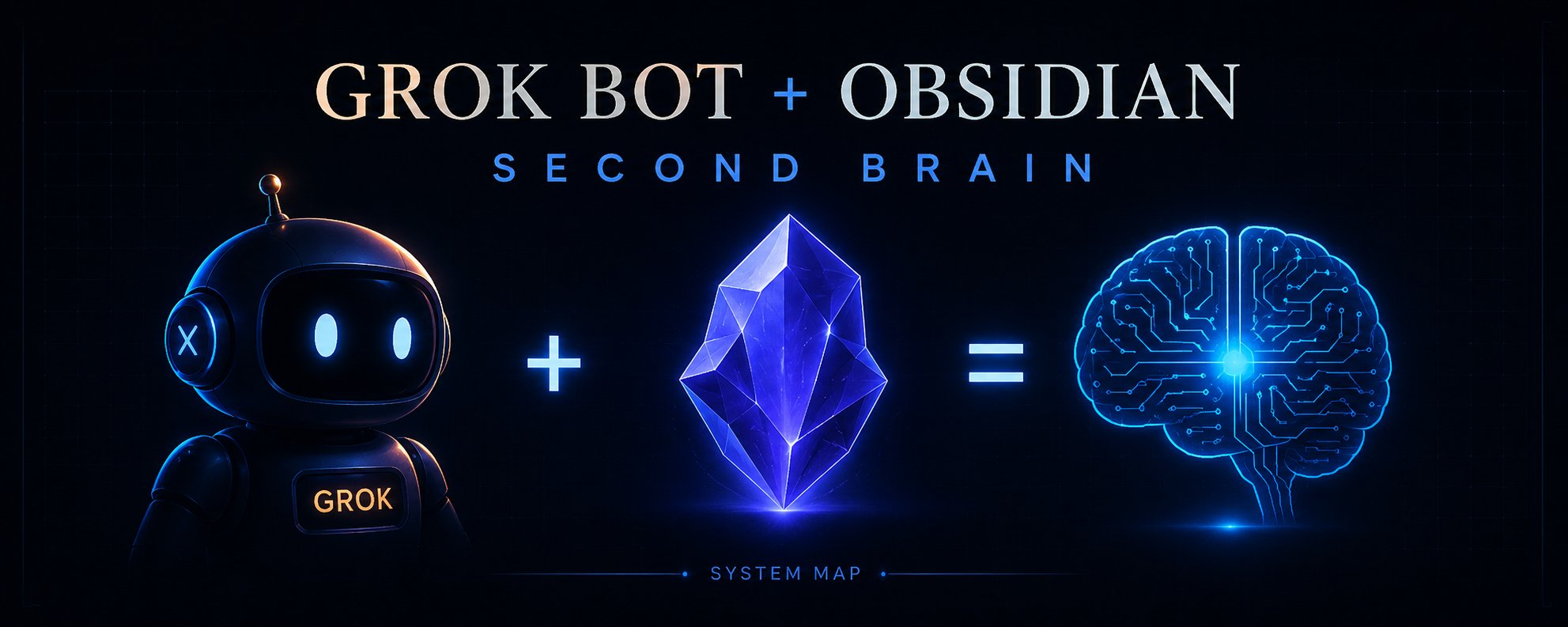
Why the real revolution in AI agents will not start with a smarter model, but with a memory that belongs to you.
Most AI assistants today suffer from the same problem: they can think, search, write, and even control a computer, but they don’t remember your life as a continuous system.
You can spend two hours with the model, explaining the project, the team, your requirements, your favorite writing style, the decisions you’ve made, and dozens of small nuances. A few days later, you have to piece together part of this context again. The history of dialogues helps, the built‑in memory helps, RAG helps, but all of this still feels like a set of separate conversations rather than a real second brain.
With Grok Bot, an interesting opportunity arises to change the architecture itself.
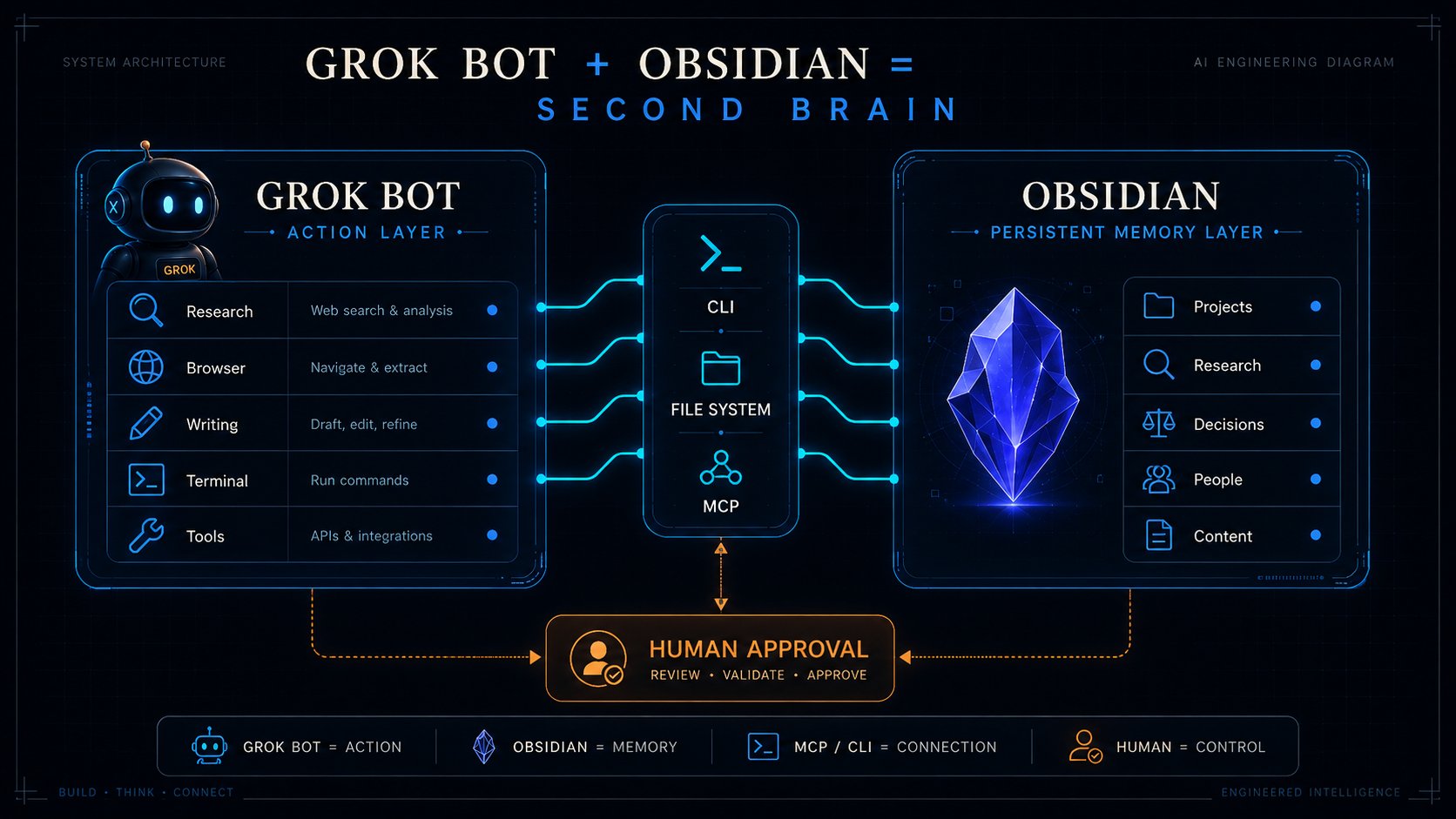
Grok Bot is not just a chat window. xAI describes Bot as a permanent AI employee with its own cloud computer: a browser, a file system, and a terminal. Several Bots can work in parallel, pass tasks to each other, and use shared files and sessions on the user’s computer. There is also the option to allow commands to be executed on a local Mac or Windows — with approvals settings.
Now let’s add Obsidian.
Obsidian stores notes not inside a closed database of a specific service, but in a regular vault folder.
Inside, there are Markdown files, properties, links, attachments, and a structure that can be read not only by the Obsidian interface. Moreover, the fresh Obsidian CLI allows you to search vault, read notes, create new ones, add text, work with properties, backlinks, templates, and Bases.
This is where the idea of making Grok Bot an active execution system comes from.
Obsidian becomes a permanent memory system.
And you stop being a person who manually transfers context between them every time.
This is already much closer to a Second Brain than yet another AI chat.
The problem with the typical “AI Second Brain”
When people talk about a second brain with AI, they often imagine a nice chat into which you can upload thousands of notes and ask: “What did I write about this six months ago?”
It’s useful, but it’s just an archive search.
A real second brain should be able to do at least four things:
-
Capture new information.
-
Connect it with what is already known.
-
Use the accumulated knowledge when performing real tasks.
-
Update the memory after the work is done.
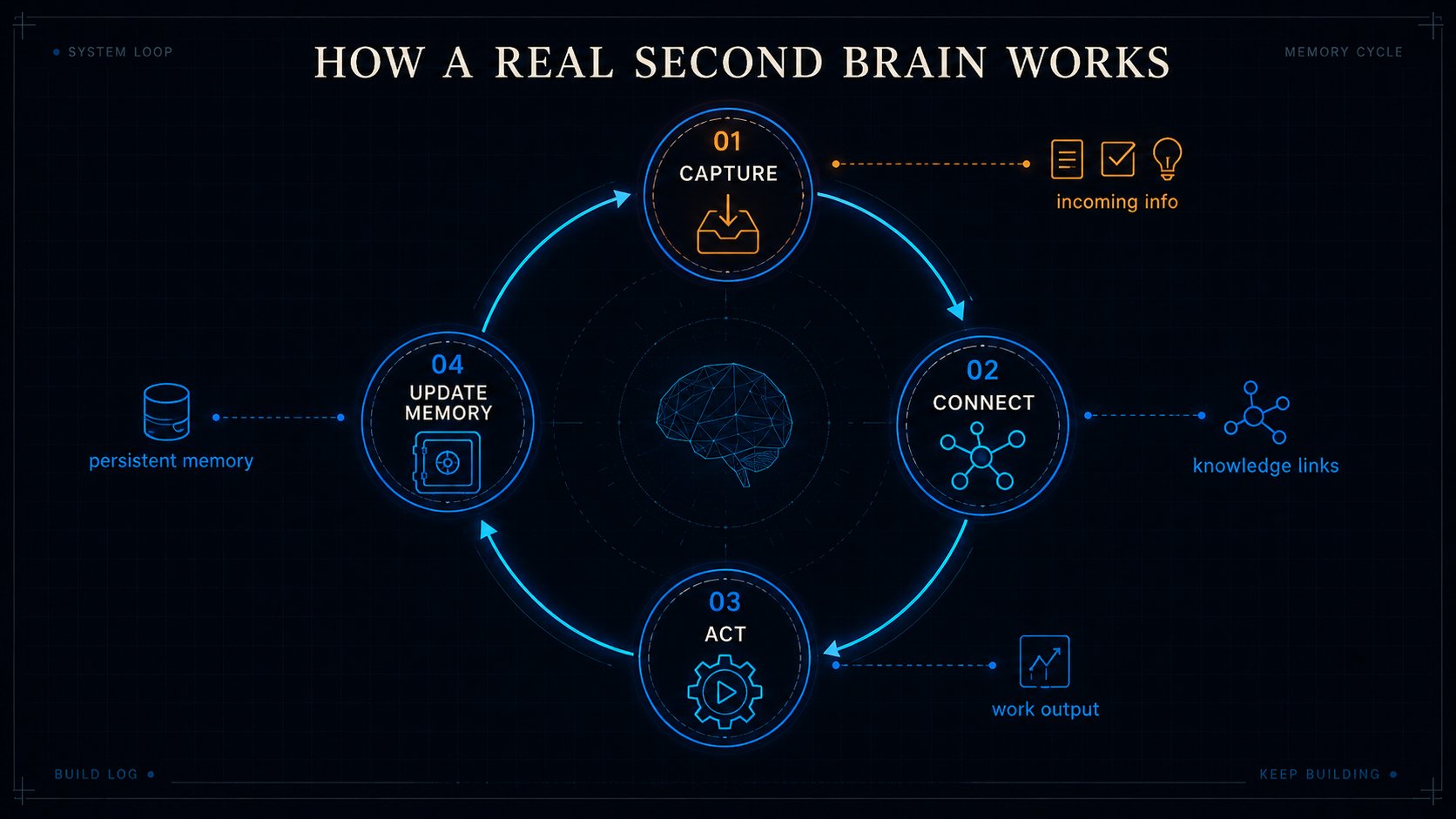
Most systems do the first two operations very well and barely cover the last two.
For example, you’ve saved dozens of notes about your project in Obsidian. Then you ask the AI to write a launch strategy. The model reads the materials and creates a good document. But after that, the new solutions often remain only in the chat. A week later, you’re back to having two realities: up‑to‑date data in the correspondence and outdated data in the knowledge base.
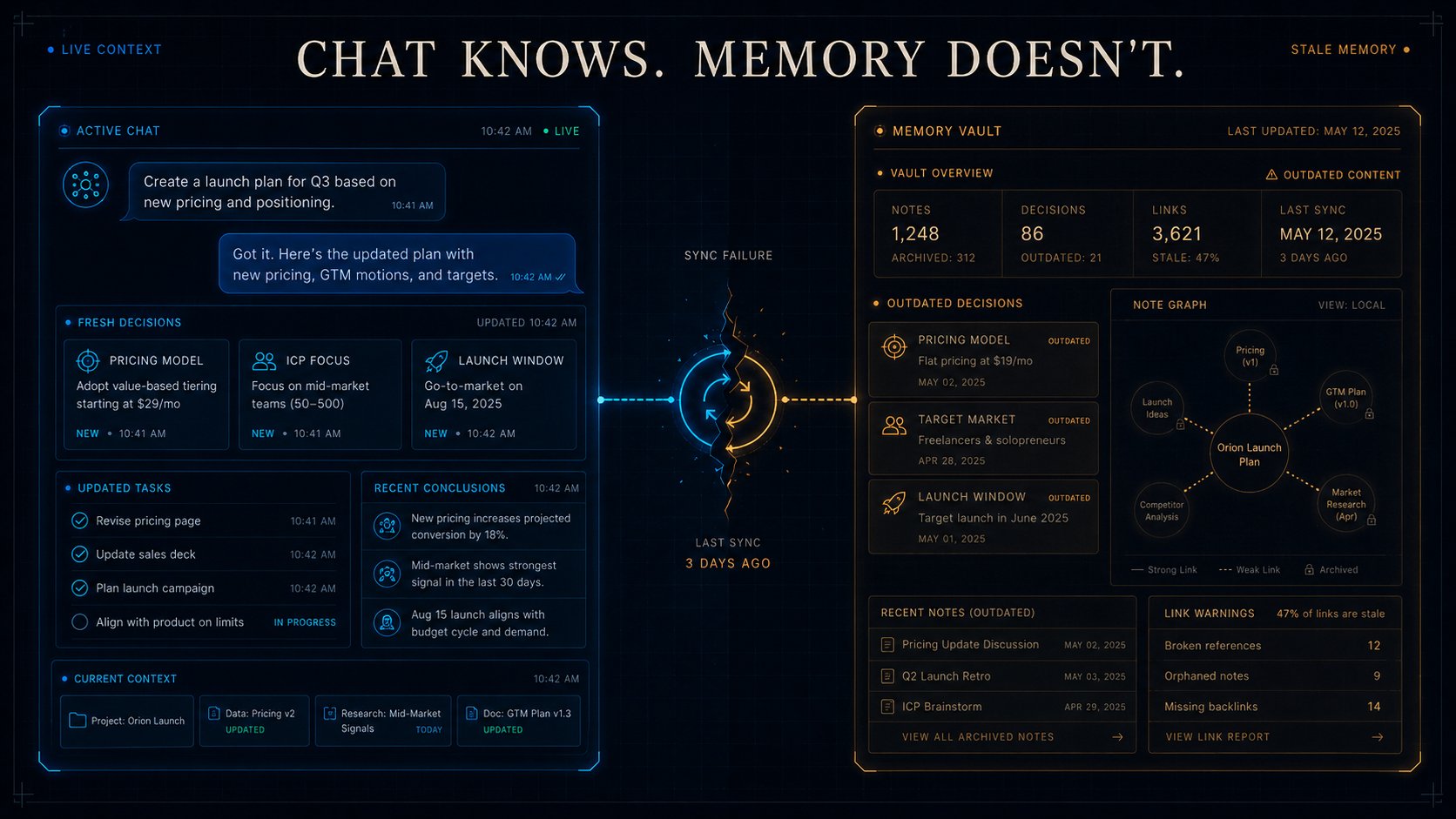
Second Brain breaks down the moment when memory stops synchronizing with actions.
The Grok Bot + Obsidian combination is interesting because the agent can potentially complete this cycle.
Not just read the memory.
Not just respond.
But complete the task and write the result back.
What might it look like?
Let’s imagine that you have an Obsidian vault with the following structure:
Inside the project, there are not long, chaotic documents, but atomic notes.
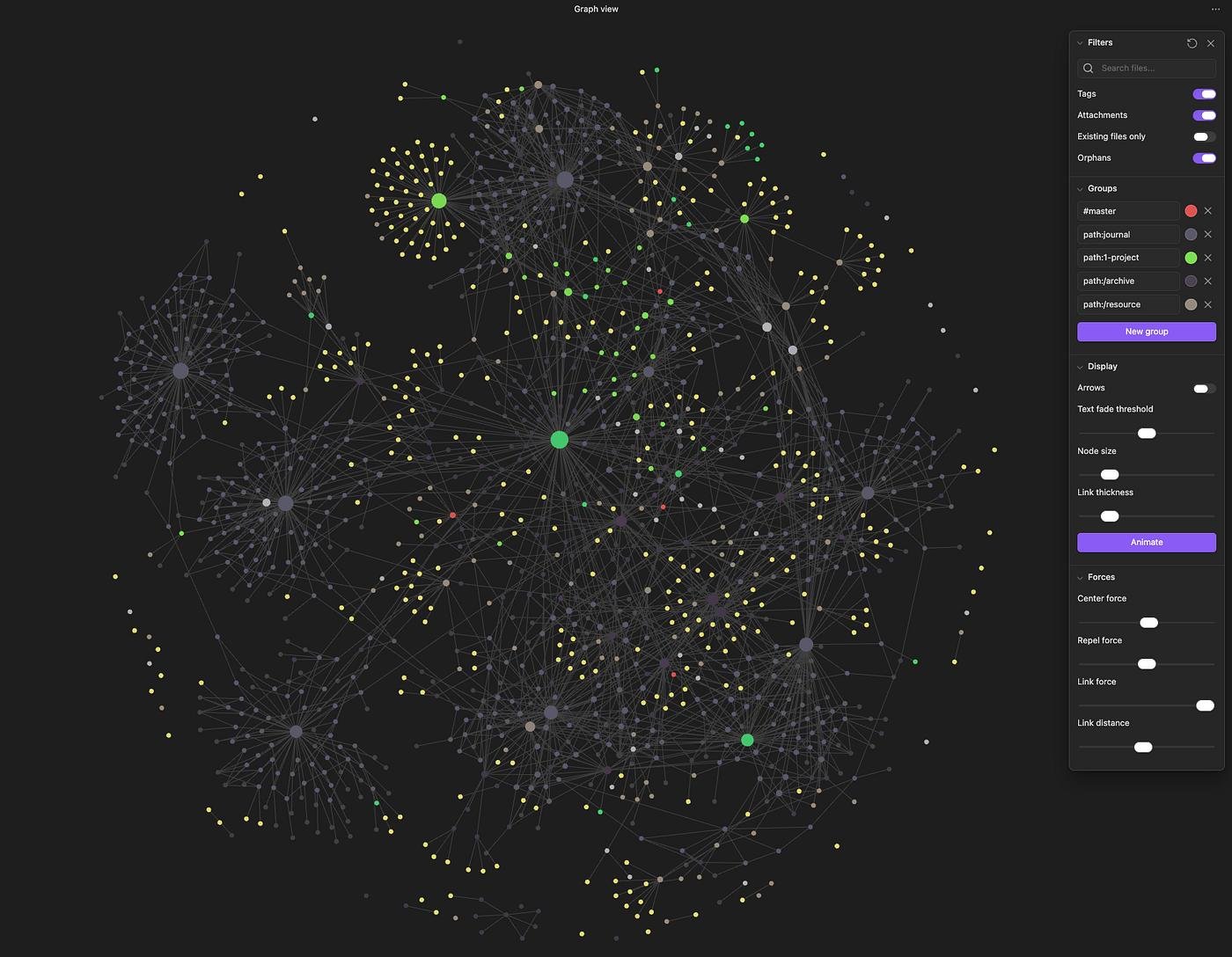
For example:
Each note has the following properties: type, project, status, created, updated, source, confidence, tags.
Now you are giving Grok Bot a task:
“Prepare a new post about my AI Signal Agent system. First, review the latest decisions regarding the project, my past texts, and notes about Grok Bot. Don’t repeat ideas that I’ve already published. After I approve the final version, save the theses and new conclusions back to Obsidian.”
Here, the AI doesn’t start from a blank slate.
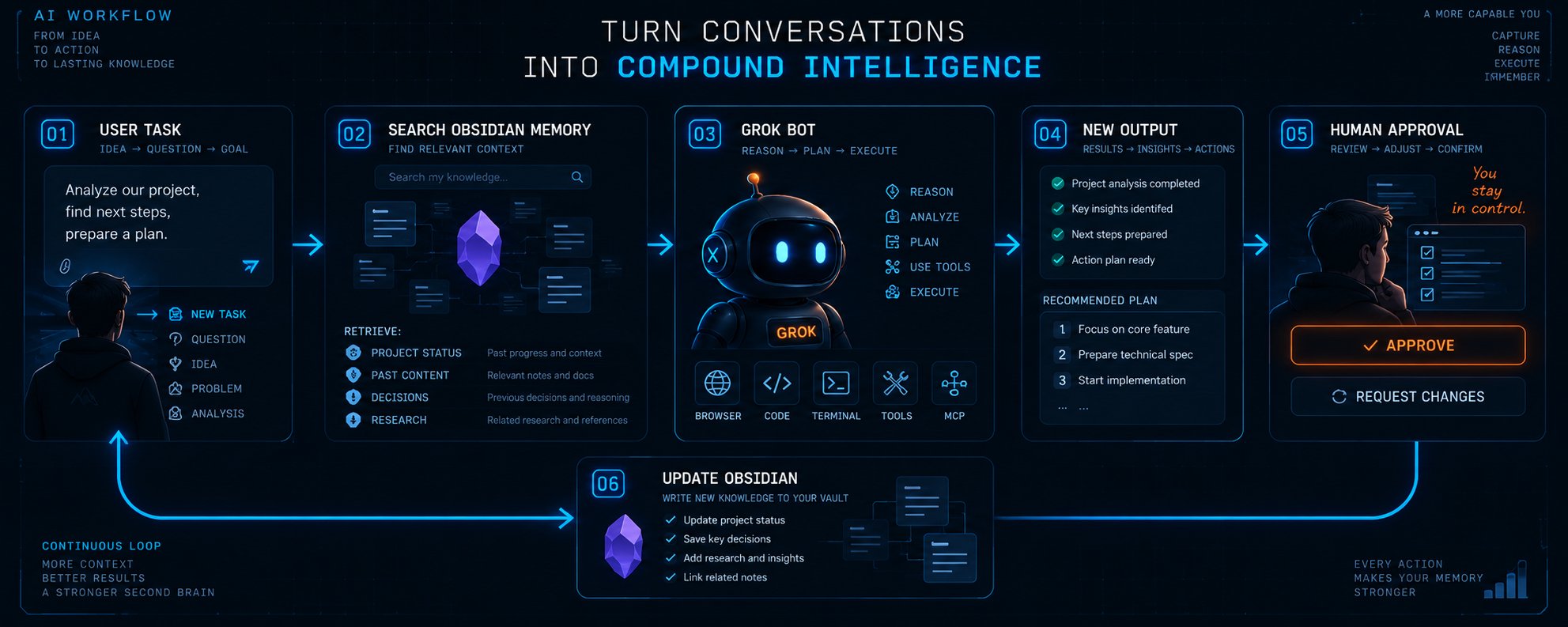
It can first perform a search in the vault. Find the current status of the project. See that you abandoned SQLite a week ago. Find your style from past publications. Check the notes from research. Prepare the material. Get the edits from you. And then update Content, Project, and Decisions.
As a result, the new conversation doesn’t disappear,it turns into a new task.
Memory layer instead of an infinite context window
The industry talks a lot about context window: 1 million tokens, 2 million, even more.
But a huge context now is not the same as memory.
If you feed your entire digital life into the prompt every morning, we end up with an expensive and cumbersome system. Most of the information is not needed for a specific task, and important facts are easily lost among thousands of irrelevant notes.
A normal architecture works differently:
-
First, the agent understands the task.
-
Then, it extracts only the necessary context.
-
After that, it performs the work.
-
And finally, it writes back only what is truly worth remembering.
In this scheme, Obsidian becomes the memory layer that you own. This is fundamentally important.
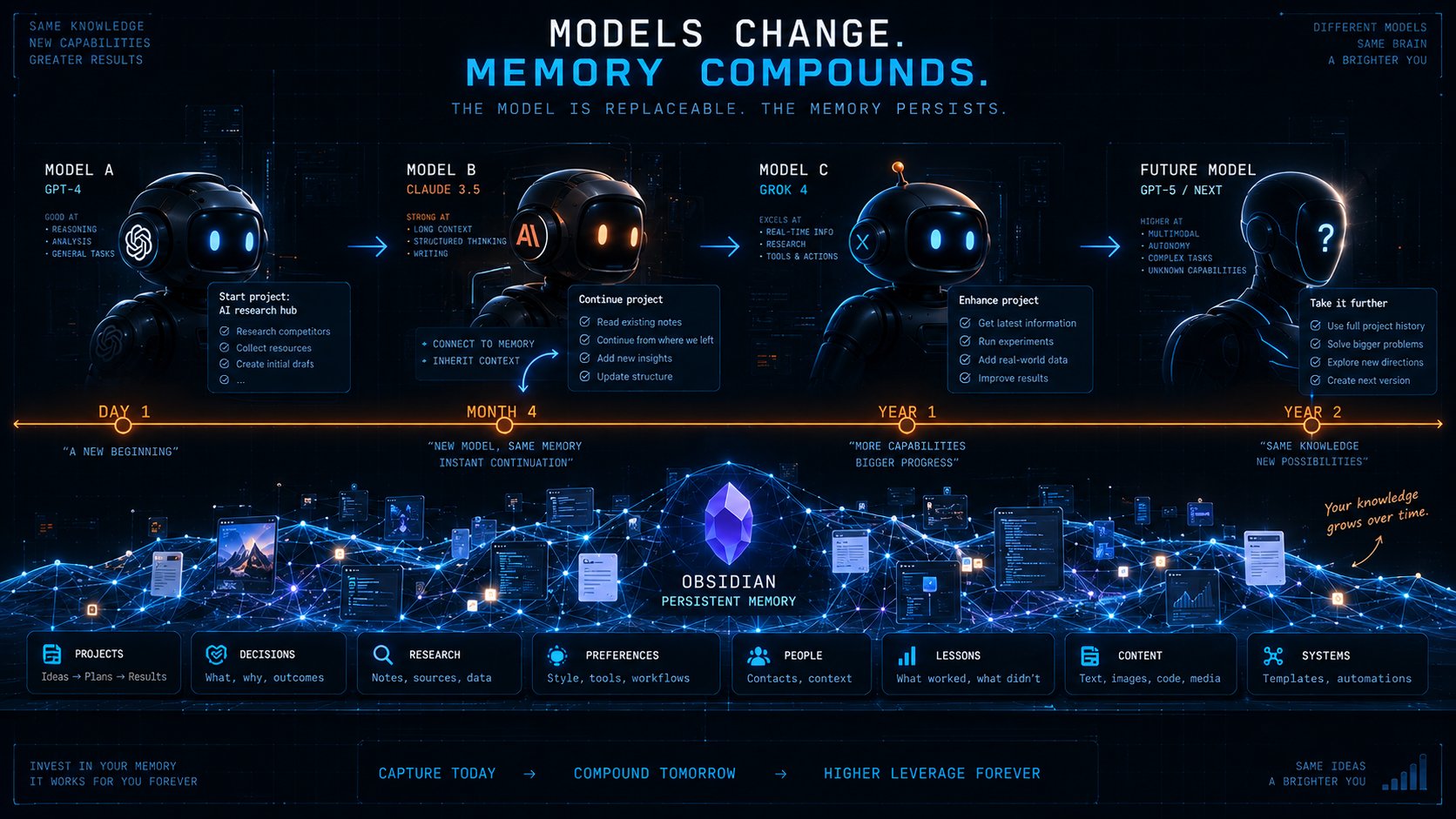
Your knowledge remains in Markdown files. They can be opened with a regular text editor, put under Git, synchronized in any convenient way, indexed using a local embedding model, or transferred to another system. Even if you replace Grok Bot with another agent tomorrow, the brain itself won’t disappear.
The model becomes replaceable, and the memory becomes persistent.
Why Obsidian is a good fit for agents
Obsidian is interesting not only because it stores Markdown.
It already has several levels of structure that AI can use as an interface to your knowledge:
-
Wiki-links provide connections between entities.
-
Backlinks allow you to understand where an idea has been used.
-
Properties turn notes into semi-structured entries.
-
Bases allow you to build tables and views on top of Markdown.
-
Templates set the standard for how new entries should look.
-
Daily Notes provide a chronological log.
-
Web Clipper saves articles, highlights, and metadata from the browser.
-
CLI turns all of this into a programmable surface.
That is, the vault can be designed almost as a lightweight database for both a human and an agent at the same time.
The human sees convenient notes.
The agent sees files, fields, links, and commands.
And this is much more interesting than storing a “memory.txt” file with 40,000 lines.
Three memory levels for Grok Bot
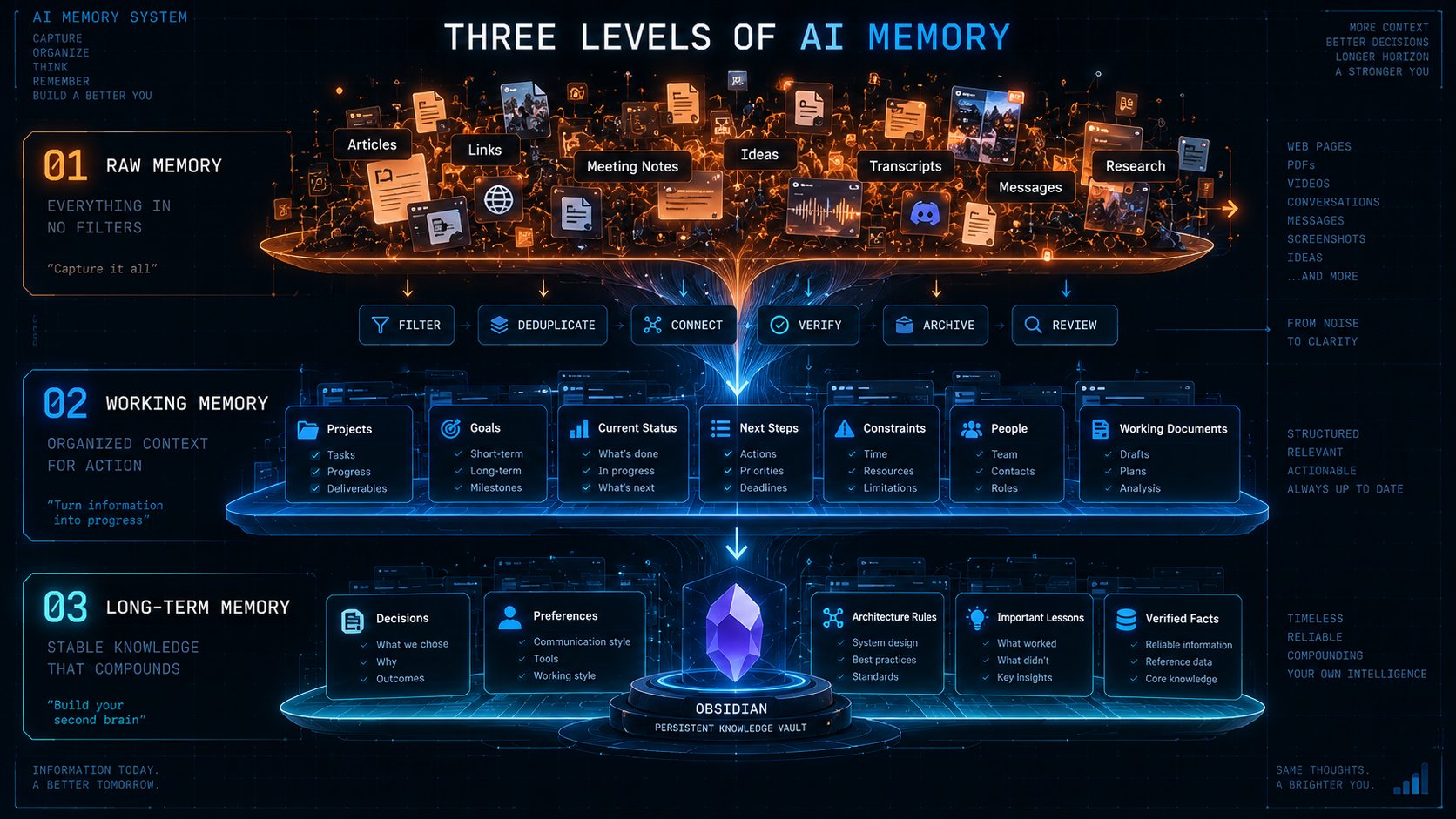
I wouldn’t let the agent just read and rewrite the entire vault. It’s better to divide the memory into three levels:
First-Raw Memory
This is where raw data goes: articles, links, notes from meetings, ideas, transcripts, messages, research results.
The agent shouldn’t consider all of this to be the truth. It’s just raw material for further work.
Second - Working Memory
This is where the current context of active projects is located: goals, current status, next steps,
restrictions, people, and working documents.
This is the layer that Grok Bot should read most often.
The third layer is Long-Term Memory
Only stable knowledge is included here: decisions that have been made, your ongoing preferences,
architectural rules, important lessons, verified facts, and completed projects.
This approach reduces one of the main problems of AI memory, namely the accumulation of garbage.
If you allow the agent to save everything indiscriminately, after a month, Second Brain turns into a digital attic.
Memory should not only grow. It should be able to forget, archive, merge duplicates, and reduce the confidence in outdated facts.
From the notes in the operating system
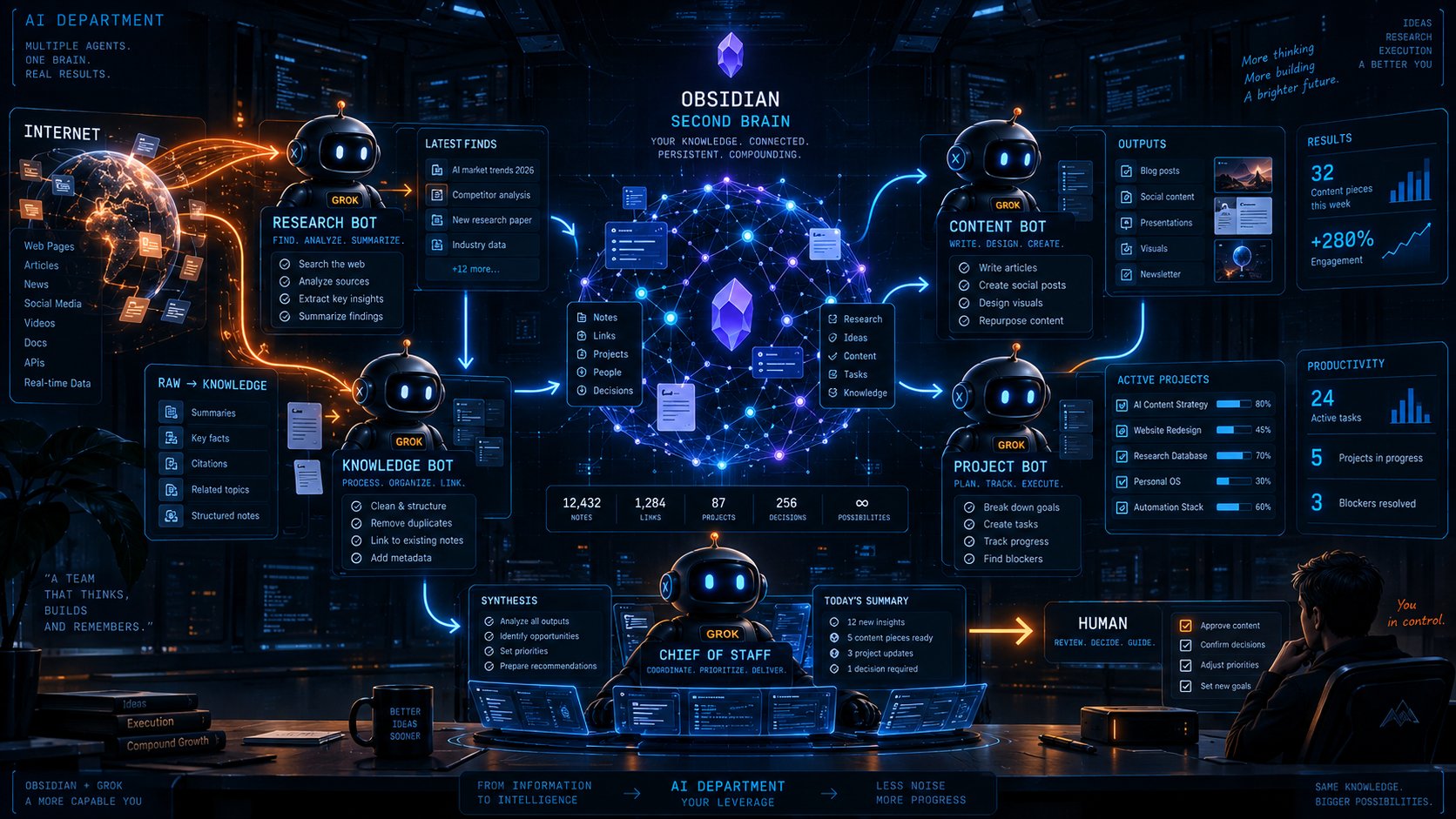
The most interesting part begins when Grok Bot receives not just isolated requests, but roles in its operation.
Research Bot can collect new materials every morning and put them in the Inbox.
Knowledge Bot can parse the Inbox, merge duplicates, and add links and properties.
Content Bot can review Research, your previous publications, and the list of ideas, and then prepare new posts.
Project Bot can monitor active projects, update the status, and generate next actions.
Chief of Staff reads Daily Notes, Projects, and Decisions, and in the morning issues a short briefing on what has changed, where the blockers are, and what decisions are needed from you.
Then Obsidian stops being an application that you have to constantly fill in by hand.
It becomes a shared working memory for the digital team.
And here it’s especially important that Grok Bots can pass context to each other and work on a shared cloud computer. This makes it possible to have a workflow where one agent conducts research, another uses the results for an article, and a third updates the knowledge base.
However, there is an important security nuance: a shared computer also means a shared access boundary.
According to the xAI documentation, files, browser sessions, and credentials on this cloud computer are available to your entire Bots team. Therefore, different Bots should not be considered separate security boundaries.
How to connect Grok Bot and Obsidian in practice
Now you can try 3 options:
Option 1: local vault + local execution
Obsidian is on your Mac or Windows. Grok Bot gets permission to run local commands and works with the vault via regular files or the Obsidian CLI. This is the most straightforward option, but access to the local computer needs to be restricted. In Grok Bot, the default for local execution requires approval before execution, and I wouldn’t disable this barrier unless necessary.
Option 2: synchronized working copy
A separate vault or a limited part of it is synchronized into the environment accessible to agents. In this case, Grok Bot does not get access to your entire computer. The downside is that the issue of synchronization and conflicts arises.
Option 3: controlled memory gateway
Between the agent and the vault, there is a small service or MCP interface with limited tools: search_notes, read_note, create_inbox_item, propose_memory_update.
This is more complex, but architecturally it’s the best option.
The agent doesn’t receive the command “rewrite any files.”
It receives narrow actions.
For example, changes to Long‑Term Memory may first be written to the Memory Proposals folder, and
you confirm them with a single command.
This human‑in‑the‑loop approach significantly reduces the risk that a hallucination will be written to permanent memory.
The main rule is: AI should not decide for itself what is true
This is perhaps the most important principle of the entire system.
If Grok Bot makes a mistake in a regular chat, the error will disappear from the message history.
If it made a mistake and saved it in Long‑Term Memory, a month later another agent might use the false fact as the original reality and introduce errors into your business.
Therefore, the notes created by AI must have a source and confidence.
I would add the following fields:
For critical entities: finance, clients, legal information. I would prohibit automatic recording without human confirmation.
Second Brain should enhance your memory, not rewrite it.
The strongest trait is continuity
The value of the system is not in the fact that it can find a note about PostgreSQL, as this is just a regular search.
The real test begins when, after four months, you give the agent the command: “Continue the AI project Signal Agent.”
A good agent should understand why the project was created, what decisions have already been made, what didn’t work, which sources you trust, what stack you’re using, and what tasks remain. It doesn’t need to reload ten pages of brain dump.
He continues working from where you left off.It is continuity, not the size of the context window, that can become the boundary between a regular AI chat and a personal agent.The model may become 20 % smarter. But an agent that remembers two years of your work, understands the structure of projects, and carefully updates its memory after each action can deliver a much greater practical effect.
Conclusion
Grok Bot can be the execution layer, and Obsidian can be the memory that you own.
Together, they provide the foundation for a personalized AI system: agents receive work context, act through tools, share results with each other, and return new knowledge to the vault.
For now, this requires setup. You need to think through the structure of notes, access rights, metadata, approvals, and rules for writing to long‑term memory.But the direction looks strong.
The next stage of personal AI is not just a model that responds faster. It’s an agent with tools, a working environment, and memory accumulated over months and years.
For me, the combination of Grok Bot and Obsidian is one of the most clear‑cut promising options.
If you want more articles like this about AI, agents, and new technology, follow @21_borv
If you want more articles like this about AI, agents, and new technology, follow @21_borv
How to work with Grok Bot next
• xAI - introducing Grok Bot: https://x.ai/news/introducing-grok-bot
• xAI Documentation - overview of Grok Bot: https://docs.x.ai/grok-bot/overview
• xAI Documentation - approvals, security, and privacy: https://docs.x.ai/grok-bot/approvals-security-and-privacy
• Obsidian Help - how Obsidian stores data: https://obsidian.md/help/data-storage
• Obsidian Help - Obsidian Command Line Interface: https://obsidian.md/help/cli
• Obsidian Help - Core Plugins / Bases: https://obsidian.md/help/plugins
• Obsidian Help - Introduction to Bases: https://obsidian.md/help/bases
• Obsidian Help - Web Clipper: https://obsidian.md/help/web-clippe
Published on grokbot.sh. Cite the public log, not a prompt pack.