
Grok Bot in Practice: Keep a Project Current (Part 4 of 4)
The family reunion started as 20 people at a lake house in July. Then it was 34 people. Then Aunt Dara could only do August. Then the budget dropped by a third. Real projects change midway, and that
Article
Job breakdowns
The family reunion started as 20 people at a lake house in July. Then it was 34 people. Then Aunt Dara could only do August. Then the budget dropped by a third.
Real projects change midway, and that is when work with a Bot gets sloppy. Old versions pile up. The Bot answers from the plan of three weeks ago. You stop being sure which file is the real one.
The fix is a small habit: one current plan, a backup before every change, a check you can run yourself, and a weekly note. By the end you will have a plan that has survived three changes, with totals you can verify and a Monday routine that reports on it.
You need Grok Bot installed and a Bot you can give an ongoing project. Python 3 is optional, for the check script. You can do the same arithmetic by hand with the tables below. All the names, prices and numbers here are practice data, so you do not need to share anything real.
Start with a concrete plan
Bots on your account share one cloud computer, and the shared workspace is /workspace. Use one folder and full paths throughout, so nobody has to guess which file you mean.
Create the folder /workspace/reunion-2027 with these files: plan.md, budget.csv and decisions.md. Put the contents I give below into plan.md and budget.csv. Leave decisions.md with a single dated line: "Started plan with 20 guests." When I change a requirement, edit these existing files. Do not create copies with different names, except the numbered backup folders I ask for below.
Contents for plan.md:
Contents for budget.csv:
Work the starting total by hand: 3600 + 1900 + 600 + 100 = 6200, which is 6700 under the limit. Hold on to those numbers. You will compare against them after every change.
Open the folder and confirm all three files exist and match what you pasted. That is your first check, and it takes a minute.
Add a check you can run yourself
A Bot can add numbers wrongly, or describe a total it never recalculated. A short script gives you a second opinion that does not depend on the Bot's reading.
It reads budget.csv, prints each line total and the grand total, and says whether you are under the limit you give it. You need Python 3. Save it as /workspace/reunion-2027/tools/budget_check.py, or on your own computer in a folder separate from your data.
Run it as python3 -I budget_check.py budget.csv 12900. For the starting file, you should see:
Now break it on purpose. Delete the word unit_cost from the header row and run it again. It should print STOP: missing columns: unit_cost and exit with code 2, with no total at all. That is what you want from a check. A missing column should stop the work, not produce a believable wrong number.
The script only knows that the values are whole numbers and that the multiplication works. It does not know your headcount or your planning rules, so it cannot tell you that parking should be 7 passes. Your own hand figures catch that kind of stale count. I ran the script on my own computer against all four states in this article and the missing-column case. That was a plain script check on practice data, and I have not run any of this inside Grok Bot. If your output differs from the expected output, trust your hand arithmetic first, then look at the script.
Change one thing at a time, with a backup first
Every change follows the same loop: back up, change, check, log. The backups are just folders the Bot copies for you. They are not built-in version history, and the Bot can only restore what it actually copied, so look inside the folder to be sure the copy is there.
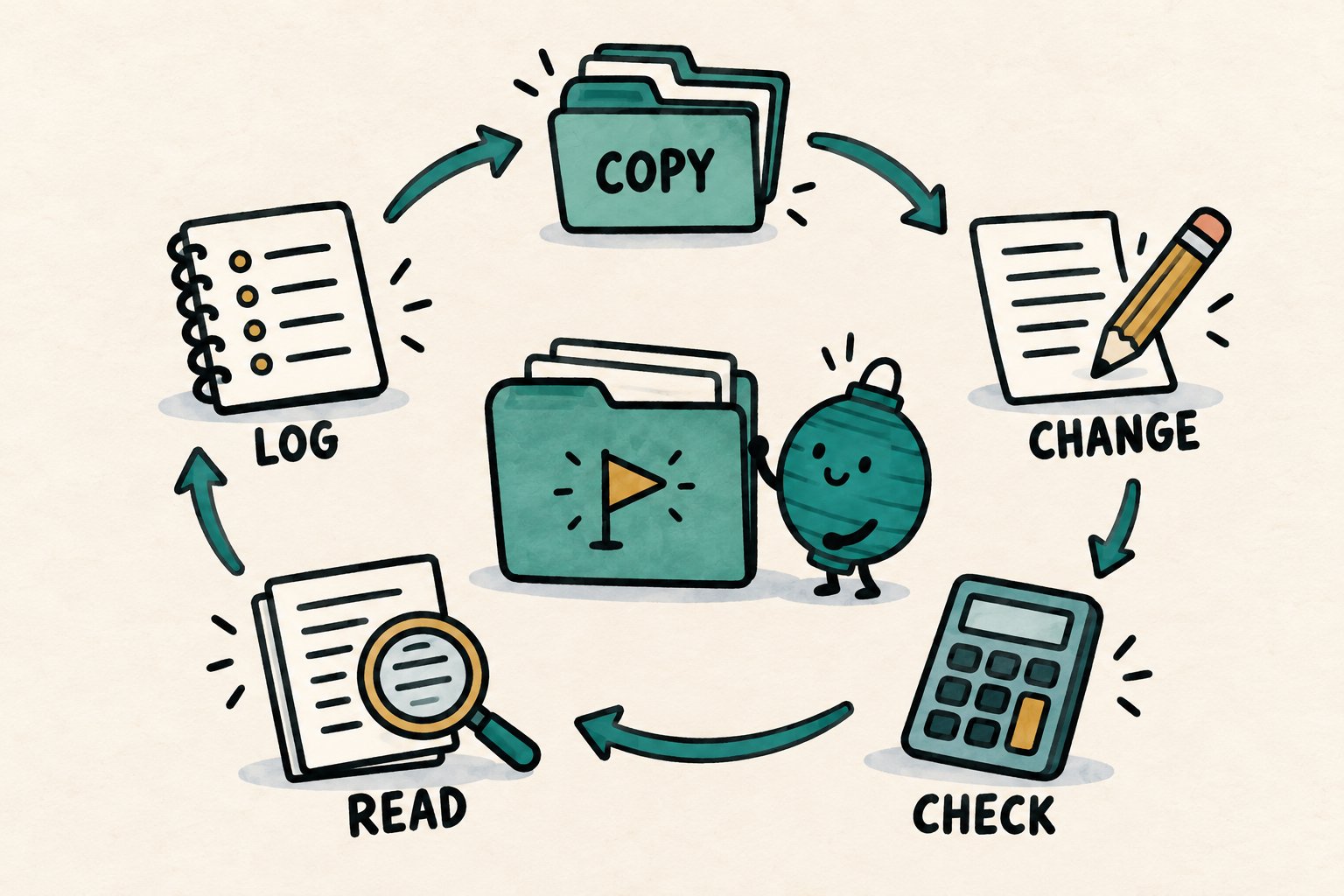
Change 1 is the headcount.
First copy plan.md, budget.csv and decisions.md into /workspace/reunion-2027/backups/v1 and list that folder. Then update: the guest count is now 34, not 20. Apply the rules in plan.md to lodging, food, activities and parking. Edit the existing files and add a dated entry to decisions.md. Then list everything this change affects, what you changed in each, and anything you could not confirm.
Houses are 34 divided by 10, rounded up, which is 4. Parking passes are 34 divided by 5, rounded up, which is 7. The correct budget.csv now reads:
The line totals are 7200, 3230, 1020 and 175, for 11625. Against the 12900 limit, that is 1275 under. A good change report names all four lines. If the Bot updated the guest count but left parking at 4 passes, your hand total gives it away: the script prints 11550, not 11625.
Change 2 is the date. Aunt Dara needs August 9 to 11, and lodging that week is 2100 per house.
Copy the current files to /workspace/reunion-2027/backups/v2 and list that folder. Then change the dates to August 9 to 11 and the lodging unit cost to 2100. Same rules as before.
Lodging becomes 4 times 2100, which is 8400. The total is 8400 + 3230 + 1020 + 175 = 12825, which is 75 under the limit. The plan still fits, barely, and the check makes that easy to see.
Change 3 is the budget. The limit drops by a third, from 12900 to 8600.
Copy the current files to /workspace/reunion-2027/backups/v3 and list it. Change the budget limit in plan.md to 8600. Do not change any quantities or costs. Run the check and tell me the result.
Run the script yourself with limit 8600. The last line should be OVER: 4225 over the limit, and the exit code is 1. The right thing for the Bot to do is tell you the plan no longer fits, not quietly trim a line to make it work. Then ask for options.
Give me three ways to bring this plan under 8600, with the new total for each. Do not edit any file yet.
Pick one, tell the Bot, and have it apply your choice and log the reason in decisions.md.
Here are these numbers as a table you can select and copy. All of it is practice data.
Keep one current plan, and deliberate backups
The top-level files are the only current plan. The numbered backup folders are history you chose to keep on purpose, so they do not count as stray copies. The rule is simple: new work is only ever saved over the top-level files, and the Bot never opens a backup to answer a question unless you ask it to.
If a change goes wrong, ask the Bot to first copy the current files to a new folder such as backups/v3-failed and list it, so the failed version is kept. Then have it copy the backup you want back over the current files and rerun the check. If the project matters, keep a copy of the backups folder somewhere outside the workspace too.
Keep changing facts in the files
Bot memory is good for preferences and summaries. The guest list, the date and the budget limit belong in the files. Before anything important, ask for a fresh read.
Before you answer, reopen plan.md and budget.csv and use only what they contain now. If something I told you earlier conflicts with the files, tell me.
If the Bot repeats an old number, correct it in plain words: "The date is August 9 to 11. Update plan.md and stop using July."
Redirect without starting over
You can send another instruction while work is running. A new message takes priority and can change the current turn, so "wait, the limit just dropped" works mid task. If you want to react to one option in a list, reply in a thread under that message. And write out changed instructions rather than reacting with an emoji.
If the plan spawns a separate job, like a fundraising letter for a family scholarship, start a new thread or a new Bot for it.
Add the weekly routine
A routine is a scheduled workflow owned by one Bot, and it can run while your laptop is closed. Add it once the plan has survived a change or two. This one only reads files and writes a note.
Create a routine for this Bot that runs every Monday at 9:00 am, time zone America/Chicago. It reads /workspace/reunion-2027/plan.md, /workspace/reunion-2027/budget.csv and /workspace/reunion-2027/decisions.md. If any of those is missing, it says which one and stops. Otherwise it writes a status note with what changed in the last week, what is unresolved, and what is due in the next two weeks, and the budget total against the limit in plan.md. Save the note as /workspace/reunion-2027/status/status-YYYY-MM-DD.md using the run date. Do not use any messaging or email tools.
Swap in your own time zone if you are not on Central time. Then check three things before you rely on it:
-
Settings, then General, then Bot, shows the time zone you meant.
-
The Bot reports a next run time that matches Monday 9:00 am in that zone.
-
The routine names full file paths, and a missing file makes it stop instead of guess.
The line about messaging tools is a request, not a lock. Other connectors on your account may still be reachable, so do not treat it as a safety fence. Keep the review in your own hands: open the note yourself, and do not ask the routine to notify anyone yet.
Use Test run once. A test run does real things, like reading and writing files, so afterward check that the only new file is the note in the status folder. Open the note and compare its numbers with your own check. After change 3 it should show an 8600 limit and a 12825 total, or the total for the option you chose. If it cannot read the files, fix the paths. A file problem there would show up on Monday too.
A few limits worth knowing: a Bot can own up to 50 routines, schedules must be at least five minutes apart, and the app keeps the 20 most recent run records per routine. Deleting a routine cannot be undone.
A two-minute weekly review
Each Monday, read the note and ask:
-
Does the guest count match what you know?
-
Does decisions.md have every change, with a reason?
-
Is there one current file for each thing, plus backup folders only?
-
Does your own run of the check agree with the note's total?
If any answer is no, tell the Bot what is wrong and ask it to fix the existing file.
What to remember
A project that keeps moving needs a stable home. Keep one current plan, copy it before every change, ask what each change touches, and confirm totals with something other than the Bot's word. Your part is small: say what changed, and run the check.
Published on grokbot.sh. Cite the public log, not a prompt pack.