
Grok Bot for business: why do you need a department of 10 people if you can assemble it from agents?
The most costly mistake for a business may not be that AI will replace employees. But that a competitor will build a digital department before you do. Where does the business scenario star Imagine
Article
Job breakdowns
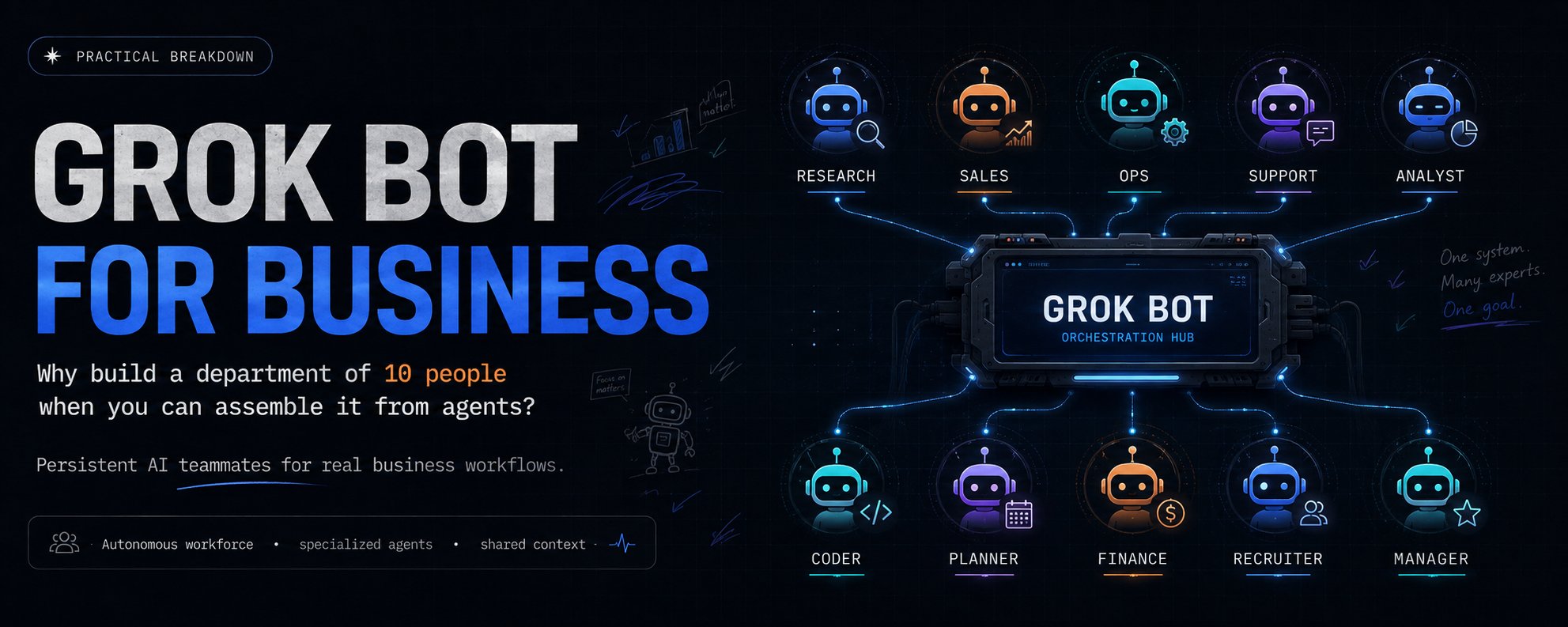
The most costly mistake for a business may not be that AI will replace employees. But that a competitor will build a digital department before you do.
Where does the business scenario star
Imagine that tomorrow your sales department starts working several times faster.
New leads are automatically analyzed. The CRM is put in order. A brief analysis appears for each client. The emails are already prepared. The manager just needs to review the results and make a decision.
At the same time, another AI agent analyzes the business metrics. A third one monitors the competitors. The fourth one prepares the content. The fifth one checks the work of the others.
And all of this isn’t happening a month after the implementation of yet another corporate platform, but potentially from several Grok Bots to which you’ve defined roles, rules, and available tools.
That’s precisely why Grok Bot isn’t interesting as just another AI chat.
It raises a far more unpleasant question for businesses:
If 60–80 % of a department’s routine work consists of searching for information, preparing, transferring data, checking, and monitoring, then why continue to have people do all of this?
This does not mean that ten Grok Bots automatically replace ten employees.
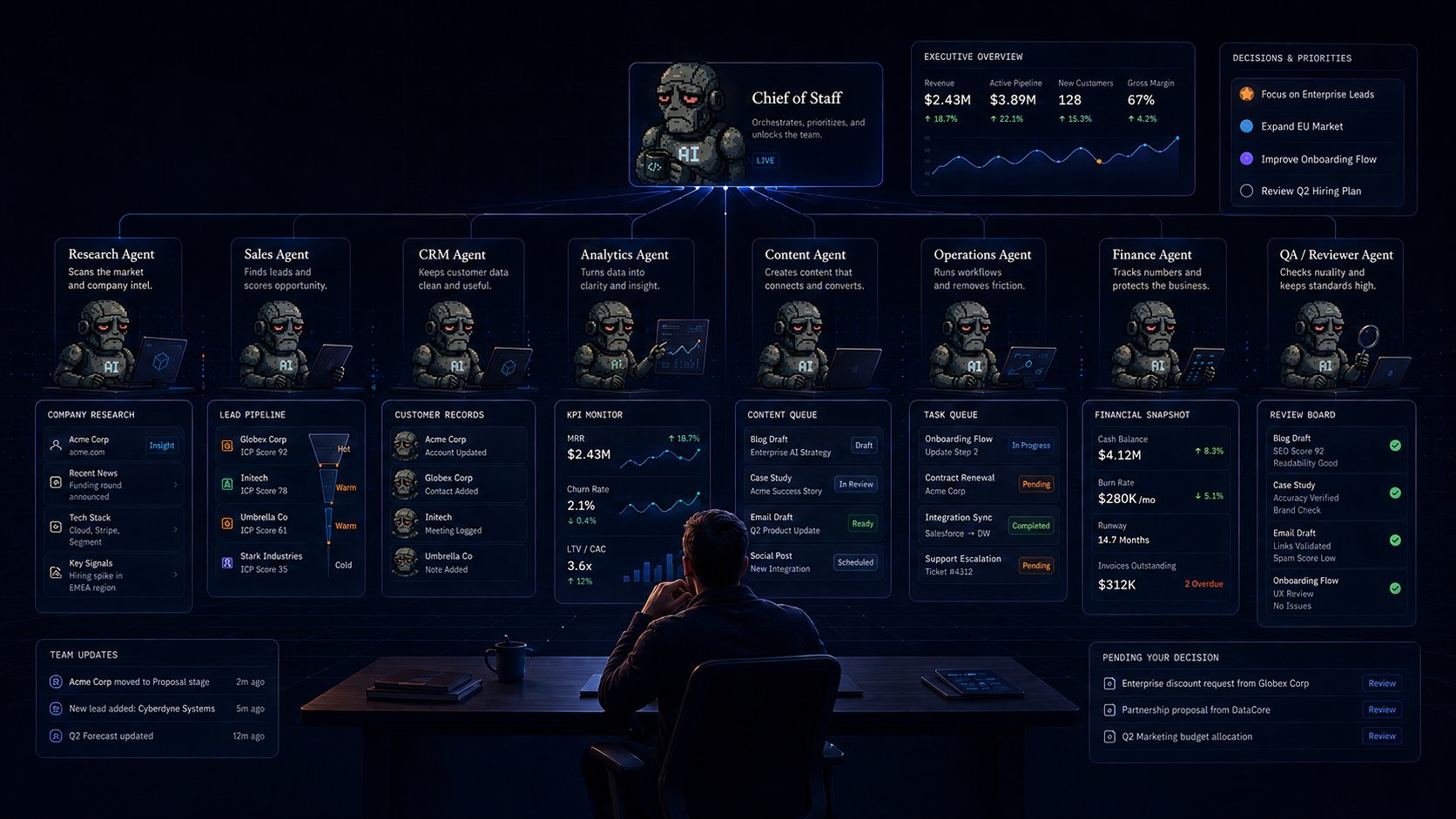
But another possibility arises:one person + a digital team of agents can handle the volume of operational work that previously required a small team.
Not an AI employee. AI department
Most people still use AI in a similar way: a person asks a question to ChatGPT / Grok and gets an answer.
Grok Bot offers a different model: a person sets a business goal, and then the Chief of Staff and several specialized agents deliver the finished result.
For example, instead of a single universal AI for sales, you can put together:
For example, you set a task: prepare everything needed for new leads today.
Inside your system, a chain is triggered: the researcher collects data, the CRM agent retrieves the history, the analyst forms a hypothesis, the strategist selects a scenario, the writer prepares the text, and a separate agent checks the result.
Instead of switching five times between the browser, CRM, spreadsheet, and email, the manager receives one ready‑made package.
Where can a huge savings actually come from?
The main mistake is to assume that AI should completely replace a job.
It’s much more useful to break down a job into tasks.
Let’s take a sales manager.
Part of their day looks something like this:
-
open a new request;
-
find a company;
-
study the website;
-
understand the product;
-
check LinkedIn;
-
check the CRM;
-
gather contact history;
-
qualify the lead;
-
write a note;
-
prepare a letter;
-
create a follow-up;
-
update the status.
Of these twelve actions, only two or three may actually require a human decision.
The rest involve collecting, processing, and verifying information.
That is why the potential of agent-based systems can be much greater if you automate the entire workflow. The savings will add up immediately due to several routine tasks.
Example: 100 leads
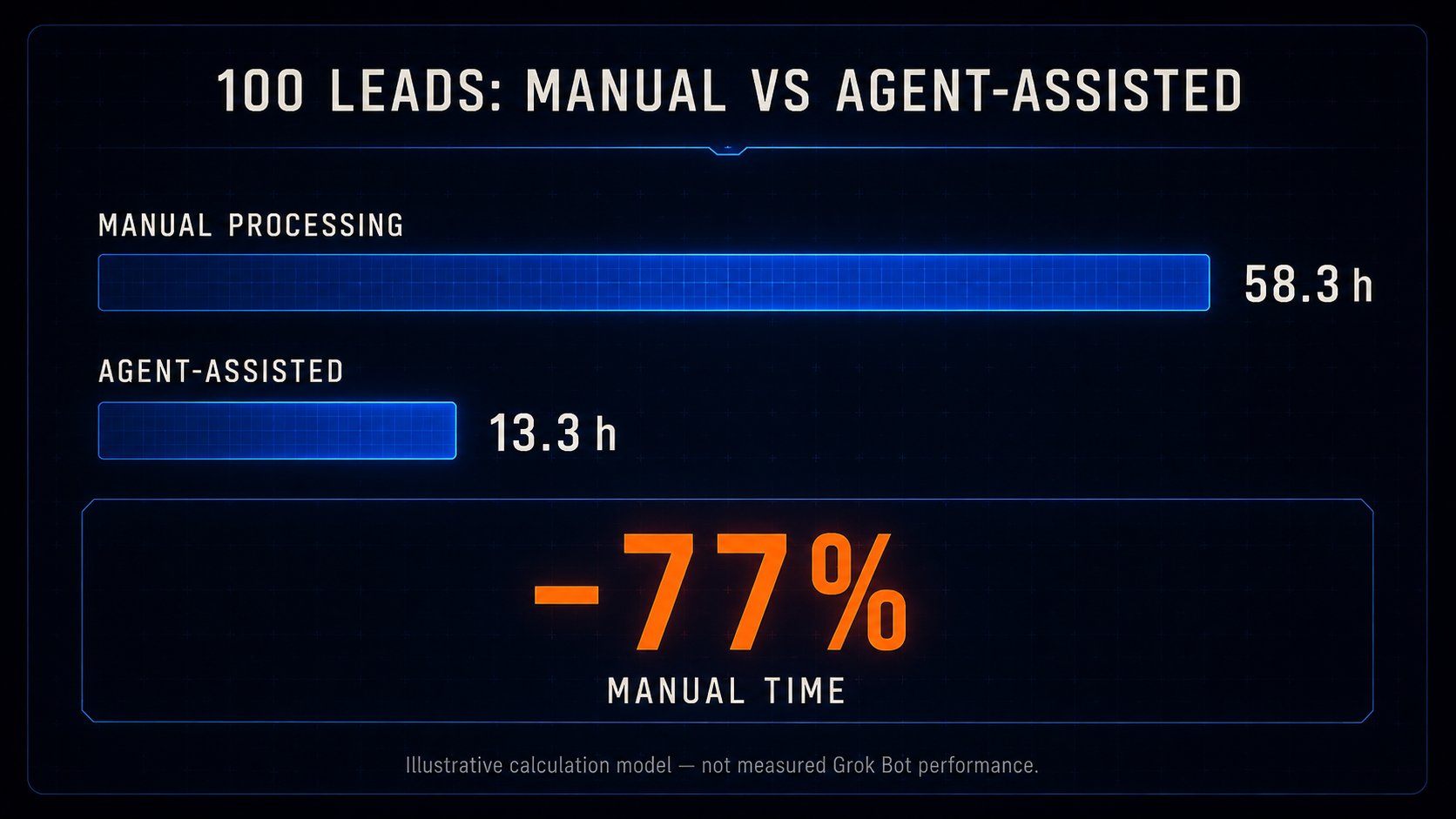
Manual processing of one lead takes 35 minutes. Using the example of 100 leads: 58.3 hours of human work.
With a notional cost of an hour of $20 ≈ $1,167 for all work
Now let’s imagine that Grok Bots independently:
-
collect information;
-
study the company;
-
check the CRM;
-
assess the ICP;
-
prepare a message;
-
compile everything into a card.
And the manager spends only 8 minutes on the final review.
Then the human time is reduced to: 13.3 hours.
In the model presented, this means approximately a 77% reduction in manual time and about a 75% reduction in direct variable costs. But this is precisely a calculation model, not a confirmed result of a real Grok Bot implementation: it does not take into account configuration, integrations, errors, and infrastructure.
That is why the correct idea here is not:
Grok Bot is guaranteed to reduce costs by 75%.
But:
If you find a process where a person spends most of their time collecting and transferring information, the potential for automation could be enormous.
Which processes should be automated first
Find work in your campaign that: is repeated frequently + has a clear input + has a clear output + is easy to verify.
The most obvious candidates:
Sales
Research clients, lead scoring, CRM hygiene, outreach preparation, follow-up.
Marketing
Market research, competitors, ideas, content preparation, analytics.
Operations
Documents, reports, task control, information transfer between systems.
Support
Call classification, problem-solving, response preparation, FAQ database creation.
Management
Daily summaries, KPIs, deviation analysis, project status.
Recruiting
Primary screening, candidate research, card preparation.
You don’t need to automate everything to start with. It’s enough to find one operation that costs tens of hours per month to get a significant economic effect for the entire campaign.
Step 1. Measure how much money you are currently losing
Let’s say an employee spends two hours every day on: research + copying information + updating the CRM + preparing a report.
This amounts to approximately: 2 hours × 22 working days = 44 hours per month.
If a full hour of an employee’s work costs the company approximately $25: 44 × $25 = $1,100 per month.
And this is just one operation performed by one employee.
Now look at the entire company.
If there are ten such processes, we’re no longer talking about saving a few SaaS subscriptions.
We could be talking about hundreds of human hours each month and thousands of dollars.
Step 2. Don’t create 10 Bots at once
Paradoxically, the best way to build a department of ten agents is not to build a department of ten agents right away.
Create one. For example: Lead Researcher.
His job will be to look for new campaigns, conduct research, and provide a ready‑made client card.
Give him 5–10 real tasks and see:
-
where he makes mistakes;
-
what he comes up with;
-
which sources he uses;
-
how stable the format is;
-
how much time he saves.
After each mistake, correct not the specific answer, but the rule.
For example:
If you don’t know the number of employees, write UNKNOWN instead of making an estimate.
Or:
Every important fact should have a source.
After a few launches, you’ll get not just a Bot, but a fairly stable digital position.
Step 3. Turn a successful process into a procedure
This is where the real magic begins.
The first good result means nothing.
We need a process that can be repeated 100 times without errors or hallucinations:
Run #1 → fixed
Run #2 → fixed
Run #3 → checked another case
Run #4 → checked for errors
Run #5 → stable result
After this, the workflow can be saved as a repeatable Skill.
A good template contains not only the prompt but also the agent’s role, tools, result format, verification criteria, and escalation conditions.
It turns out that AI begins to accumulate not just a history of conversations, but the operational expertise of the business.
Step 4. Add a second agent
After the Researcher, we create a Sales Qualifier.
Now the Researcher does not provide a customer assessment.
He only collects facts and passes them on to the Sales Agent, who then calculates the ICP Score.
Here is an example of this type of work:
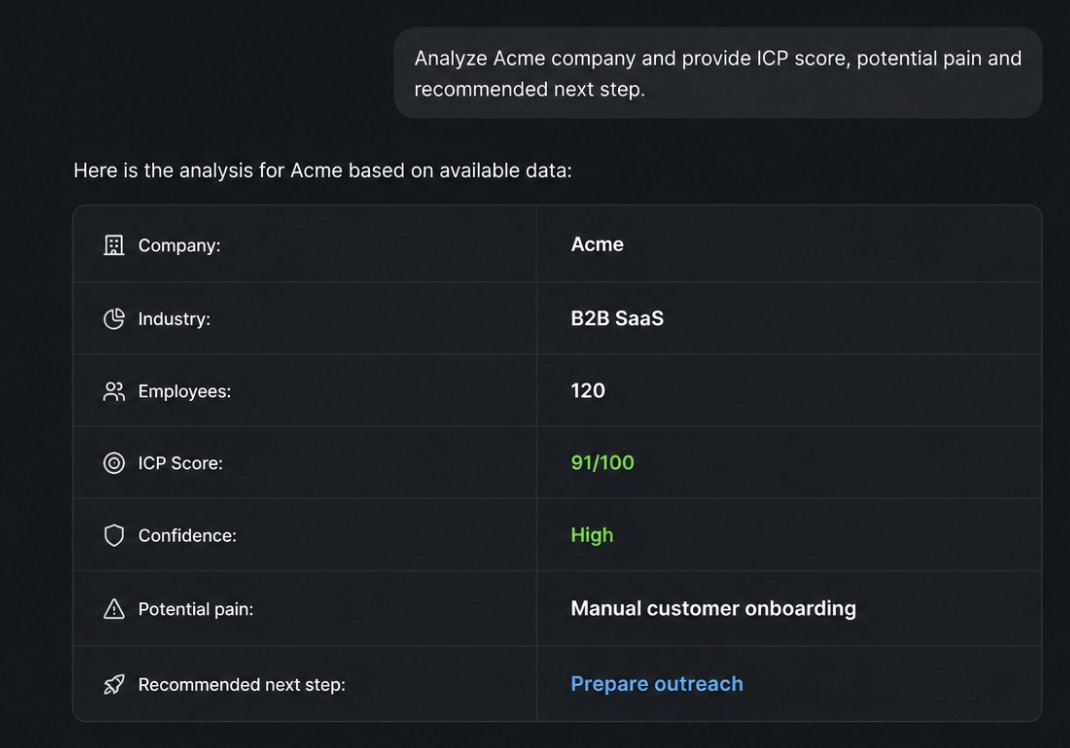
This is an important architectural idea, as each agent should do one thing well. Don’t assign multiple responsibilities to bots, as this will complicate the system. This means there’s a higher probability of error.
The more responsibilities you assign to a single bot, the harder it is to understand where the system went wrong.
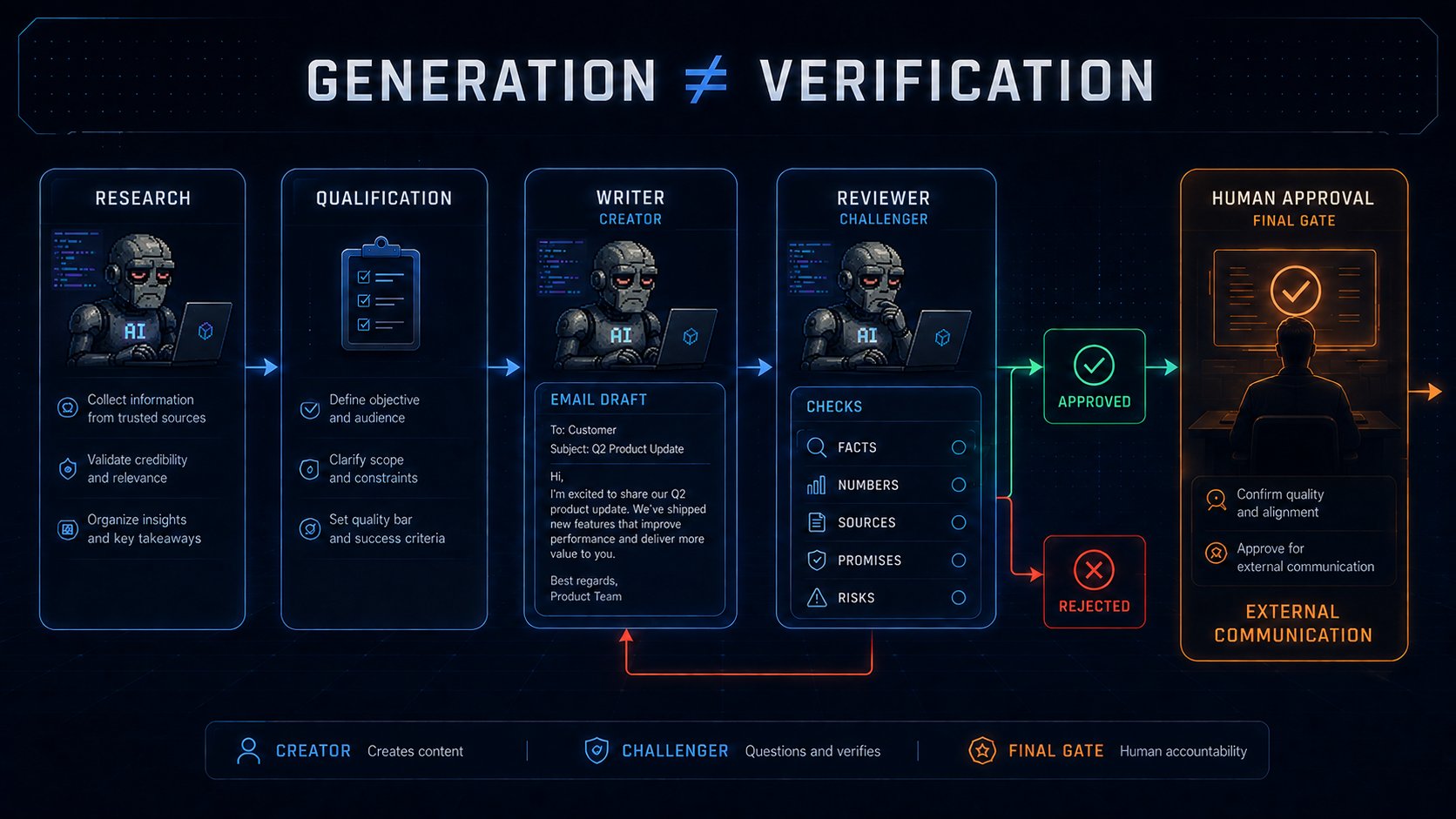
Step 5. Add Writer and Reviewer
Now the workflow looks like this: the researcher searches for information, passes it on to Qualification, who then sends it to Writing, and after that it goes for review.
The reviewer is not there to praise the result. Their task is to find problems with it.
They check:
-
whether any fabricated facts have appeared;
-
whether the provided figures can be trusted;
-
whether key statements are substantiated;
-
whether the text promises more than the product can actually deliver;
-
whether there are any potential risks in the proposed action.
This is an important part of the system.
If one agent came up with a solution, wrote the text, checked it themselves, and ultimately deemed it perfect, no independent verification took place. They simply confirmed their own result.
Therefore, in the original model, the agent who creates the text should not be the sole person to decide whether it can be used.
The final decision should go through a separate reviewer and, if we’re talking about important actions, through a human. It’s better if a human handles the review at the initial stages.
Step 6. Create a Chief of Staff
When there are five agents, an unexpected problem arises.
You’re doing manual work again.
Only now, instead of managing employees, you’re managing Bots:
-
Researcher, check the client.
-
Sales, look at the research.
-
Writer, write the email.
-
Reviewer, check the Writer.
This isn’t automation.
That’s why you need one more agent at the top: Chief of Staff.
He receives from you not micro‑instructions, but a goal. For example: Select the five most promising new clients for today and prepare everything necessary to make a decision. Do not write to anyone without my permission.
Chief distributes the work among the bots:
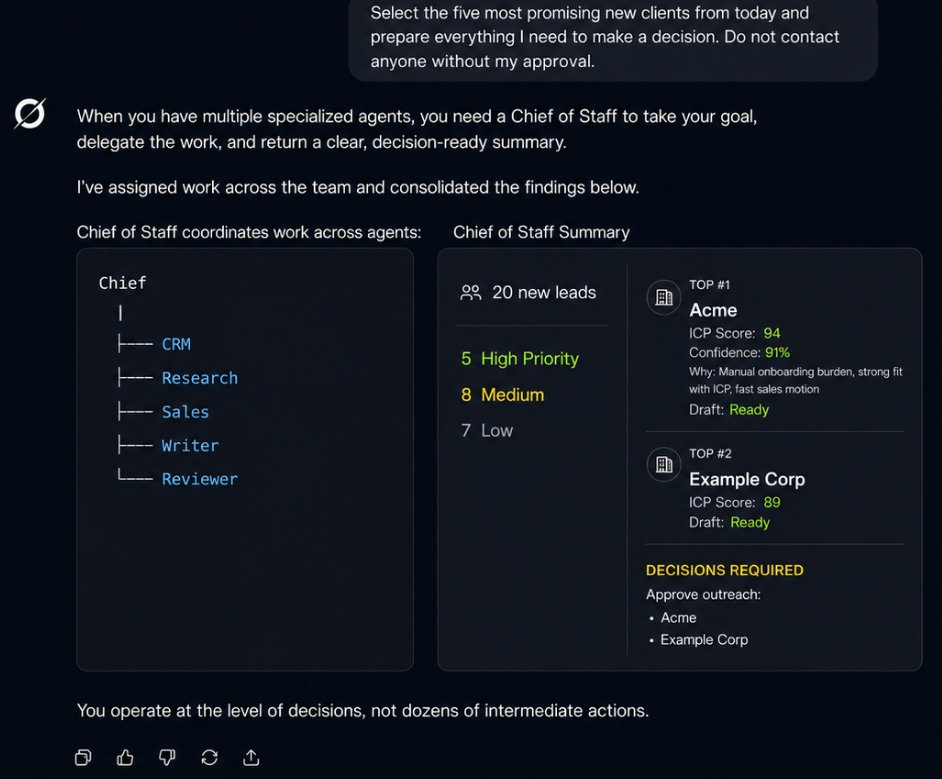
That is, instead of dozens of intermediate steps, you work at the level of solutions.
How big can the effect be
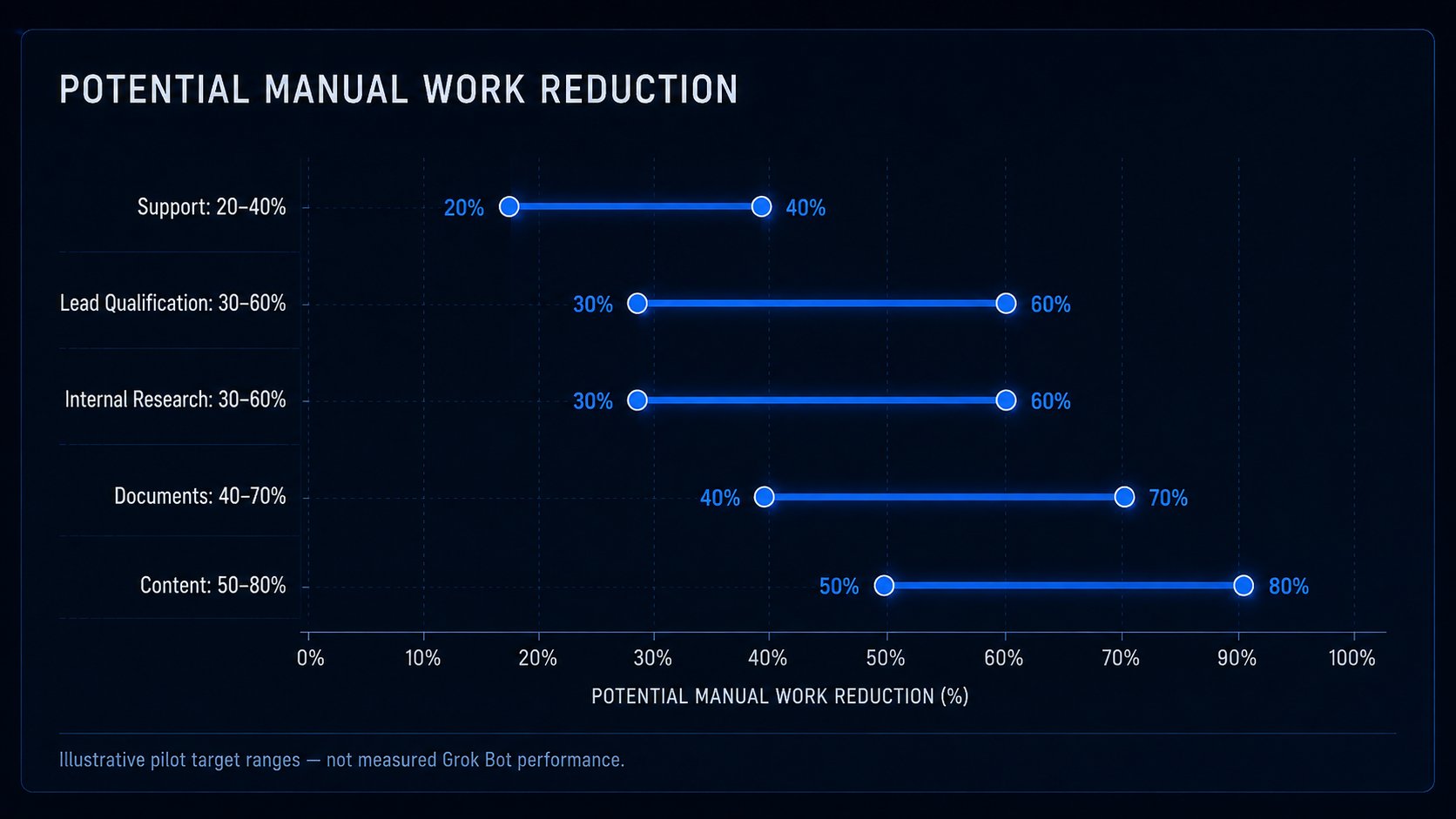
Lead qualification potentially −30–60% of manual time;
Support −20–40% of time until the first substantive response;
Documents −40–70% of time for manual entry and preliminary reconciliation;
Content −50–80% of time for research, structure, and draft;
Internal research −30–60% of time until the first verifiable note.
And this is where an effect arises that may be much more important than saving on salaries.
If your team used to be able to handle 100 clients per week, now it can handle 300.
You don’t have to lay people off.
You can triple the business’s throughput with the same team composition.
When you don'T need to create a new Bot
There’s another extreme.
After the initial successes, it’s very easy to create 30 Bots:
-
Google Agent
-
Website Agent
-
Research Agent
-
Company Agent
-
Fact Agent
-
LinkedIn Agent
This is bad architecture.
A new agent is needed if it has: a separate competence + a separate input + a separate output + its own quality criterion.
If a Researcher is capable of working effectively with both Google and company websites, there’s no need to turn each tool into a separate position.
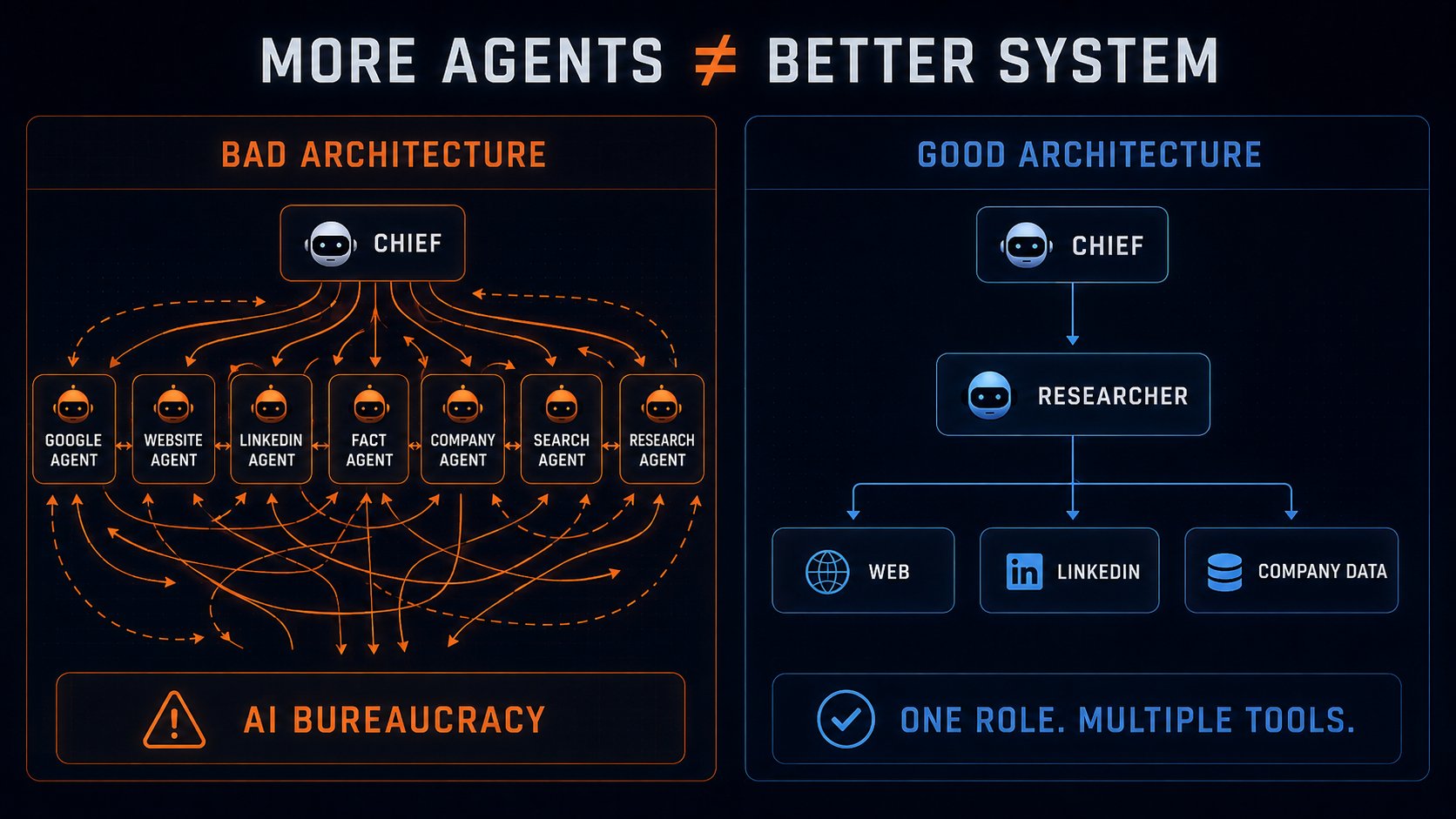
Otherwise, instead of an AI company, you’ll end up with an AI bureaucracy.
Conclusion
Grok Bot should not be seen as just another assistant.
It is a potential builder of a digital workforce.
Previously, five people spent 150 hours a month on a certain process. Now, agents do the basic preparation automatically, and the team spends 30–40 hours on review and decision‑making. This way, they can save up to 70% of the time.
And sometimes something else is more important:
x2 or x3 output of the same command, if the freed‑up time is used not to reduce staff but to grow the campaign.
Because the main potential of Grok Bot is not to replace one employee, but to enable one person to manage the volume of work that previously required an entire department.
How to work with Grok Bot next
Below are the official materials that will be useful at various stages of implementation.
If you are launching Grok Bot for the first time
Start with the official Get Started guide. It describes the basic path from the first launch to creating your own Bot.
https://docs.x.ai/grok-bot/get-started
Then take a look at the general product overview to understand the main features and the logic behind how Grok Bot works.
https://docs.x.ai/grok-bot/overview
The official xAI announcement is also useful for understanding how the company views Grok Bot as a product and what work scenarios it envisions for it.
https://x.ai/news/introducing-grok-bot
If you are building your own AI employees
The Bots section is worth studying before creating a Researcher, Sales Agent, Analyst, Reviewer, or Chief of Staff.
Here you will find the current rules for creating and configuring agents:
https://docs.x.ai/grok-bot/bots
If you plan to integrate several Bots into a single working system, study the documentation on interaction and collaboration separately:
https://docs.x.ai/grok-bot/chat-and-collaboration
If you want to automate repetitive work
After the Bot has successfully completed the process manually several times, the next step is to turn its work into a repeatable procedure.
Documentation on Skills, Routines and Automations:
https://docs.x.ai/grok-bot/skills-routines-and-automations
If Grok Bot gains access to real business operations
Before connecting to CRM, email, documents, client accounts, and other operational systems, be sure to review the section on Approvals, Security, and Privacy:
https://docs.x.ai/grok-bot/approvals-security-and-privacy
If you’re looking for ideas for your own business
xAI separately collects examples of what tasks Grok Bot can be used for:
https://docs.x.ai/grok-bot/use-cases
If something isn’t working as expected
It’s best to check the current limitations, answers to common questions, and product features in the official FAQ:
https://docs.x.ai/grok-bot/faq
If you want more articles like this about AI, agents, and new technology, follow @21_borv
Published on grokbot.sh. Cite the public log, not a prompt pack.