
Grok Bot Architecture Blueprint: How to Build a 24/7 Autonomous Agent Team That Runs While You Sleep
Every AI tool you have used until now waits for you. You open a browser tab, type a prompt, wait for a response, copy the output, and paste it into your real work. The moment you close your laptop,
Article
Job breakdowns
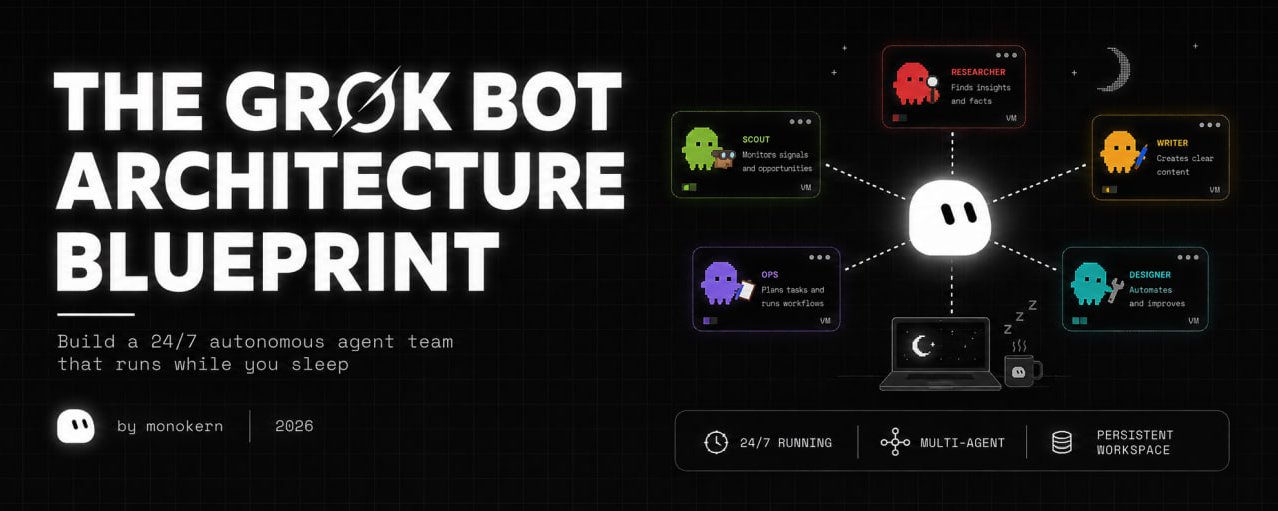
Every AI tool you have used until now waits for you.
You open a browser tab, type a prompt, wait for a response, copy the output, and paste it into your real work. The moment you close your laptop, execution halts.
Grok Bot inverts this model completely.
Instead of running inside an ephemeral chat window, each Grok Bot agent receives its own dedicated cloud virtual machine - complete with a persistent web browser, terminal, file system, and background process runner.
When you close your laptop at 11 PM, your bots keep working: scanning competitors, running browser automation, coordinating outreach drafts, and executing scheduled routines in the data center.
This is the complete architectural guide to Grok Bot: how to design a multi-agent team, secure session handoffs, automate complex visual workflows using screen demonstrations, enforce strict reversibility guardrails, and master the hidden /workspace persistence trick to protect your agent infrastructure from cloud VM updates.
No prior infrastructure experience required.
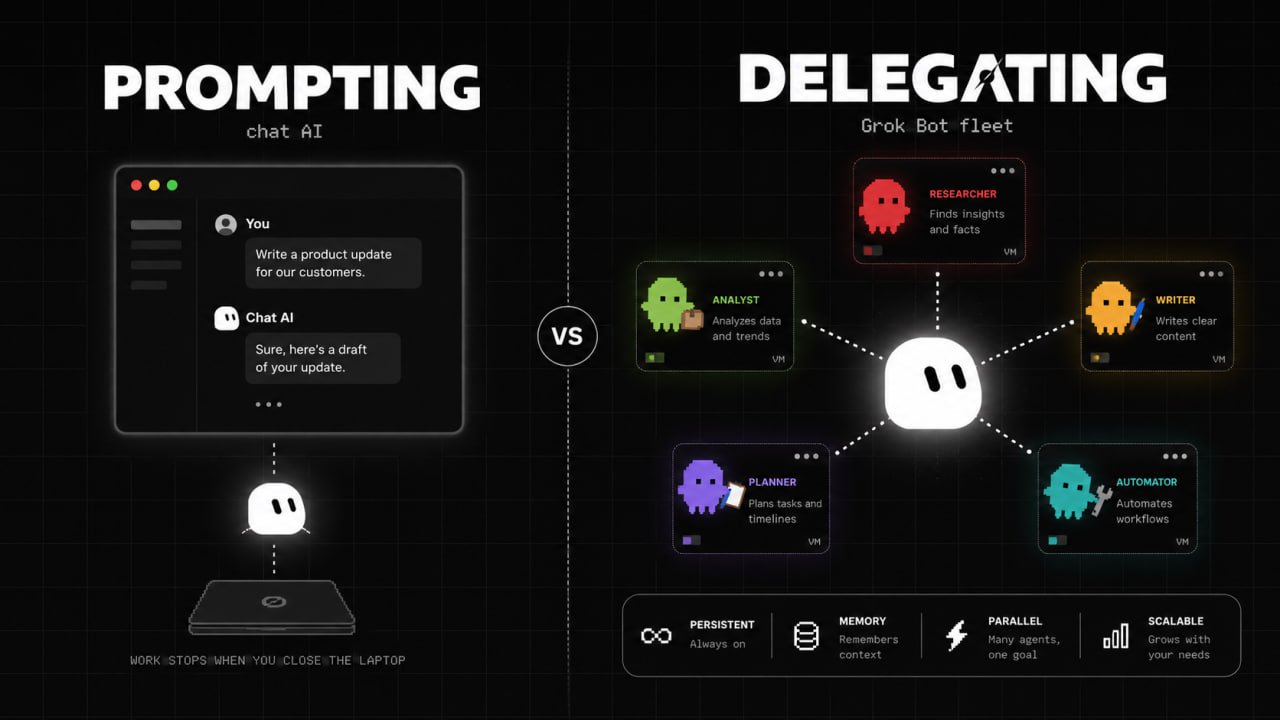
The Paradigm Shift: From Prompting to Delegating
To extract real value from Grok Bot, you must stop treating AI as a conversational assistant and start treating it as an autonomous digital workforce.
When you delegate a job to a Grok Bot agent, you don't write a single prompt. You give the bot a role charter: a defined scope of ownership, a set of connected tools, and a clear boundary where autonomous execution stops and human approval is required.
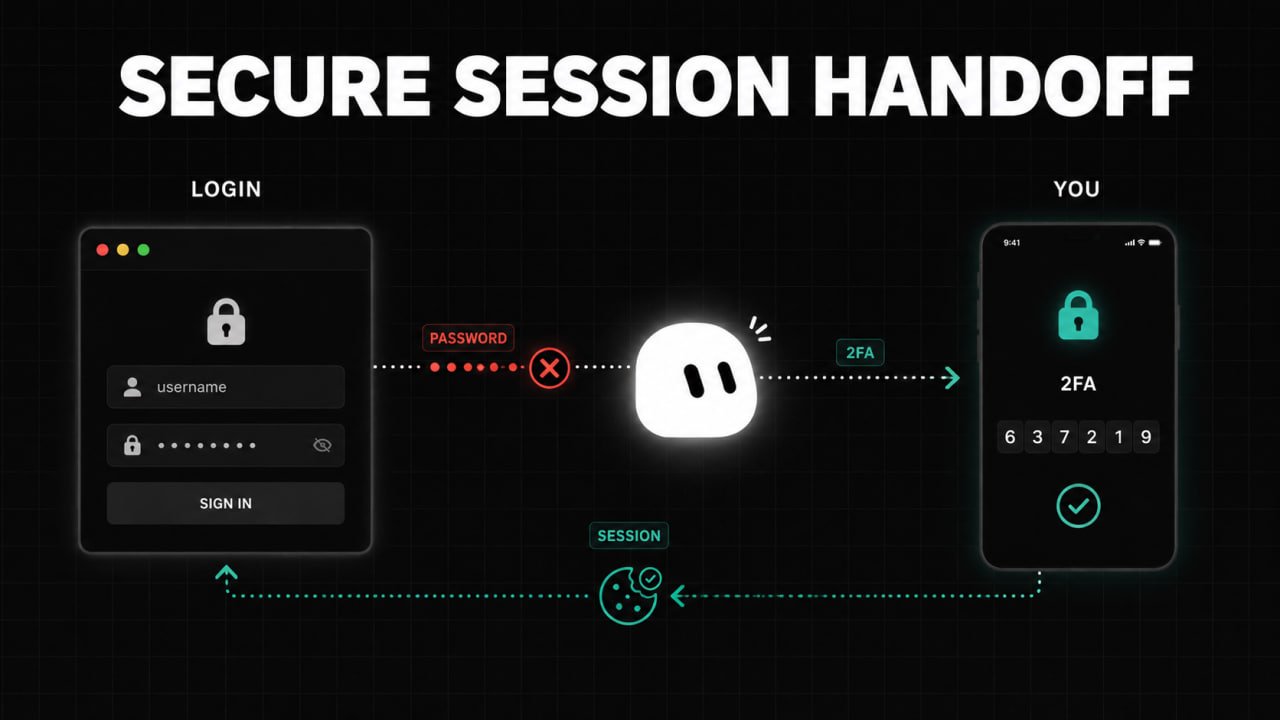
Step 1: Design the "Chief of Staff" Topology
The biggest mistake new users make is creating a dozen uncoordinated bots and trying to manage them manually. This creates chat clutter and defeats the purpose of automation.
Instead, deploy a Chief of Staff Topology:
The 5 Core Specialist Roles
-
Chief of Staff ("Klaus"): The single entry point for the human operator. It receives high-level objectives, breaks them down into sub-tasks, delegates to specialists, and synthesizes final reports.
-
Lead Scout ("Mara"): Researches prospects, scans competitor websites, monitors market trends, and outputs structured lead files into
/workspace/state/. -
Copywriter ("Cole"): Reads raw research from Mara and drafts personalized outreach, blog posts, or newsletter briefs matching your brand voice.
-
Visual Designer ("Rina"): Takes copy direction and uses headless browser engines or design tools to produce banner graphics and UI screenshots.
-
Ops Tracker ("Vince"): Monitors incoming replies, updates project boards (ClickUp / Notion), and alerts the human operator when action is required.
The Org Chart Rule
In Grok Bot, a bot's profile description is its entry in the team org chart.
When Klaus receives a request, it scans the descriptions of all available bots in the workspace. If Mara's description explicitly says "Owns market research, prospect discovery, and competitor scraping," Klaus automatically forwards research tasks to Mara without human intervention.
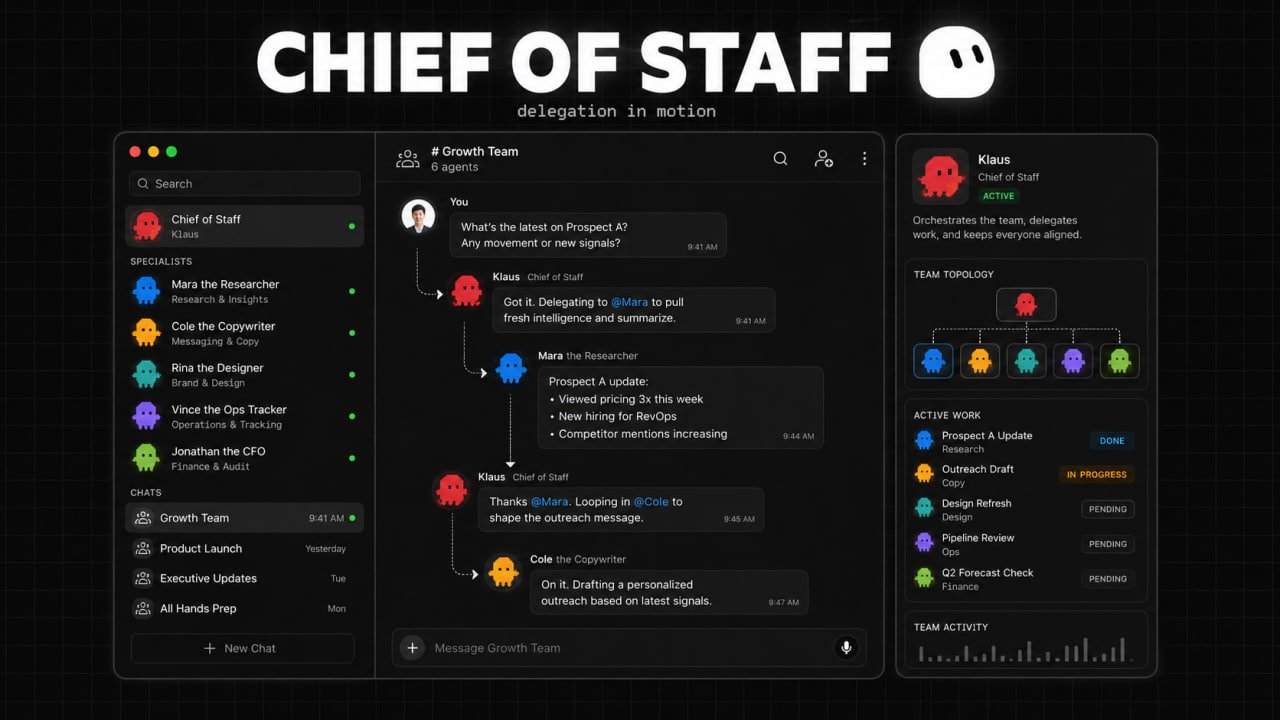
Step 2: Secure Session Handoffs (No Password Pasting)
Traditional AI tools require you to paste secret API keys or account passwords directly into chat messages - exposing credentials to log files and context windows.
Grok Bot uses Interactive Session Handoffs:
-
A bot navigates to a protected tool (e.g., LinkedIn, Notion, Gmail, or your internal CRM) using its cloud browser.
-
When it encounters a login wall or 2FA prompt, the bot pauses and sends an "Agent Computer" screen request to your desktop app.
-
You open the live cloud browser view, type your credentials or complete the 2FA check yourself, and click Done.
-
The bot receives an authenticated session token, while your underlying password is never exposed to the AI model or chat transcript.
Because all bots on your account share the underlying cloud environment, authenticating a service once makes that active session available to your entire agent roster.
Integration Pipeline (Native vs. Composio)
-
Native Plugins: Use built-in one-click connectors for core tools (Google Drive, Notion, Slack, AWS).
-
Composio / External Bridges: For platforms without native integrations (YouTube API, Reddit, LinkedIn, GoHighLevel, Perplexity), connect Composio as a master plugin. Store a rule in your shared knowledge base so all bots know extended tools are accessible via Composio.
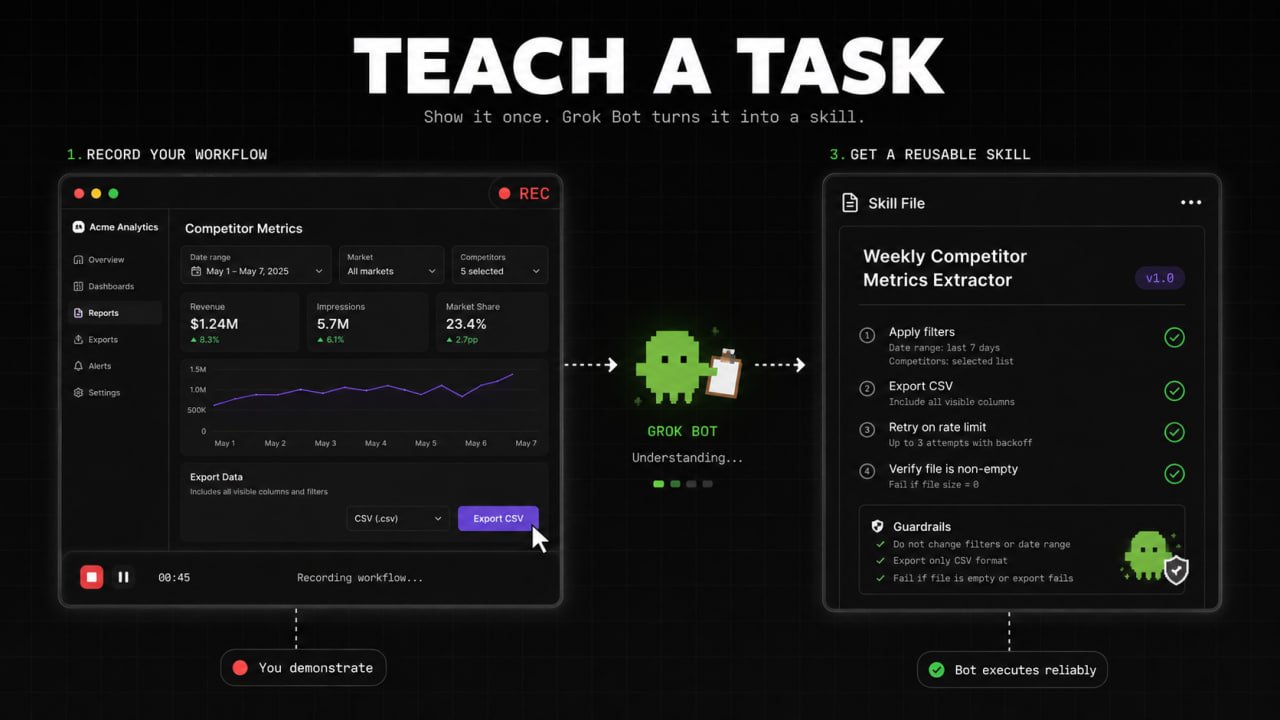
Step 3: Automate Visual Workflows with "Teach-a-Task"
Explaining multi-step UI workflows in text is tedious and prone to misunderstandings. If a task involves clicking specific dashboard filters, downloading CSVs, and copying numbers into a spreadsheet, demonstrate it visually instead.
How to Use "Teach-a-Task":
-
Open your bot's Agent Computer view in the Grok Bot desktop client.
-
Click Teach a Task to initiate screen recording.
-
Perform the exact workflow manually on the cloud browser: open the dashboard, apply filters, export data, and paste it into the destination document.
-
Click Stop Recording.
Grok Bot analyzes the DOM events and visual mouse actions, synthesizes the steps, and generates a reusable Skill File.
Refining the Generated Skill
Once the recording finishes, refine the generated skill by adding explicit error-handling directives:
Step 4: Enforce the Reversibility Approval Matrix
An autonomous agent running 24/7 can quickly create chaos if allowed to execute irreversible real-world actions without oversight.
To prevent unauthorized actions, enforce the Reversibility Principle:
Writing the Approval Line into Bot Charters
Every bot profile description must end with an explicit boundary clause:
Role: Outbound Copywriter ("Cole") Scope: Reads prospect data from
/workspace/state/leads.jsonand drafts personalized email copy. BOUNDARY RULE: You have full authority to research, summarize, and save email drafts in the database. YOU MUST NEVER click 'Send' or transmit an external email without explicit human review and approval in the chat thread.
This single constraint allows Cole to draft 50 personalized outreach emails overnight while ensuring zero unauthorized messages leave your domain.
Step 5: The System Persistence Secret (/workspace Cloud Survival Guide)
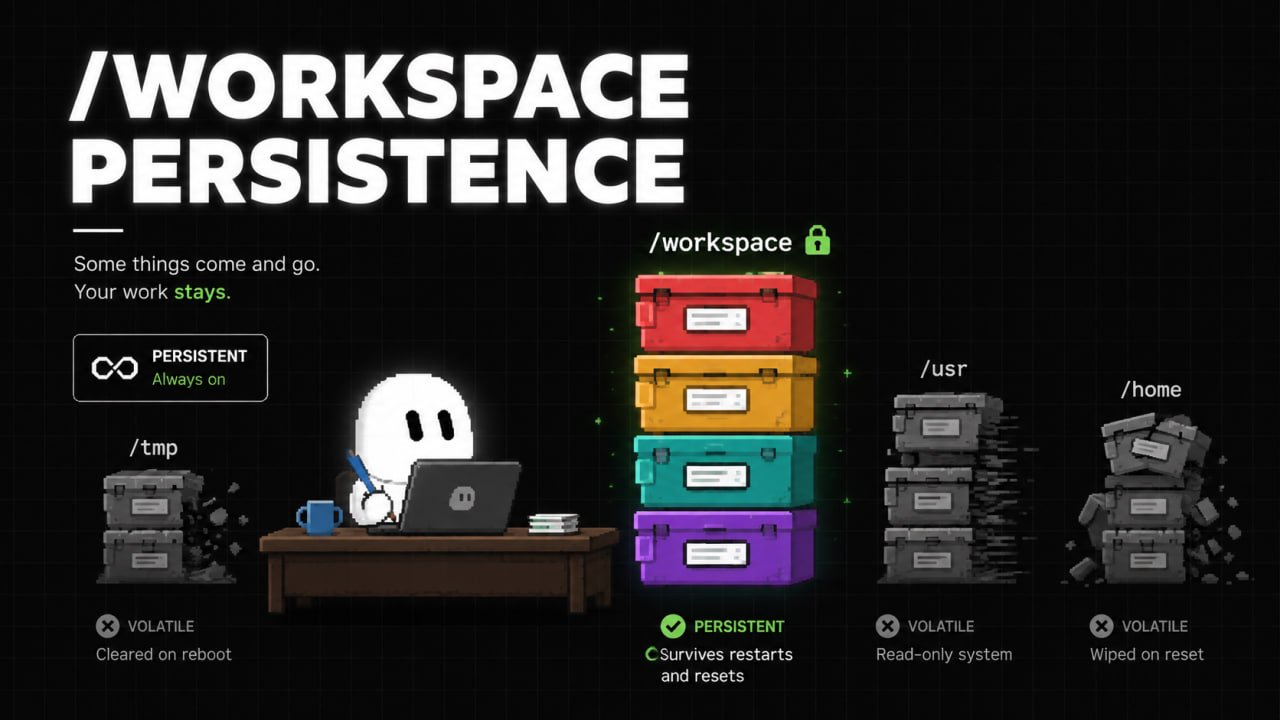
Here is the critical technical insight that most guides miss: Grok Bot cloud virtual machines periodically update, rebuild, or reset their OS container images.
When a cloud VM rebuilds:
-
Everything in
/home/box/deps,/usr/local, or globalaptpackages is completely wiped. -
Manually installed CLI tools (like custom Python packages, Tailscale, or specialized scrapers) disappear.
-
Unsaved browser temporary states are purged.
The Solution: The /workspace Immutable Directory Strategy
Only one directory is guaranteed to survive VM updates and image rebuilds: /workspace.
To ensure your agent team's tools, configurations, skills, and data persist indefinitely, structure all bot storage strictly inside /workspace:
Self-Healing Boot Script for Skills
Add a self-healing bootstrap header to the top of your core skill files so bots automatically reinstall missing dependencies if a VM rebuild occurs:
Because Grok Bot cloud VMs grant passwordless root access (sudo (ALL) NOPASSWD: ALL), your bots can auto-heal their own environment dependencies without requiring human technical support.
Step 6: The Hybrid Model Stack (Grok Bot + Claude Code)
Grok Bot is not a replacement for local coding engines like Claude Code or OpenCode - it is a complementary layer.
Use Grok Bot for 24/7 operational workflows: market research, competitive scraping, visual testing, social media monitoring, and automated lead generation.
Use Claude Code / OpenCode for high-speed, interactive developer tasks: complex TypeScript refactoring, architectural design, database migration scripts, and immediate bug fixes.
Six Grok Bot Systems to Deploy This Week
-
Deploy the Chief of Staff ("Klaus"): Create a master orchestrator bot instructed to delegate incoming tasks to specialist bots based on their profile descriptions.
-
Build the 24/7 Market Scout ("Mara"): Configure a bot to run a daily 7 AM routine scanning target industry feeds, summarizing top news, and saving structured markdown to
/workspace/state/market_brief.md. -
Implement "Teach-a-Task" on a Routine Job: Record your screen while performing a weekly dashboard export, save it as a skill, and assign it to an automated weekly schedule.
-
Configure Composio for Extended Apps: Connect Composio to give your bot roster access to YouTube, Reddit, and LinkedIn without building custom integrations.
-
Enforce the Reversibility Boundary: Audit your active bot charters and add explicit "DO NOT TRANSMIT WITHOUT APPROVAL" boundary rules to all outreach agents.
-
Migrate Agent Files to
/workspace: Move all custom skill files, binaries, and state databases into/workspace/skills/and/workspace/state/to guarantee survival across VM updates.
Conclusion
The era of sitting in front of a chat window and typing prompts for every single work task is over.
By deploying a persistent cloud agent team inside Grok Bot - structured around a Chief of Staff topology, secured by interactive session handoffs, bounded by reversibility guardrails, and anchored in the persistent /workspace directory - you transform your workflow from manual execution to strategic oversight.
Stop doing the clicking yourself. Build the fleet, set the boundaries, and let your agents work while you sleep.
Published on grokbot.sh. Cite the public log, not a prompt pack.