
From a $300 Subscription to a Company That Runs Itself
For most of the last three years the deal with AI was the same. You opened a window, you typed, you got an answer, and every bit of the actual work stayed on your desk. The model was smart. The
Article
Job breakdowns
For most of the last three years the deal with AI was the same. You opened a window, you typed, you got an answer, and every bit of the actual work stayed on your desk. The model was smart. The company was still you.
That changed on August 11, 2026.
xAI opened the beta of Grok Bot, and the shape of the product is different from everything that came before it. You do not get a chat window. You get a roster. Each bot is a named teammate with its own cloud computer, its own browser session, and its own set of logins. You hand it a job, it works the job to the end, and it comes back when it needs a decision. It keeps running while your laptop is closed, while you are on a plane, while you sleep.
One person with a subscription now assembles something that used to require hiring.
The cheapest door in
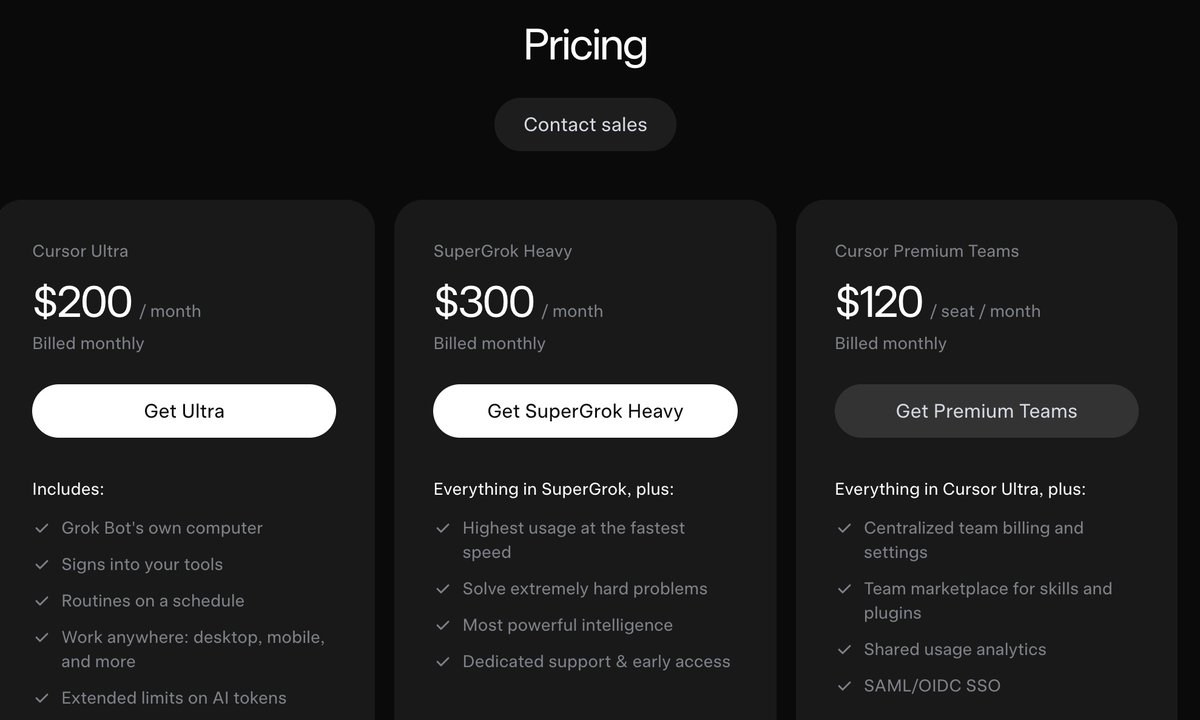
There is no standalone Grok Bot fee, which confuses people. Access rides on a tier. Cursor Ultra at $200 a month opens it, SuperGrok Heavy at roughly $300 opens it, and Cursor Teams Premium runs about $120 per seat for teams. Every tier carries a weekly usage allowance, and heavier weeks bill on demand from token cost, with Grok 4.6 published at $2 per million input and $6 per million output under a 200k prompt.
If you are solo and want the full roster plus the top model, Heavy is the clean answer. If you already pay for Cursor Ultra, you already have it and did not know.
What $600 a month actually covers
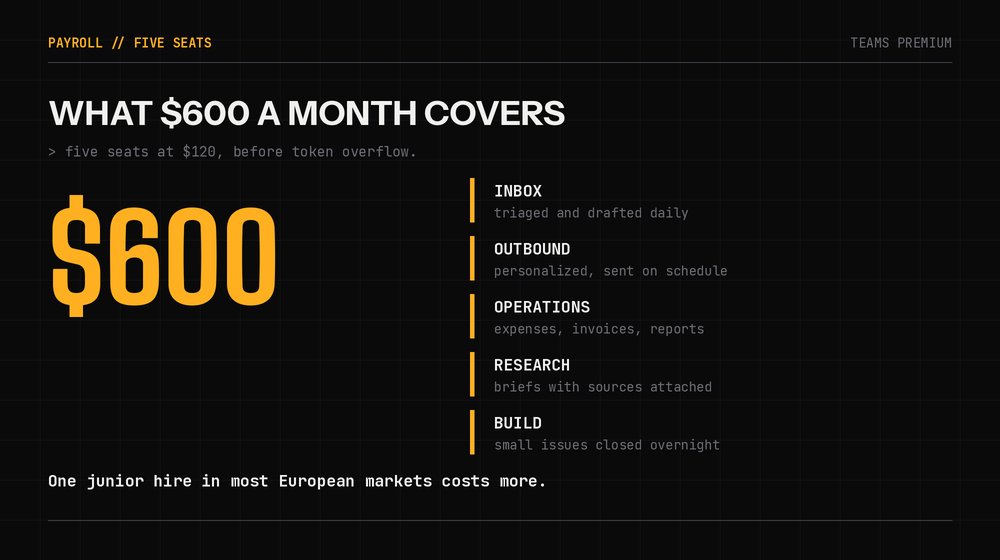
Five seats on Teams Premium lands around $600 a month before token overflow. For that you get an inbox that triages itself, outbound that goes out on schedule, expenses that reconcile, research that arrives as a finished brief, and a bug queue that shrinks overnight.
Price that against one junior hire in almost any European market and the comparison stops being close.
Day one: build the org chart, not the bots
Everybody installs this, spins up six bots in ten minutes, and ends up with an expensive group chat. The order fixes that.
Install where it runs. macOS, Windows, and iPhone on iOS 18 or later. Install on all of them and the roster syncs, so a routine you configure on desktop is visible and controllable from your phone. Linux, Android, and iPad were not supported at launch.
One workspace, one business. Every bot on the roster shares the same cloud computer. Point them all at the same goal and that shared machine becomes an asset, because files, sessions, and context accumulate in one place.
Build the chief of staff first. Create one bot, give it a name, a title, and a description, then ask it to look at your actual work and propose the team you should hire. Onboarding runs as a conversation rather than a settings panel, so it interviews you about which tools and data the job needs. Let it draft the roster. It is better at that than you are at 11pm on day one.
One role per bot. Each agent gets a single thread by design, so a narrow job description outperforms a generalist every time. Six specialists beat one assistant carrying six unrelated conversations.
Connect plugins once. Open the plugins panel, add Gmail, Drive, Calendar, Notion, and whatever else the work touches. Authorization is shared across agents, so one connection covers the whole roster. Where a real connector exists, use it instead of letting the bot drive the screen, since the structured path is more reliable.
The delegation map
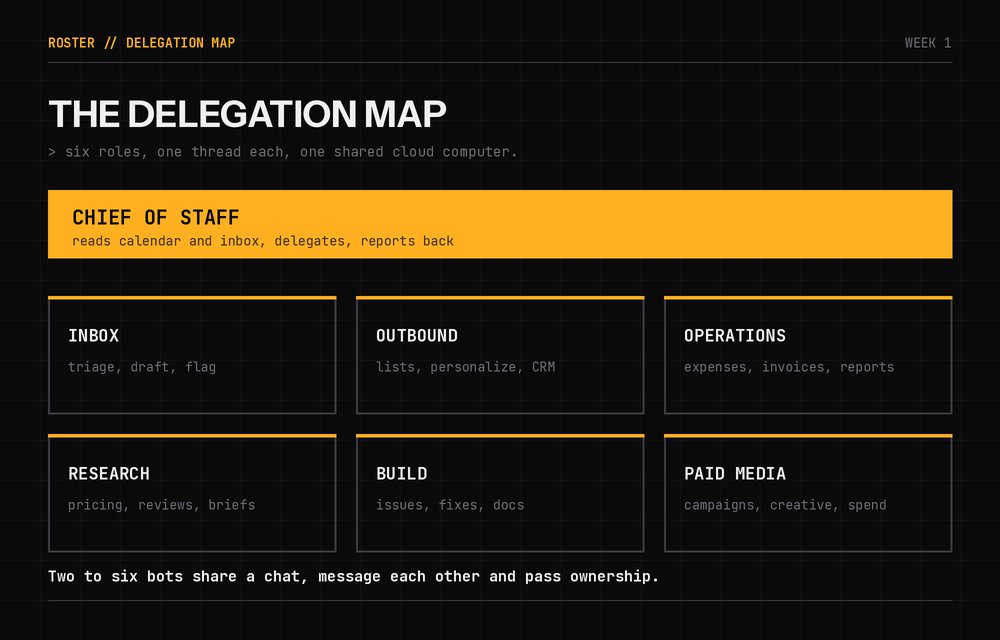
xAI ran this internally before opening the beta, on sales outreach, marketing campaigns, onboarding, office operations, inbox triage, expenses, recruiting, and bug fixes. Their own named examples include Sales Outbound, Paid Media, and Chief of Staff. That list is a hiring plan, and it is a good one to copy.
A roster that works from week one:
Chief of staff. Reads your calendar and inbox, delegates to the others, and reports back. Ask it for a morning digest and it will assemble one. People have it deliver the day as an audio brief instead of a document.
Inbox. Triages, drafts replies in your voice, flags what needs you. This is the one that pays for the subscription by itself.
Outbound. Builds lists, personalizes, sends on a schedule, logs to the CRM.
Operations. Expenses, invoices, recurring reports, the recurring admin nobody wants.
Research. Pulls competitor pricing, reviews, forum threads, and community feedback, then returns a written brief with sources.
Build. Closes small issues, ships fixes, updates docs.
The four primitives that make it compound
This is the part people miss. Grok Bot is not one feature, it is four that stack.
Plugins and connectors. Structured access to real tools, plus MCP servers where you need them. Auth once, available to the whole roster.
Skills. Any process that worked becomes reusable, with its own steps, decision rules, output requirements, and approval boundaries baked in. A skill is an employee handbook page you only write once.
Routines. A skill on a schedule, or triggered by an event. This is where the economics flip. A skill you trigger by hand saves minutes. A routine that has already run before you open the laptop is what you are actually buying.
Teach a task. Where the feature is live, you click record, walk the workflow on the bot's own screen, and it turns the demonstration into a draft skill you review and test. A demo can run up to ten minutes. Use it for anything visual and annoying to explain in words, which is most real software.
Stack those four and every week costs less work than the one before it.
Power moves
Write a job spec, not a prompt. Six fields: goal, inputs, steps, decision rules, output format, verification. The decision rules field is the one that separates a bot that repeats clicks from a bot that handles a page it has never seen.
Clear your screen before you record. During teach a task the bot learns what it watches. A clean desktop keeps it from picking up habits you did not mean to teach.
Correct the first run on purpose. Run the new skill once, fix what it missed, feed the fix back. The correction is a construction step, not cleanup.
Use group chats for handoffs. Two to six bots sit in one chat, message each other, and pass ownership of a task. Research finds it, writing drafts it, publishing queues it, and you review once at the end instead of copying context between threads.
Take the computer back when a site fights. Passwords, passkeys, and anti-bot checks stop an agent. It hands you its cloud computer, you clear the gate, it carries on. Plan for it and it costs thirty seconds.
Batch the writes. Have bots sync documents and save finished work once at the end of a run rather than updating connectors constantly. Chatty agents burn tokens and run slower.
Start with evidence work. Jobs where the bot gathers material and produces a checkable artifact pay back immediately. Save the taste-heavy work until the roster has proven routines.
Set approval gates early. Sending, publishing, deleting, purchasing, and touching production can all require your sign-off. Set them on day one and you can delegate aggressively everywhere else without thinking about it.
Skip the hard integration on day one. Anything requiring a developer portal and a bearer token will eat your first session. Get three boring workflows running first, then come back to it.
The first month
Week one, build two bots and connect the obvious tools. Inbox and research. Let them run rough.
Week two, take the two workflows that actually worked and turn them into skills with written decision rules.
Week three, put those skills on routines and stop triggering anything by hand.
Week four, hire the rest of the roster and give the chief of staff the job of coordinating them.
By the end of it, work is happening on a machine that is not yours, on a schedule you set once, in a company that has exactly one employee on the payroll.
The seat is $300. The org chart is free.
Published on grokbot.sh. Cite the public log, not a prompt pack.