
9 Things I'd Actually Use Grok Bot For
Grok Bot makes it dangerously easy to build an AI org chart before you have any work. Chief of Staff. Researcher. Writer. Operator. Four Bots. Zero clear jobs. The useful setup starts with the work:
Article
Job breakdowns
Grok Bot makes it dangerously easy to build an AI org chart before you have any work.
Chief of Staff. Researcher. Writer. Operator.
Four Bots. Zero clear jobs.
The useful setup starts with the work: one inbox, one research brief, one pull request, one calendar.
Give one Bot one job that repeats, crosses tools, and ends in something you can inspect.
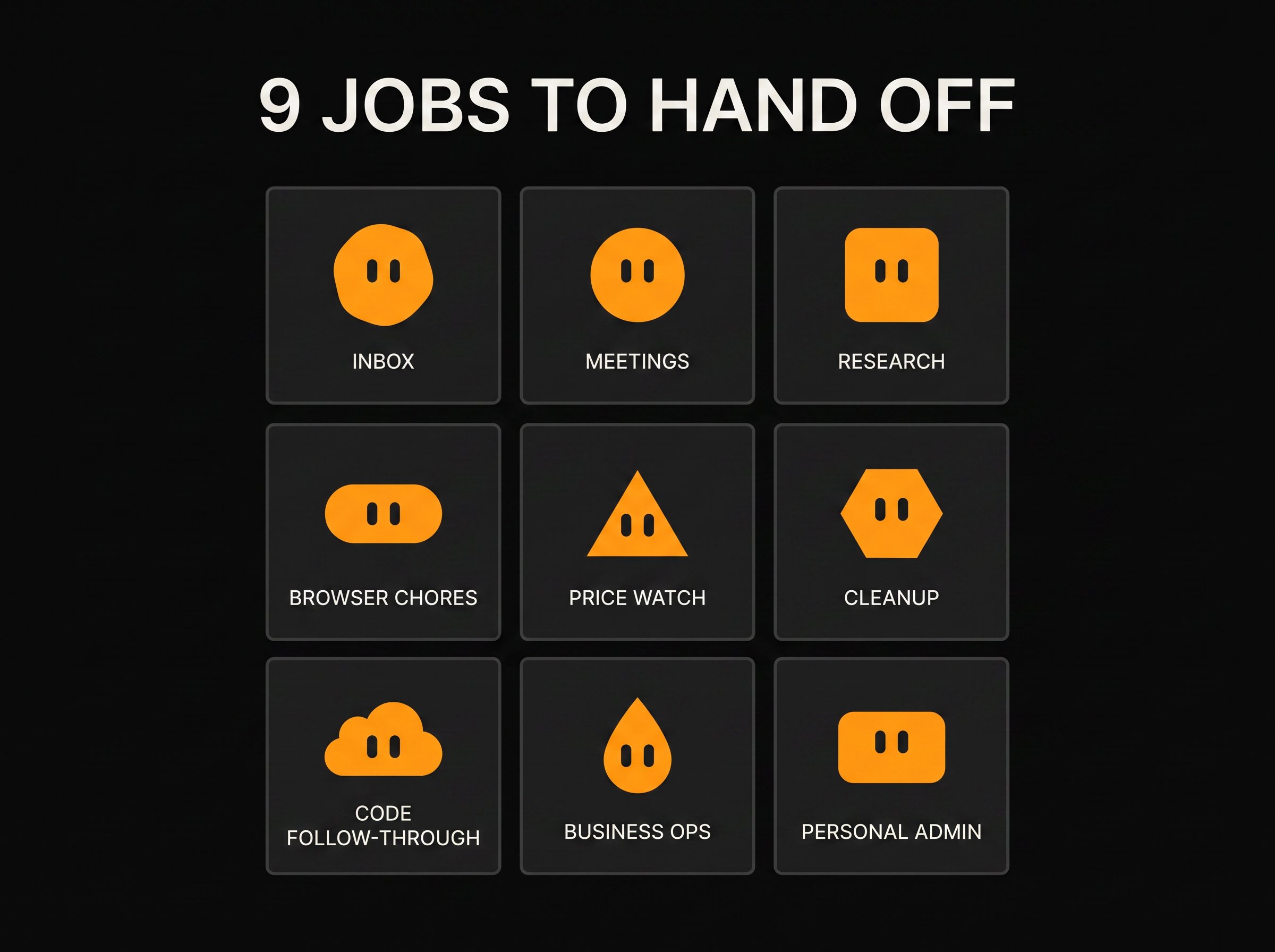
These are the nine jobs I'd start with.
First, what Grok Bot is
A Grok Bot is a named agent with a persistent cloud computer. It has a browser, files, and a terminal. You can connect apps, teach it a workflow, and schedule that workflow to run while your laptop is closed.
The persistence is the interesting part. The Bot keeps the browser session and can continue where it stopped.
One detail matters before giving it anything sensitive: all of your Bots share one computer. They get separate screens, but they can access the same files, browser sessions, app logins, and command-line credentials.
A separate Bot is not a separate security boundary.
With that out of the way, here are the jobs.
1. Clear the inbox without letting it send
Email is the obvious first handoff.
title="YouTube video" class="aspect-video w-full rounded-xl border-0" allow="accelerometer; autoplay; clipboard-write; encrypted-media; gyroscope; picture-in-picture; web-share" allowfullscreen loading="lazy">Matthew Berman has an email Bot review overnight messages, group the obvious archive candidates, summarize the ones that need attention, and draft replies using context from Gmail, HubSpot, and Drive.
title="YouTube video" class="aspect-video w-full rounded-xl border-0" allow="accelerometer; autoplay; clipboard-write; encrypted-media; gyroscope; picture-in-picture; web-share" allowfullscreen loading="lazy">Alex Finn uses a similar setup for business enquiries. His Bot researches the sender and company, picks the important opportunities, learns his email style, and leaves replies in Gmail drafts.
The drafts folder is the part I'd copy.
An autonomous inbox sounds impressive until it confidently sends one strange email to the wrong person. Let the Bot do the reading, sorting, research, and first draft. Keep the send button.
2. Turn meetings into the work that follows
Meeting summaries are easy. The annoying part starts five minutes later.
Someone needs to pull out the commitments, draft the follow-up, add the date to the calendar, and make sure the task doesn't disappear.
Berman connects meeting transcripts to a Bot that checks for new calls, writes a summary, separates action items, and sends the result back through Grok Bot or Telegram. His next step is letting the Bot inspect those action items and attempt the ones it can finish safely.
That is more useful than another transcript nobody opens.
I would ask for four things after every meeting: what I promised, what they promised, what needs a decision, and the drafts waiting for me.
3. Wake up to research instead of a pile of links
title="YouTube video" class="aspect-video w-full rounded-xl border-0" allow="accelerometer; autoplay; clipboard-write; encrypted-media; gyroscope; picture-in-picture; web-share" allowfullscreen loading="lazy">Peter Yang built a YouTube research Bot that monitors channels, finds outlier videos, mines the comments, and returns a short list of content ideas. He also made an X scout that groups strong posts by theme and suggests angles he could write about.
This is the first one I built.
The Bot handles the slow part: checking the same sources, collecting the links, and putting the evidence in one place. I still have to decide what is worth saying.
The output needs a hard limit. Top three ideas. Top five examples. Direct links. A short note on why each one matters.
Without that, the morning brief becomes another inbox.
4. Hand off the browser chores you keep delaying
Browser chores are where a cloud computer earns its keep. There is no clean API, just too many clicks.
The examples I found included comparing products, finding listings, returning an Amazon order, booking a gym slot, preparing groceries, and navigating appointment websites. Because the browser lives in the cloud, the Bot can keep working after you close your laptop.
These chores are a good fit when they take 20 annoying minutes and the finished result is obvious.
I would stop it before the last click. Find the item, fill the form, prepare the return, or reach the booking screen. Purchases, payments, cancellations, and identity checks stay with me.
5. Keep checking prices after you get bored
Humans are bad at searches that need to be repeated every week.
Yang gave a travel Bot a trip document, asked it to compare flight combinations, and scheduled it to keep checking. He reported finding a round trip that was roughly $2,700 cheaper than the original open-jaw plan.
That saving is his claim, not something I independently verified. The workflow itself is easy to understand.
The same pattern works for flights, hotel dates, equipment, used listings, or anything else where the search is simple and patience is the advantage.
Give it the dates, constraints, preferred sources, and the exact format you want back. Let it watch. Don't let it book.
6. Make a deletion list, then delete nothing
Digital cleanup showed up in two useful forms.
Yang's cleanup Bot reviewed Gmail, Drive, and subscriptions, then returned a numbered list so he could choose which items it should act on.
Berman asked a Bot to inspect his computer and group possible deletions by risk. It found caches, unused Docker images, old worktrees, and other large files.
His instruction was the important one: don't delete anything.
Audit the mess. Show the evidence. Estimate the space or cost. Let the human select the numbers.
A cleanup routine that guesses wrong creates more work than it saves.
7. Put Grok Bot above the coding agent
The coding examples were different from the usual "build me an app" demo.
title="YouTube video" class="aspect-video w-full rounded-xl border-0" allow="accelerometer; autoplay; clipboard-write; encrypted-media; gyroscope; picture-in-picture; web-share" allowfullscreen loading="lazy">Matt Palmer showed a flow where a Bot finds a content idea, gets approval, starts a Cursor cloud agent, then follows the work through a pull request, screenshots, and a demo video.
Berman described another setup where Grok Bot gathers context from Slack, Notion, and GitHub, calls a coding agent, and keeps following up until CI is green.
Grok Bot is the coordinator in both examples. The coding agent writes the code. The Bot remembers why the work exists, watches what happens next, and returns a short status instead of a terminal full of output.
I already use Codex and Claude Code. The follow-through is what interests me: someone watching the whole job after the first prompt.
8. Run the boring middle of a small business
The most believable business demos were small and specific.
title="YouTube video" class="aspect-video w-full rounded-xl border-0" allow="accelerometer; autoplay; clipboard-write; encrypted-media; gyroscope; picture-in-picture; web-share" allowfullscreen loading="lazy">In Greg Isenberg's interview, a local newsletter used Bots for research, sponsor preparation, and sales-inbox monitoring. Research moved into Notion. A deterministic automation handled repetitive formatting. A human still reviewed the issue and the sales message.
That split makes sense.
Use the Bot where the work changes slightly each time: research the local stories, check the sender, prepare the pitch, explain what is missing. Use a script for identical formatting. Keep the relationship with the human.
I would rather see five researched prospects and three good drafts than 200 autonomous emails.
9. Give one Bot the personal admin
Personal admin is less flashy and probably more useful.
Berman made a school Bot that reads long emails, extracts the dates, creates calendar events, and sends the short version to the family. Palmer mentioned moving a personal training app into a Bot so the conversation, plan, and tracking live in one place.
For me, the interesting version would read my gym and MMA schedule, check my calendar, keep the training log, and prepare the next week for review.
I wouldn't ask it to invent a serious training program from nothing. I would give it the coach's plan and let it handle the admin around it.
The failed demos were more useful than the hype
One creator tried to have Grok Bot produce a 10-minute YouTube video overnight.
Three hours later, the output was 7 minutes and 38 seconds. The connectors kept timing out, the screen recording was missing, and the final cut was mostly an awkward avatar slideshow.
title="YouTube video" class="aspect-video w-full rounded-xl border-0" allow="accelerometer; autoplay; clipboard-write; encrypted-media; gyroscope; picture-in-picture; web-share" allowfullscreen loading="lazy">Tech With Tim ran into the same class of problems: slow computer use, ambiguous instructions opening the wrong browser, connectors timing out, and tasks that never quite finished.
I wouldn't start with a long creative pipeline.
Browser work can be slower than doing a tiny task yourself. Connectors fail. Vague instructions create strange results. Long jobs need checkpoints.
The useful jobs had four things in common:
-
they repeat
-
they touch more than one tool
-
the finished result is obvious
-
the Bot can stop before anything irreversible happens
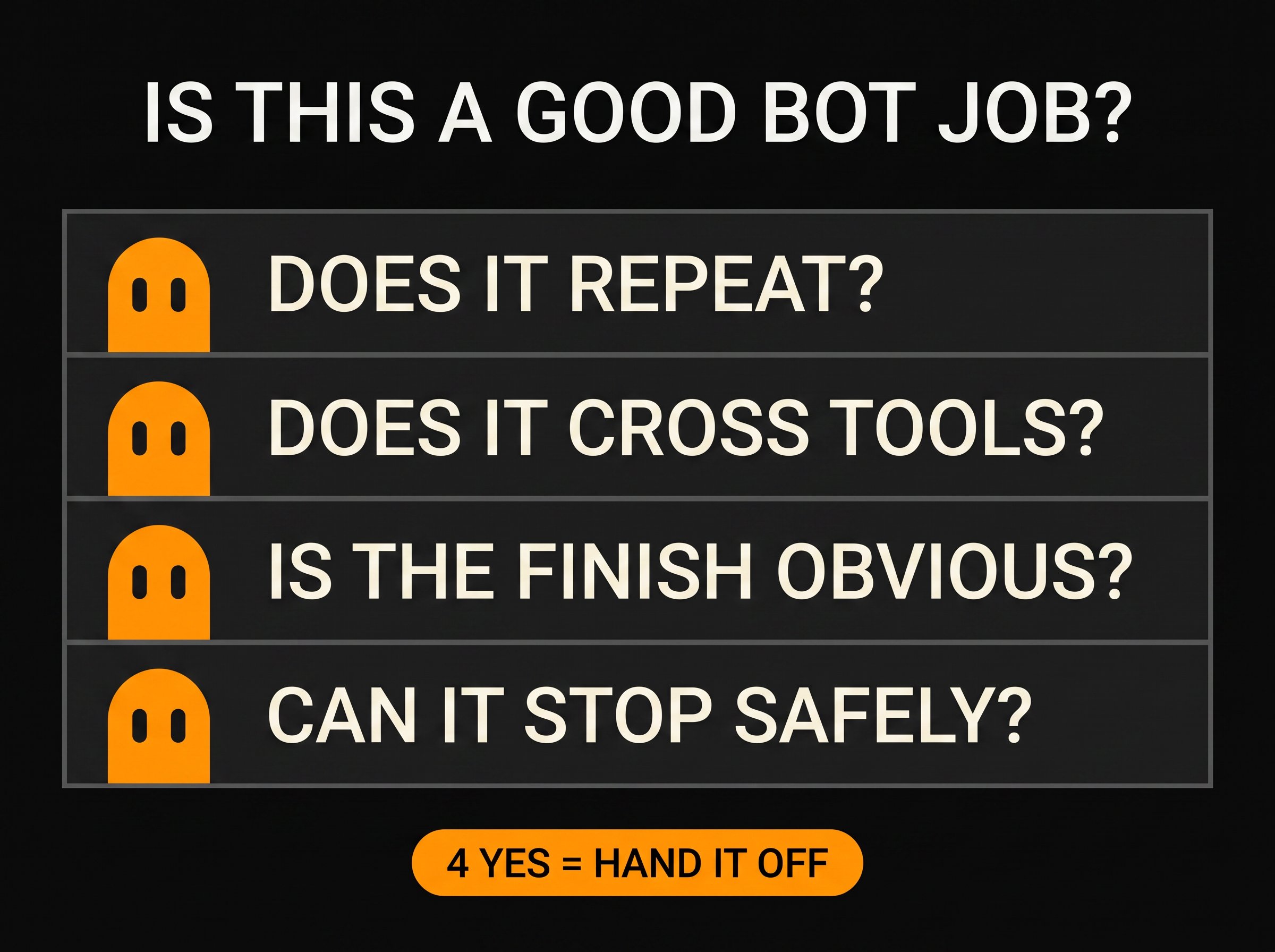
Email triage fits. A research brief fits. "Run my company" doesn't.
I built the research scout first
I gave it one job: read the current Grok Bot conversation across X and YouTube, then return three Article angles with the evidence attached.
Six minutes later, it had recorded 35 X posts from 28 authors, checked seven YouTube videos, and returned three angles I could actually investigate.
The useful part wasn't the volume. It checked what people were saying against the primary sources.
One recent installation tutorial claimed that every Bot runs on a separate virtual machine. The official documentation says every Bot on an account shares the same computer.
Signal Scout caught the contradiction and separated the demonstrated facts from the claims it couldn't verify.
That is exactly what I wanted. Not another page of content ideas. A research assistant that shows me the evidence before I repeat something wrong.
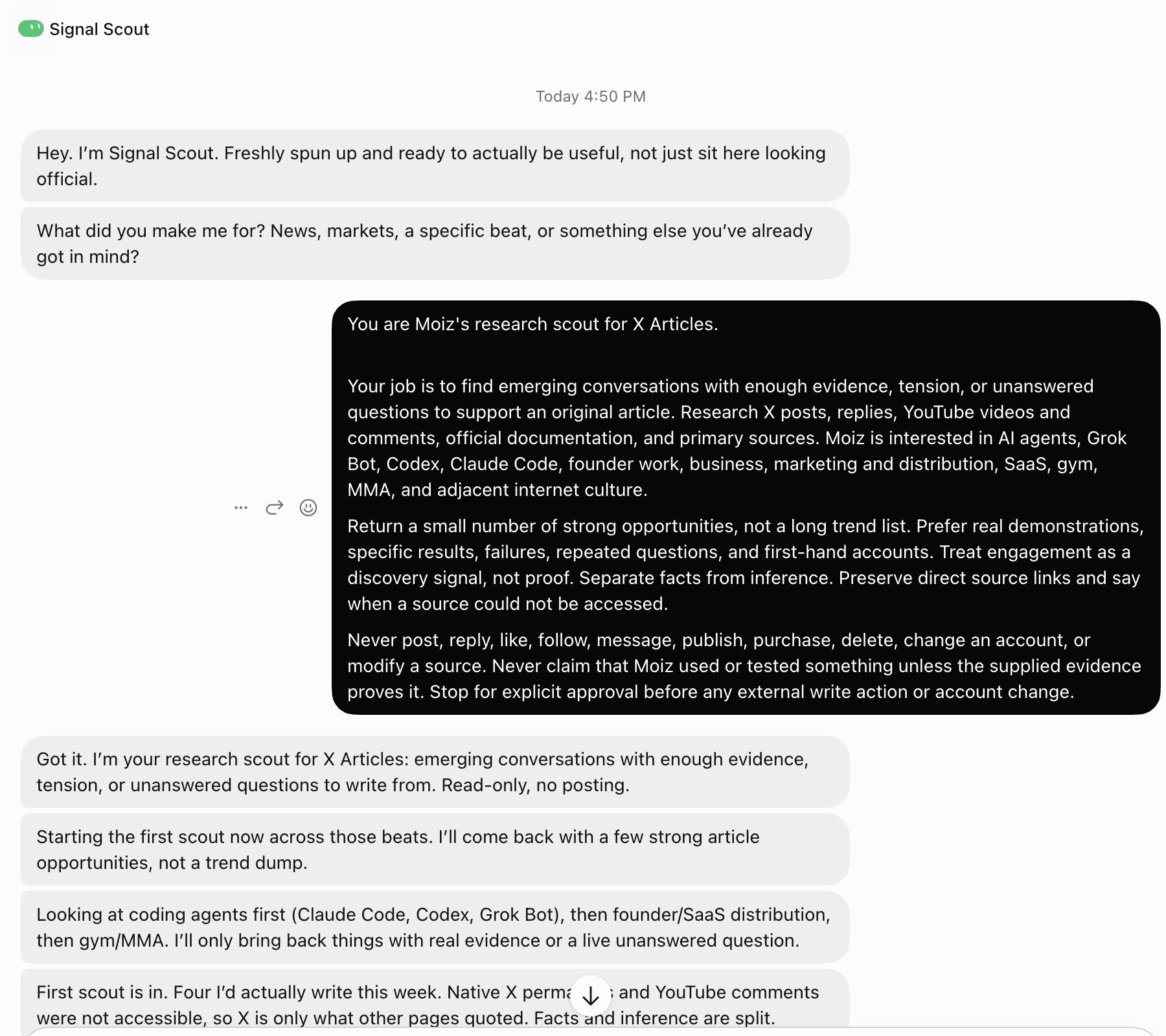
The first run wasn't perfect. It couldn't access native X replies or YouTube comments, so I still had to check that part myself.
But it took me from a blank page to three sourced directions in six minutes. It also told me precisely where its research stopped instead of pretending it had seen everything.
I'd use that again.
Once I fix the source access, this becomes a simple routine: check the conversation, collect the evidence, and leave three strong Article ideas waiting for me.
That is a much more useful first Bot than an imaginary AI Chief of Staff.
Published on grokbot.sh. Cite the public log, not a prompt pack.