
This Isn’t Just Another AI Chat. Grok Bot Is a New Way to Work
The new AI solution Grok Bot from SpaceXAI (not to be confused with Grok the chatbot that has been around for years) I tested Grok Bot, SpaceXAI’s new agent product, as a way to run a small AI team
Article
Job breakdowns
The new AI solution Grok Bot from SpaceXAI (not to be confused with Grok the chatbot that has been around for years)
I tested Grok Bot, SpaceXAI’s new agent product, as a way to run a small AI team and the interesting part is not another chatbot. It is a separate app, launched in early beta on 11 August 2026. You do not ask it a question and wait for an essay. You hand work to named teammates that keep going after you close the laptop.
The killer feature is the roster. You create several specialized Bots in one workspace. Each Bot has a name, a job, its own conversation memory and skills. They can message one another, sit in a group chat, pass ownership of a task, and work in parallel. Officially, an account can hold up to 50 Bots and group chats combined.
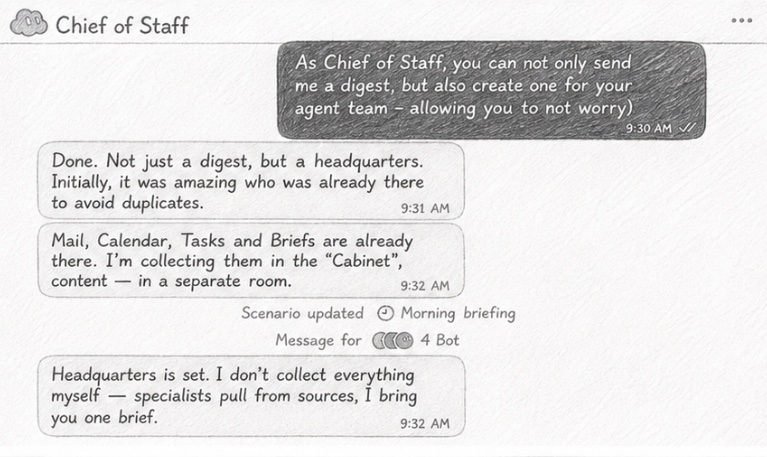
What really stands out is the simplicity. There’s no need to choose AI models or adjust the “intelligence level” for each model, as you have to do with other top services. All you’re expected to do is assign tasks. The interface is minimalist and isn’t overloaded with features and sections, unlike Claude, Gemini, or ChatGPT.
The concise responses and speed are also impressive. Unlike ChatGPT, Gemini, and Claude, which tend to give lengthy answers by default and make you wait, Grok Bot responds briefly and gets straight to the point.
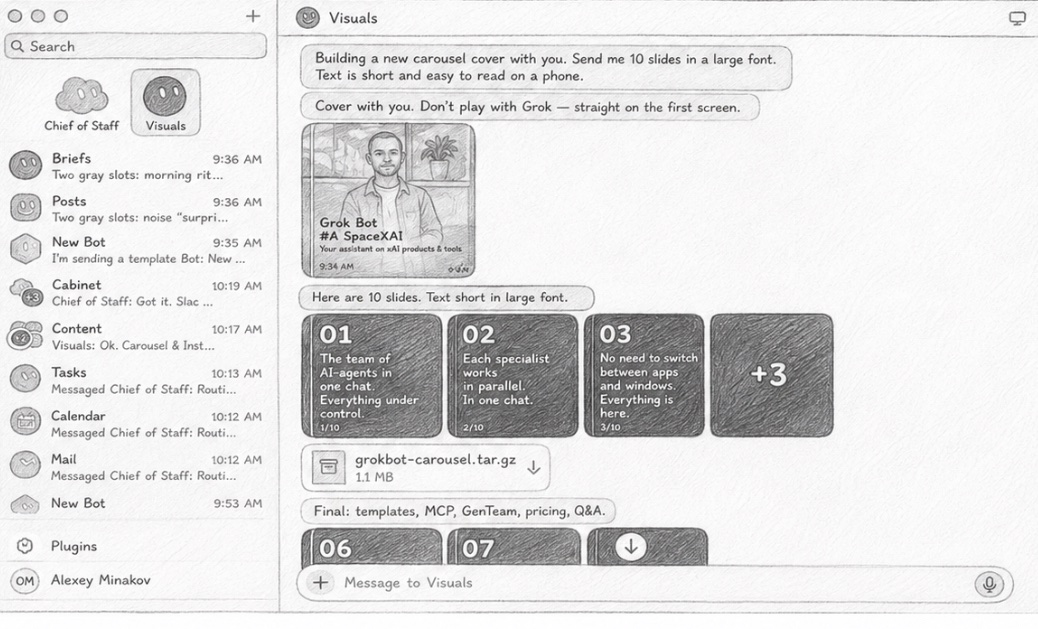
What stands out is the lack of ceremony. You are not asked to pick a model or an “intelligence level” for every task, which is still the default ritual in ChatGPT, Claude, and Gemini. You create a Bot, describe the job, grant access, and assign work. The interface is closer to messaging a colleague than to configuring an agent framework.
One architectural detail matters more than the marketing line “each Bot has its own computer.” All of your Bots share one persistent cloud computer on your account: the same files, browser sessions, and logins. Each Bot gets its own screen, so they can click through tools at the same time, but they are not separate security boundaries. If one Bot is signed into Gmail, the others on that account can use the same session. Treat logins as team-wide, not Bot-private.
Responses in chat tend to stay short, because the product is built to do the work in the tools rather than narrate it. That is a different genre from ChatGPT, Gemini, or Claude, which still default to long answers. Speed and brevity here are a design choice, not a published benchmark.
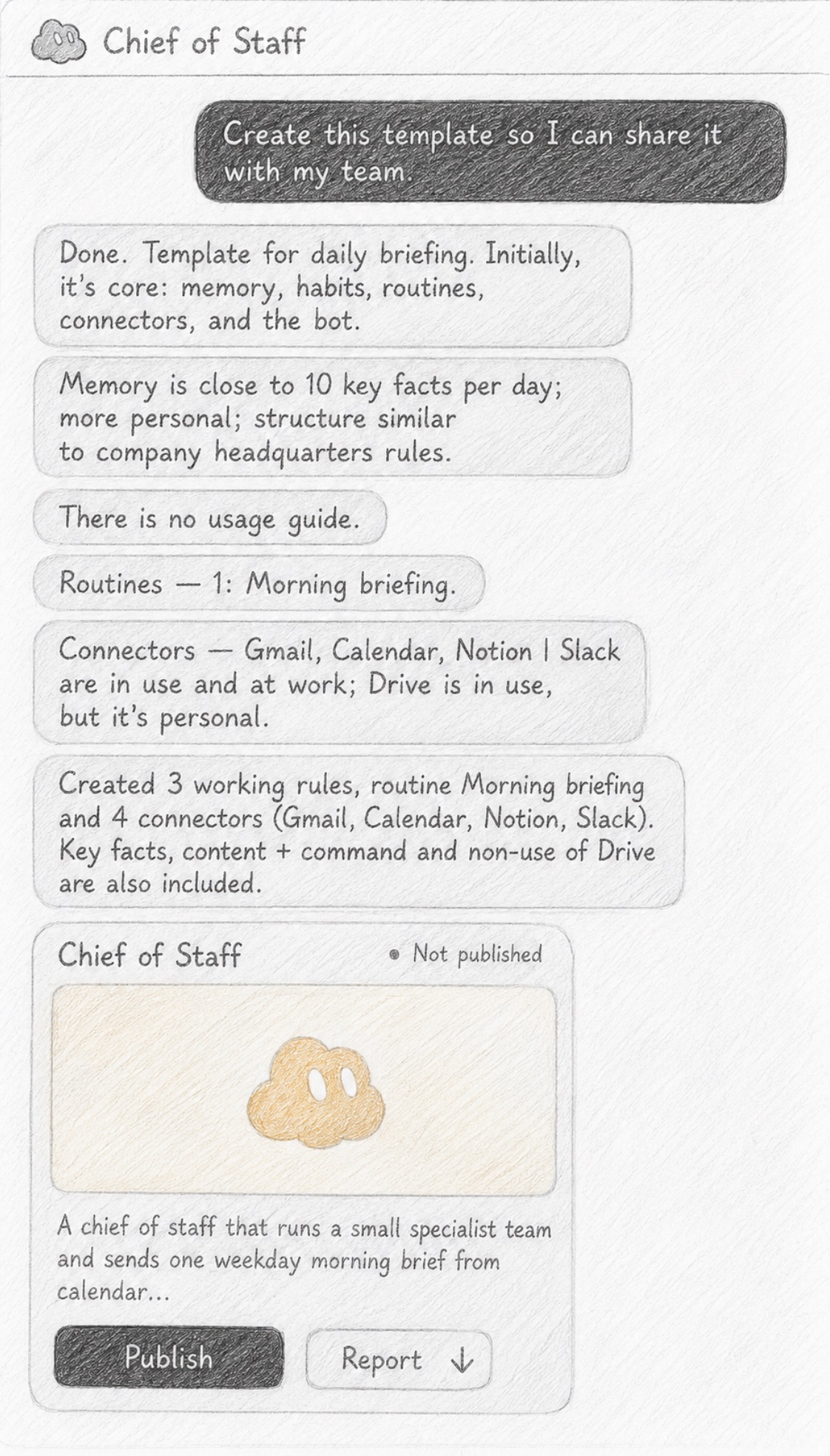
You can also share a Bot as a template. The recipient does not get your computer, logins, or chat history. They connect their own services and the agent follows the same role. The catch, which the share dialog should make obvious: the link is public and exposes the Bot’s configuration name, description, skills, routines. Strip anything confidential before you send it.
In the rest of the stack it looks like the current agent generation:
-each Bot keeps role memory and prior work
-external tools connect through MCP / connectors
-repeating work can be saved as skills and routines
-a Bot can learn a path by watching you do it once
-computer use covers sites and apps that have no clean API.
This is not a category of one. Genspark shipped GenTeam on 21 July 2026 a team chat where people and AI agents sit in the same channels. Grok Bot arrived three weeks later, on 11 August, with a harder bet on a persistent cloud computer and bots that keep working while you are away. The pattern is becoming the default: not one assistant, but a small staff.
Pricing is the part most first-look posts get wrong. There is no standalone “Grok Bot” plan. At launch it sat inside expensive tiers SuperGrok Heavy, Cursor Ultra, and Cursor Teams Premium. On 26 August SpaceXAI widened access across SuperGrok and Cursor Pro plans. The cheapest individual on-ramps now are typically Cursor Pro at $20 a month or SuperGrok at $30. Bot usage has its own weekly allowance and does not eat your normal Grok or Cursor quota. A trial exists, but it behaves like a usage credit inside a short window, not a full week of unlimited work. One long overnight job can burn it.
I do not think the mass-market next step is a smarter single chat window. It is products that let a non-technical user stand up a few agents and give them jobs. Grok Bot is one of the cleaner attempts at that. It will not pay for itself on day one. Like a new hire, it needs context, corrections, and a clear brief. The product is quietly training people to treat agents as functional virtual employees, not as search boxes.
That shift creates a new kind of literacy. -When is a single Bot enough When do you add a chief of staff Bot to coordinate the rest -How large should the roster be before coordination costs more than it returns
- Should a Bot be allowed to spin up its own teammates
- How do you introduce two agents to each other so they do not duplicate work or trip over the same inbox
Those are no longer thought-experiment questions. They are staffing questions. And that is the real change Grok Bot is pushing: from prompting a model to managing a team.
Most people use Grok Bot like another ChatGPT. That is the weakest mode.
title="YouTube video" class="aspect-video w-full rounded-xl border-0" allow="accelerometer; autoplay; clipboard-write; encrypted-media; gyroscope; picture-in-picture; web-share" allowfullscreen loading="lazy"> title="YouTube video" class="aspect-video w-full rounded-xl border-0" allow="accelerometer; autoplay; clipboard-write; encrypted-media; gyroscope; picture-in-picture; web-share" allowfullscreen loading="lazy"> title="YouTube video" class="aspect-video w-full rounded-xl border-0" allow="accelerometer; autoplay; clipboard-write; encrypted-media; gyroscope; picture-in-picture; web-share" allowfullscreen loading="lazy">The product is built for a staff, not a chat thread. Four setups from SpaceXAI’s internal guides that almost nobody starts with. If you want this on screen, not just on the page: a short onboarding in Grok Bot Tutorial for Beginners, a CEO-style team setup in Grok Bot is the best AI agent ever. Here’s how to set it up, and the cleanest click-by-click start in Getting started with Grok Bot.
A secretary that writes the truth, not the plan
Do not tell the bot, “keep my priorities.” Morning priorities are already a liе
Make one secretary bot. Once an hour it checks email, Slack, and the calendar. By evening you do not have a to-do list. You have a list of where your attention actually went.
An incident. A candidate. A draft you promised to review.
title="YouTube video" class="aspect-video w-full rounded-xl border-0" allow="accelerometer; autoplay; clipboard-write; encrypted-media; gyroscope; picture-in-picture; web-share" allowfullscreen loading="lazy">Keep every other bot narrow. The secretary is the only generalist. If nothing changed, it stays quiet. Alex Finn walks through the same logic in his setup video: one front-door chat, then that bot hands work to specialists. A project is a room, not a pile of chats
One project. One channel. One small team.
A manager sits on top: opens the room, calls the people you already have, and does not invent extra roles “just in case.” Start with bots that already exist. Five specialists plus the manager is enough. Two to six bots in a group is comfortable. More than that is noise.
Do not dump five browser jobs on one bot. It has one screen and one live computer-use task at a time. Need parallel work? Call a second bot. Remember the shared desk: every bot on the account sits at one cloud computer. If one signs into email, the others can see that session.
title="YouTube video" class="aspect-video w-full rounded-xl border-0" allow="accelerometer; autoplay; clipboard-write; encrypted-media; gyroscope; picture-in-picture; web-share" allowfullscreen loading="lazy">Matt Palmer shows handoffs and allow/deny rules in Getting started with Grok Bot, including a live chain from X data into Notion. Do not set an alarm for work you have not done yourself
Grok Bot has two different tools. A skill is how to do the job. A routine is when to run it. First do the task together. If it works, save the method. Only then say “every morning at eight.”
You do not have to write every step. There is a mode where the bot watches you click through the browser, then drafts the skill. About ten minutes. After that you add the stops: where it must pause and ask you.
Separately, ask it to read your sent mail. Not so it can reply for you. So it can write in your voice.
title="YouTube video" class="aspect-video w-full rounded-xl border-0" allow="accelerometer; autoplay; clipboard-write; encrypted-media; gyroscope; picture-in-picture; web-share" allowfullscreen loading="lazy">Clearmud runs the SpaceXAI team tips on camera in I tried every tip from the Grok Bot team: roles, voice from your own writing, routines for monitoring.
The hiring bot This is the strangest useful move. Create a bot that does not execute work. It looks at the roster and tells you who not to hire.
Not a bot per department. Not a bot for a new report format. A new role is unnecessary by default.
Cut the waste first. Then simplify. Then add a skill to a bot you already have. Only then add someone new.
Otherwise you get a circus by tonight, not a team.
title="YouTube video" class="aspect-video w-full rounded-xl border-0" allow="accelerometer; autoplay; clipboard-write; encrypted-media; gyroscope; picture-in-picture; web-share" allowfullscreen loading="lazy">What it looks like when a chief of staff audits the roster and hires an operator with hard lane limits: My Grok Bot Chief of Staff Hired Its Own Team.
Tomorrow
One narrow bot.
One job you already know how to do. One saved method after a live run. One rule: ask me before you send.
Everything after that is an orchestra. An orchestra with no score just plays the wrong piece loudly.
title="YouTube video" class="aspect-video w-full rounded-xl border-0" allow="accelerometer; autoplay; clipboard-write; encrypted-media; gyroscope; picture-in-picture; web-share" allowfullscreen loading="lazy"> title="YouTube video" class="aspect-video w-full rounded-xl border-0" allow="accelerometer; autoplay; clipboard-write; encrypted-media; gyroscope; picture-in-picture; web-share" allowfullscreen loading="lazy">Need fifteen minutes, no extra noise: Grok Bot Tutorial for Beginners. Need a pile of examples of work you can hand off after that: Grok Bot Is Now Only $20 — 9 Wild Use Cases.
Published on grokbot.sh. Cite the public log, not a prompt pack.