
OpenAI Dots Full Guide: From Launch Day to a Dot That Earns Its Keep
OpenAI launched dots at DevDay on September 29. They are always-on agents running on GPT-6 Astra, and each one has its own cloud computer, a browser, and plugin access to more than 4,000 apps. The
Article
Job breakdowns

OpenAI launched dots at DevDay on September 29. They are always-on agents running on GPT-6 Astra, and each one has its own cloud computer, a browser, and plugin access to more than 4,000 apps.
The interesting part isn't launch day, it's day two. A dot with no direction is an expensive chat window. Give it a clear job, sensible boundaries and a way to prove its work, and it can keep a narrow workflow moving while you're away.
So here's how I'd onboard one.
Availability first: dots are rolling out to eligible Pro and Business Premium users aged 18 and older. Free, Go and Plus don't include dots at launch. Pro access excludes the EEA, Switzerland and the UK for now. Enterprise workspaces, including Edu and Healthcare, can try the beta when an admin enables it. Your first dot comes with your Pro or Business Premium plan at no extra cost. Access may take several days to reach your account.
Onboard it like a person, not a prompt
Give your primary dot a name and explain how you work. What are you responsible for? What usually wastes your time? What does a good result look like?
OpenAI says a dot learns your preferences and keeps context for ongoing work. I'd spend the first week correcting actual output rather than loading it with a long description of my personality.
Start on desktop web or in the ChatGPT desktop app. Connect only the apps needed for its first job, and review the permissions. Plugin connections are shared across dots, ChatGPT, ChatGPT Work and Codex, so check what you've already enabled too.
Your dot's cloud computer is separate from your laptop. Local computer access is optional. Connect it when the job needs local files, tools or a signed-in browser.
For supported sign-ins, you enter credentials through a secure flow that doesn't expose them to the model. That protection doesn't cover passwords pasted into a chat or document.
You can open the dot's computer and review its activity. I'd do that often in the first few days, especially before expanding its access.
Write the job description
The most useful thing you can tell it is what it owns and when it should come back to you.
Start with a short brief in the conversation. Use Custom Rules for supported action boundaries, and plugin permissions to control access. A paragraph in chat doesn't replace either of those controls.
Here's the brief I'd use:
You are my front door for work.For every request: Restate it as one clear objective. Ask about missing information or access when it would change the result. Do the work yourself, or start a task in Codex or ChatGPT Work when that fits better. Keep track of required outputs, completed work, supporting evidence and open issues. When setting up recurring or event-driven work, confirm what you actually configured. Come back when the work is finished, you need my approval, or you're blocked.Never report an action as completed unless it actually happened.Before calling a substantial task finished, show me the outputs and what you verified.Don't send, publish, merge, purchase or change account settings unless my request or an applicable rule explicitly authorizes it.
Adjust that last line to the work you're delegating. If you want a weekly report sent automatically, specify the recipient, content and schedule. Approval for one message shouldn't quietly become permission to contact people whenever the dot thinks it's useful.
These instructions improve the baseline. You'll still need to catch mistakes and refine them.
Pick one first job
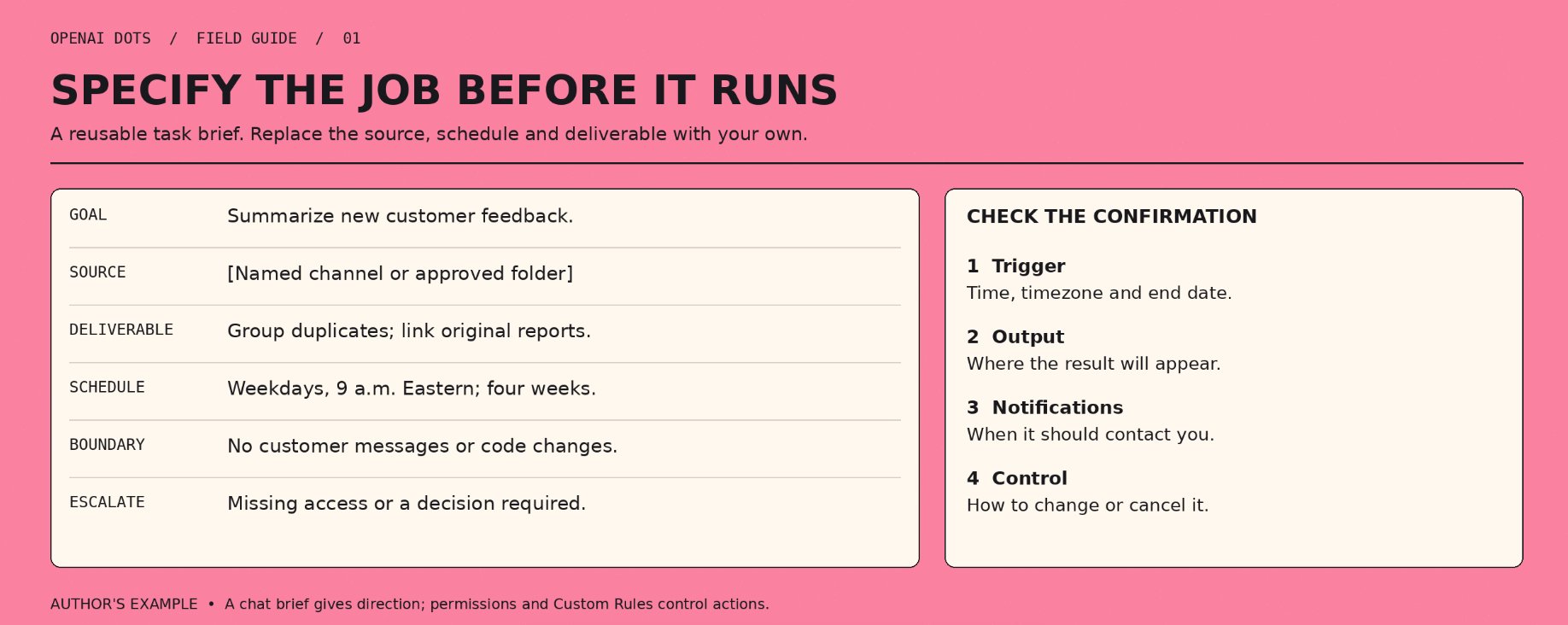
Don't start with forty routines.
OpenAI's examples include investigating a bug reported in Slack, turning customer feedback into tested fixes, revising launch materials when scope changes, updating proposals and turning interview transcripts into content.
Choose a job where you can recognize a good result quickly. A draft proposal or a feedback summary is easier to evaluate than “help grow my business.”
Run it manually first. Correct the output, then check whether the next attempt carries those corrections. Two good rounds are a reasonable starting point for a low-risk routine, but keep reviewing anything consequential.
For a recurring task, give it an actual schedule:
Every weekday at 9 a.m. Eastern for the next four weeks, review new feedback in [source]. Group duplicates, flag likely bugs and prepare a short summary with links to the original reports.Don't contact customers or change code. Notify me if something blocks the task or needs a decision.Confirm the schedule and where I can review or cancel it.
Check the confirmation instead of assuming the schedule exists. You can review and manage scheduled work from the dot's profile.
Dots can also react to events, like a new bug report landing in Slack. Say which event you care about and what the dot should do, then ask it to confirm what it set up.
Let it work while you're away
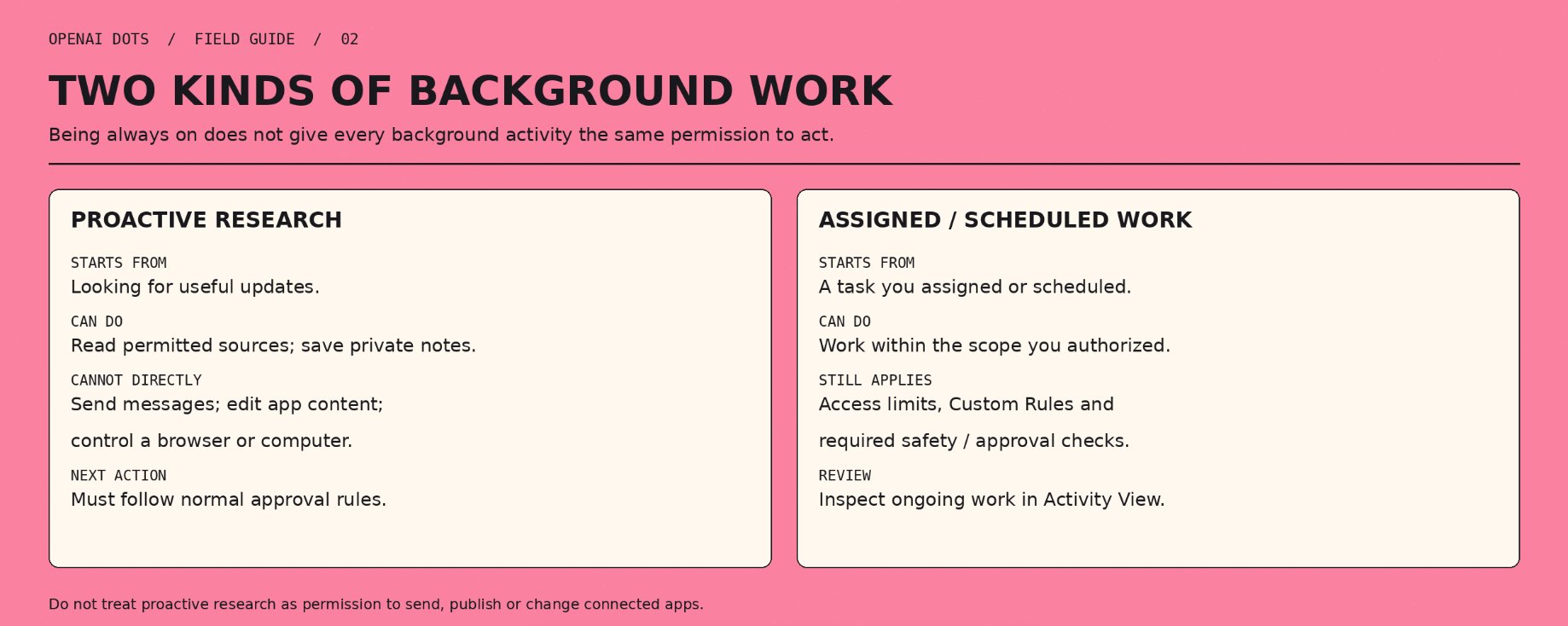
There are two kinds of background work worth separating.
A task you've assigned or scheduled can continue under the permissions and approval rules that apply to it.
Proactive research is more restricted. The dot can read permitted sources and save private notes, but its research tools can't directly send messages, change content through plugins or control a browser or computer. Any follow-up action still has to pass the usual checks.
So “always on” doesn't mean every background activity has permission to act. Review Activity View to see what it's doing and redirect it when needed.
Set the rules of trust
I'd expand access gradually:
-
Read and research. Start with a narrow source and a clear question.
-
Prepare. Let it produce drafts, revised materials or PRs for review.
-
Make reversible edits. Allow specific changes to internal documents once you've seen reliable work.
-
Take external actions. Define exactly what it may send, publish or change. Auto-review checks certain planned actions against your instructions, Custom Rules and safety requirements.
-
Handle sensitive actions. Keep tight approval boundaries around money and irreversible changes. Some actions, including transferring money or changing a password, require you to take over.
Custom Rules let you adjust supported actions, but they don't grant new app access or switch off core safeguards. The dot can also make mistakes while following those rules.
One launch example gives a useful pattern: a tester's dot noticed he'd forgotten to invoice a publication, prepared the invoice and sent it after approval. I'd copy that workflow before trying anything more ambitious.
Make it show its work
Long-running agents can produce a convincing summary even when part of the job is unfinished.
Before accepting substantial work, ask for:
-
The original objective and each required output.
-
Links or paths to the results.
-
What was checked, with evidence.
-
Anything incomplete, uncertain or awaiting approval.
For code, that might mean a PR, test results and a short video showing the changed behavior. A research task should include sources and unresolved questions. For a document revision, you should be able to see what changed.
OpenAI's customer-feedback example includes complete PRs and videos of the changes. That's much easier to review than “I fixed the issues.”
No proof, no done.
Know how to stop it
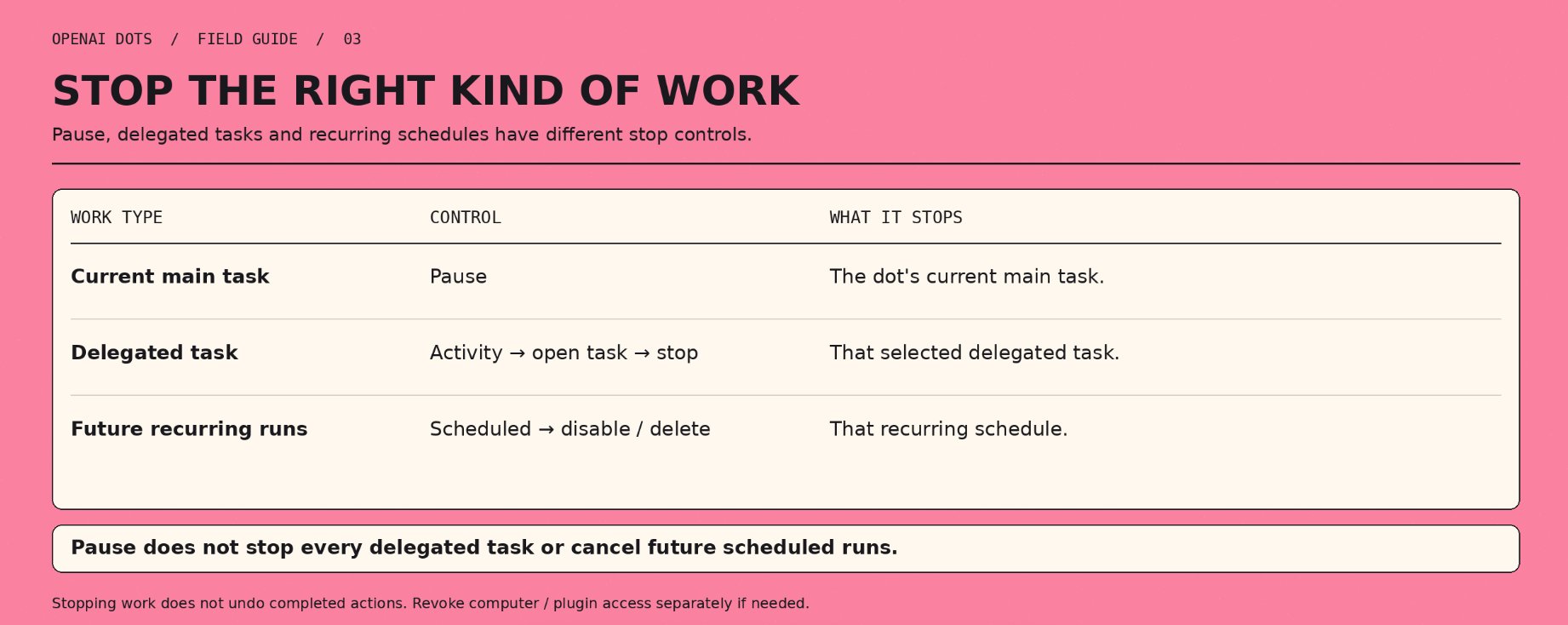
Learn the stop controls before giving the dot a recurring responsibility.
Pause stops the dot's current main task. It doesn't stop every delegated task or cancel future scheduled runs. Open Activity to stop delegated tasks, and Scheduled to disable or delete recurring work.
If the problem is access, revoke the relevant computer access or disconnect the plugin too.
Stopping work doesn't undo completed actions. Whether you can reverse a message or a change depends on the app involved.
Watch the meter
Talking to your dot doesn't count against your ChatGPT usage limits. Tasks it starts or manages in Codex or ChatGPT Work do.
Your plan also includes extended limits for the first month after launch. Use that period to find out which workflows are worth keeping.
Track how often a task succeeds, how much review it needs and how many retries it takes. A workflow that saves twenty minutes but needs thirty minutes of supervision isn't helping yet.
For paid work, include your review time in the calculation. Faster first drafts only matter if the finished result takes less effort.
Where I'd point it first if the goal is revenue
Dots are only days old, so these are workflow ideas based on OpenAI's examples, not proven income claims.
Freelancers and small studios
Give it your approved record of completed work and ask it to flag uninvoiced items and prepare invoice drafts. You check the amounts, recipients and payment terms before sending.
Sales and proposals
Have it compare new client requirements with the current proposal and prepare an updated draft explaining the changes. Pricing, contractual commitments and sending stay under your approval.
Content creators
Provide a transcript and examples of your work, then ask for clip candidates, show notes and draft posts with timestamps. You check accuracy and context before publishing.
Developers
Give it a defined customer-feedback source and ask for reproducible bug reports or tested fixes in PRs. Require reproduction steps and test evidence, and keep merging and deployment under review.
Run one workflow for a week and count the time saved after review and retries. Keep it if the finished work takes less effort.
Keep the setup portable
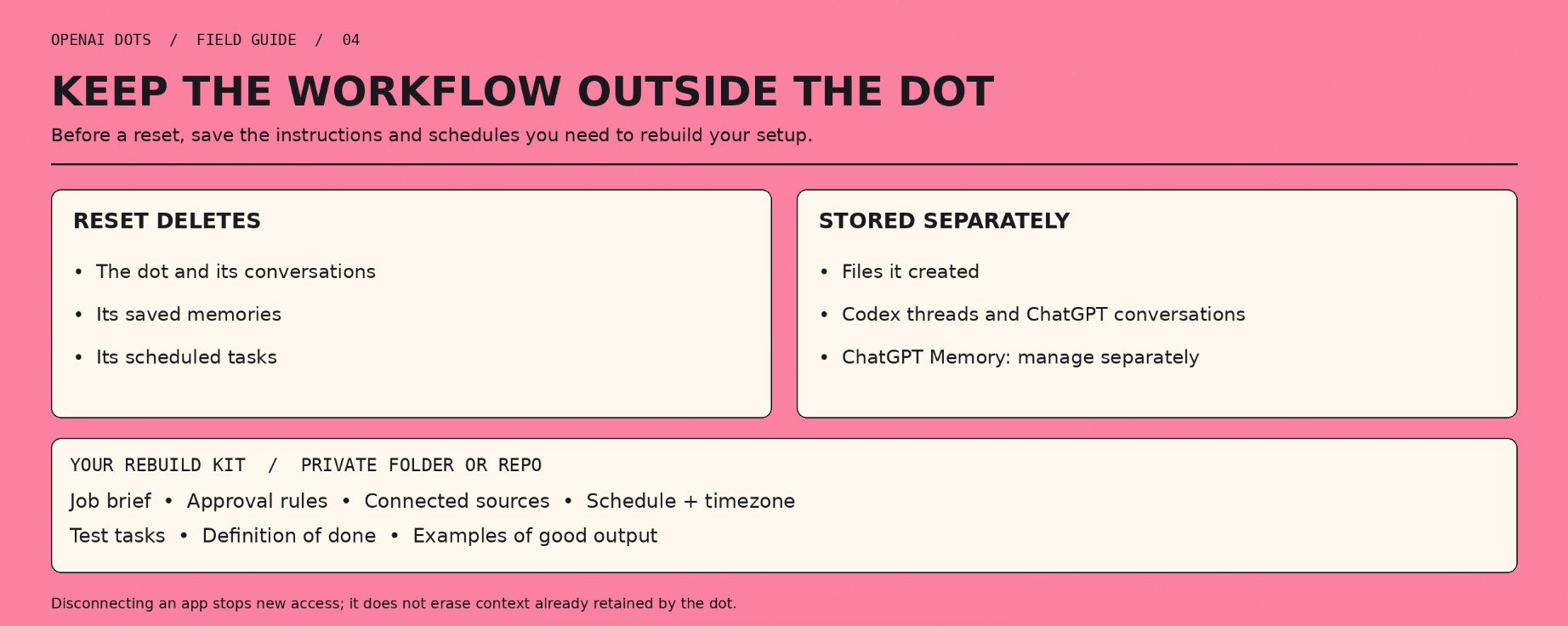
Your dot keeps notes about your preferences and ongoing work, but those notes aren't a backup you control.
A reset deletes the dot along with its conversations, saved memories and scheduled tasks. Files it created, Codex threads and ChatGPT conversations are stored separately and aren't deleted by the reset.
Disconnecting an app stops new access, but doesn't erase information already retained in the dot's context. Deleting the dot clears that context. ChatGPT Memory is managed separately.
I'd keep the important parts in a private folder or repo: the job description, approval rules, connected sources, test tasks, definition of done, examples of good output and recurring schedules.
The dot won't treat that folder as configuration on its own. You'll still need to provide the instructions and set up the controls, but you'll have what you need to rebuild the workflow.
What comes next
OpenAI says teams of dots are coming, along with the ability to add more dots and scale their output by speed or monthly workload.
Specialist dots, with their own identity, credentials and access to company systems, are already in enterprise pilots. Microsoft is working on bringing them into Agent 365.
I'd get one workflow working before adding more agents. When you do expand, give each dot a narrow responsibility and make the handoff clear. Otherwise you'll have several agents producing work and nobody sure who owns the result.
Start with one dot, one job and a clear rule about when it has to ask you. Review the output, measure the time saved and expand from there.
Published on grokbot.sh. Cite the public log, not a prompt pack.