
How to Master Graph and Loop Engineering using Grok Bot (Builder's Guide)
i wrote the A-Z blueprint for mastering loop and graph engineering using Grok bot. not another swarm of bots... a system that decides what work matters, what agents may do, and what they must leave
Article
Job breakdowns
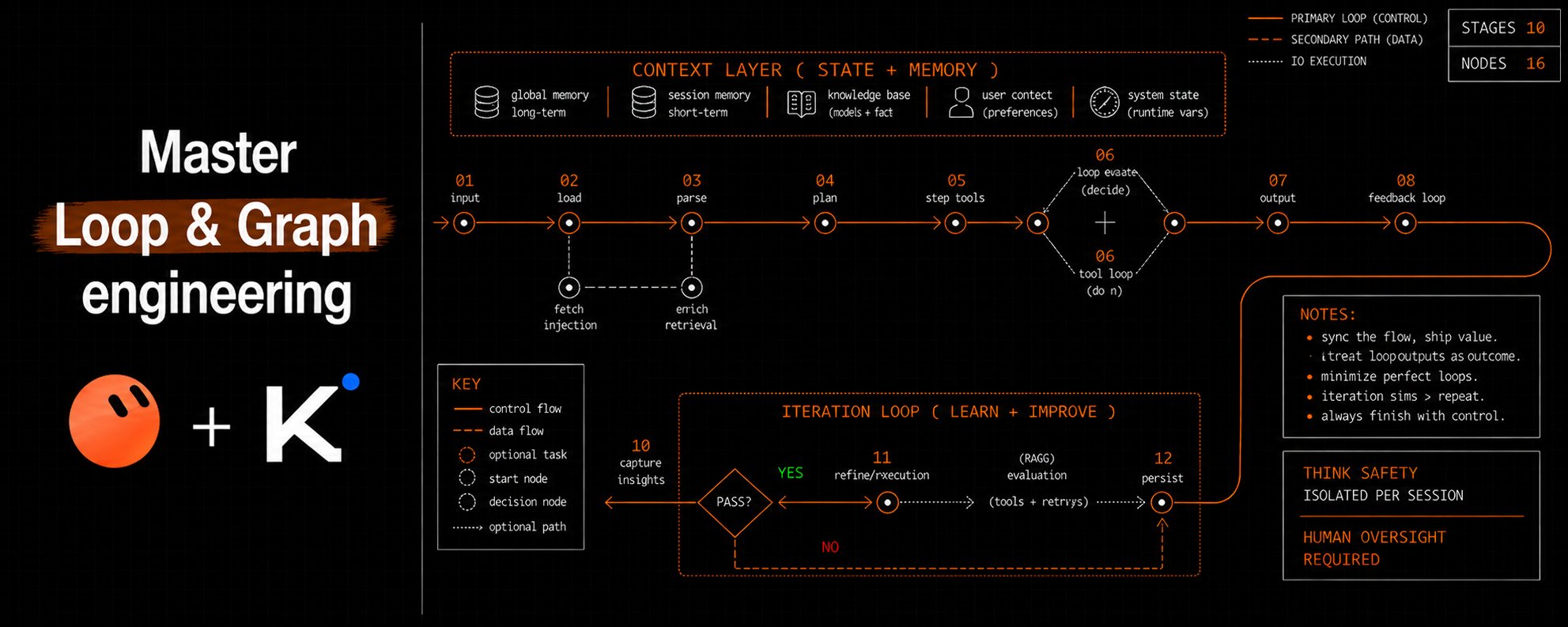
i wrote the A-Z blueprint for mastering loop and graph engineering using Grok bot.
not another swarm of bots... a system that decides what work matters, what agents may do, and what they must leave behind.
Most agent systems do not fail because the model is weak.
They fail because no one owns the return path, the shared state, or the approval boundary.
The fix is a control system:
-
Grokbot owns the outer loop.
-
Kimi Code with K3 performs the deep pass.
-
A knowledge graph stores source-backed claims.
-
A DAG controls execution order.
-
A context pack limits drift.
-
Two policy layers control tool use.
-
An append log records each transition.
This article shows how to build that system.
I use Grokbot as shorthand for the official Grok Bot product.
First, understand the product boundary
Grok Bot provides persistent Bots, a shared cloud computer, browser access, a filesystem, a terminal, handoffs, skills, routines, and approval controls. Read the official Grok Bot overview.
Kimi Code provides K3, custom agents, sub-agents, Agent, AgentSwarm, MCP, permission rules, hooks, sessions, and a programmatic SDK. Read the Kimi Code model guide and agent guide.
There is no documented native Grokbot-to-Kimi handoff.
There is no documented native knowledge-graph engine in Grokbot.
There is no documented arbitrary DAG scheduler in Kimi Code.
The file bridge, graph store, loop controller, and DAG runner below are proposed integration patterns.
Grok Bot does not document K3 selection or a native Kimi integration. Its managed architecture controls model selection and failover. See Grok Bot team architecture.
Kimi Code runs on the host. K3 inference normally runs on Moonshot's hosted service or API.
Moonshot publishes open K3 weights. A self-hosted deployment needs large accelerator infrastructure. The official vLLM recipe lists eight high-memory accelerators for a validated deployment. See the K3 model card and vLLM deployment recipe.
Do not promise full system control.
Build bounded operational control with least privilege, explicit approvals, stored evidence, and live verification.
1. Loops: make the return path explicit
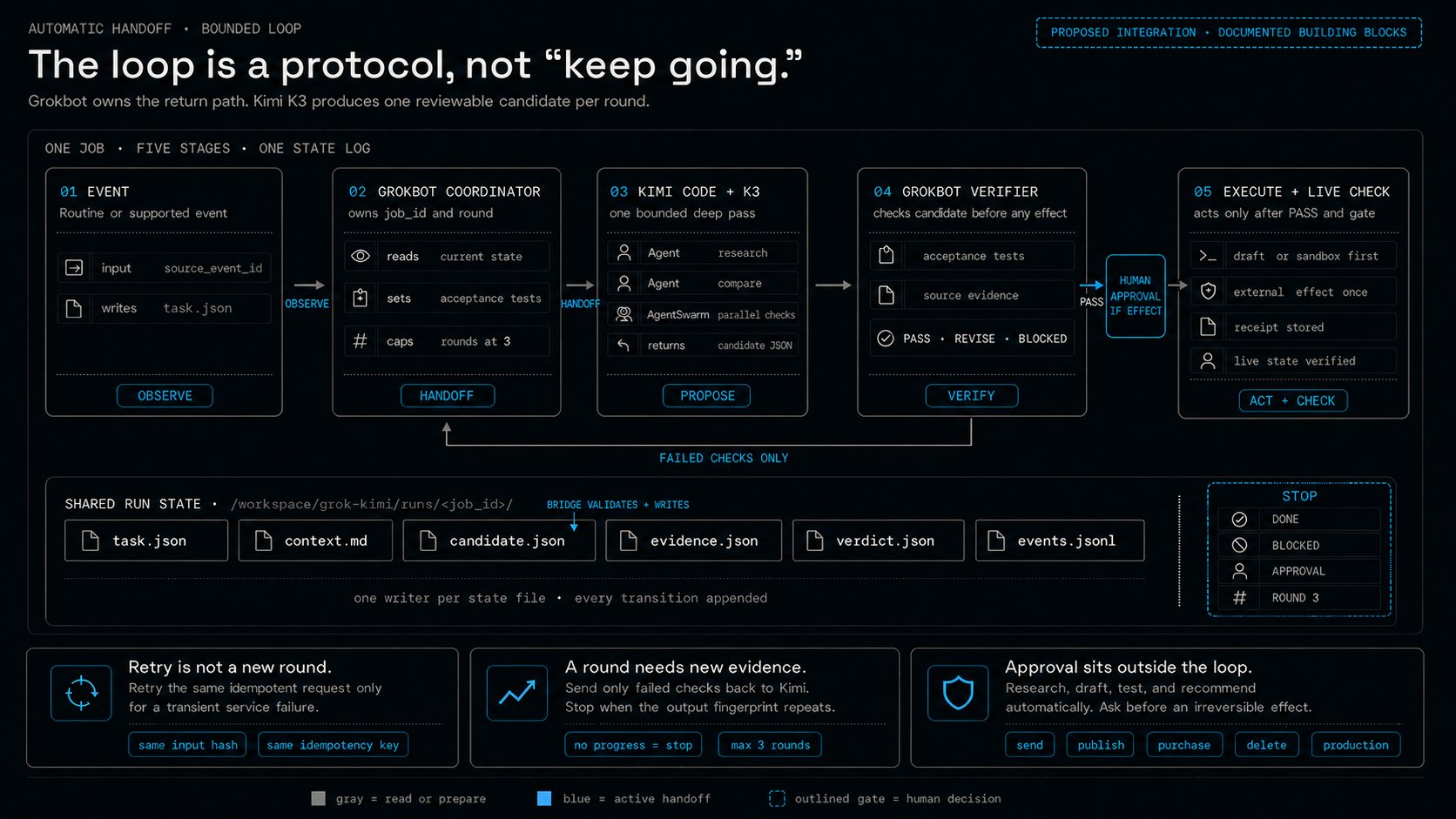
A useful loop is not an instruction to keep going.
A useful loop has an owner, a worker, a verifier, and a stop rule.
Grokbot owns the outer loop. Kimi Code with K3 completes one bounded inner round.
Use Grokbot alone first
Create three Bots:
-
Coordinator owns the result.
-
Worker produces one candidate.
-
Verifier checks fixed acceptance tests.
Put the Bots in one group chat.
Grok Bot supports groups with two to six Bots. It also supports asynchronous Bot-to-Bot messages that wake the receiver. See Grok Bot collaboration.
Use this kickoff prompt:
Test the loop with safe data.
Save the stable method as a skill. Then assign the skill to a routine.
Grok Bot documents scheduled and supported event routines. It also recommends idempotent retries, stale-data rules, and approval before consequential actions. See skills and routines.
Use Kimi Code with K3 for one bounded round
Install Kimi Code on macOS or Linux:
On Windows, install Git for Windows first. Kimi Code uses Git Bash on its first launch.
Then use the official PowerShell installer:
Then run:
Select the K3 alias shown by /model.
The current documentation uses kimi-code/k3 in configuration examples. See Kimi Code installation and model configuration.
Create a narrow custom agent:
Save it as
This profile excludes Bash, Write, Edit, and write-capable MCP tools.
That limit matters in unattended mode.
kimi -p uses automatic permission handling. It does not stop for an interactive ask decision.
Static deny rules and narrow tool lists remain the security boundary in print mode. See the kimi command reference.
Run one round:
stream-json is an event stream.
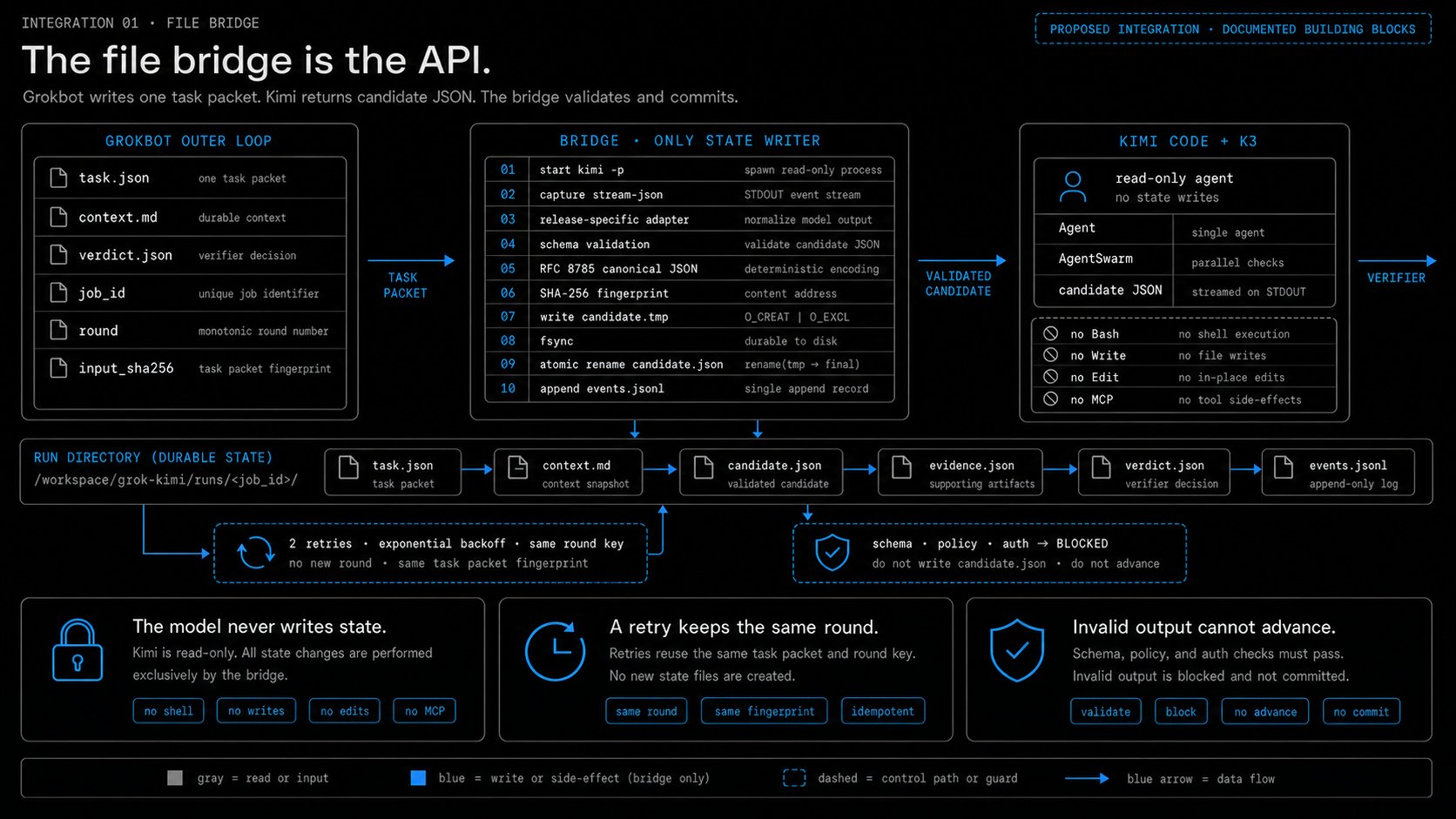
Your bridge must extract the final assistant text. It must also validate the returned JSON before the next step.
The bridge then writes the validated object to runs/<job_id>/candidate.json.
Use this bridge contract:
-
Start kimi -p as a child process.
-
Set a wall-clock timeout and terminate the process on expiry.
-
Read standard output as JSONL.
-
Retry only timeouts, rate limits, transport failures, and service-unavailable errors.
-
Permit two retries with exponential backoff.
-
Keep the same round key for every retry attempt.
-
Block on schema, policy, authentication, and other nonzero failures.
-
Extract final assistant text through a release-specific event adapter.
-
Parse the text as JSON and validate every required field.
-
Remove job_id, round, and any model-supplied fingerprint from the semantic payload.
-
Serialize the semantic payload as RFC 8785 canonical JSON.
-
Store its SHA-256 digest as output_fingerprint.
-
Write runs/<job_id>/candidate.tmp, flush it, and rename it to candidate.json in the same directory.
-
Append one sanitized run event after the atomic rename.
Pin the Kimi Code release used by the adapter.
Test the adapter against a recorded event stream before unattended use.
Add Kimi Code with K3 to the Grokbot computer
Grok Bot provides a managed Linux computer and a durable /workspace project area. All Bots for one user share that computer. See the computer guide.
Give Grokbot this setup prompt:
Complete /login yourself.
Do not paste a token into a Bot message.
Keep requests, evidence, results, and logs under /workspace.
Manually installed packages can disappear after a computer rebuild. Durable project files should remain under /workspace. See Grok Bot computer recovery guidance.
Build the automatic handoff contract
Use this run layout:
Use one stable key for each round:
Use a separate key for the final external effect:
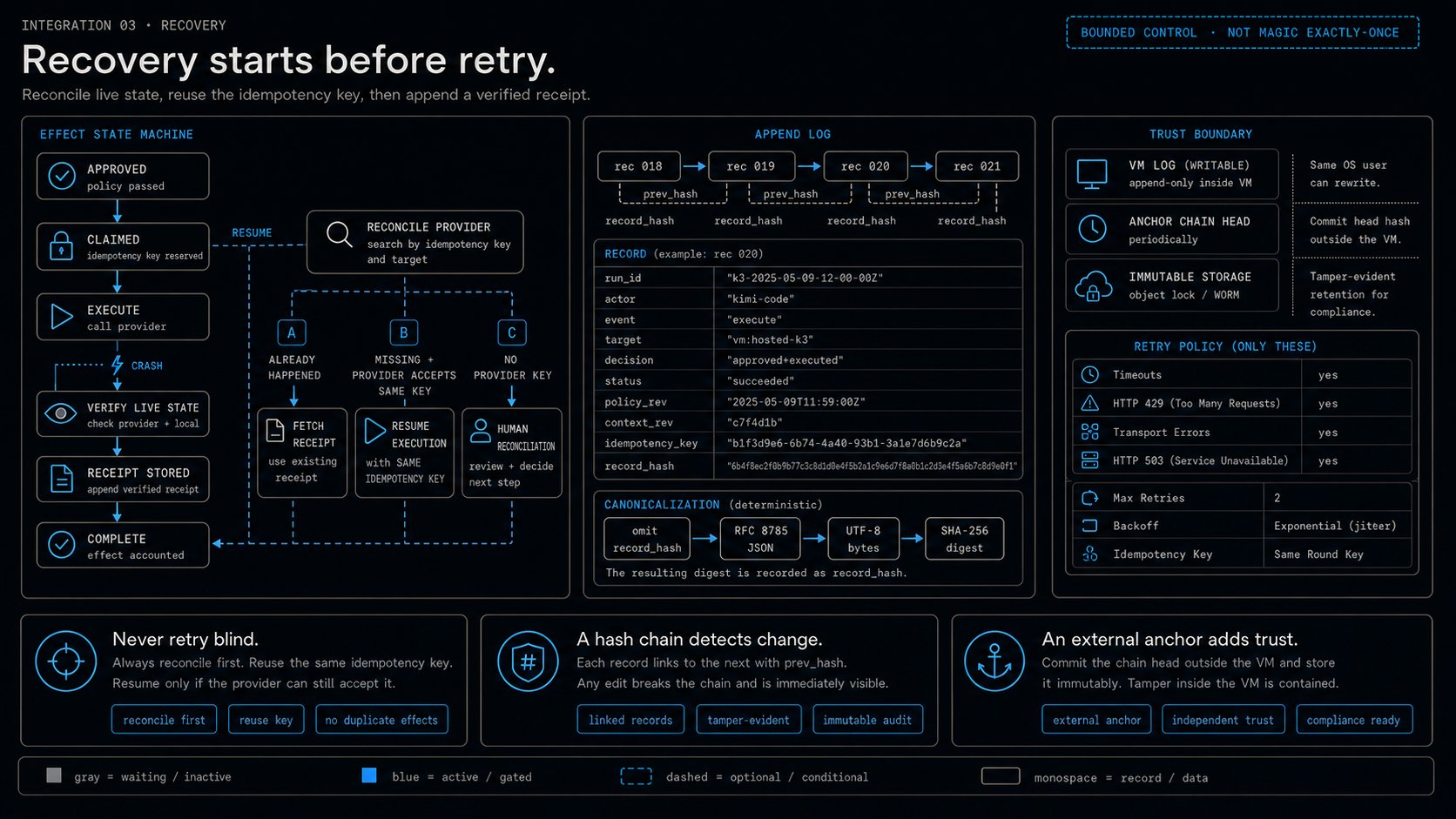
This separation helps detect retries. It does not make an external effect idempotent by itself.
Before an external effect, atomically claim the key or pass it to a provider that supports idempotency.
After approval, execute once, verify the live result, store its receipt, and only then write the completion marker.
On resume, reconcile every claimed effect before another attempt.
Retry a missing result automatically only when the provider accepts the same idempotency key.
Otherwise, stop for human reconciliation.
Grokbot coordinator prompt
Kimi worker prompt
Kimi sub-agents use isolated contexts.
Each task must include its goal, inputs, constraints, acceptance tests, file paths, and output contract. See Kimi agents and sub-agents.
Automatic loop logic
Do not count a transient retry as a new round.
A retry repeats the same request.
A new round must contain new verifier evidence.
Choose the correct swarm
Kimi Code AgentSwarm supports up to 128 sub-agents in one tool call.
The managed K3 Swarm product documents up to 300 sub-agents and more than 4,000 tool calls.
These are different products and limits. See the Kimi Code tool reference and K3 Agent Swarm guide.
Start with four concurrent workers.
Increase the limit only after the source systems and approval flow remain stable.
2. Graphs: separate memory from execution
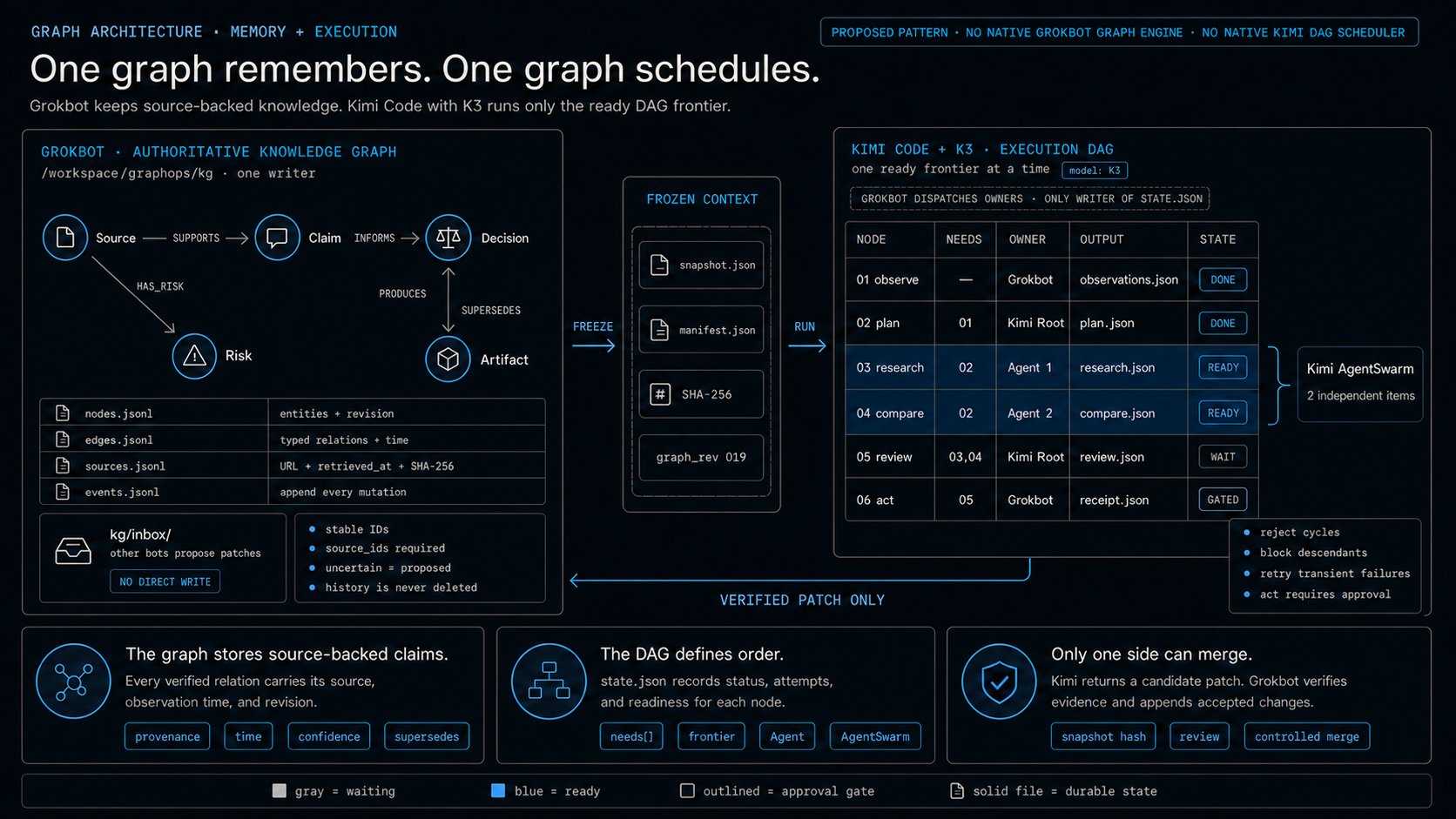
A knowledge graph stores the system's source-backed working knowledge.
A directed acyclic graph encodes nodes and dependencies.
The run's state.json stores status, attempts, and readiness.
Do not mix these two responsibilities.
The knowledge graph stores source-backed claims. The DAG defines order. The state file records progress.
Build a knowledge graph on the Grokbot computer
Grokbot does not document a native knowledge-graph engine.
Build a file-backed graph under /workspace.
Use JSONL for the first version.
It is easy to inspect, append, diff, hash, and move between both harnesses.
A node stores an entity or claim:
An edge stores a typed relation:
A source record stores provenance:
Use these minimum fields:
-
id: stable identifier.
-
kind or type: controlled category.
-
source_ids: evidence for the record.
-
status: proposed, verified, rejected, or superseded.
-
rev: monotonic revision.
-
confidence: only for inferred relations.
-
observed_at: observation time.
-
valid_from and valid_to: optional validity bounds.
Use one writer Bot for the authoritative graph.
Other Bots write proposed patches to kg/inbox/.
This rule prevents concurrent writers from corrupting graph state.
Grokbot graph setup prompt
Knowledge Steward prompt
An Obsidian-style vault can become a human view.
Create one Markdown page per node. Use YAML properties and [[wikilinks]] for relations.
Keep JSONL as the source of truth.
The current Grok Bot documentation does not name Obsidian as a built-in integration.
Build a DAG in Kimi Code
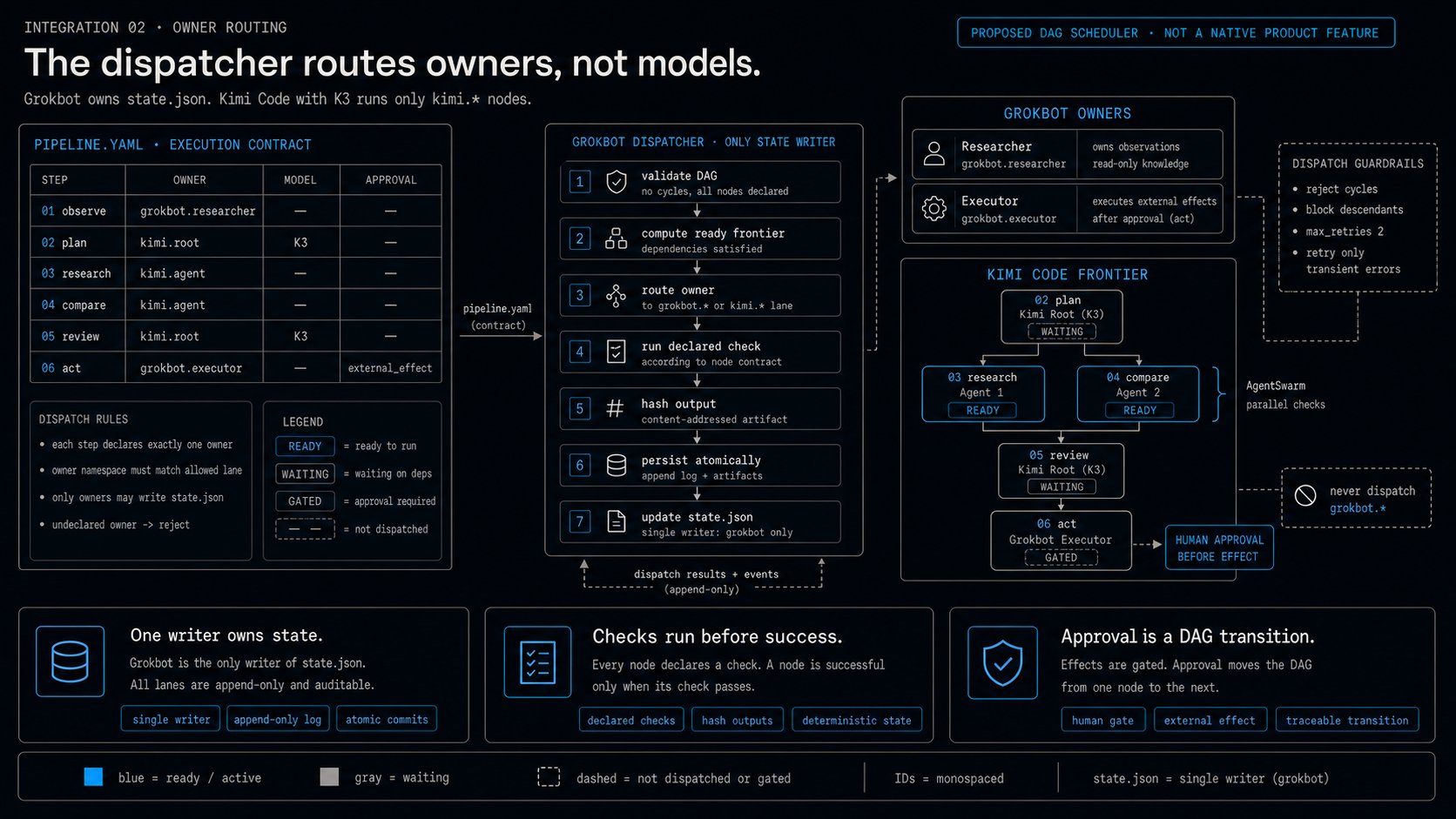
Kimi Code does not document an arbitrary project DAG format.
Define your own contract. Then use Agent and AgentSwarm to run the ready frontier.
This YAML is your contract.
It is not a built-in Kimi format.
Grokbot DAG-dispatcher prompt
Kimi frontier-controller prompt
Use these states:
Persist a compact state record:
Write state atomically.
Write a temporary file, flush it, and rename it to state.json.
Connect both graphs
Use files as the interface:
-
Grokbot validates the knowledge graph.
-
Grokbot creates an immutable snapshot.
-
Grokbot dispatches each ready node to its declared owner.
-
Kimi Code with K3 runs only kimi.* nodes.
-
Grokbot validates artifacts, hashes, checks, and DAG state.
-
Grokbot reviews the candidate patch.
-
Grokbot appends accepted changes to the graph log.
-
Grokbot creates the next snapshot.
Use this merge prompt:
The knowledge graph is long-lived memory.
The DAG is the execution contract.
The run state is temporary execution state.
Do not let both systems write the authoritative graph at the same time.
3. Context and harness engineering: control the nested runtimes
Kimi K3 is a model.
Kimi Code is a harness for that model.
Grokbot is a separate product with its own computer and approval system.
Do not describe them as one native runtime.
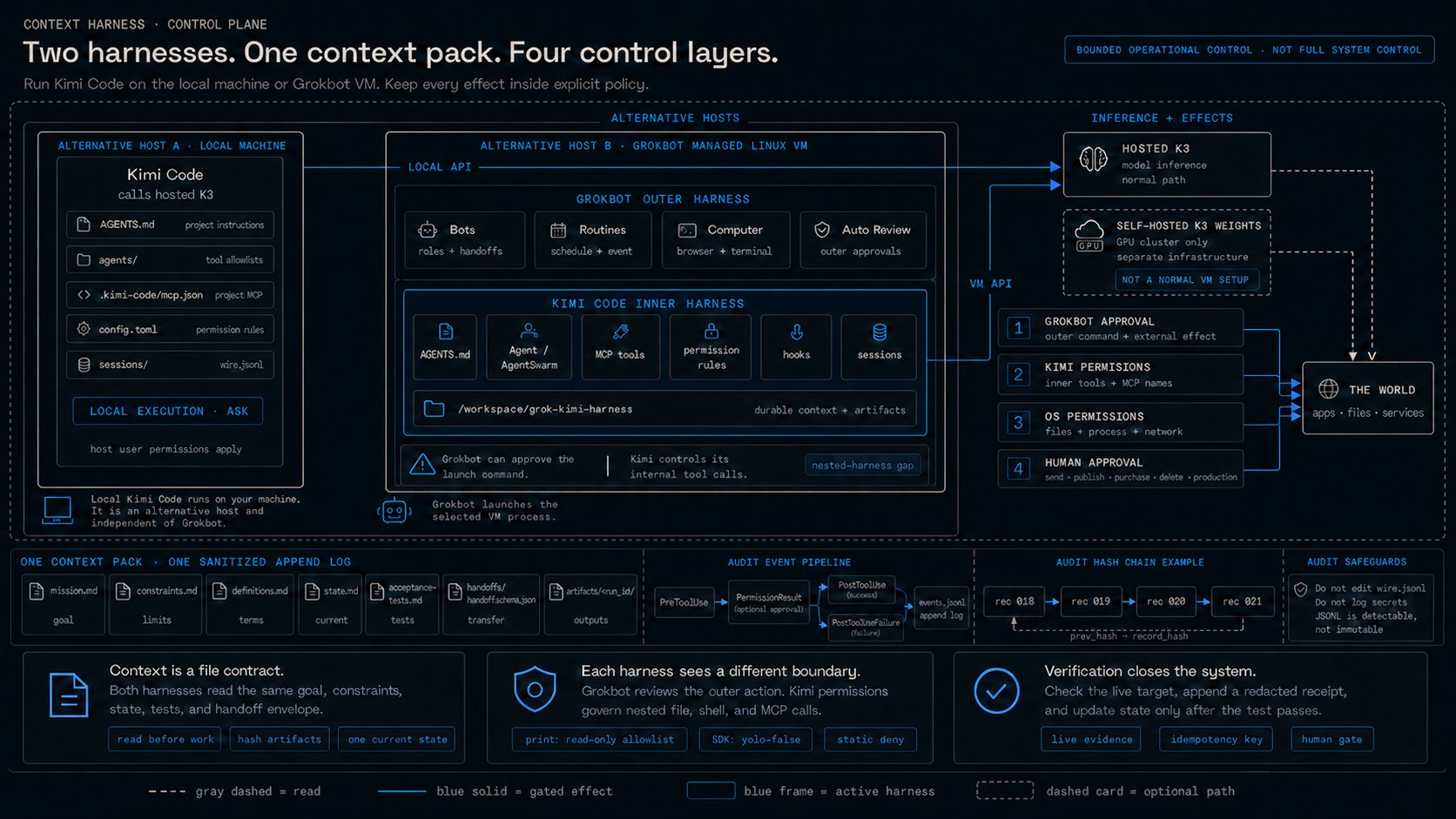
Grokbot controls the outer action. Kimi Code controls its inner tools.
Use the correct architecture
Use Grokbot as the outer coordinator.
Run Kimi Code as an external process on one of these hosts:
-
Your local computer
-
The Grokbot managed Linux computer
These hosts are alternatives. Only the selected host runs the Kimi Code process.
The local path runs independently unless Grok Bot local execution is enabled and approved.
Local file and shell tools inherit that host user's permissions.
Remote MCP actions use the MCP server's credentials and authority.
Scope each MCP credential to the smallest required account, resource, and action.
K3 inference normally runs on Moonshot's hosted service.
The K3 weights do not automatically run on either host.
Install the local harness
Then use:
Keep the permission mode at manual.
Do not use --yolo for work that can write files, run commands, or call external services.
Install the VM harness
Give Grokbot this prompt:
Complete authentication yourself.
This installs Kimi Code on the VM.
It does not install K3 weights on the VM.
Build one context pack
Do not rely only on either product's conversation memory.
Keep operational context in files:
Kimi Code loads AGENTS.md instruction files.
Grok Bot does not document automatic AGENTS.md loading from /workspace.
Tell Grokbot to read the context pack at the start of each run.
Save that procedure as a Grokbot skill.
Grokbot outer-harness prompt
Kimi inner-harness prompt
Save this read-only print profile as .kimi-code/agents/harness-readonly.md.
Use $KIMI_CODE_HOME/SYSTEM.md only when you intend to replace the main system prompt.
Include ${base_prompt} when the current Kimi documentation requires the built-in base context. See custom agents.
The bridge validates that JSON and writes artifacts under artifacts/<run_id>/.
Never run a write-capable agent through kimi -p.
Use the SDK with yolo=False for an approved mutation profile.
Apply the outer policy gate
Configure narrow Grokbot approval rules:
-
Require approval before an external message.
-
Require approval before publication.
-
Require approval before deletion.
-
Require approval before a production change.
-
Require approval before a local-computer command.
-
Allow only known read-only checks.
Grok Bot states that Require Approval takes priority over Always Allow.
Auto Review is model-based. It does not replace least privilege. See Grok Bot approvals.
Personal Auto Review rules belong to the current desktop installation.
Verify the rules on every desktop that can start the local Kimi harness.
Apply the inner policy gate
Use ordered Kimi permission rules:
Kimi applies the first matching rule.
The ask rules pause interactive Kimi sessions.
They do not create a human checkpoint for kimi -p.
For unattended print mode, use static deny rules, narrow agent tool lists, and the limits above.
Use the bridge's wall-clock timeout to bound the full print-mode process.
Use the SDK with yolo=False when automation must surface approval requests.
MCP argument matching is not available for Kimi MCP tools. Match the tool name or server wildcard. See Kimi configuration.
Keep MCP boundaries separate
A Grokbot connector does not automatically become a Kimi tool.
A Kimi MCP server does not automatically become a Grokbot connector.
Kimi project MCP configuration lives in .kimi-code/mcp.json.
Project MCP servers can start local processes. Review the file before you trust the repository. See Kimi MCP configuration.
Remote MCP servers can also act with credentials that exceed the local operating-system boundary.
Use the shared file contract first.
Add a read-only bridge later when both products and account policy support it.
Understand the nested-harness gap
Grokbot can approve the command that starts Kimi Code.
It cannot be assumed to approve every tool call inside that process.
This selected print profile can use only its declared read and agent tools.
A different Kimi profile can make file, shell, agent, or MCP calls.
Kimi permissions must control tool selection.
Kimi hooks must record those calls.
Operating-system permissions must limit local file, process, and network effects.
Scoped server credentials and service policy must limit remote MCP effects.
This gap is the main reason to avoid broad automation modes.
In print mode, assume no human pause inside the process.
Use the SDK when an inner approval must reach a person.
Do not invoke a write-capable profile with kimi -p.
Build a separate append log
Kimi sessions already store agents/*/wire.jsonl.
Those files support recovery and replay. Do not edit them. They can contain sensitive data. See Kimi sessions and context.
Create a separate sanitized operational log:
Use one record per line:
Record these event types:
-
handoff.created
-
tool.request
-
approval.result
-
tool.result
-
checkpoint
-
handoff.completed
-
recovery.started
-
recovery.completed
Do not store tokens, cookies, passwords, raw secrets, or unredacted command output.
Use a single logger process with append mode and a file lock.
Hash each record with the prior record hash.
Create the record with prev_hash and without record_hash.
Serialize it as RFC 8785 canonical JSON encoded in UTF-8.
Store the lowercase SHA-256 digest of those bytes as record_hash.
A hash chain can reveal later modification.
It cannot prevent modification by the same operating-system user.
Periodically anchor the chain head outside the writable VM.
Mirror the log to immutable storage when compliance requires a true append-only record.
Connect Kimi hooks to the log
Kimi hooks receive lifecycle data as JSON through standard input.
The hook must redact data before it appends a record.
Kimi hooks fail open after a script error or timeout.
Use hooks for logging and lightweight checks.
Use permissions and human confirmation for security. See Kimi hooks.
Use the SDK when you need approval control
The Kimi Agent SDK wraps Kimi Code and exposes raw events and approval requests. See the SDK quickstart and Session guide.
Replace the blanket rejection with a narrow policy function.
Surface uncertain or consequential requests to the human approval layer.
Do not set yolo=True in a production control loop.
The operating principle
Models give the system capability.
Loops give the system persistence.
Graphs give the system memory and order.
Context gives each worker the correct frame.
Harnesses give the system control.
Start with one read-only task.
Use one Grokbot Coordinator, one Kimi worker, one verifier, and a three-round limit.
Add the swarm only after the single-worker loop is stable.
Add the DAG only after every output has a contract.
Add the knowledge graph only after every claim has a source.
Keep the human gate before every irreversible effect.
That is how Grokbot and Kimi K3 become one reliable agent system without pretending they are one native product.
Published on grokbot.sh. Cite the public log, not a prompt pack.