
HOW TO CREATE 5 AI EMPLOYEES
Most people open Grok, ask a question, read the answer, and close the tab. That is how every chatbot has worked since 2022. Type, read, repeat. Grok Bot is not that. Grok Bot is a team of AI employees
Article
Job breakdowns
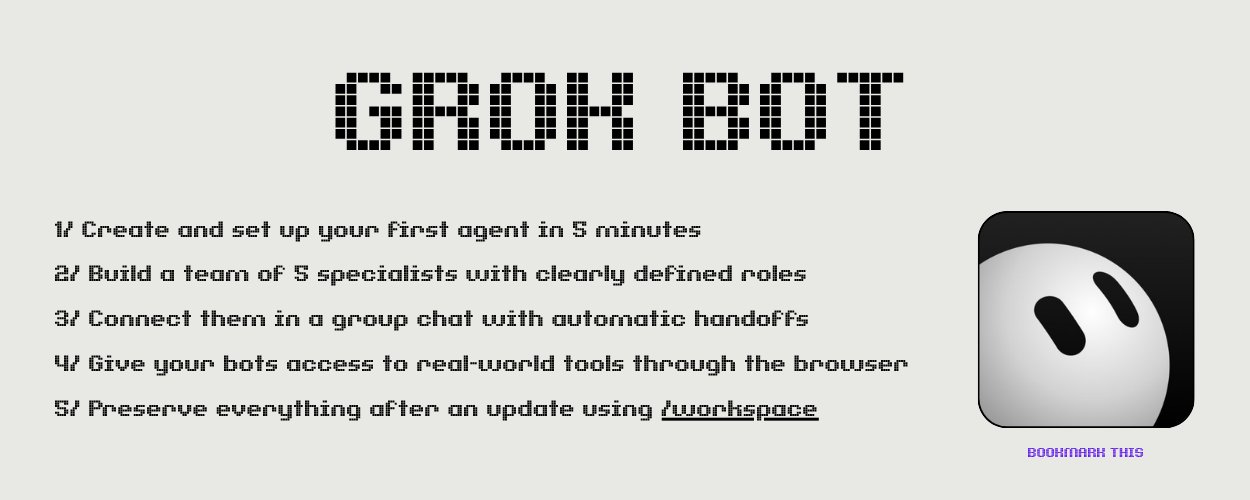
Most people open Grok, ask a question, read the answer, and close the tab. That is how every chatbot has worked since 2022. Type, read, repeat.
Grok Bot is not that.
Grok Bot is a team of AI employees that live on their own computer in the cloud. Each one has a name, a job title, a browser, a file system, and a memory that carries over between tasks. You assign work, close your laptop, and they keep going. When something needs your approval, they ping you. Everything else runs on its own.
I went from doing everything myself to managing a five-person AI roster in about a week. This is exactly how it works, what it can do, and where it breaks.
If you're into AI and want to catch setups like this before everyone else does, follow me. I post alpha on AI tools, automation, and workflows that actually save time. Links at the bottom.
What makes this different from ChatGPT or Claude
Every AI chatbot you've used works the same way. You type, it responds, the conversation sits in a browser tab. Close the tab, nothing happens. The AI has no hands, no browser, no way to do anything in the real world.
Grok Bot changes three things at once.
It has its own computer. Every Grok Bot account gets a cloud machine with a real browser, a file system, and a terminal. The bots open websites, click buttons, fill forms, save files. They do the work instead of describing how to do it.
It keeps working when you leave. Close your laptop halfway through a task and the bot finishes it in the background. Come back an hour later, the results are sitting in your chat.
It remembers. Each bot has its own conversation thread that accumulates context over time. The more you work with a bot on one topic, the better it gets at that topic. A bot that only handles contract reviews gets sharper at contract reviews every week.
The interface looks like Slack. Names down the left side, messages on the right. You can have up to 50 bots and group chats on one account.
The mental shift: employees, not prompts
This is the part people miss on day one.
A prompt is a request. You ask once, you get one answer. A bot is a role. It has a job description, a set of responsibilities, and clear boundaries for what it can and cannot do without your permission.
When you hire a person, you don't hand them a task list every morning. You tell them what they own, what good work looks like, and where they need to stop and check with you. Then they figure out the day themselves.
Grok Bot works the same way.
Your first bot should not be a specialist. Hire a coordinator. The one you message when you don't know which specialist should handle something. Everything else reports to it later.
How to set up your first bot
Four steps. Takes about five minutes.
-
Open Grok Bot. Hit Cmd+N (or New in the sidebar).
-
Choose "Create new agent." A blank bot appears.
-
Go to Bot Actions, then Edit Profile. Give it a name, a title, and a description.
-
Send it a real task. Not "hello." Not "what can you do." A real piece of work you can verify in 30 seconds.
The description is the most important field. It holds the rules that stay true after you've forgotten writing them. Today's work goes in the message. The description is the job contract.
A good description has four parts: what the bot owns, what good output looks like, what it should never do, and where it stops to ask you.
Here's an example for a prospecting bot:
Four sentences. The last two are the fence. That fence is what lets you walk away from the screen.
Building a five-person roster
One generalist bot that does everything is mediocre at everything. Split by domain. Each bot thinks about one thing and gets good at that one thing.
Here's a roster that works for outreach and sales:
Scout finds potential customers. Checks sources you specify, filters out bad fits, returns a linked list with reasons. Never contacts anyone.
Writer takes Scout's list and drafts personalized messages. One message per name, matched to their recent activity and interests. Never sends without your approval.
Designer handles visuals. Landing pages, social posts, ad banners, email headers. Delivers files, never publishes.
Responder monitors your inbox. Answers routine replies the same hour. Flags anything complex and passes it to you.
Analyst counts the week. Who paid, who went quiet, what each channel brought in. Posts a report every Friday.
Start with two or three bots. Add more once the first ones have bored you for a full week.
Group chats: where the handoffs happen
Make a group chat called "Team" and add all your bots. Everything happens in one room, which is also what makes it auditable later.
Give the room an objective, not a task list. An objective lets the coordinator split the work. A task list means you already did the thinking and the bots are just typing out your plan.
When you write a message in the group, the bots figure out between themselves who answers. Use @ when you want to name a specific one.
The key insight: a bot's description is the org chart. If a bot has no description, it can't hand work to others and others can't hand work to it. A blank description takes that bot off the map.
Teaching a job once instead of explaining it every time
Grok Bot has a recording feature called "Teach a task." You do the work once while the bot watches. It saves the steps as a named skill and runs the same sequence later on its own.
This matters because the tedious parts of your workflow are painful to write down and trivial to demonstrate. "Open the CRM, filter by last activity, export contacts with no reply in 14 days, format the list, save it" is a paragraph to type and forty seconds to show.
After recording, say this:
A skill outlives the conversation that created it.
Scheduling: work that runs on a clock
A skill waits to be called. A routine is the call on a timer.
That last line is important. Without it, a Monday routine will happily use Friday's stale data and tell you everything looks fine.
One bot can hold up to 50 routines, and the 20 most recent runs of each stay on record.
You can also just describe what you want and the bot writes the routine for you. No workflow builder, no config files. Just explain the job in conversation.
Browser control: finishing work in real tools
Most AI tools draft something and leave the last step to you. Grok Bot finishes the work inside the actual app.
The bot drives its own cloud browser. It opens your analytics dashboard, your CRM, your project management tool. It clicks, fills forms, downloads files. The output lands in the real tool, not in a chat bubble.
Five moments require you to step in:
-
A password or login screen
-
Two-factor authentication codes
-
A CAPTCHA
-
A payment or identity check
-
A site that explicitly blocks automation
Everything outside those five runs without you.
When a login comes up, the bot hands you the screen. You approve, click done, and it picks up where it left off. Browser sessions persist, so the next task on that site usually starts already signed in.
And because there's one browser for the whole account, signing in once covers every bot on your roster.
The folder that survives the wipe
This is the part nobody talks about.
Grok Bot's cloud computer rebuilds itself on updates. When that happens, most of what you installed disappears. CLI tools, packages, configs, everything outside one folder.
That folder is /workspace.
Everything your bots need to function long-term goes here:
Put this at the top of every skill:
Your bots put their own tools back before starting work. A missing dependency reinstalls itself and the job continues.
You can prove it yourself. Create a file in /workspace/ and another in your home directory. Trigger an update. One of them comes back. That's where everything goes.
What Grok Bot is actually good at
After a few weeks of use, here's where it delivers and where it doesn't.
Works well:
Real-time information. Grok pulls from live web data and X conversations. It catches signals before they show up in traditional search or news feeds.
Repetitive workflows. Anything you do the same way every day or every week. Lead research, inbox triage, report generation, data checks. Set it up once, it runs on schedule.
Multi-step tasks across tools. Open a dashboard, pull numbers, compare to last week, draft a summary, post it somewhere. The kind of work that takes you 14 open tabs and 45 minutes.
Parallel processing. Several bots working at the same time on different parts of the same objective. One researches, one writes, one checks quality.
Doesn't work for:
Anything requiring sub-second speed. The bot thinks, decides, clicks. Measured in seconds, not milliseconds.
Tasks where a single mistake is catastrophic. The bot can hallucinate a detail, misread a number, or click the wrong button. Always verify high-stakes output.
Full autonomy on day one. The screenshots you see online showing "made $X while I slept" come from good weeks, published by people who don't publish the other weeks. What this roster does reliably is research, filtering, monitoring and preparation. Full autonomy is a much later stage.
Pricing
Three ways in:
Each plan includes weekly usage. Work past that pool charges extra based on model and tokens used. The usage meter and billing details sit in Settings.
Where to start today
Don't build a ten-bot empire on day one. Here's the order that works:
Day 1. Hire one coordinator bot. Give it a description and one real task. Verify the output by hand.
Day 3. Add one specialist for the part of your workflow you repeat most often. Connect the two in a group chat.
Week 2. Teach each bot one skill through the recording feature. Set up one daily routine.
Week 3. Add browser access to one real tool. Sign in once through the handoff. Let the bots finish work in the actual app.
Week 4. Set up /workspace with your bootstrap script. Add the Analyst bot. Start tracking what the roster actually produces.
After a month you'll have a roster that handles 60-70% of your repetitive work on its own. The other 30% is decisions, approvals, and the creative thinking that still needs you.
That's the whole setup. One app, five bots, one cloud computer.
You stopped typing prompts and started managing a team.
Follow me for more: @0xCristal
My private TG: https://t.me/+V1JCe1KdbOxiMDFi
I find the AI tools, setups, and workflows that give you an edge before they go mainstream
Published on grokbot.sh. Cite the public log, not a prompt pack.