
How to Build an AI Video Business That Pays You Every Month (Full A–Z Guide)
Short vertical videos are the one thing every platform pays for right now, and brands pay for them too. Brands I work with pay $400 to $1,500 for one 30 second clip, about a week of pay at many jobs.
Article
Job breakdowns
Short vertical videos are the one thing every platform pays for right now, and brands pay for them too.
Brands I work with pay $400 to $1,500 for one 30 second clip, about a week of pay at many jobs.
A year ago one clip needed a camera, someone in front of it and an editor.
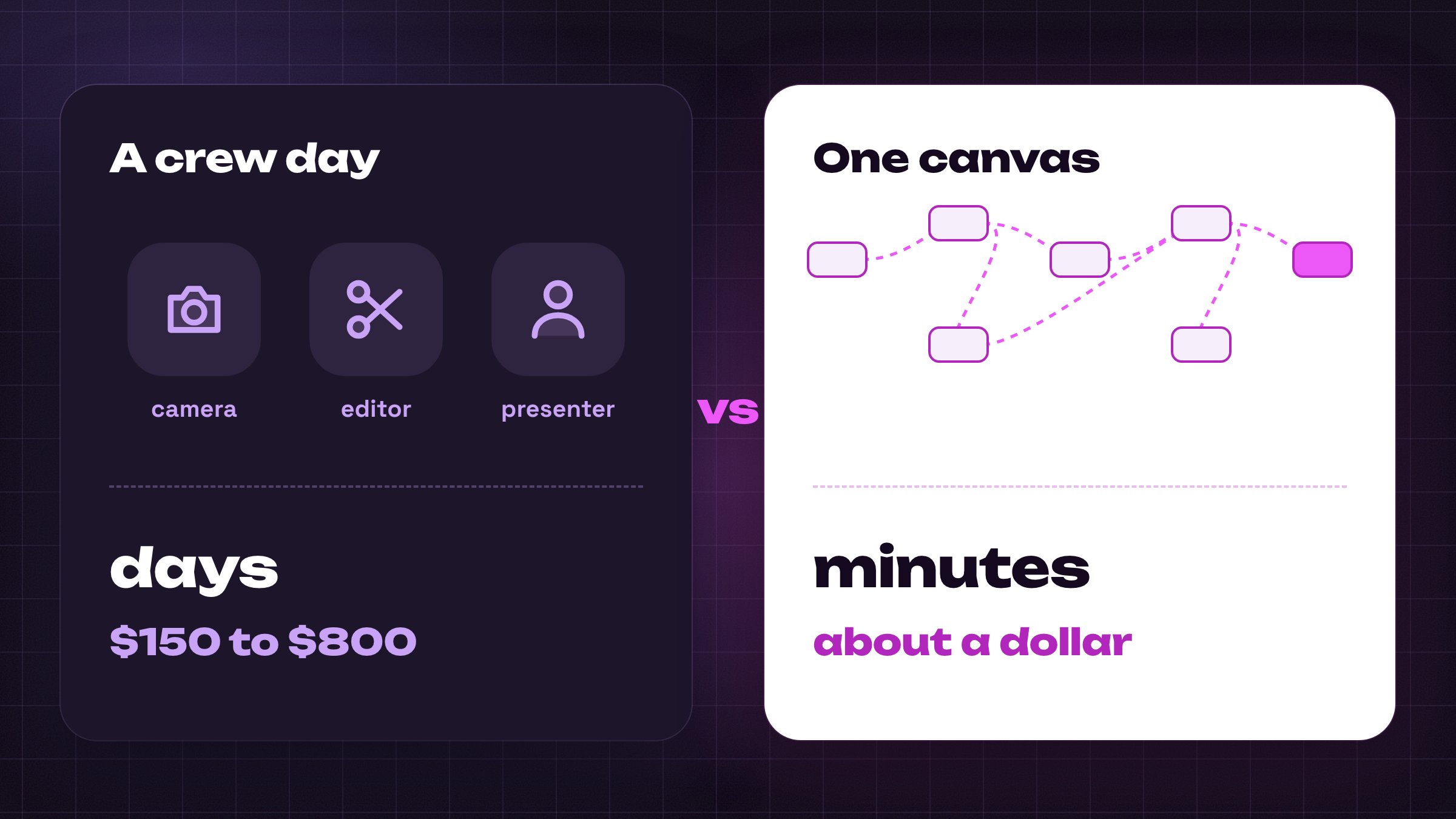
Now the same clip takes a few minutes of clicking and costs about a dollar. Nobody has to show a face.
I run this for my own products and for two brands. Below is every step, start to finish, and the setup I use is linked at the bottom.
Every price in this guide is the number the button showed.
Most of what follows is preparation for one step, making the video, and that step is where a channel is won or lost.
Give it an hour a day for a month and the first money arrives. A first month I watched paid $94 from the link in the bio.
Seven parts, in the order you will read them.
-
How the money is made
-
Why a beginner can do this
-
Seven steps, from the topic to the video everything rides on, then the first post
-
Month 1, 2 and 3
-
Money on your own channel, then brands
-
What one run cost, and what kills a channel
-
Your cost, and the checklist
At the end I put one subscription next to what 10 brand videos or 30 posts bring in. Then the 10 step list to start tomorrow.

Before we start, follow me on X and join my Telegram channel where I post more AI content every day. Both are free.
Telegram: https://t.me/+r0clI4-MMC03ZjAy
How the money is made: your own channel first, brands later
Short vertical video is the format TikTok, Instagram and YouTube all push hardest, so that is where the money is this year.
Where the money comes from
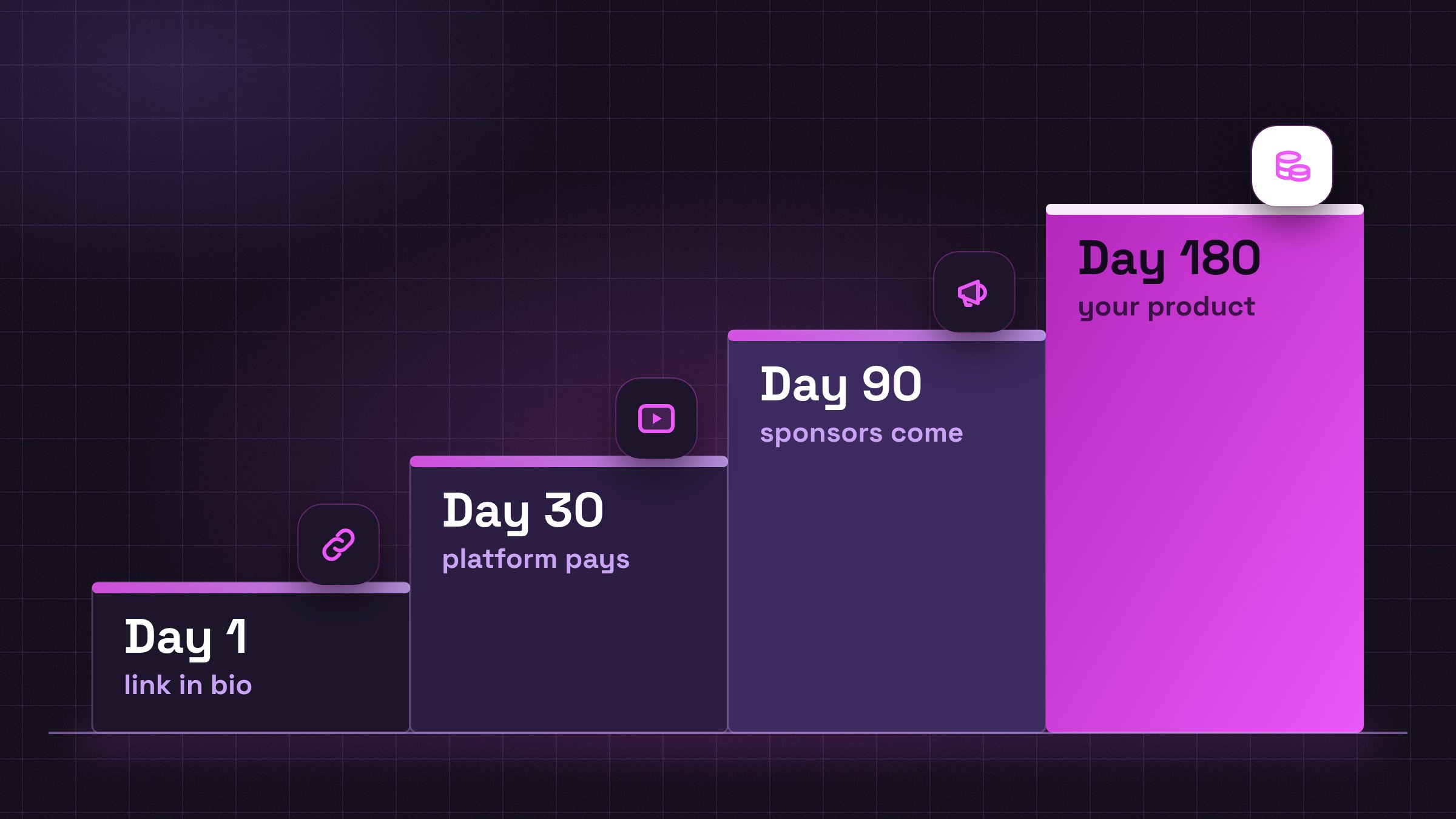
That is the order it arrives in. Slower is normal.
Everything hangs on one step
Everything before the video is preparation: the account, the topic, the scripts. A stranger in the feed sees the finished clip and nothing else.
A platform ranks the channel on how long he watches it. When a brand pays you, it is paying for a clip.
Two channels on the same topic split on one thing: whose next clip comes out sooner and keeps the viewer longer.
This is the one step where I never cut a corner, and the one I spent the most time choosing a tool for.
Where the video gets made. I make every video in Picsart Flow, one web page where the picture, the motion and the voice are each a box you connect, and each button shows its price. Step 5 walks through it box by box.
Who is already doing this
Five accounts I watch are built on finished AI video alone. The views below are their recent posts, never the one hit.
-
Valentin Loiseau: 1.6 million on Instagram, a Picsart partner. Impossible everyday objects, a couch the size of a room filling with a family. Recent reels run 48,000 to 730,000 views.
-
Mikaela Tala: 394,000 on Instagram, one permanent virtual heroine, a woman who does not exist and posts lifestyle scenes daily. Recent reels do 72,000 to 486,000.
-
The AI Filmmaker: 165,000 on Instagram, animated sketches about office life. Recent reels go from 131,000 to 1.7 million.
-
Kelly Boesch: 309,000 subscribers on YouTube, surreal music clips, animals in absurd hats cut to the beat. The last 8 videos did 28,000 to 223,000.
-
Mia Zelu and Kyra: 284,000 and 249,000 on Instagram, two more virtual personas. Recent reels stay between 26,000 and 144,000.
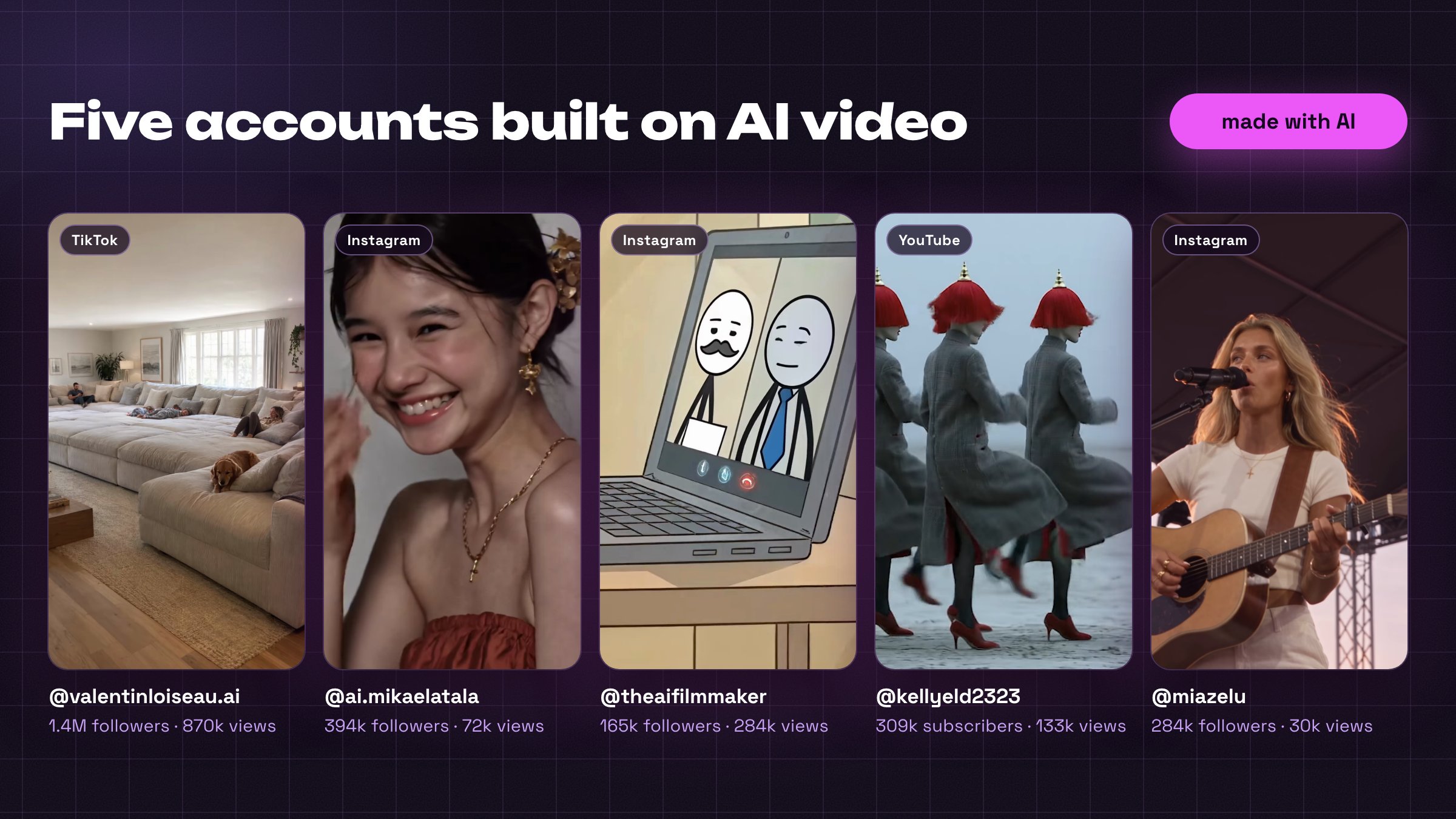
The same ladder. Their money comes from the top rungs: a partner tag in the bio, brand deals in the captions, their own products.
Five is a short list for a format every feed pushes this year, because few people make it well yet. A brand looking for AI ads this autumn finds the accounts already posting them.
How slow it really is
One channel I watched posted 101 videos in a year: one did 1.9 million views, the other hundred did not.
From 0 to 1,000 followers feels slow. From 1,000 to 10,000 happens faster than you expect once one video hits.
Where brands fit
Brands are the second stage. They start writing to a channel at 10,000 to 25,000 followers, and without a channel the first jobs pay in free product.
That $400 to $1,500 from the intro is the rate with a portfolio behind it. I plan on the low end of every range.
Link in the bio on day 1; the platform and the brands come after the numbers.
Why a beginner can do this
Six things changed, and none of them needs you to understand how the models work.
-
The product is three things: a script, a voice reading it, and pictures on the screen that match the words. The channel name, the banner and the logo are wrapping paper.
-
The camera is gone. A video starts from one line of text and one picture, and the software adds the motion, the sound and the spoken line.
-
There is no editing: the clips come out finished and you line them up. A person filming it charges $150 to $800. The clip itself costs about a dollar.
-
One shape, repeated: you build one workflow once, then change the subject inside it.
-
Time: 1 to 2 hours a day at the start, and a finished video takes me 20 to 30 minutes.
-
Platforms do not care that the video is AI, only whether people watch it. One channel passed 2.5 million views with the AI label under every title.
Strip the business down and one question is left: how quickly and how well you can make the next video.
Why the video step is open to a beginner
Making the video sounds like the part that needs a skill. It is the part I would let a beginner start on tonight.
What the page takes off your hands. In Picsart Flow one menu lists the newest AI model for each job, so you skip comparing tools. A failed try turns red and shows its price. One script comes back as five clips; keep the best.
Step 5 shows that page with every click and every prompt word for word. A wrong try there costs about a dollar.
Brands I work with ask for 20 fresh openings a month, new first seconds for the same ad, because an ad wears out in weeks. TikTok shows every new post to about 300 people, and that test is free.
A finished AI video when it works: a 60 second ad from a 12 year e-commerce seller, 20,000 likes, 10,000 saves.
A TikTok post lives 24 to 72 hours. A Short keeps collecting views for months, because YouTube is also a search engine.
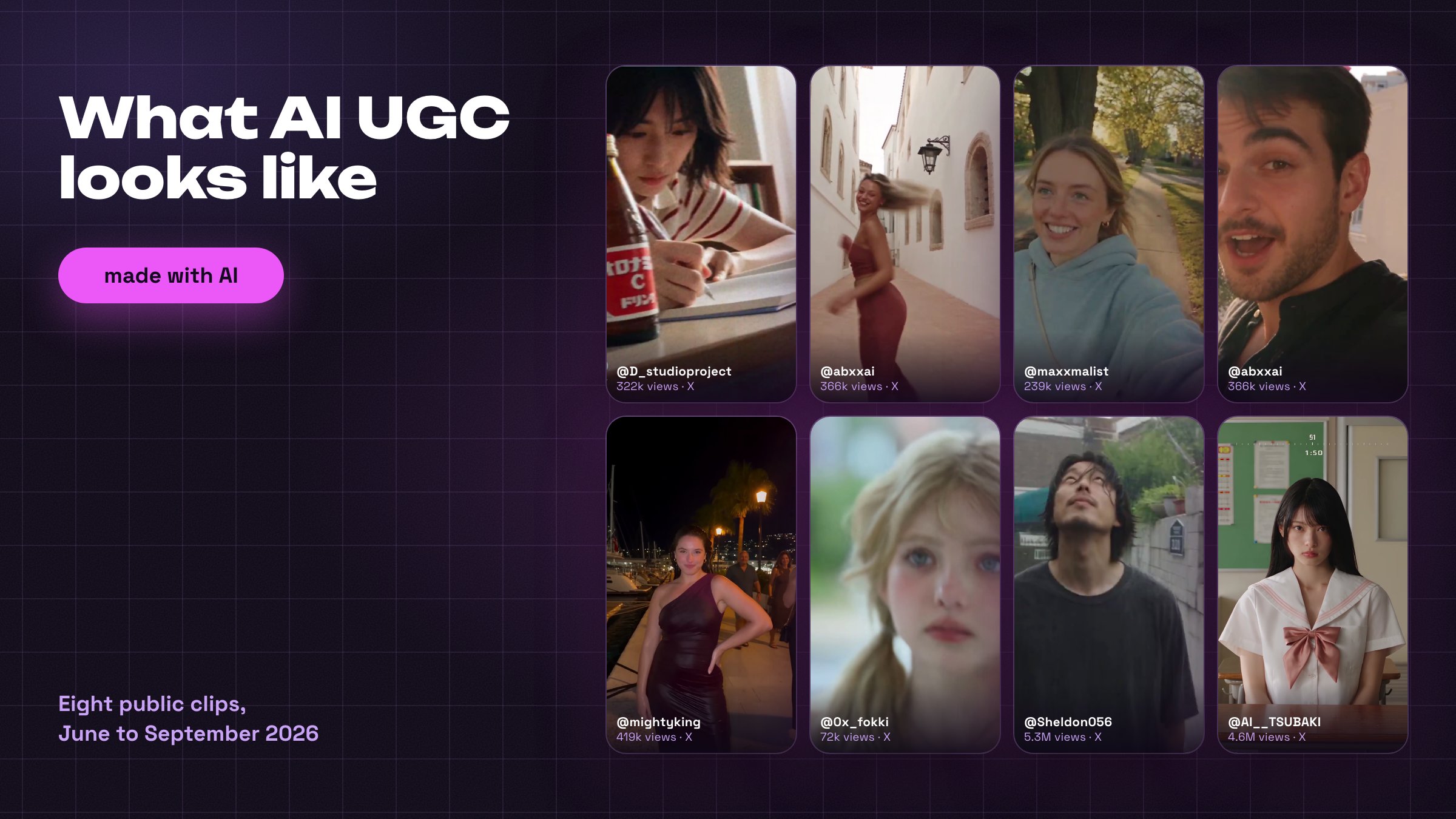
What AI UGC looks like, video that seems shot by a customer on a phone: eight public clips from June to September 2026, each labelled AI by its author on X.
A new clean account gets found on its own. One account I watched reached 110,000 views from the home feed in 2 weeks.
None of the six things above needs a skill learned in advance, and every month you wait, the same topic gets one more channel.
A script, a voice and pictures on the screen are the product, and you build the setup once.
Step 1: Pick one platform and one topic
Two decisions before any account exists, and both take one evening. Get them wrong and the next 15 videos test nothing.
Educational or entertainment
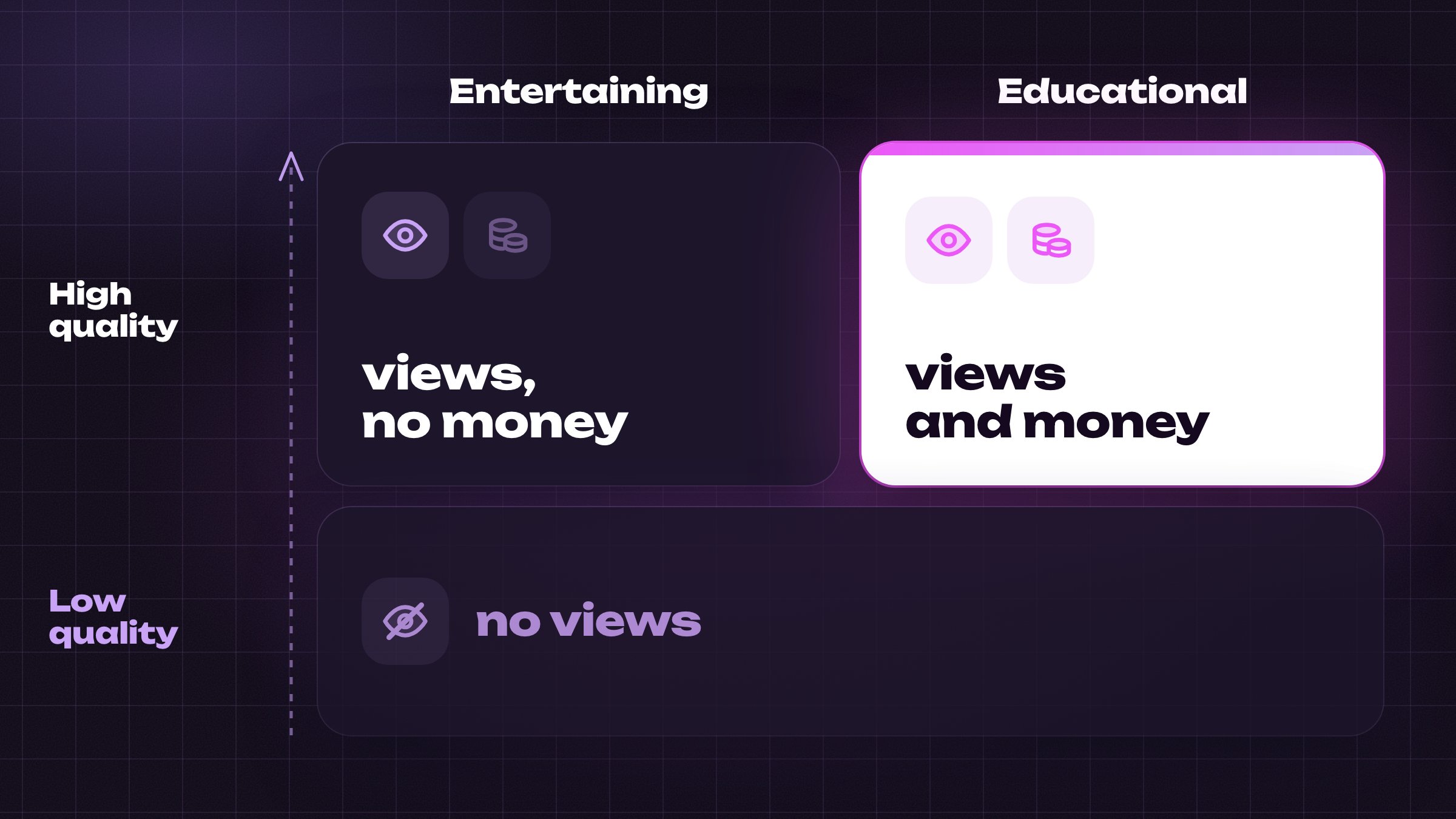
People open Instagram and TikTok to be entertained or to learn something. Entertainment grows faster and lives on brand deals. Educational grows slower and earns more per follower.
One platform first
Every channel I saw grow this year built one platform for the first month and copied to the others later.
-
TikTok: the fastest test. A new post reaches strangers on day one, and the creator program starts at 10,000 followers.
-
Instagram: no payout per view. The money is the link in the bio and the brands, and an AI character with one face works best here.
-
YouTube: search traffic and the slowest, largest money, behind a threshold that is the highest of the three and doubles on 1 February 2027.
Four filters
Your topic has to pass all four. Answer each in one line:
Filter 3 decides whether 100,000 subscribers pay you $500 a month or $15,000.
How to find it
A list of topics cannot tell you what is working this month. Look at real channels that started recently and already get views without a face.
-
The outlier, by hand: open a channel page in your topic, one with under 100,000 subscribers, sort its videos by Popular and compare the top video's views with the channel's usual ten. At 5 times the channel's usual views in the last few months the topic is a candidate; at 10 times you have the shape you copy this week.
-
The dummy account: a fresh YouTube account where you click only videos with no face in your candidate topics. In a few days its home page shows you new channels like that.
-
Tutorials beat stories in 2026: AI narrated histories, fiction and compilations are what YouTube flags as inauthentic. How to and tutorial topics are not.
The window on any format is about 2 weeks. Take the winner apart before you write: the length of its opening, the number of sections, a question or a claim.
One platform, one topic, four filters, then the account.
Step 2: Create the accounts in one hour
People spend 3 weeks on this part. It takes an hour per platform, and the settings below decide money later.
YouTube
-
Make a new Google account for the channel, not your personal one, so the brand emails, the affiliate accounts and the channel stay together. It takes about 2 minutes.
-
Open YouTube Studio, then Settings, Channel, Feature eligibility, and verify your phone. That opens custom thumbnails, videos over 15 minutes, external links and the monetization setup.
-
Turn on 2-Step Verification on the Google account. It is a condition of the partner program.
-
Write a two line description about the viewer, add a work email, set the channel keywords and tick not made for kids.
-
Never start on an old channel with 200 plus subscribers from another topic: YouTube shows a new channel's first Shorts to 20 to 3,000 people and decides on that.
-
Switch to a Creator account in settings. Pick a short handle.
-
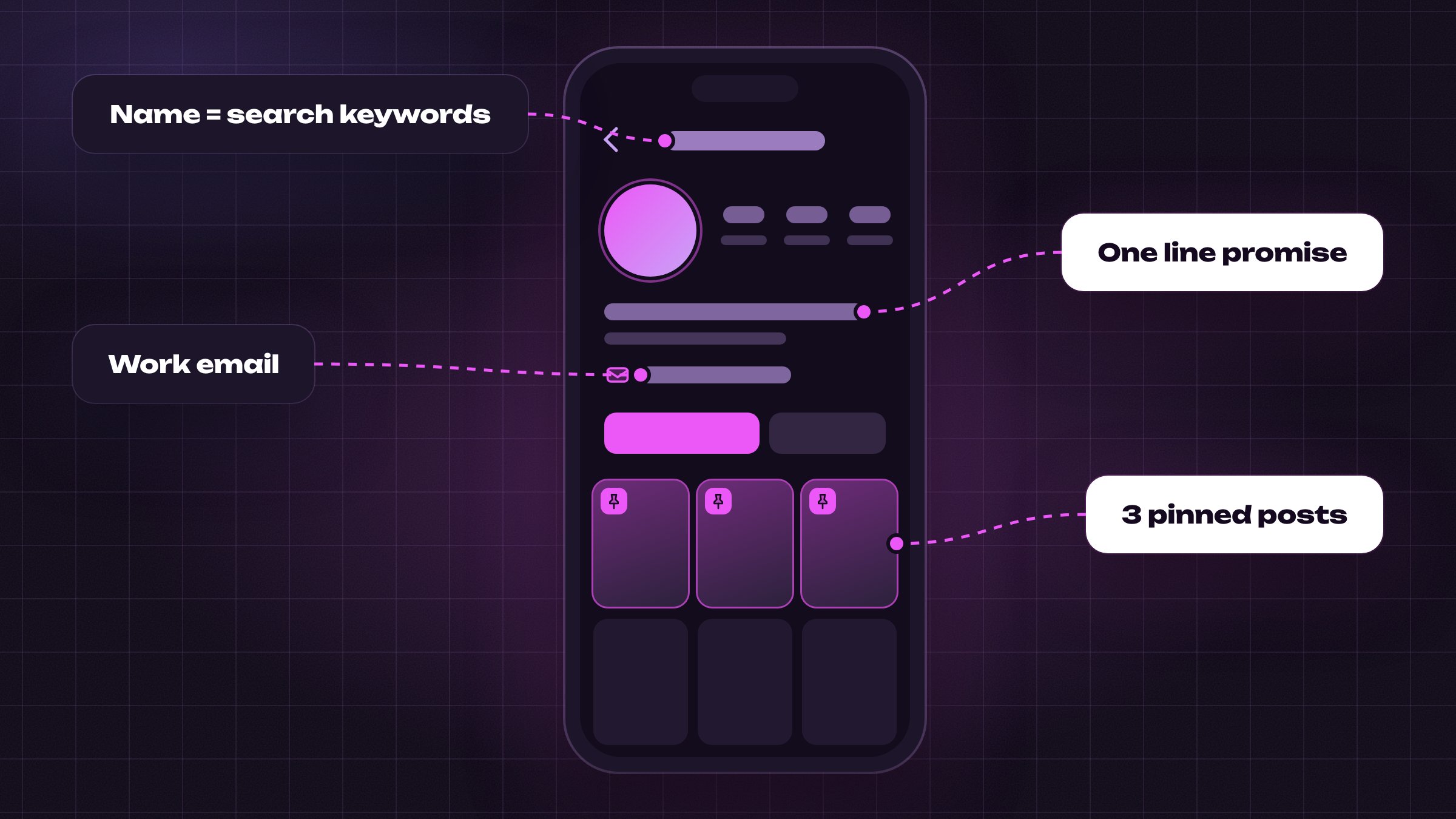
Set the name line to the words people search. A grooming account reads doodle grooming tips.
-
One line of bio that says what the follower gets, then the work email, then one call to action.
-
Three pinned posts once the first videos exist. A start here post, your best example, and a past partnership or a quick win.
TikTok
-
Register a Personal Account: Business accounts are not eligible for the Creator Rewards Program.
-
Use your real name and date of birth, 18 or older, and register from the country whose audience you want paid for.
-
Open TikTok Studio after signing up. The program tile shows even before 10,000 followers.
-
Warm the account for 5 days: watch and like videos in your topic, follow a few accounts, post nothing. If it still blocks follows on day 5, post anyway.
-
Never put a paid link in a fresh TikTok bio, because it triggers a manual review; point the bio at Instagram or Telegram and keep the money links there.
Brands that cannot find your email do not chase you.
A Personal TikTok account, a separate Google account and a work email in every bio, all before the first post.
Step 3: Set up the stack before video one
Six things stand between an idea and a posted video, and four are free. Set them up tonight.
What to set up
-
Scripts and names: ChatGPT or Claude, about $20 a month, or the Text box on the video canvas in Step 5 for 1 credit a set. Either writes the 20 scripts, the channel description and the captions.
-
Video: one tool for the frame, the motion and the voice, $15 a month to start and $47 for the 15 post test. It gets its own step below.
-
Voice: your own, recorded on the phone in a wardrobe full of clothes, free and impossible to copy. Or one AI voice you pick once and keep.
-
Captions: free inside TikTok, or CapCut, iMovie or DaVinci Resolve. Pick one and stop comparing.
-
A topic bank: a Google Doc or Notion page with 15 video topics before the first post; most people run dry at 12.
-
One affiliate account before video one: Amazon Associates is free, and the link goes into the description from the first video.
What you do not need
-
A scheduler: I post by hand in month 1, from the phone.
-
Thumbnails for vertical video: the first frame is the thumbnail.
-
A microphone or a camera.
All of this is set up once and left alone. You open the video tool every working day, and the money depends on it.
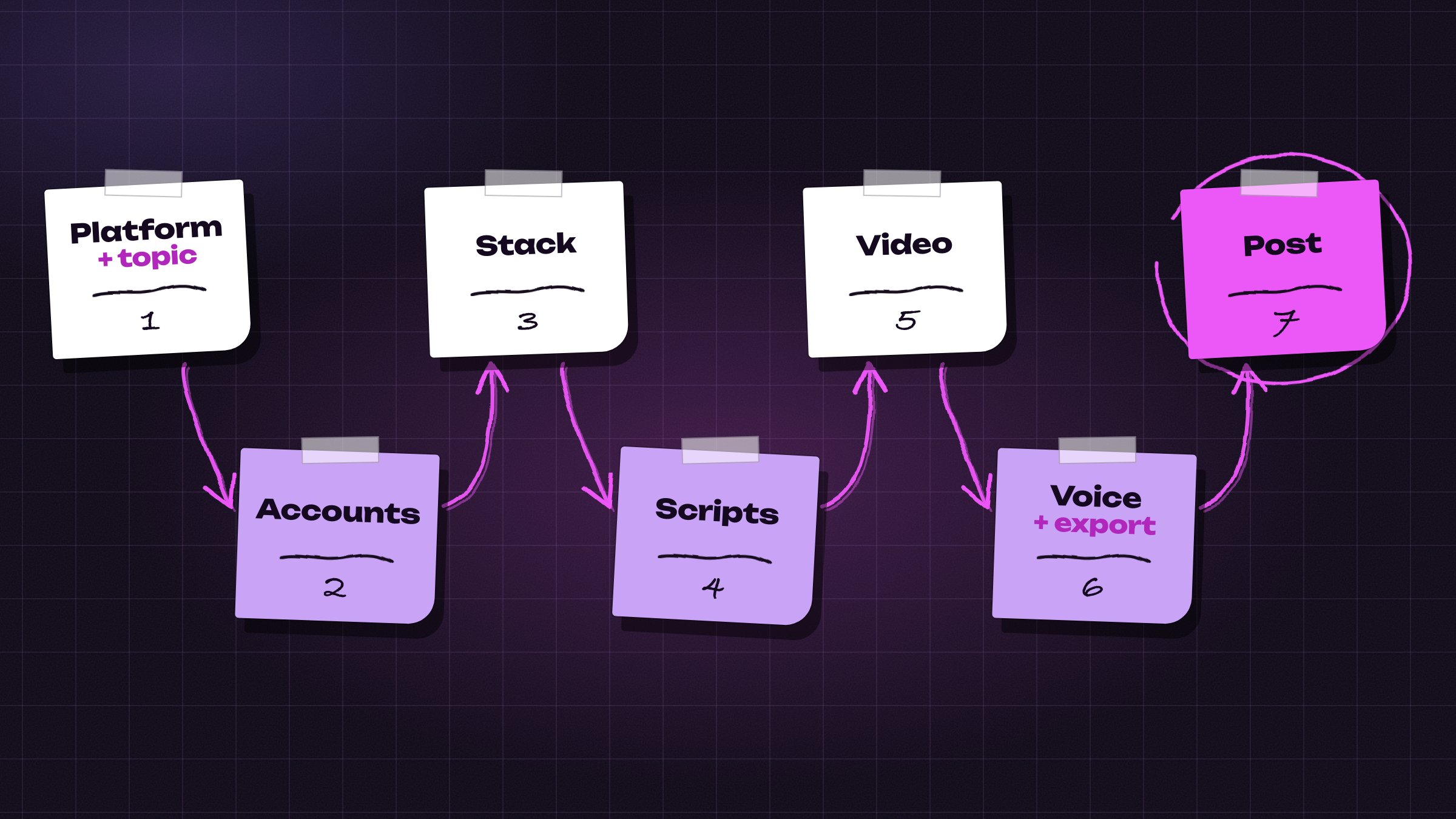
Seven steps, from the platform and topic to the first post.
One tool for scripts, one affiliate account and 15 topics in a document: the stack is ready.
Step 4: Write 20 scripts in one evening
A video that gets skipped in 2 seconds earns nothing, and nobody knows in advance which opening will work.
Feed the model, do not ask it
Scripts that fail come from write me a script about fasting. The ones that work name the title, who watches, the outlier from Step 1, your angle, the sources, and the one answer the viewer leaves with.
Before the 20 lines, find one video in your topic at 10 times its channel's usual views. Copy its shape, the first frame and the first line, and put your own subject inside.
20 scripts, one prompt
Paste this into ChatGPT or Claude and swap the product or topic in the brackets:
Line 1 from my run, word for word:
Read each line out loud before you keep it. A line you stumble on, the voice model stumbles on too.
Why 20 and not one
A hook, the opening line on screen, is 6 words, and the first 2 seconds decide whether the viewer stays. 20 lines cost the same as one, and when line 7 wins, the next 20 copy its shape.
10 hooks that keep working
Paste them into the prompt above as examples, or swap your product into the blanks:
On screen the hook is two lines at most, the topic word in one colour, in the middle or the top third of the frame. Never the bottom, where the caption bar covers it.
Three lines to read your numbers later. Nobody clicks: the title or the first frame is wrong. They click and leave: the hook or the script is wrong. They click and stay: make more of exactly that.
A page of scripts earns nothing. The next step, in Picsart Flow, turns them into the files the feed ranks and the brands pay for.
Write 20 openings in one evening and let the feed pick the winner.
Step 5: Make the video for about a dollar
Why I moved to one canvas
I built this step out of separate tools first, and it fell apart in a week: four subscriptions, four logins, one file dragged between tabs, four queues for a single clip.
Picsart Flow is the page I moved to. Every part of the video is a box on one canvas, words, frame, motion, voice, stitch, joined by lines you draw and paid from one balance.
Why this one and not the others
-
One page: script, frame, motion, voice and stitch are neighbouring boxes on one balance.
-
One list: the newest model of each kind waits in the same picker, nothing compared across sites.
-
Templates: a finished canvas from the gallery clones into your projects and the original stays put.
-
Button price: the credit cost is printed on the run button and changes with length and resolution.
-
Failed take: a render that dies comes back to the balance as a refunded line.
-
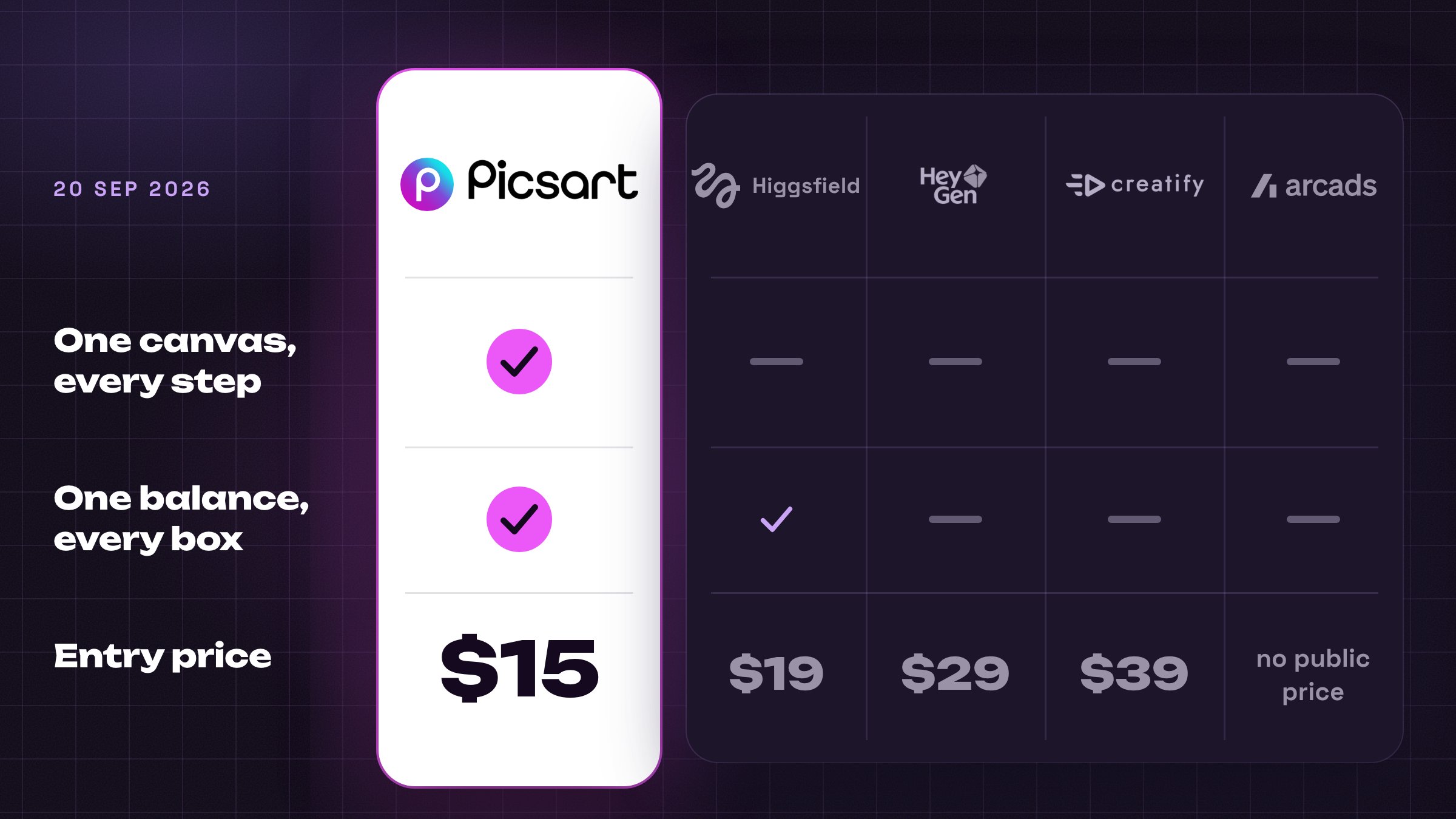
Entry price: $15 a month, against about $100 for four rival tools that cover parts of it.
Runway costs less if video is the only box you ever open, and its free credits do not expire.
Which plan to take
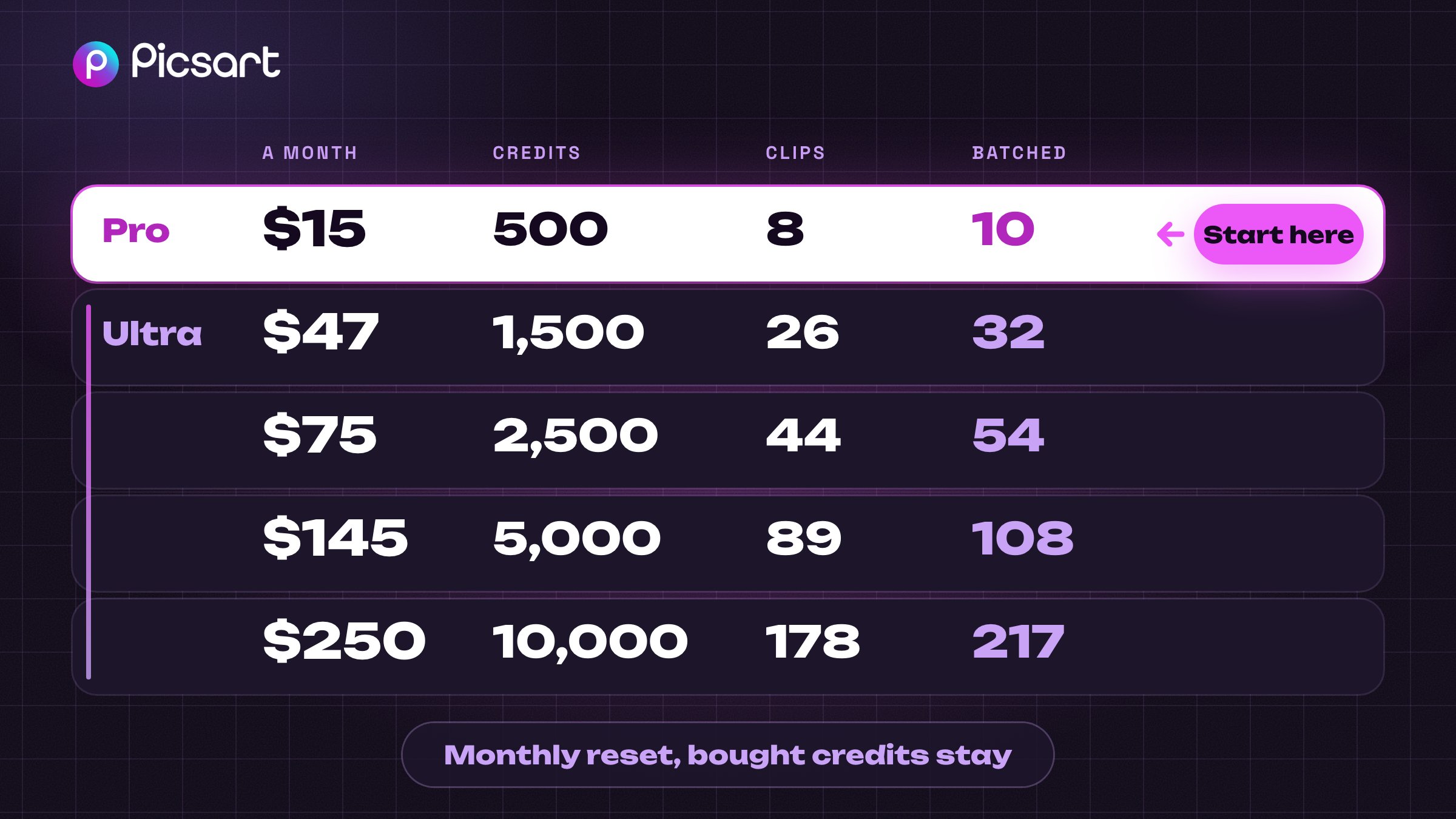
Start on Pro at $15. That is 500 credits, or 7 to 9 finished clips, enough to see whether your format holds.
Move up when posting turns daily. The 15 post test fits Ultra at $47, a clip every weekday the $75 tier.
Subscription credits reset each billing month. A top up pack does not, and the balance pill sells it.
Skip the long takes at full resolution for now. One costs more than a whole entry month.
Where to click first
Sign up on picsart.com with an email or one Google click, no card at this step.
-
Sign up on picsart.com with an email or one Google click, no card at this step.
-
You land in Create, where the AI tools sit next to the photo editor.
-
Press Create new workflow on picsart.com/create/workflows and an empty canvas opens.
-
For a running start, open Featured and press Use this template on a finished canvas.
-
Your credit balance is the pill in the top right corner; clicking it sells more.
-
A finished file waits inside its own box, the canvas itself in My projects.
Each model on it is the newest of its kind. GPT-6 Astra or Claude Fable 5.1 for the words, GPT Image 2.5 Sunburst for the frame, Seedance 2.5 for the motion, ElevenLabs for the voice.
-
Price: every button shows what the box will cost.
-
Batch: five takes of one script at once, for less than five singles.
-
Templates: a gallery of finished canvases from other creators; Use this template clones one into your account, you swap the product and press Run.
-
Refund: a failed take comes back as a credit log line.
This step decides whether the channel earns. The video is the only thing a platform grades, and the only thing a brand pays for.
One subscription instead of a stack, $15 a month at the entry level.
It is the cheapest way I know to make that video well and often, so I pay for it every month.
Six words the page uses
-
UGC: a video that looks shot by a customer on a phone.
-
Canvas: the page the boxes are on.
-
Box: one job on the canvas, a picture, a clip, a voice.
-
Wire: the line you drag from one box into the next.
-
Take, or render: one output of a box, and a second press is a second take.
-
Credit: the unit every button prices in, about 3 cents.
Two references, one take
My finished canvas is shared at https://picsart.go.link/7podC. Open it next to this page.
Right click the empty space, add a Text box and paste the 20 scripts from Step 4 into it.
To write them here instead, click the model name at the top of the panel and pick Claude Fable 5.1; the button asks a single credit for all 20.
Leave this box wired to nothing. Wired into a picture box, it pushes all 20 scripts into that picture, so I copy one script out by hand.
Picture first
Right click again and pick Image, a box of its own. In the model list pick GPT Image 2.5 Sunburst, the strongest image model on it.
It draws the sharpest frame on the list and keeps the face you described.
This picture is the person only, nothing in her hands. Mine, word for word:
Under a minute later the picture is there. On an earlier canvas the balance dropped by more than the button promised, so I write the balance down after every click.
For a heroine who has to look the same in every clip I add one reference picture of her on Nanobanana Pro, set to vertical. One clip needs only the frame.
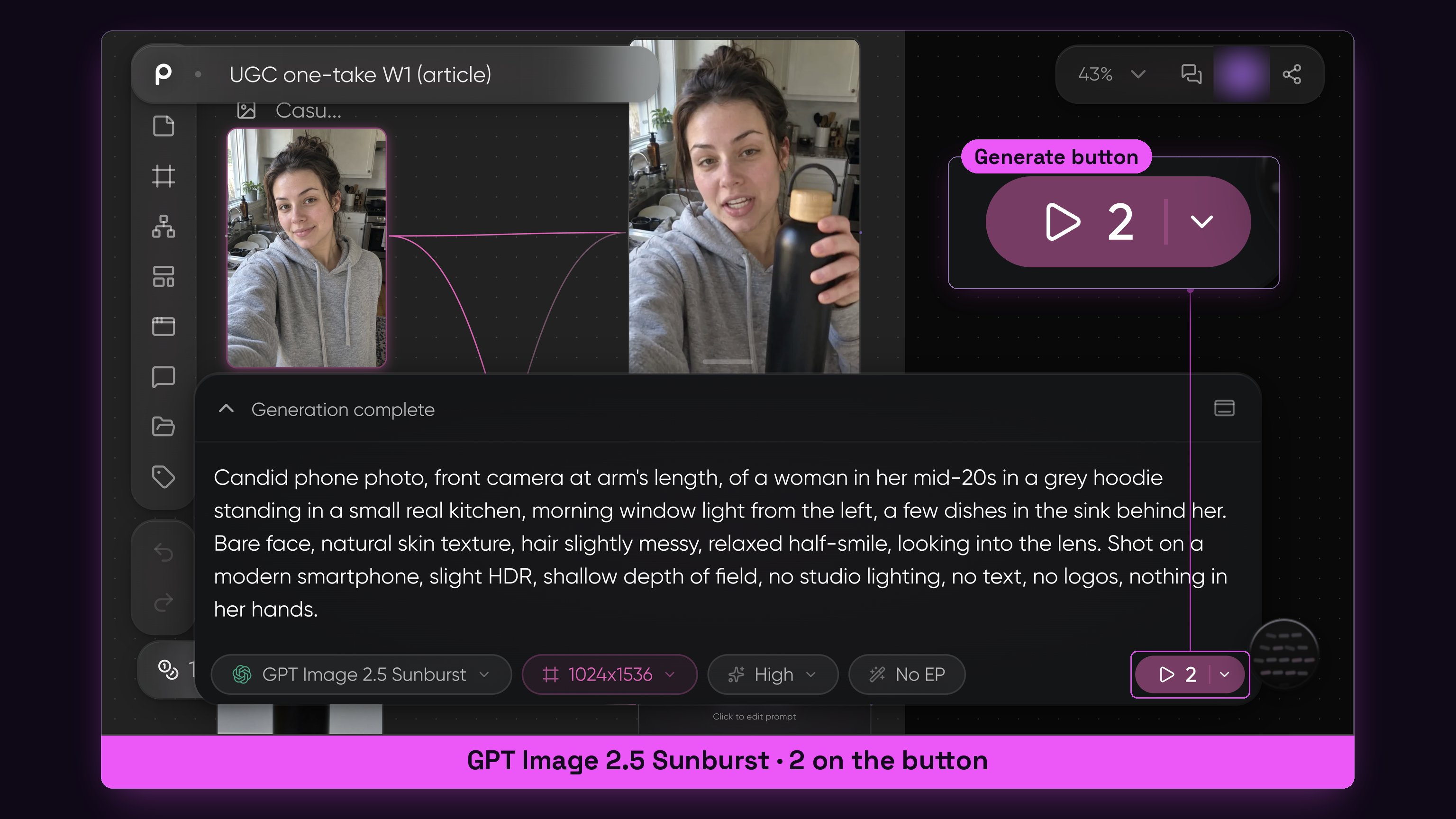
Image box, with the price of the frame on the button.
Then the product photo
Your product comes in as a real photo. Add a second Image box and upload it there instead of writing a prompt: plain background, even light, readable label.
Described in words, the model invents its own packaging. Given the photo, it keeps the shape, the cap and the label in every frame.
Make it move
Drag from the dot on the frame box into empty space and pick Video, then drag the dot of the product photo into the same box.
Set the model to Seedance 2.5, the newest on the list, and one take runs up to half a minute with sound.
Two small pictures now appear above the prompt field, the person and the bottle, and the small label next to the length reads Reference instead of Frame.
Now the box knows who is in the video and which product is in her hand.
Set it vertical, 8 seconds, Audio on, 720p for the feed. The button reads 56, about a dollar and a half of credits. The prompt is a short brief in blocks. Mine for the hook:
A few minutes later the clip plays inside the box, sound included, her own voice on the lines.
A full take is the same brief with more beats, in a second Video box under the first.
Three things the blocks do:
-
References: say which picture is the person and which is the product, or the model redraws one of them.
-
Beats: every few seconds gets one action and one spoken line, and every claim is paired with the action that proves it.
-
Audio and the do not list: name the room sound, write no music, and end on no scene changes, no exaggerated motion, a line I copied from a finished canvas in the templates gallery.
Set the length a touch longer than the lines need; a voice that slows down to fill the clip means the take is too long. Regenerate a couple of seconds shorter.
Draft at 480p, ship at 720p
Before the feed sees anything I render the hook at 480p. Same box, one click on the resolution label, about a dollar a try.
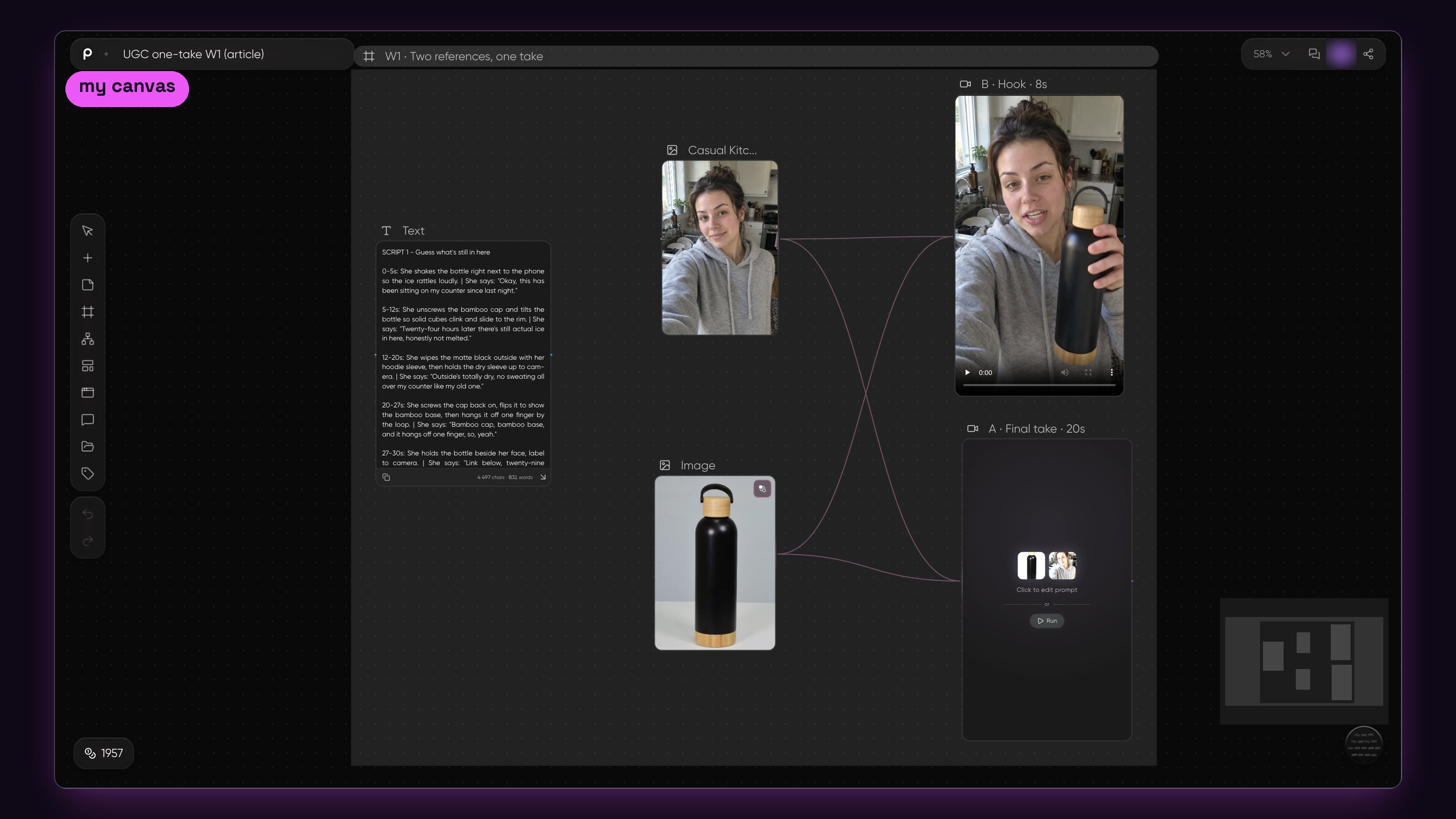
My canvas: the person and the product photo wired into two Video boxes, the hook and the full take.
Cheap lane, hero lane
The cheap lane is the feed, about a dollar a clip. The hero lane is the brand folder, a few dollars a clip, and every button is listed further down.
Same frame, two boxes. The same frame and prompt went through Seedance 2.5 at feed resolution and Veo 3.1 at full resolution with sound. The cheap one went to the feed, the polished one to the brand folder.
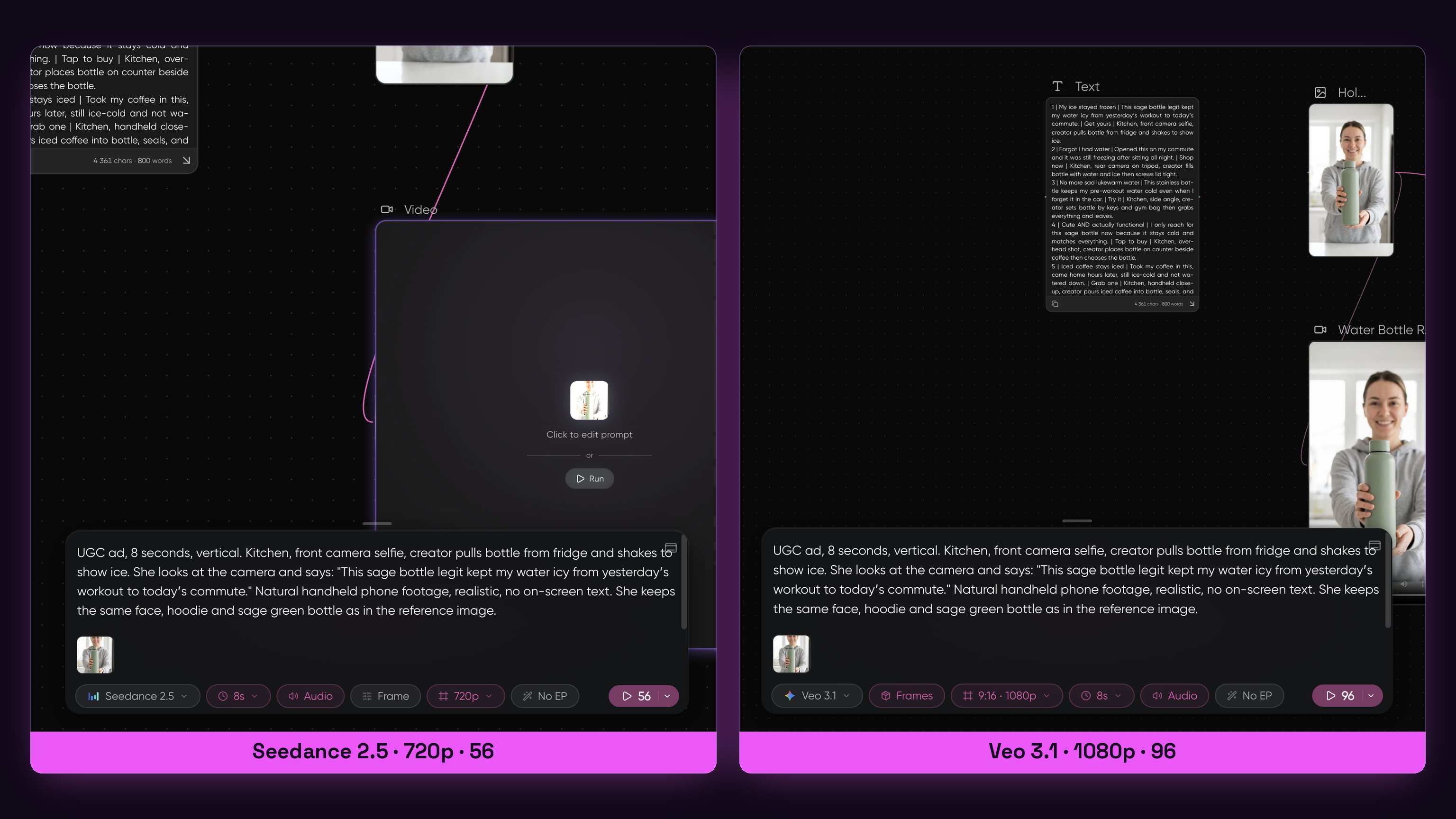
Same frame, same prompt: Seedance 2.5 on the left, Veo 3.1 on the right, the price on each button.
Five at once
A small arrow next to Generate opens Generate options. Set Variations to five.
Press Generate, and the five clips render side by side in about five minutes. I run it on the hook box, never on the full take.
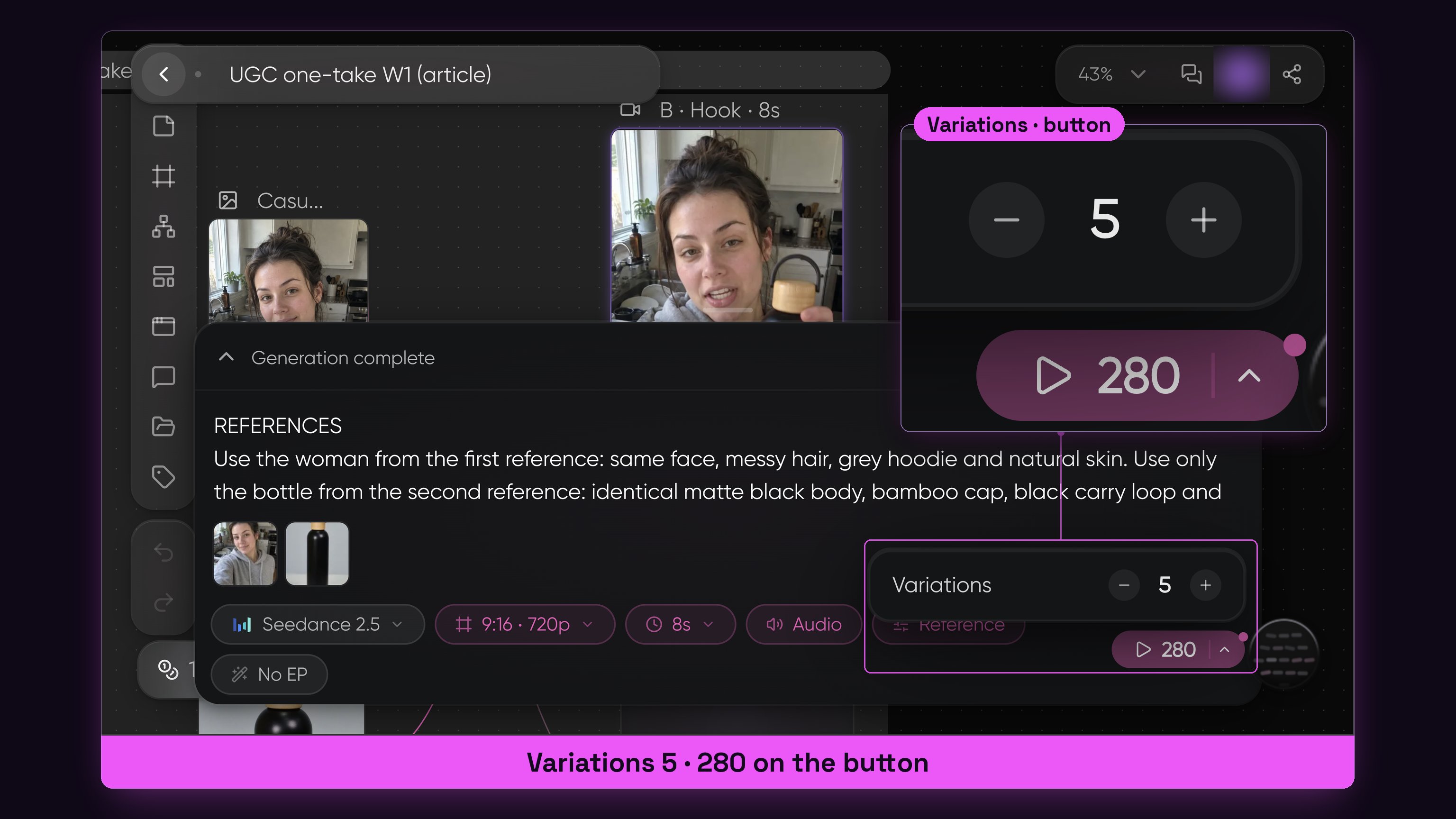
Variations set to five, and the button showing the price of the whole batch.
Variations set to five, and the button showing the price of all five.
One take failed
My first Seedance run came back red: Workflow execution failed with unknown reason.
A line in the credit log later showed it marked Refunded, and the counter on the page did not move that evening. I pressed Generate again on that one box, nothing else on the canvas moved.
Budget one failed take per run anyway.
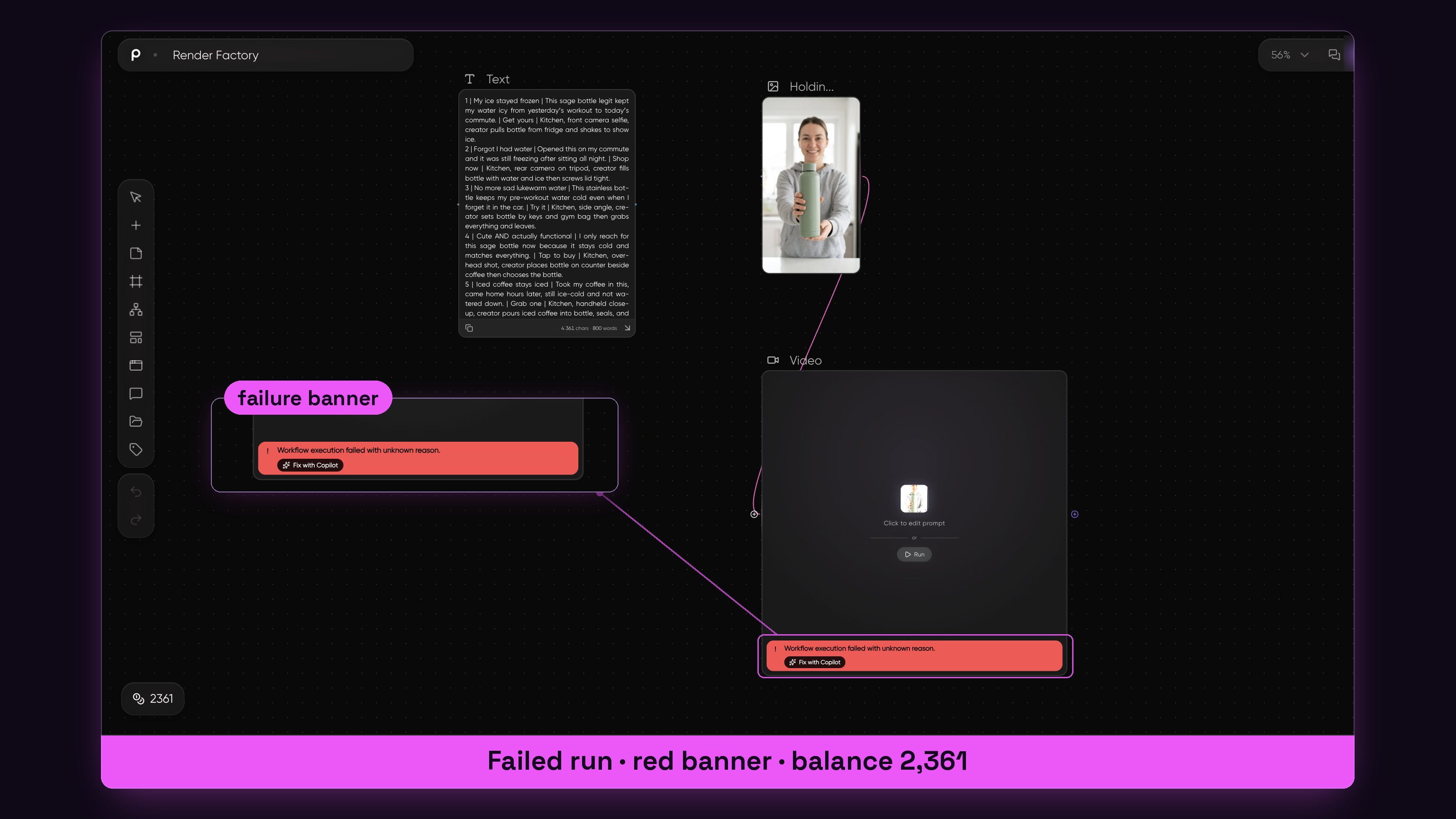
The red banner on the Seedance box after the failed run.
Red banner on the Seedance box after the failed run.
The prompt field adds to what is already there. Select all, delete, then paste.
Two canvases I cloned from the gallery
Two finished canvases from the gallery, cloned with Use this template, opened next to mine with every box, prompt and wire in place.
Not new renders. Both came with the makers' example videos in their Video boxes. The prompts I wrote into them have not been run yet.
Solar Bloom is a product film: a product photo, a logo, a brief and a scene bible go in, four scene frames and four short reveals of the bottle come out. I keep it for the client who wants the product alone.
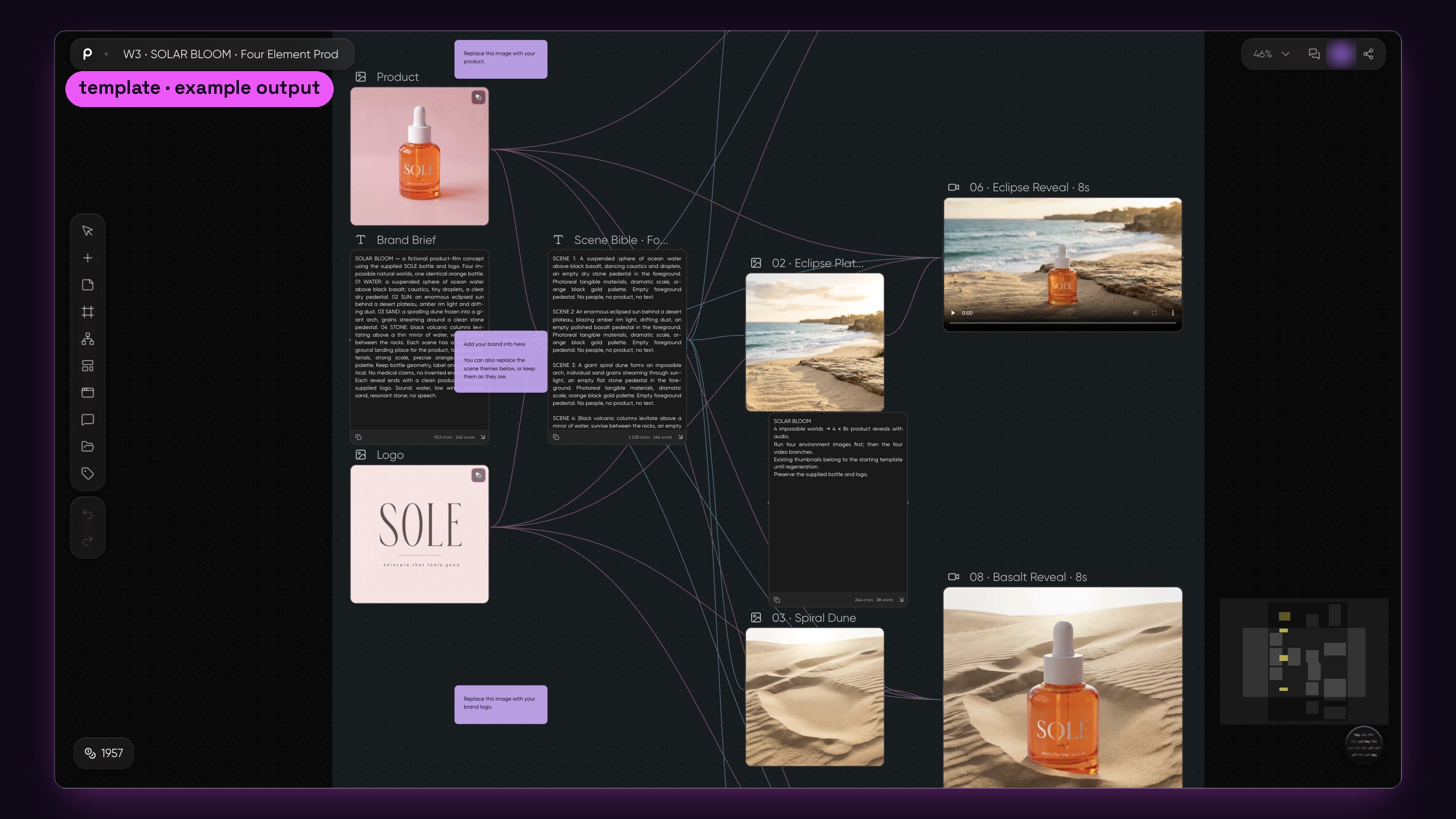
Solar Bloom as it landed in my account: product, logo, the brief and the scene bible, four scenes, four reveals, the example films already in the boxes.
Solar Bloom as it opened in my account: product, logo, the brief and the scene bible, four scenes, four reveals, the example films already in the boxes.
My copy of Solar Bloom is shared at https://picsart.go.link/5xGi1.
The same canvas on my screen: the brief and the scene bible on the left, the four scene frames, the reveals playing in their boxes.
Same canvas on my screen: the brief and the scene bible on the left, the four scene frames, the reveals playing in their boxes.
The Garden That Stole Time is a short story film: a character portrait, a wardrobe frame, a story in six beats and a director's note go in, one fantasy scene with sound comes out. The entertainment accounts in Who is already doing this post this shape every day.
My copy of the garden canvas is shared at https://picsart.go.link/i1xVv.
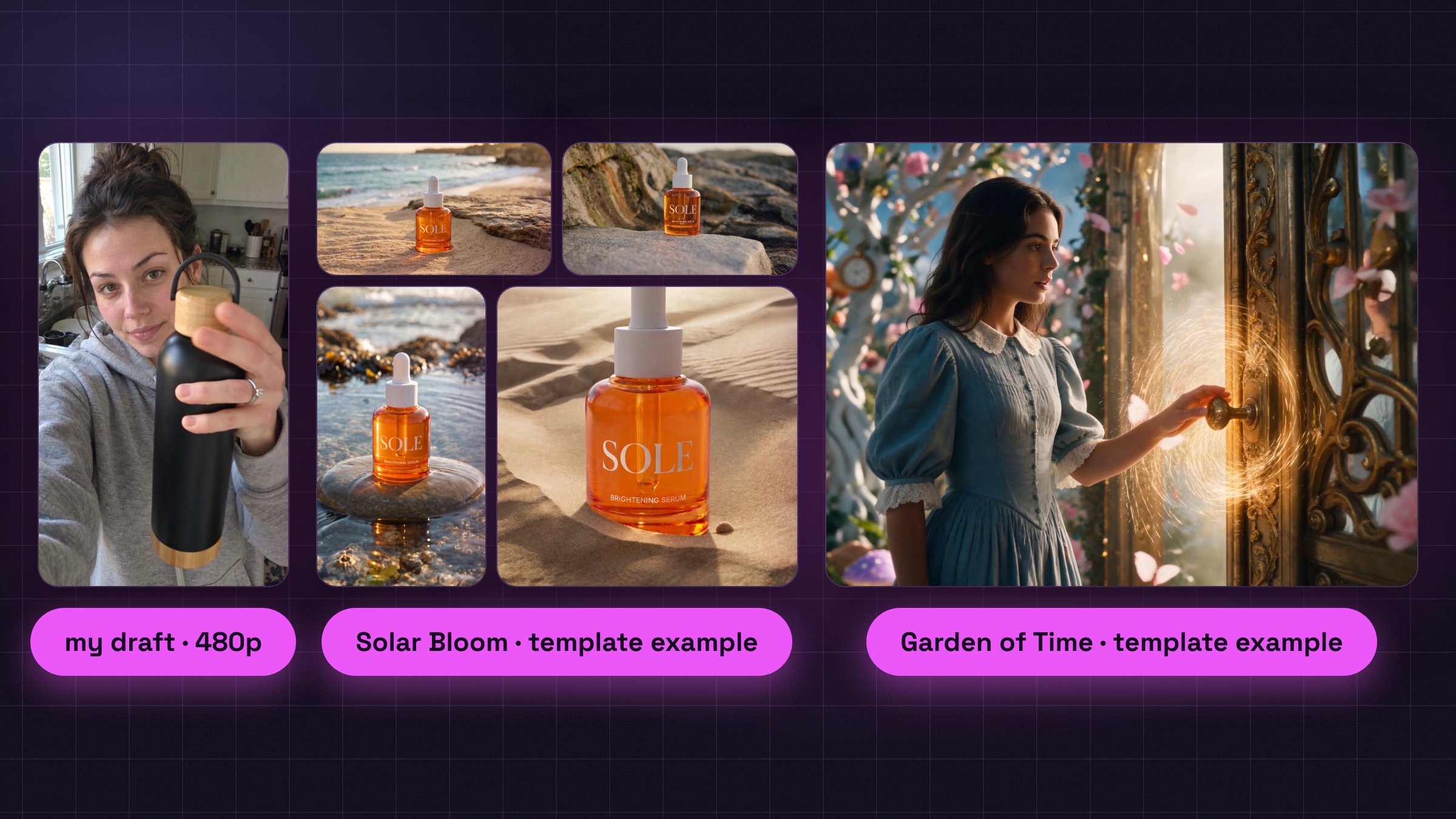
Frames from the six clips on the three canvases: my hook draft, the four Solar Bloom reveals and the garden scene, the templates' own example output.
One of Solar Bloom's four reveals, the template's own example output, as it sat in the box when I cloned it.
Your canvas is built, a draft try costs about a dollar, and the first clip can render today.
If the empty page stops you, press Use this template on one of the two above.
Draft every hook at 480p, ship the winner at 720p, and set Variations to five on the script that won.
Step 6: Voice, captions and export
Seedance 2.5 renders the spoken line inside the clip, so a talking clip from Step 5 needs no voice box. The Audio box is for a voice over with nobody on screen, or for a brand file.
Add a voice
For one AI voice, right click, pick Audio, and set the box to ElevenLabs, a few credits for a spoken line.
That panel says Prompt not available for this node. Words come from a wired box: add a Text box, choose Type manually, paste the line and drag its dot into the Audio box.
Write the spoken line into the video prompt too, even with the Audio box connected; otherwise the model picks its own sound for the mouth.
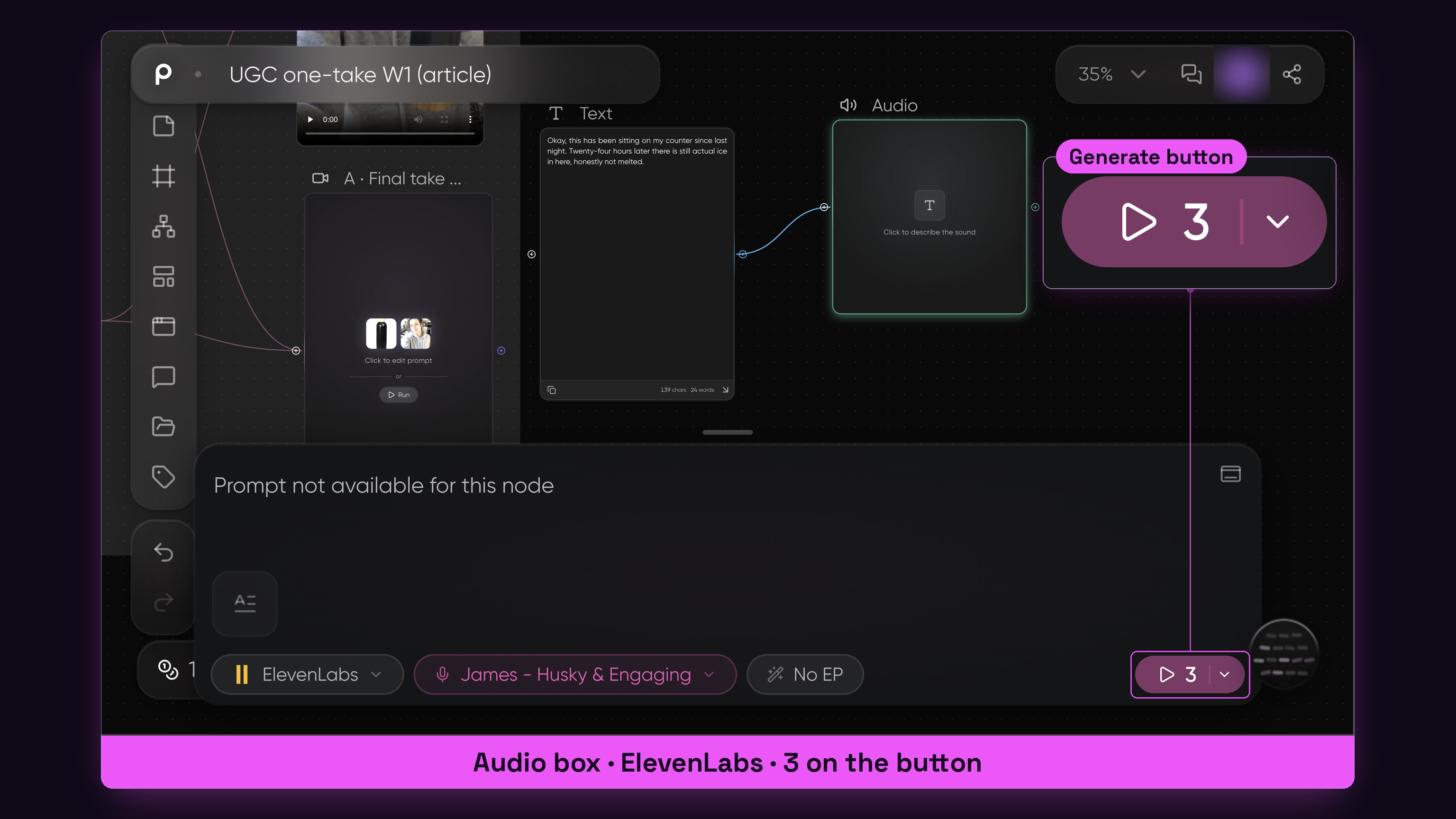
Audio box with the Text box wired in, and the price of one spoken line on the button.
Captions
Burn the spoken line in as captions, in TikTok's own caption tool or in CapCut from Step 3. On my channel that is about 15 percent more watch time.
The first 3 seconds run with the sound off. The hook is text on screen, the caption is the voice, and the sound is a bonus for the people who tap.
Export
A clip renders vertical straight from the vertical frame, so there is no resize step. Hover the finished clip and download it.
-
Name the file by script number and platform.
-
Tick the AI label: on YouTube the altered or synthetic content box in the uploader, on TikTok the AI toggle. It costs no reach, and skipping it where required drops an account from a payout program.
-
Feed clips ship at 720p as they leave the box. The 1080p line is for the brand file only: 1080p at 30 fps, never 4K, because TikTok cannot process 4K and marks the video low quality.
-
No licensed song on a video of a minute, or it is flagged unoriginal and muted.
-
No rounded frame around the clip and no split screen template; the platforms file both as low quality.
-
Move the files to the phone and post from the apps.
Burn the captions in, tick the AI label and post the 720p clip, and keep 1080p for the brand file.
Step 7: Post 15 videos before you judge anything
The first month is the audition. A platform decides what your account is inside the first 30 days, on what you post.
Cadence on one platform
-
TikTok: 1 to 2 videos a day at the same two hours; when one moves, post the second the same day. Keep the first videos under a minute until the program accepts you, then go over a minute so the views count.
-
Instagram: at least one Reel a day in month 1. Messy is fine. 7 to 15 seconds for reach, 30 seconds or longer for saves.
-
YouTube: one Short a day at the same time, 30 to 50 seconds, or 2 long videos a week on the same upload day.
15 videos, then judge
Take the 15 topics from Step 3, make all 15 videos, and post them on a post, skip, post, skip rhythm over 30 days. All 15 go out, whatever the first five do.
Either the channel starts to move, and you make more of what moved.
Or nothing moves, and you go back to the five causes: the topic, the video topics, the packaging, the length, or the account itself.
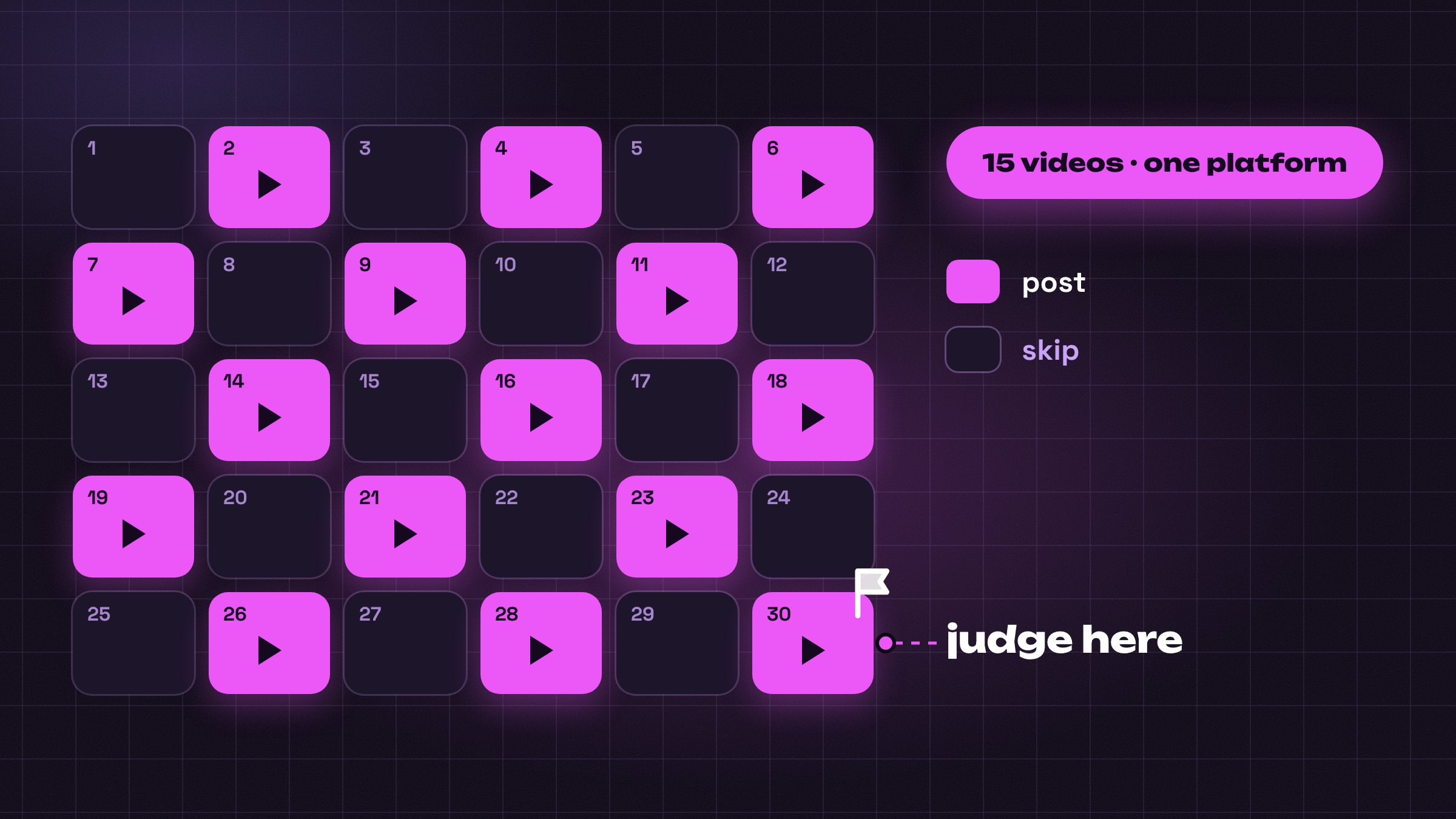
Make the videos 1.5 times as long as the competitors from Step 1.
What to read, three numbers
-
YouTube: click-through above 6 percent, and how many people are still there at second 30.
-
Instagram: watch time, saves and shares. Average posts get 3 to 5 seconds, one save in 30 and 2 percent shares. Posts that travel get 36 seconds, one save in 10 and 5 to 10 percent shares.
-
TikTok: completion rate, and where the audience lives.
Every two weeks, two numbers. Retention above 70 percent means the feed pushes the video to new people; the click-through bar above tells you whether the hook works.
15 videos on one platform, then judgement; 6 videos are not data.
Month 1, 2 and 3: the plan
90 days is the unit I plan in, and each month has one job.
Month 1, get it out
-
Days 1 to 7: Steps 1 to 4, the accounts, the stack, the 15 topics and the 20 scripts.
-
Days 8 to 30: the 15 video test on the one platform, the affiliate link in the description from video 1, every comment answered.
-
A TikTok test video with 0 views means the account is not warm yet. Wait a day and post again.
Month 2, narrow and double
-
Keep the two formats that moved and drop the rest: one genre, one story type, one look.
-
Add the second platform. One video goes to two platforms, but never as one identical file: change the on-screen hook, the first second and the caption, because each platform scores how original a post is.
-
Put the TikTok bio link in after video 10. Apply to the program at 15 public videos of 60 seconds or more.
-
Pull the first 20 brand names from Meta's Ad Library, the public list of running ads explained in part 5, and post 3 samples publicly.
Month 3, cut the bottom
-
Open the insights and sort by follows and shares. Anything at 400 and up against a usual 100 to 200 gets repeated; a format that is low every time gets stopped.
-
Add the third platform and fix the batch day.
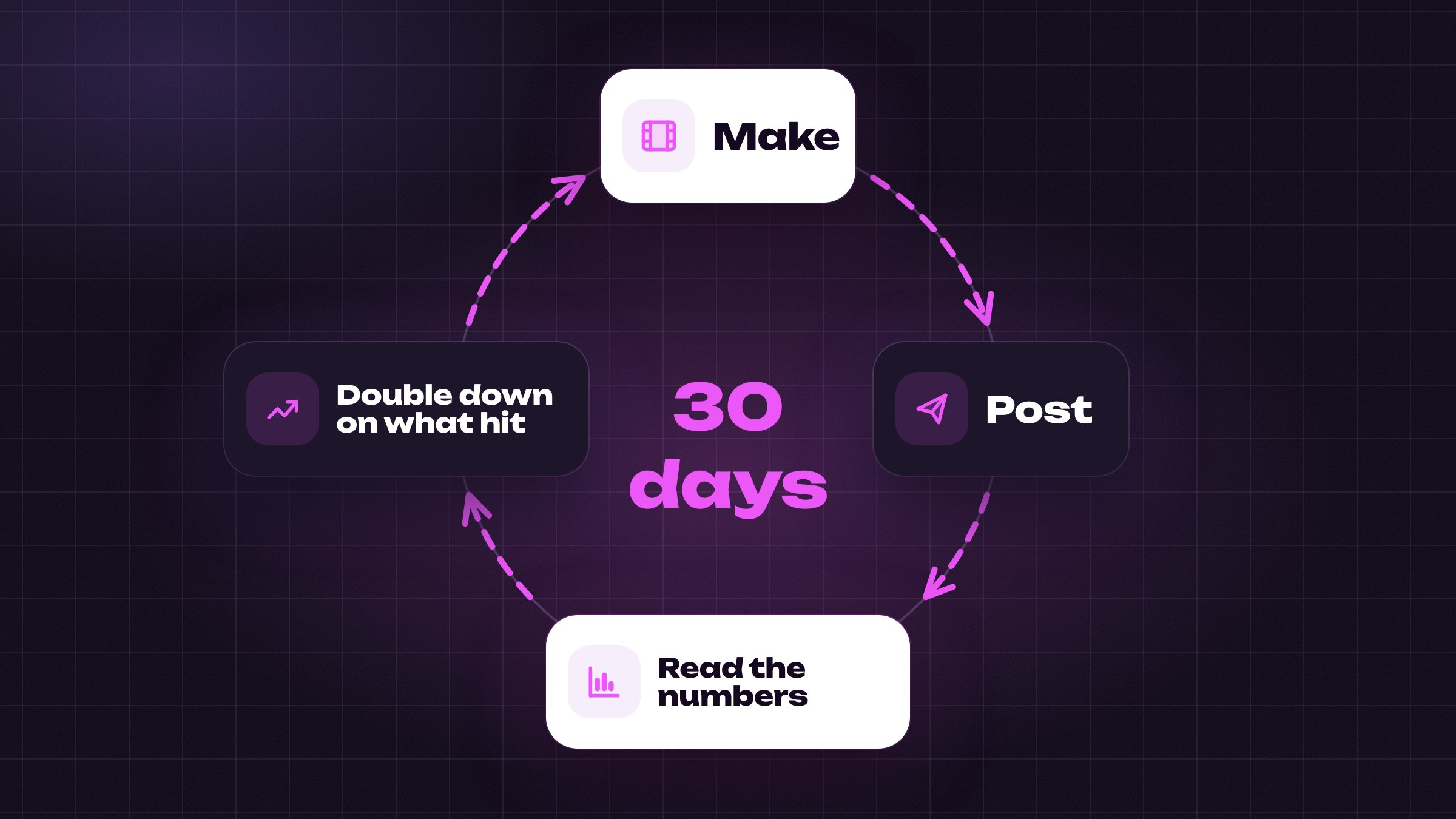
What the first months look like
A first month I watched closely: 14 long videos, 103 subscribers, 4,000 views, $94 from affiliate links, and the one video that moved did it on day 21.
My own note from a first channel: if you would quit at video 8, it started moving at video 24.
Your first 15 posts decide what the account is; the first one only starts the count. Put it up this week.
Month 1 is messy and on one platform, month 2 narrows and adds the second, month 3 cuts the bottom.
Money on your own channel: before and after the thresholds
A platform program is the second payment. The first needs no permission, and one channel builder I follow made $23,000 before YouTube paid him.
Before the thresholds
-
Affiliate link: a channel getting any views, an offer that fits the audience, and a link in the description from video 1. Send people to a simple landing page first.
-
A digital product in the bio: educational accounts sell a $9, $27 or $47 guide from week one.
-
TikTok Shop: at 5,000 followers a Shop button appears, and you earn a commission on each sale from 7 to 10 second videos of the product. A first honest 30 day try paid about $200.
-
Clipping campaigns: brands and creators pay $1 to $3 per 1,000 views for short clips posted from your account, no follower floor, capped around $500 to $1,000 a video.
$23,000 from affiliate links on a channel with no face on camera.
Thresholds, read on 19 September 2026
YouTube. 1,000 subscribers, plus either 4,000 hours watched on long videos in 12 months or 10 million Shorts views in 90 days. A smaller door at 500 subscribers and 3 million Shorts views opens memberships and tips. AdSense through Studio, a review of about a month.
TikTok. A Personal account, 18 or older, a listed country, 10,000 followers and 100,000 views in 30 days, videos of a minute or more posted after acceptance. No duets, no stitches, no copies. Five unoriginal strikes in a month remove the account.
Instagram. No payout per view. The bonus is invite only and pays about 6 cents per 1,000; subscriptions open at 10,000 followers.
What a thousand views pay
TikTok's creator program pays $0.40 to $1.20 per 1,000 qualified views, the views TikTok agrees to count.
YouTube Shorts pay $0.03 to $0.07 per 1,000, and a US audience lifts that.
Long YouTube videos pay $3 to $15 per 1,000 in most topics with no face on camera. Money, finance and tech pay several times more.
What changes on 1 February 2027
From 1 February 2027 new YouTube applications need 8,000 watch hours or 20 million Shorts views in 90 days, twice today's bar; the 1,000 subscribers stay.
Applications are judged by the rules on the day you apply.
An account that starts this autumn and reaches the numbers before 1 February applies against today's bar; one that starts in spring applies against double.
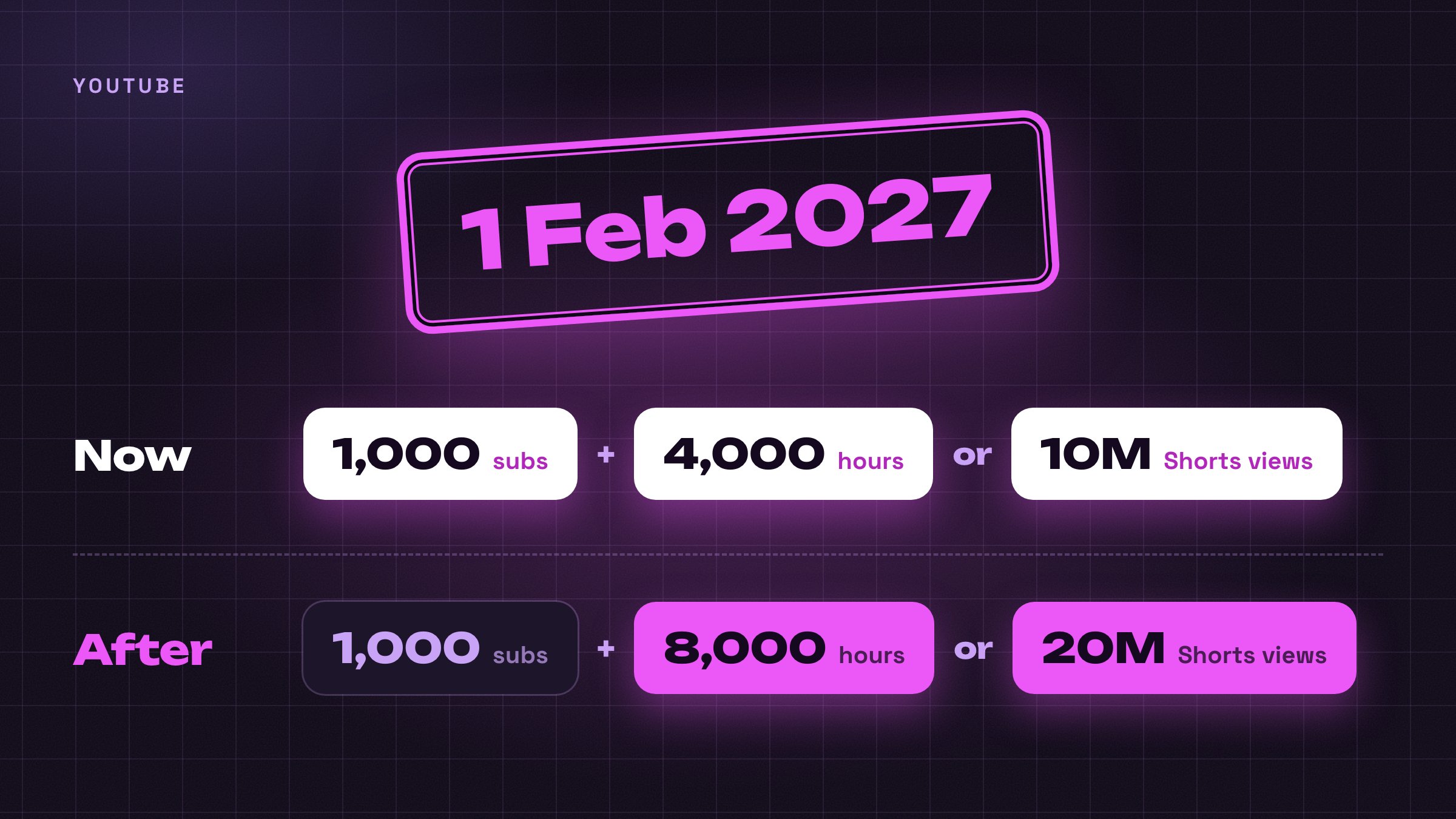
Your link pays from video 1, the platform after the thresholds, and the YouTube application goes in before 1 February 2027.
When brands come: the second stage
Brands buy numbers, and a beginner has none yet. There are two doors, and both open after the channel exists or instead of it.
Door A, on your own channel
One AI character account on X posted its own timeline: started around 13 May, first product sold on day 27, first partnership message on 25 June, first paid promotion on 21 August.
First paid promotion, 14 weeks after the first post.
When they write, or you write first, send numbers: engagement rate, conversion on the last product, views per post. A brand manager I talked to put it bluntly: monetize before the brands pay you, because brands are smart.
Email 100 brands. The first message is short and never asks what their rates are.
Door B, without an audience
Making short ads for brands without a channel is a separate job: apply, pitch, follow up.
Brands already run these. One advertiser I follow wrote on 16 September that his AI ads convert better on Meta than the clips from his human creators, because the model can act and most creators cannot.
-
Portfolio: 5 kinds of video, one each, made in a day: an unboxing, a testimonial with no face needed, a demo, a lifestyle clip, a before and after.
-
Where the brands are: small online shops doing $100,000 to $2 million a year. Meta's Ad Library, a free public page, shows every ad a brand runs and its start date; one running since spring needs new openings.
-
Price ladder: free product or a $5 job for the logo in the portfolio, then $50 to $150 a video, then $300 and up after 5 to 10 jobs. With a portfolio and results behind you the same 30 second video pays $400 to $1,500: skincare $400 to $800, supplements $500 to $1,000, software $600 to $1,500.
Three formats brands pay for, from other creators' public posts: the product ad, the influencer reel and the Short.
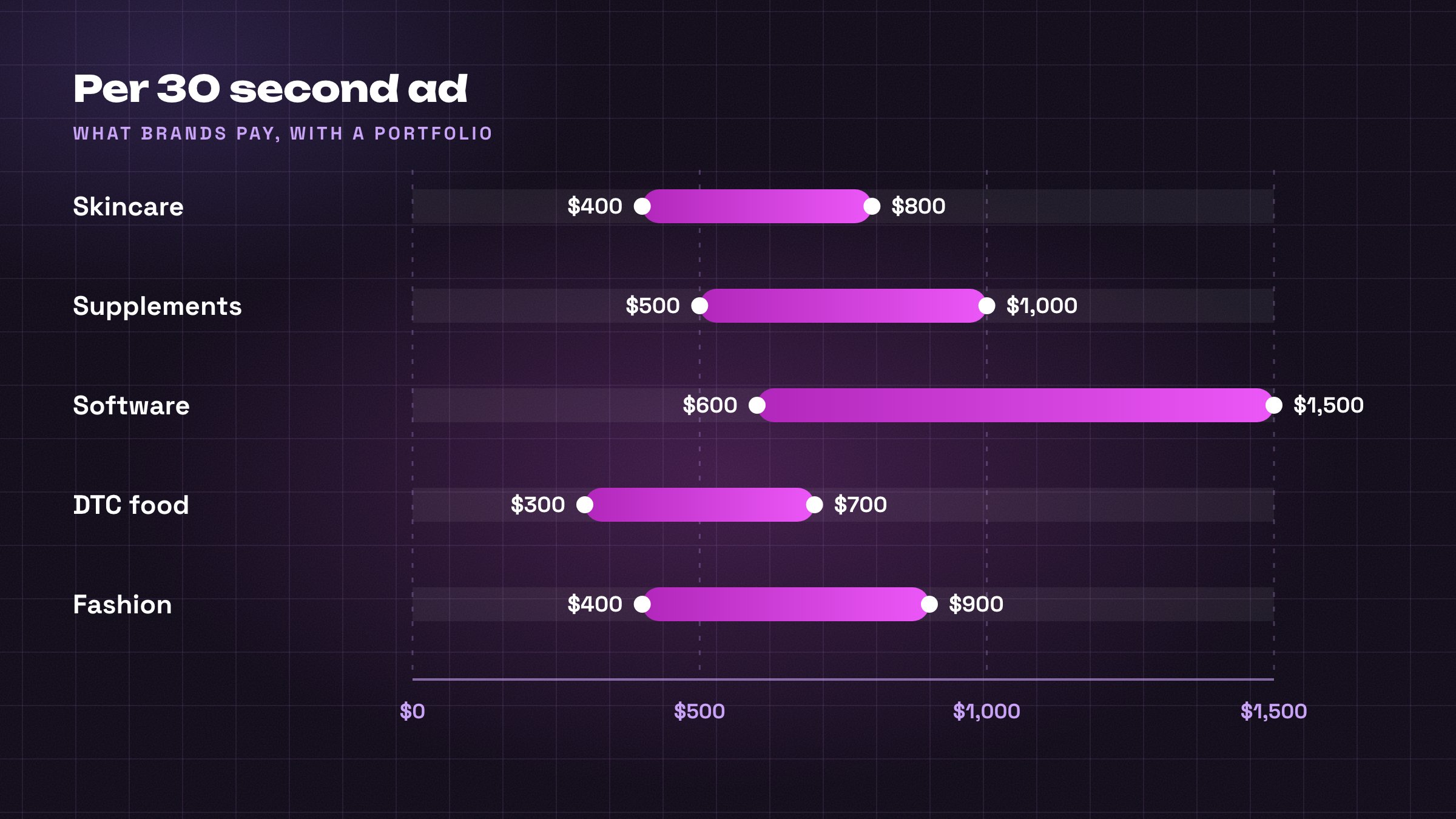
What to send
10 to 20 messages a week, every weekday morning. In my outreach 5 to 15 percent reply and 1 in 3 of those closes, so a month of steady messages brings one to three paying brands.
Each message is one line and 3 finished videos made for their product ahead of time, one style each: product in hand, product in use, a two person clip.
Cost: about $4 of credits for three plain clips, $14 for three polished files, the stitch described below.
When a brand asks for a rate, quote a range where the bottom is the number you are happy with.
Brands also come to you. A builder I know posted his 3 samples publicly and got a request for 50 to 100 videos a month, off a post with a few hundred views.
Making the brand's file
For a brand's ad I add a closing card and stitch it to the voiced clip, on the same canvas. Right click, pick Motion, set it vertical, full resolution, 10 seconds. That box draws the closing screen with the price and a call to action, the line that tells the viewer what to do next.
That button prices a preview first. When the preview plays, a second button appears, Render (10), for the final file.
Add a Video box set to Audio Video Concat; it lays the voice over the clip. Then one set to Video Concat, which joins the voiced clip and the card end to end. Both charge by the second, so the stitch costs a handful of credits.
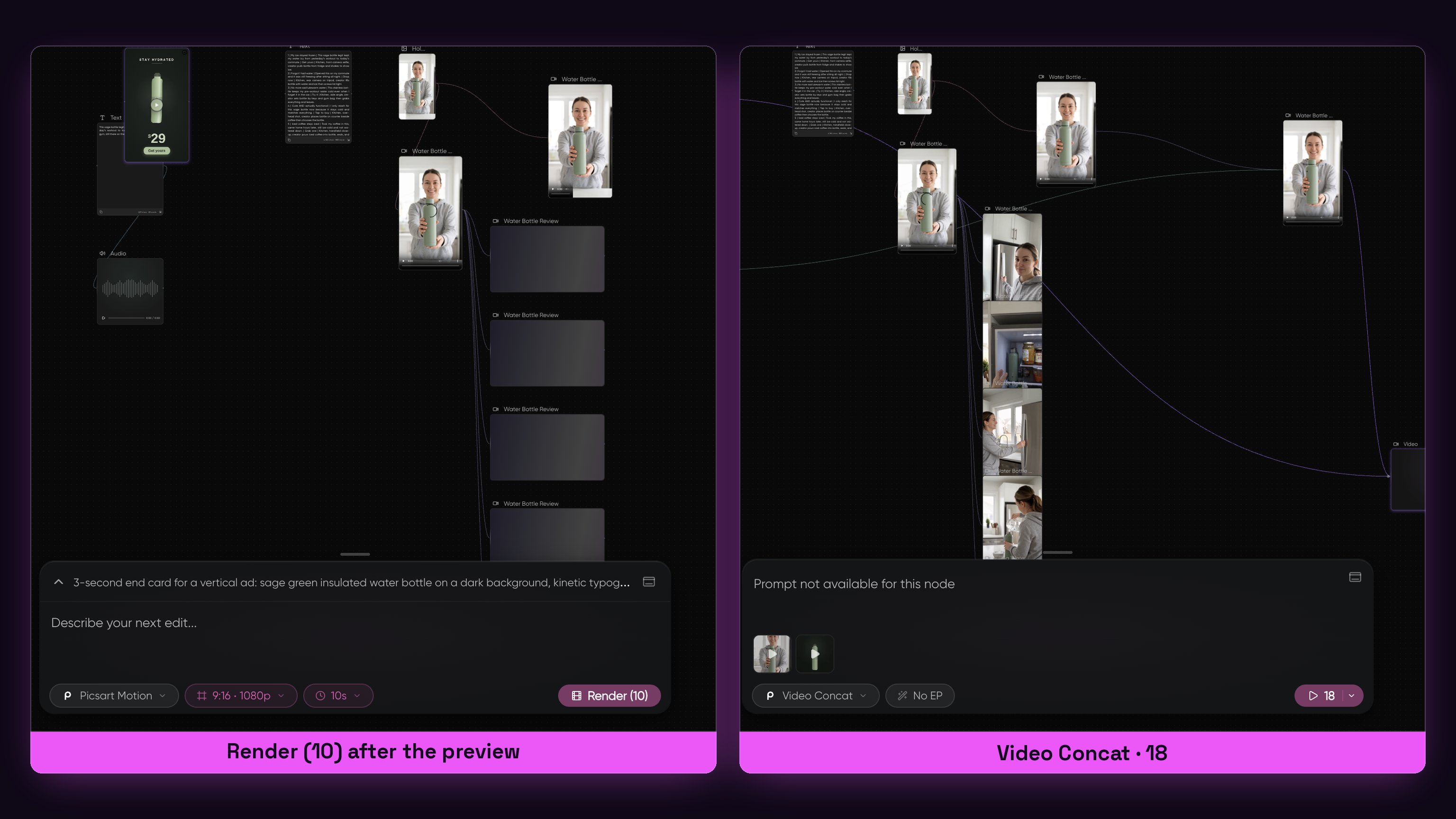
Price and rights
$65 a video is the price at which a brand starts comparing you to a tool.
One builder's number, from a workflow post with 300,000 views: $0.23 a second of finished video, against the $50 a video that used to be the floor.
Usage rights are their own line: 90 days and two channels are in the price, and perpetual worldwide rights never come inside a flat fee.
After the second order ask for the monthly deal: one brand, 8 to 15 videos a month, $2,500 to $8,000 a month. Deliver on time and ask for a testimonial.
Brands come to a channel with numbers; without a channel, brands are a job of 100 emails.
What one run cost me
One evening on 18 September, one product, an empty canvas to 7 finished videos.
-
Scripts: 20 for 1 credit.
-
Frame: 5 on the button, 6 charged. That run used Nanobanana Pro, and today's frame is 2 credits.
-
Motion: 56 for one Seedance clip at 720p and 8 seconds, 96 for one Veo clip at 1080p with sound.
-
Five variations: 280 on the button, 200 charged, 40 a clip.
-
Voice, title card and stitch: 3, then 25 and 10, then 8 and 18 by the second.
-
A failed take: 56, refunded in the credit log.
-
The run: 11 renders, 479 credits, balance 2,424 to 1,945.

Every box and what it charged on 18 September 2026; recheck the buttons before you pay.
Every plan comes to about 3 cents a credit, so that evening cost about $14.
On my own canvas, read on 19 September, the 8 second hook at 480p is 32 credits.
A polished brand file of 18 seconds is 160 credits, about $4.80.
Your month
30 videos for your own channel, made five at a time, is about 1,400 credits, inside the $47 tier.
One at a time they need 1,900, and the tier runs out at video 24.
30 posts a month is a fixed cost. The 1,500 credits renew with the subscription, and the brand invoices come on top of that line.
Ten brand videos cost $14 to $48 to make and $4,000 at the low end to sell.
Five ways this dies
Every channel I watched stop this year stopped for one of five reasons. None of them is the tool.
-
Waiting for the platform: months of posts with no link anywhere, when an affiliate link or a Shop button pays from week one.
-
Someone else's clips or storyline: TikTok removes the account, YouTube judges the channel, label or no label, and one channel lost its program for leaning on reused footage.
-
A topic from a list or a passion with no demand, judged after 6 videos: hobby content with a YouTube account.
-
Every video looks like a different channel, or exactly like the farms: a voice like every other voice, the same rounded frame, a paid link in a fresh bio, generic titles and silence in the comments. One channel's click-through went from 5 to 7 percent after specific titles.
-
Brand work done wrong: rights forever inside a flat fee, no price ever named, a missed deadline, so no repeat order.
Original from the first frame. Your own words, hook and voice, a different layout each time; the platforms have nothing to match that against.
Put a link in the bio in week one and never post the same layout twice.
One subscription against eleven
Everything a month costs, before a single video exists.
Picsart Ultra, one balance for frames, motion, voice, title cards and stitching: $47 a month, 1,500 credits, or Pro at $15 for 500.
Phone and a free posting app: $0.
Total in: $47, or $75 on my tier, and no ChatGPT line: the scripts cost 1 credit on the canvas. Out: the link in the bio and the platform program from 30 posts a month, then the first brand's 10 videos, $4,000 at the low end.
Month one on the entry plan
Month one on Pro: $15 buys 500 credits. That is about 10 clips made five at a time, or 8 one by one. The 15 post test needs Ultra at $47.
Expect $0 to $100 back in month one from the link in the bio. The platform pays from month 3 to 6, once the numbers in part 5 exist.
Bought one subscription at a time, the same kind of tools come to $277 a month, and the count and the provider prices are Picsart's own. Gemini, OpenAI, Runway, Kling, Pika, Luma, ElevenLabs, Recraft, Ideogram, Flux and Hailuo, 11 tabs and 11 balances.
Why the button price matters
A brand hears $400. You know it costs about a dollar in the cheap lane, about $5 in the hero lane.
$47 in, 1,500 credits, about $1.40 a video in a batch. The 11 tabs cost $277.
$47 is the cost line; the link in the bio and the first brand payment are the other one.
Start tomorrow: the checklist
Steps 1 to 3 fit in one evening. Do them today and your 15 posts are up before the reader who comes back next month has an account. 10 steps:
-
Pick one platform and run the topic through the four filters from Step 1.
-
Create the account the way Step 2 says: a separate Google account or a Personal TikTok account, phone verified, one line and a work email in the bio.
-
One tool for scripts, a document with 15 topics, one affiliate account.
-
Write 20 scripts and copy the shape of one outlier, the first frame and the first line.
-
Open the canvas linked at the bottom, make the first frame and the first clip, and watch it to the end before you spend on variations.
-
Variations 5 on the winning script, and budget one failed take.
-
Captions burned in, the AI label ticked, the 720p clip to the phone; 1080p only for a brand file.
-
Post 15 videos on one platform, post, skip, post, skip, with the link in the description from video 1.
-
Read three numbers every two weeks; narrow in month 2 and add the second platform.
-
Apply to the program at the threshold; write to brands only after the numbers exist.
Bottom line
Tonight the platform and the topic. This week the account, 20 scripts and the first clip. Then 15 posts in 30 days.
Month one returns $0 to $100 from the link in the bio, and $94 was the best one I watched.
Start now and you apply against today's YouTube bar. Wait until spring and it doubles.
Make the first clip tonight; the 15 posts start counting tomorrow.
If you want to stay up to date with everything happening in AI, follow me on X and Telegram:
Telegram: https://t.me/+r0clI4-MMC03ZjAy
My setup, shared straight from the canvas. Open it in Picsart: https://picsart.go.link/hlACS
Published on grokbot.sh. Cite the public log, not a prompt pack.