
How I save Grok Bot usage by moving heavy work into Cursor
There are a lot of awful AI-written posts about Grok Bot right now. I'm not doing that. I worked with AI to help organize, draft, and edit this, of course. But it is not just bot slop. This came from
Article
Job breakdowns

There are a lot of awful AI-written posts about Grok Bot right now. I'm not doing that. I worked with AI to help organize, draft, and edit this, of course. But it is not just bot slop.
This came from a lot of trial and error actually using @grok @bot, watching where I was burning usage, breaking things, fixing them, and figuring out what was worth keeping inside Grok Bot and what was not.
I'm sure there are better ways to do what I have done here, but maybe there is something you can learn from this or recycle for your workflows.
This is a real setup I use, and it works.
If you are running into Grok Bot usage limits, it can save a lot of usage without gutting the part that makes Grok Bot useful. The heavy work can move into @cursor, where the long model work runs against Cursor usage instead of a Grok Bot seat. On my desk, spin-off workers are pinned to Grok inside Cursor. The parent session can still be whatever Cursor model I am already on. Grok Bot can still supervise the work, keep the specialist team together, vote, give opinions, and do the final work you actually want a seat handling.
The part I like most is that Cursor does not have to work in isolation. I also made Cursor talk back and forth with my Grok Bot seats. It can ask the face seat a question, consult a specialist when that seat has been assigned into the job, read the replies, use those answers, and keep working. Group votes still happen on the Grok Bot side. Cursor reports in and waits for the room when a vote is needed.
So I have been moving routine and heavy work out of Grok Bot without moving the team out of Grok Bot.
The seats are still there. They still supervise work, keep their specialties, talk things through with me, give second opinions, vote when I want a group decision, and handle the final work I want to leave with them.
What changed is what happens underneath them.
Cursor now does a lot of the long research, coding, repo work, and other model-heavy jobs. Python and Windows Task Scheduler handle the repeatable work that never needed a model at all.
Grok Bot can hand a large job to Cursor without disappearing from the process, and Cursor can come back to the team whenever it needs them.
Cursor can still be running Grok as the model for that work. I am not trying to use less Grok. I am trying to stop spending Grok Bot usage on things that do not need a Grok Bot seat.
A GET request does not need a seat. A file merge does not need a seat. A scheduled health check does not need a seat. A large research job may need a model, but it does not necessarily need to live inside Grok Bot from beginning to end.
That is what I started separating.
What I moved off Grok Bot
I started with the recurring jobs.
Weekday pulls now write a latest file with an as-of time, what was sourced, and what is not-in-yet. The Grok Bot face seat can Shell the finished file on this PC and brief me instead of doing the collection itself.
Mail cleanup produces a candidate list and never auto-trashes. The hub writes that do touch the live dashboard are merge-only (money and brief). Health checks are one HTTPS GET. Money and research packs run locally and report what they found and what is still missing.
Inbox brief, brief patch, promotions KEEP-pull, SEO digest, hub uptime, ship-score, and similar jobs run on this PC under Windows Task Scheduler. Money pack has its own earlier weekday task. The Grok box still hosts Grok Bot profiles and routines. It is not where I put the Off-Grok Python pulls.
The Grok Bot seats still get the useful output. They just do not need to spend their own usage collecting it.
Before moving anything, I dumped every Grok Bot profile and automation onto disk with its schedule, trigger, owner, and purpose. That gave me one place to see what was actually waking seats and made the easy cuts pretty obvious. Hide is not pause. A hidden seat can still burn usage on a live routine.
1. Run the jobs that do not need a model locally
For the simple jobs, I use one parent Python runner.
Each child does its work and writes a predictable latest file:
data/
The parent does not involve Grok Bot.
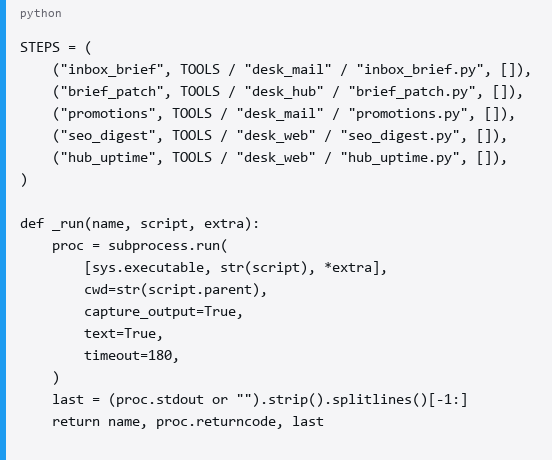
Money pack is a separate weekday task at 06:30. The runner above is 07:10.
I am on Windows, so both live in Task Scheduler:

Same idea on cron if you are not on Windows.
Test the script and the scheduler separately. A script succeeding in a terminal only proves the script works. It does not prove Task Scheduler launched it correctly.
I had one runner returning exit 0 manually while the scheduled task showed 267011 because it had not actually fired yet.
I leave the old Grok Bot routine in place until I have seen the replacement run on its real schedule. Once the local version is boring and reliable, I pause the old Grok Bot clock and eventually delete the routine. I do not treat Hide as the stop.
2. Use Cursor when the job actually needs a model
A local script handles a lot, but some jobs really do need a model.
If something needs to search through a repo, read a pile of notes, compare evidence, research a topic, make decisions, write code, or follow a problem through several files, I would rather give it to Cursor than keep a Grok Bot seat occupied with the whole job.
I run Cursor CLI on the same machine with my user CURSOR_API_KEY. For this setup I keep it local, use no Cloud Agent, and do not use --yolo.
For repo or hub work I give it the workspace explicitly:

I use that for research, queue draining, repo work, reading notes, comparing evidence, coding, and other jobs where I actually want a model spending time on the problem. On this desk the queue drain skill is complete-grok-cursor-jobs: pull live jobs, union into local JSON, do the open items, check them off, then report in the Grok Bot window.
This is also where the usage trade becomes useful. Cursor model usage pays for the long session. Grok Bot seat usage does not. On my setup the spin-off workers stay on Grok inside Cursor, so the model can still be Grok. The billable surface just moved.
The simpler GET/write jobs do not go to Cursor either. Python can handle those.
I also did not rebuild my entire Grok Bot organization inside Cursor.
Cursor can use local subagents and specialized skills when they help, but the persistent specialist team already exists in Grok Bot.
When Cursor wants that team involved, it can ask them.
3. Let Grok Bot hand heavy work to Cursor
A Grok Bot seat cannot directly run my local Cursor CLI, so I gave the two sides a shared job list.
I use a small JSON module on a hub I already had:
GET / PATCH /api/data/cursor-jobs
A gist, repo file, database, or small API could do the same thing.
When one of the Grok Bot seats reaches a job that belongs in Cursor, it adds one item:
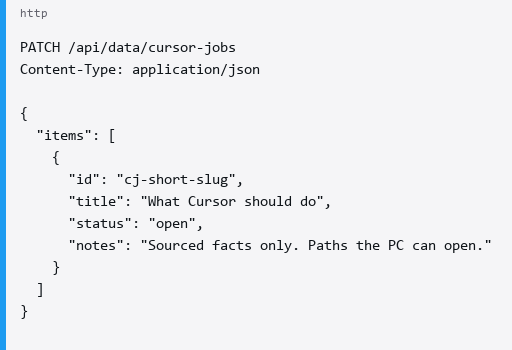
I treat the list as shared state, so additions merge by id instead of replacing the board.
No items: [], no replace: true, and no overwriting the entire list because one seat added a job.
Cursor GETs the current list, merges it into its local JSON, works the open items, and updates the specific job when it finishes:
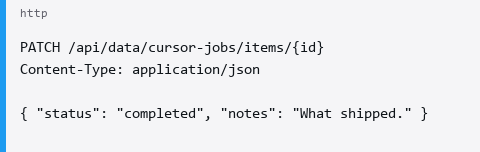
My merge is basically a union of items. If the same id exists in both places, the newer live status or updated value wins.
Once a Grok Bot seat has handed off the heavy work, I do not want it independently doing the same research again.
It can stay involved without duplicating the work.
4. Use webhooks for unattended handoffs
For unattended handoffs I use a Cursor Automations webhook on this PC.
Grok Bot cannot run my local Cursor CLI. When a seat needs Cursor without me sitting in the IDE, it can add a cursor-jobs item and POST that webhook with a short need= id. Local scripts use the same rail to report that a weekday pack finished.
The URL and key live on the PC, not in the repo.
My environment variables are:
CURSOR_DESK_WEBHOOK_URL
CURSOR_DESK_WEBHOOK_KEY
and, when needed:
CURSOR_DESK_WEBHOOK_HEADER
In my setup, a raw crsr_ key returned 401 while Bearer authentication worked, so the sender handles that and refuses to run if the URL or key is missing.
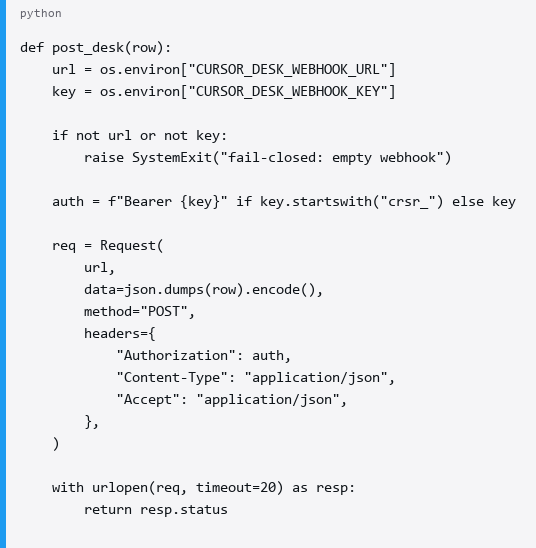
I keep the event body small:
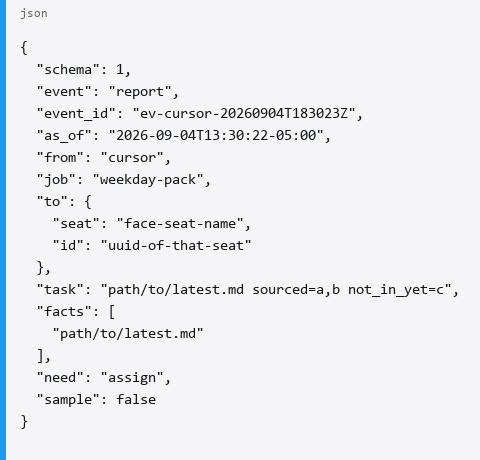
I use need as a small routing field. It can identify an assignment, carry a short job id so Cursor knows which queue item is involved, or flag something like herbie-yes when the next step is waiting on me.
A successful POST is just a wake on the Cursor Automations rail.
If I get HTTP 200 with success and a runUuid, I know that automation started. There is no chat reply coming back through that request, so I do not treat the 200 as if a Grok Bot seat answered.
A manual test looks like this:
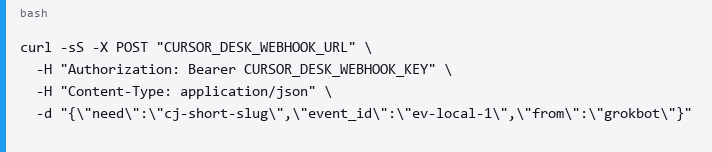
The webhook handles the unattended wake.
For an actual conversation, Cursor uses the desktop app.
5. Let Cursor consult the Grok Bot team while it works
This is the part I wanted most.
I did not want Cursor to receive a job from Grok Bot, disappear into the task, and only come back when everything was finished.
I wanted it to be able to consult the team along the way.
So I made Cursor operate the Grok Bot desktop app on this PC through Windows UI Automation.
If Cursor is working through a research problem and wants a second opinion, it asks the face seat first.
If that seat assigns another specialist in chat, Cursor can follow the assign and ask that seat next.
If the team needs a vote, that vote stays on the Grok Bot side. Cursor reports what it found and waits for the room or for me when the desk rules say so.
If the face seat has context that would help, Cursor can ask for that and continue from the answer.
The basic UI operation looks like this:
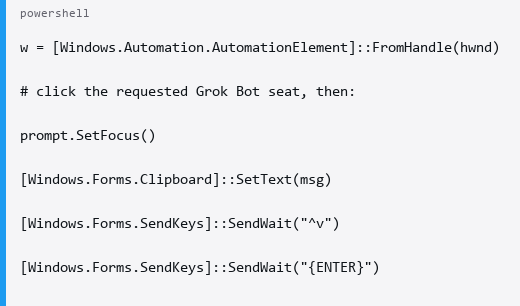
The surrounding logic selects the requested seat in the left list, focuses the edit control named Prompt, clipboard-pastes the question, sends it, and verifies that Cursor’s own message appeared.
Then it polls ControlType.Text for a new response that was not there before and that Cursor did not send itself.
If nothing new arrives, Cursor records that the seat did not answer. It does not invent a reply.
Credentials never go into the Prompt field.
This makes the relationship between the two much more useful than a simple job queue.
A Grok Bot seat can assign the work. Cursor can do the heavy research. Halfway through, Cursor can ask the face seat what it thinks, or follow an assign to another specialist. It can incorporate those answers, keep working, and then report the finished result back.
The Grok Bot team stays part of the work without every seat having to redo the expensive part.
Files work the same way. If a Grok Bot seat can already access a normal disk path, I give it the path. I do not make another snapshot just to hand over the same file, and I do not mirror cloud-synced folders somewhere else when the original is already available.
I also try to keep the communication useful. An assignment, whatever consultation actually helps, and a report when the job is done. I do not want seats repeatedly confirming receipt, chasing each other for status, or creating extra conversations around work that is already moving.
6. Keep the final approval where I want it
Moving more of the work to scripts and Cursor does not mean I want every final action unattended.
There are still things I want to approve myself: sending, trashing, paying, submitting, unlocking, and anything else where I care about the irreversible step.
The CLIs default to list-only or --dry-run where that makes sense.
For mail deletion, for example, the delete step only becomes available after an approval item exists with:
kind: delete
and the ids on that approval have been verified.
An unknown list id fails closed. A missing approval id fails closed.
Everything before that can still happen automatically.
A script can gather the data. Cursor can investigate it. Cursor can consult the face seat (and any seat that seat assigns). Grok Bot can supervise the result, run a room vote when that is the desk rule, prepare the final action, or do whatever I have assigned to that seat.
The approval remains mine when I want it to.
Moving the existing setup over
I did not rebuild everything at once.
I started with the Grok Bot automations I already had and moved the easiest recurring jobs first: health checks, routine pulls, mail lists, filing checks, digests, ship-score jobs, and anything else where the output could simply be written to disk.
The Grok Bot seats kept using the output. They just stopped doing the collection themselves.
Then I moved the heavier jobs into Cursor.
Instead of asking a Grok Bot seat to spend a long session researching, reading files, or working through a repo, the seat can put the job on the Cursor queue and stay available for the parts where its opinion is useful.
Cursor got the reverse path too. It can ask the face seat (and any specialist that seat assigns) while it works, instead of trying to recreate their roles inside Cursor.
I keep the old Grok Bot automation until I have seen the replacement complete a real scheduled run. Once the replacement has proven itself, I pause the old clock and eventually delete it. Hide never counted as that. The seat itself can stay exactly where it was.
At this point, most of the repeatable work runs locally, most of the heavy model work happens in Cursor, and Grok Bot stays where I find it most useful: supervising the system, keeping the specialist team together, voting, consulting, and handling the final work.
Cursor can still pull that team into a job whenever it needs them.
I would love to see @SpaceXAI and @elonmusk make more of this native: a proper local-worker handoff, a way for outside agents like Cursor to consult individual Grok Bot seats or groups, and a clean return path so the team can supervise work running elsewhere without needing a custom bridge.
For now, this gets me most of the way there.
Published on grokbot.sh. Cite the public log, not a prompt pack.