
Grok can now see your bank. Can it help with your books in QuickBooks or Xero?
On September 26, xAI let Grok Bot read your bank, card and investment accounts. By October 3 the announcement had about 24.6 million views. The same day, @farzyness asked for a QuickBooks connector,
Article
Job breakdowns
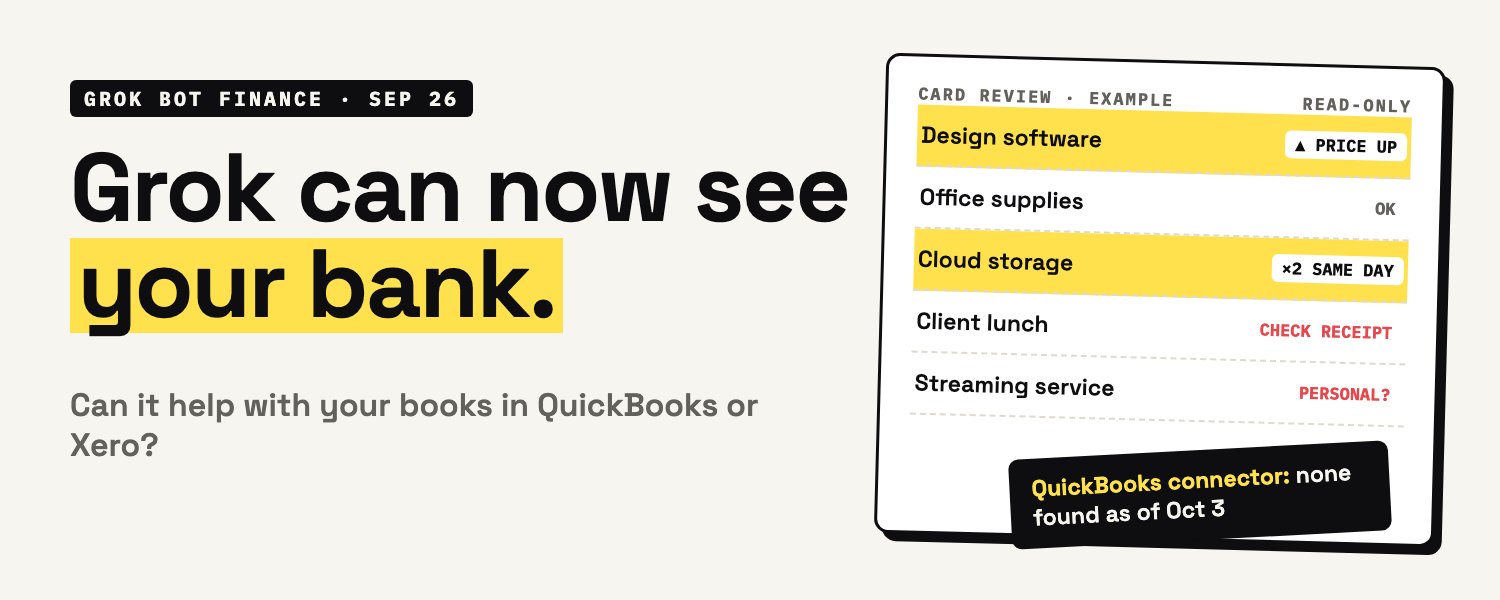
On September 26, xAI let Grok Bot read your bank, card and investment accounts. By October 3 the announcement had about 24.6 million views.
The same day, @farzyness asked for a QuickBooks connector, saying it would make Grok Bot a no-brainer for small businesses. His post has more than 1,100 likes:
We build Booke AI, an AI bookkeeper for QuickBooks Online and Xero, so we went through xAI's announcement, the Grok Bot docs and its plugin marketplace, and then tested Grok Bot on three months of made-up books. The short answer: it reads bank activity well. On our test data it found every item on our answer key. But as of October 3 we found no QuickBooks connector, its route into Xero needs developer setup, and for the test we supplied the data, wrote the prompts and chose the limits ourselves. Below are the five checks we ran, where to fix each finding in QuickBooks Online or Xero, and, at the end, notes on the parts we also had to solve when building Booke.
What Grok Bot is
Grok Bot is xAI's agent product, separate from the Grok chat app. In xAI's words, bots "have their own computer. They sign into the tools you already use and work across apps, inboxes, and more." The bots on your account share that cloud computer, including its files and signed-in browser sessions, so they can work in websites that have no official connection. They can also run scheduled routines. For a password, a two-step code, a human-verification check or "a payment or identity check," a bot may ask you to take over.
Grok Bot comes with paid individual Cursor plans (Cursor Pro is $20 a month) and self-serve Cursor Teams plans bought online; Cursor Enterprise needs it turned on. You can also get it by linking an individual SuperGrok, SuperGrok Plus, SuperGrok Heavy or X Premium+ subscription. SuperGrok Lite doesn't include it. Included usage resets every week. Extra usage is billed if on-demand usage is on, which Teams turns on by default, and linking a subscription doesn't increase the usage included in your Cursor plan. It runs on Mac, Windows, Linux, iPhone, iPad and Android.
What the Finance integration can and can't do
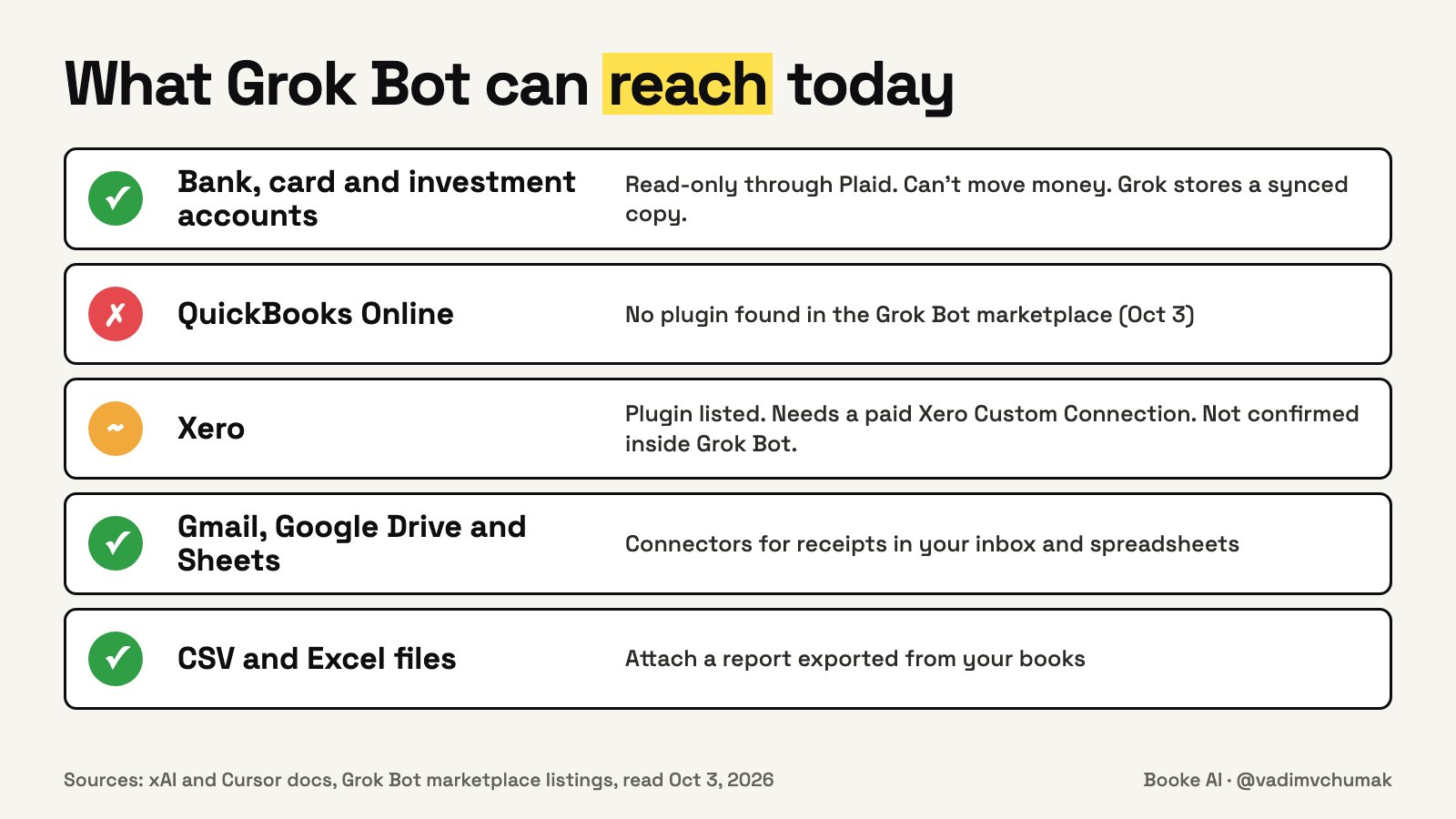
Finance is a plugin (an add-on that connects Grok to another service) you add from the Grok Bot marketplace, and you link accounts through Plaid, a bank-connection service. Here is what the plugin's listing says:
-
It reads, it can't pay. Access is read-only, and the listing says a financial connection "can't be used to move money into or out of bank accounts."
-
It shares more than transactions. You share "contact details, account and balance info, transactions, credit and loans, and investments."
-
Grok keeps a copy. Grok "syncs and stores your linked account data so the connector can work." The listing doesn't say for how long, or whether unlinking deletes it, so read xAI's privacy policy before you link.
-
xAI doesn't see your bank login, and you can unlink accounts from the Finance page on cursor.com.
Grok Bot's privacy mode controls whether your conversations are stored or used for training, but the account data sync stays on for the plugin to work. Finance needs Grok Bot 0.49 or newer and a linked Grok account.
xAI's copy talks about personal finances and doesn't mention business accounts, and Plaid announced the same connection for the Grok chat app for "U.S. users." If your business account links, keep personal accounts out of the same bot, so every answer is about the business.
The official demo shows the kind of question it's built for: "What subscriptions am I paying for? Flag anything that went up in price." In xAI's example, the bot pulls 12 months of charges from Chase and Amex and finds 14 subscriptions, two price increases and two music services.
QuickBooks and Xero: what's there today
QuickBooks Online: no connector found. As of October 3, we found no QuickBooks or Intuit plugin in the Grok Bot marketplace or the official plugin repository behind it, and no announcement from xAI about one. @DavidMoss wrote that he wanted to use Grok Bot "but without a Quickbooks connector I had to go with Meta for this project." Meta's Muse, ChatGPT, Claude and Perplexity all have QuickBooks connections listed by Intuit.
Xero: a plugin, with a catch. The marketplace lists a Xero plugin, published by Cursor and built on Xero's own connection software, that can "read and write invoices, contacts, reports, and payroll" (the payroll part needs a UK or New Zealand organisation). It needs a Xero Custom Connection, which Xero sells as a paid add-on for each organisation. Its instructions are written for Cursor, the coding app, and we found no confirmation that it shows up or works inside the Grok Bot app. One Xero user replied that his bot helped him build his own connection and now handles much of his bookwork. That's a project for someone comfortable with developer tools. Third-party services such as Zapier and Albato also sell Grok links to QuickBooks, and Albato to Xero, but they come from neither xAI, Intuit nor Xero, and we found nothing confirming they work with Grok Bot.
The browser route. Because a bot can sign into websites, you could in theory let it into QuickBooks or Xero through the browser. We found no documentation confirming that works, sites can block automation, and we don't recommend it for your books. A bot signed in as you can do whatever your login can do, while the Finance plugin can only read. Grok Bot's terms also make you responsible for "appropriate human review" before it takes actions involving financial transactions.
For the workflow we recommend here, keep Grok on the reading side: give it an export when a check needs your books, then verify the findings and make the changes yourself.
Five checks to try with Grok Bot
Grok Bot accepts CSV and Excel files and can hand back a spreadsheet, so each check below uses the Finance connection plus, where needed, a report exported from QuickBooks or Xero. We tested versions of them on pasted, made-up data (results in the next section). Start every prompt with this line:
Review only. Use my linked business accounts and any files I attach. List each finding with the date, amount and account, and say when you're unsure instead of guessing.
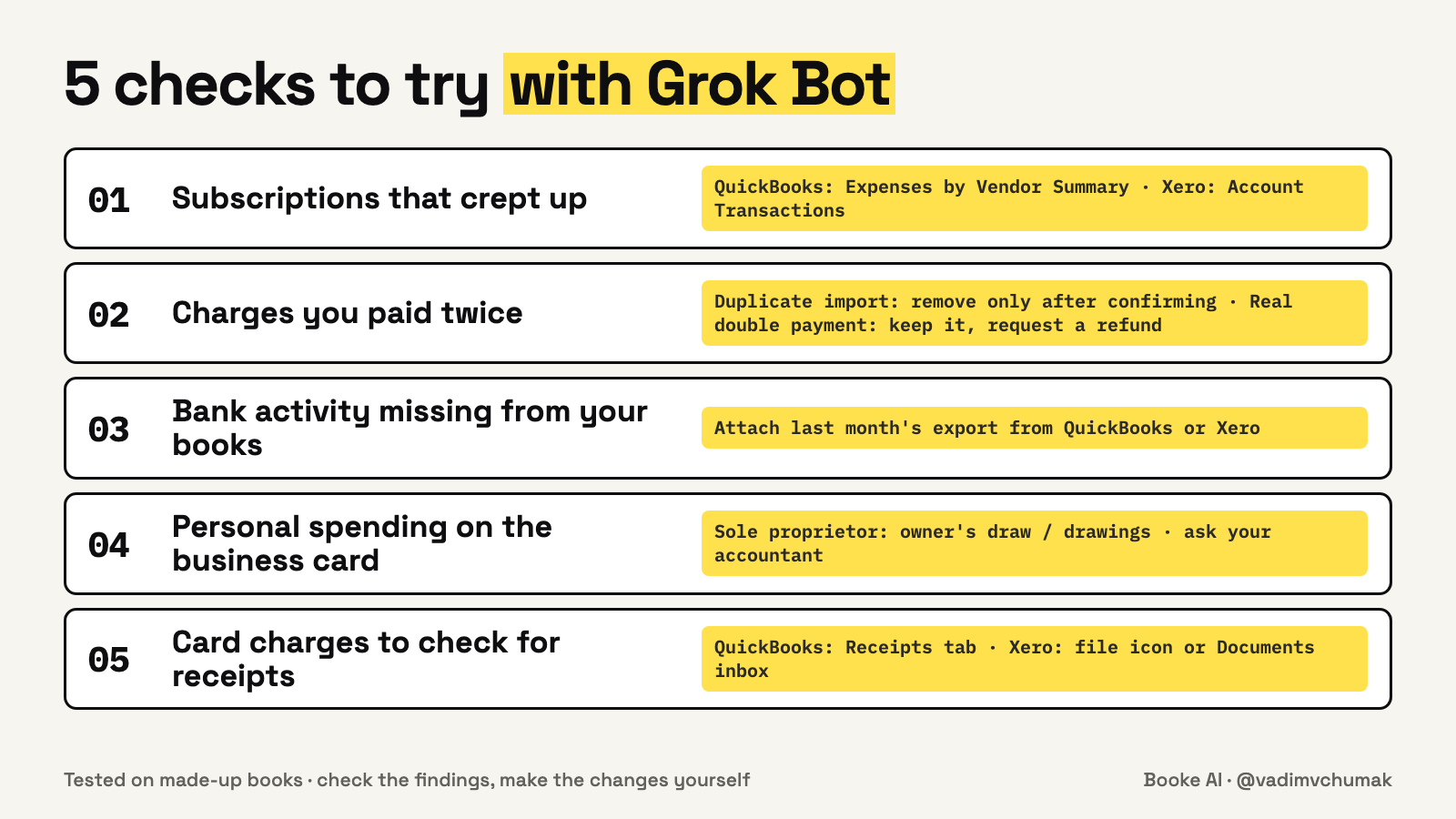
- Subscriptions that crept up. This is the official demo, and it's a good first test because you can check every answer against your statements.
List every recurring charge on my business accounts for the last 12 months. Flag new ones, price increases and two services that do the same job.
-
In QuickBooks Online: run the Expenses by Vendor Summary report for the same 12 months to see what each subscription cost you in your books. The Recurring Template List only shows templates you set up yourself, so a card subscription that comes in through the bank feed won't be on it.
-
In Xero: open the Account Transactions report and add the Contact column. The Payable Invoice Detail report covers bills, credits from suppliers and overpayments, so it misses subscriptions coded straight from the bank feed (the transactions your bank sends into Xero).
- Charges you paid twice. Duplicate card charges and double-paid bills are easy to miss in a busy month. When Grok finds a pair, first check your bank statement: did the money leave twice, or did one payment get imported into your books twice? Remove only a duplicate import. A real double payment stays in your books, and you ask the merchant for a refund.
Find charges with the same merchant and the same or nearly the same amount within 7 days of each other. Show both charges side by side. For each pair, tell me whether it looks like I really paid twice or the same payment was entered twice in my books.
-
In QuickBooks Online: if a duplicate import is still in the For review tab (it may be called Pending), select it and choose Exclude. If it was already added or matched, open the Categorized tab (or Posted), select the link in the Added or Matched column, choose Undo, then exclude it. Don't delete it: Intuit says QuickBooks will download a deleted transaction again.
-
In Xero: run the Duplicate Statement Lines report. On the Reconcile tab, click Options on the extra line, select Delete statement line, choose the reason and click Delete. Xero keeps deleted lines so you can restore them.
- Bank activity that isn't in your books. This is the check that needs both sides. Export last month's transactions from your books (see below) and attach the file.
Compare my linked bank and card transactions for last month with the attached export from my accounting software. List bank transactions with no matching entry, and entries with no matching bank transaction.
-
Export from QuickBooks Online: run the Transaction Detail by Account report for last month, then Export/Print and Export as CSV.
-
Export from Xero: run the Account Transactions report for last month, then Export and Microsoft Excel. Xero reports don't export to CSV, and Grok Bot accepts Excel files.
Compare the same accounts and the same dates on both sides, and look into each unmatched item before you add anything. One possibility is an unrecorded transfer between your own accounts, such as paying off the business card from checking. Record it once as a transfer, in QuickBooks with + Create, then Transfer (or Pay down credit card for a card payment), and in Xero with Transfer money, then match the other side, so it isn't counted as income or an expense.
- Personal spending on the business card. If you sometimes use the business card for personal things, catch them before they end up as business expenses.
List charges on my business accounts that look personal: groceries, streaming, personal travel, gyms. Mark each as likely personal or unclear.
How to record them depends on how your business is set up, so confirm with your accountant. For a sole proprietor:
-
In QuickBooks Online: categorize personal charges to an owner's draw account, the account Intuit describes for "withdrawals of the company's assets to pay an owner."
-
In Xero: code them to a drawings account, which tracks money taken from the business for personal use. Xero's help says, "For a personal expense, we recommend categorising it to a drawings account." Xero's US guide adds that owner's draws aren't a business expense and don't reduce your taxable income.
- Card charges that need a receipt. Grok can't see which transactions already have receipts in your books, so ask it for a short list to work through. The $75 below is just a cutoff to keep the list short; pick your own.
List every card charge over $75 from last month, grouped by merchant, so I can check each one has a receipt.
-
In QuickBooks Online: upload missing receipts in the Receipts tab (or with Receipt snap in the mobile app), then choose See suggested matches, pick the matching expense and select Match. You can also set up a forwarding address ending in @assist.intuit.com and email receipts to it from the address you use to sign in to QuickBooks.
-
In Xero: open the transaction, click the file icon and upload the receipt, or send it to your Documents inbox email with auto-match turned on.
The review-only line is an instruction, not a technical lock. Try these prompts first on a month whose books you've already checked and finalized. After that, check each finding against your statements and your books before you change anything, and talk to your accountant before anything that touches taxes or payroll.
We tested it on made-up books
We built three months of books for a made-up design studio: 141 bank and card transactions and a matching export laid out like QuickBooks' Transaction Detail by Account report. We planted problems for each of the five checks, plus five traps that look like problems but aren't, such as a subscription billed in euros whose dollar amount moves with the exchange rate. On October 3 we ran versions of the five prompts above in the Grok Bot app for Mac. In the test, the opening line told Grok to use only the two data files instead of linked accounts, checks 1 and 3 covered July to September 2026, check 5 covered September, and check 3 also asked for amounts that didn't match.
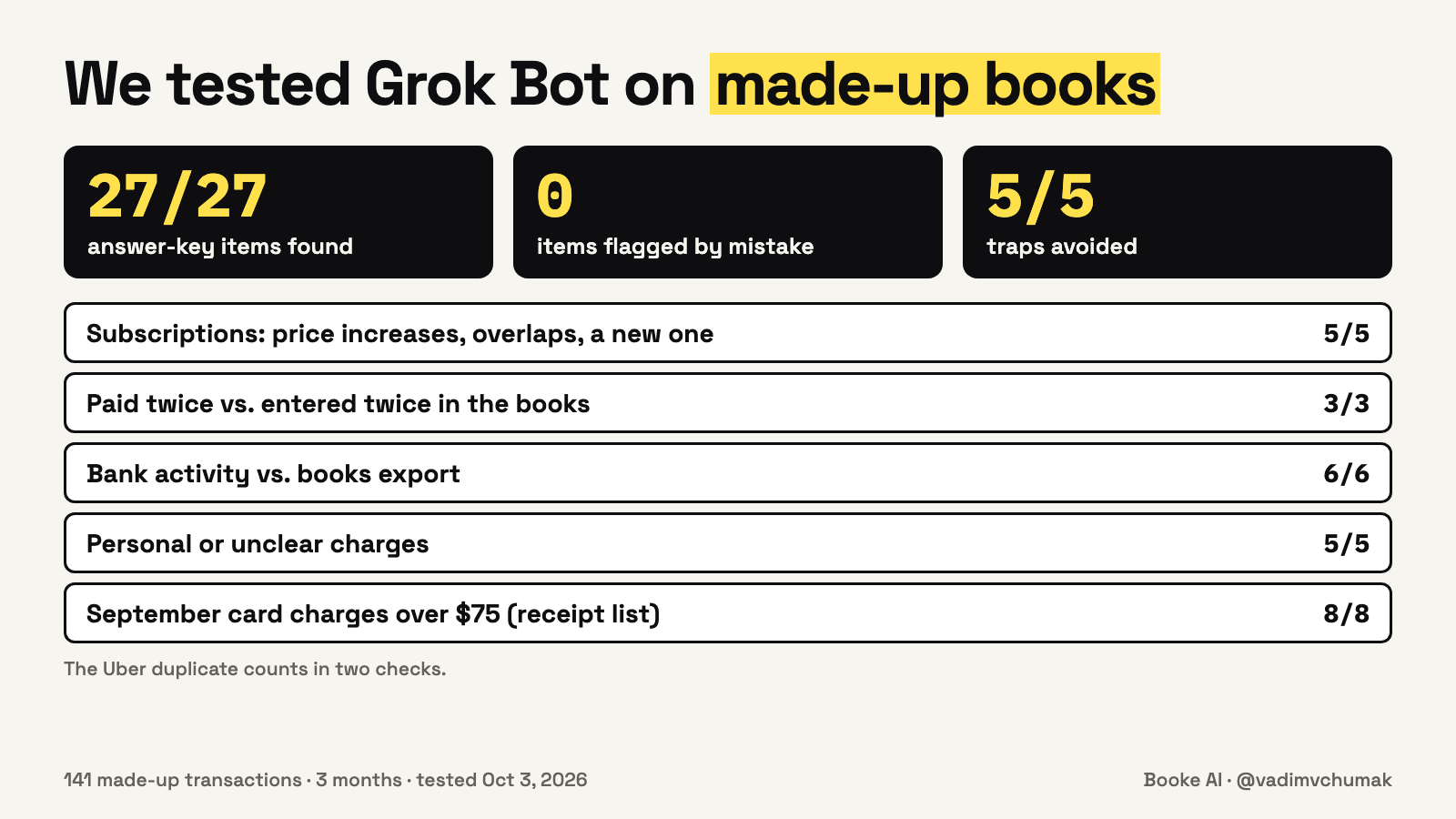
It found all 27 items on our answer key, flagged nothing that wasn't there and stepped around all five traps. The 27 include eight charges for the receipt list, and the Uber entry counts in two checks. On the trickier items, it said:
-
The euro subscription: "The bank line still says EUR 10.00, so the dollar change looks like the exchange rate. I would not call that a price increase."
-
Paid twice or entered twice: for two payments of the same invoice that both left the bank, it said "looks like you really paid twice." For an Uber ride charged once but entered twice in the books, it said "looks like the same payment entered twice in the books."
-
A check that hadn't cleared: a check written on September 30 wasn't on the bank yet, and Grok said it "may not have cleared yet" instead of calling it an error.
-
Business or personal: a flight and an Orlando hotel went under "unclear," not "personal," because nothing in the files said what the trip was for.
It also compared the bank with the books on its own, before we asked, and marked what it wasn't sure about. Each answer took about a minute, and the whole test used about a tenth of the free trial.
One practical note: the message box cut longer messages at about 8,000 characters, so we pasted the data in three parts.
Where Grok leaves the work to you, and what we had to solve in Booke
Running these checks on your real books every month raises practical questions, and we had to answer the same ones when building Booke.
-
Your business's history. On real books, the right category often depends on how this business recorded the same vendor before, and that history lives in your books, not in a bank line. In our test, Grok had only the files we gave it. It was a challenge for us too when building Booke. Booke checks how a vendor has been handled before and whether its transactions usually come with a document, and each client has a separate AI Brain that learns only from that client's history, approvals and corrections.
-
The settings. Some checks need a cutoff someone has to choose: 7 days, $75, how close two amounts must be. We left "nearly the same amount" undefined, and Grok decided it meant "within about a dollar." Those choices change what gets flagged. In Booke we had to turn this into rules you set yourself, for example "All transactions over $50 need receipts," and Booke follows them when it brings items to your attention.
-
Getting the data in. Grok reads your bank through the extra Plaid connection described above, and for some checks you make and hand over an export from your books. Booke uses the bank feed already in QuickBooks Online or Xero, with no new bank connection. You invite it as a user, and it runs on Booke-managed infrastructure, so your computer doesn't need to stay on.
-
From findings to changes. In our checks, Grok produced findings and the changes in QuickBooks or Xero were ours to make. Booke categorizes eligible bank-feed transactions inside QuickBooks Online or Xero and matches them to invoices, bills and receipts. When an expected document is missing, it can request it instead of reconciling without it.
None of this removes review. In Booke, low-confidence or unusual transactions still come to you, with a suggested way to record them and the reasoning behind it, and we keep working on how well Booke categorizes. Booke is software, not a bookkeeping service, so the decisions stay with you or your accountant. The AI Bookkeeper Business plan costs US$129 per business per month.
What this is based on
xAI's Grok Bot announcement of August 11 and its Grok Bot documentation, the @bot posts of September 26, 28 and 30, the Finance and Xero plugin listings in the official plugin repository behind the Grok Bot marketplace, Cursor's Grok Bot plans and terms pages, Plaid's post of September 4, Intuit's and Xero's help pages, the posts by @farzyness, @DavidMoss and other owners on X, Booke's product pages, and our own test of Grok Bot on made-up books, all reviewed on October 3, 2026.
TLDR
-
Grok Bot's Finance plugin reads bank, card and investment accounts through Plaid. It can't move money, and Grok stores a synced copy of the data.
-
We found no QuickBooks connector as of October 3. A Xero plugin exists, but it needs a paid Xero Custom Connection and isn't confirmed inside the Grok Bot app.
-
O
-
In our test, Grok was a strong reader. In the workflow we describe, you supply the data, choose the settings, verify the findings and make the changes.
See how Booke AI handles daily bank-feed work in QuickBooks Online and Xero.
See how Booke AI handles daily bank-feed work in QuickBooks Online and Xero.
Published on grokbot.sh. Cite the public log, not a prompt pack.