
Grok Bot: The Complete Setup and Usage Guide
Grok Bot is not a chatbot. It is a team of agents, each with its own cloud computer (browser, file system, terminal) running in a data center. Close your laptop and the work keeps going. The real
Article
Job breakdowns
Grok Bot is not a chatbot. It is a team of agents, each with its own cloud computer (browser, file system, terminal) running in a data center. Close your laptop and the work keeps going.
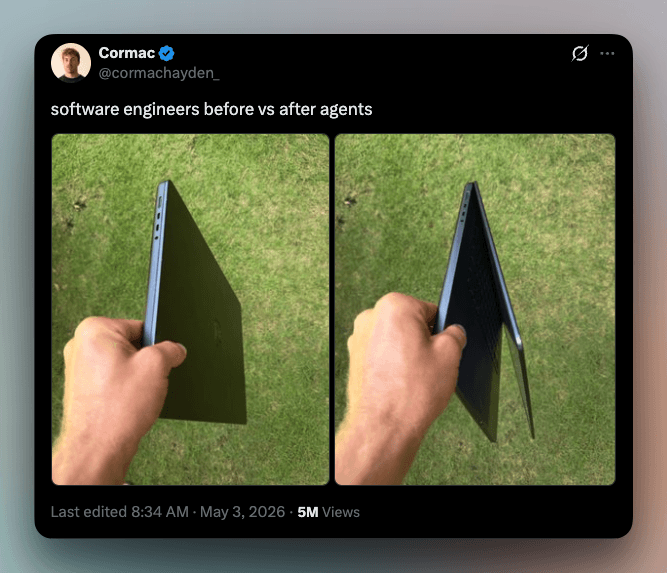
The real shift is mental: you stop prompting and start delegating. The skill "how do I phrase this" gets replaced by "what exactly am I delegating, and where does its authority end." That is a management question, not prompt engineering.
The working order of operations is always the same:
Role instead of a prompt → access instead of an instruction → show it once → draw the approval line → put it on a schedule → review it weekly
Skip any link in that chain and the system either does nothing on its own, or does the wrong thing while you sleep.
1. What it actually is under the hood
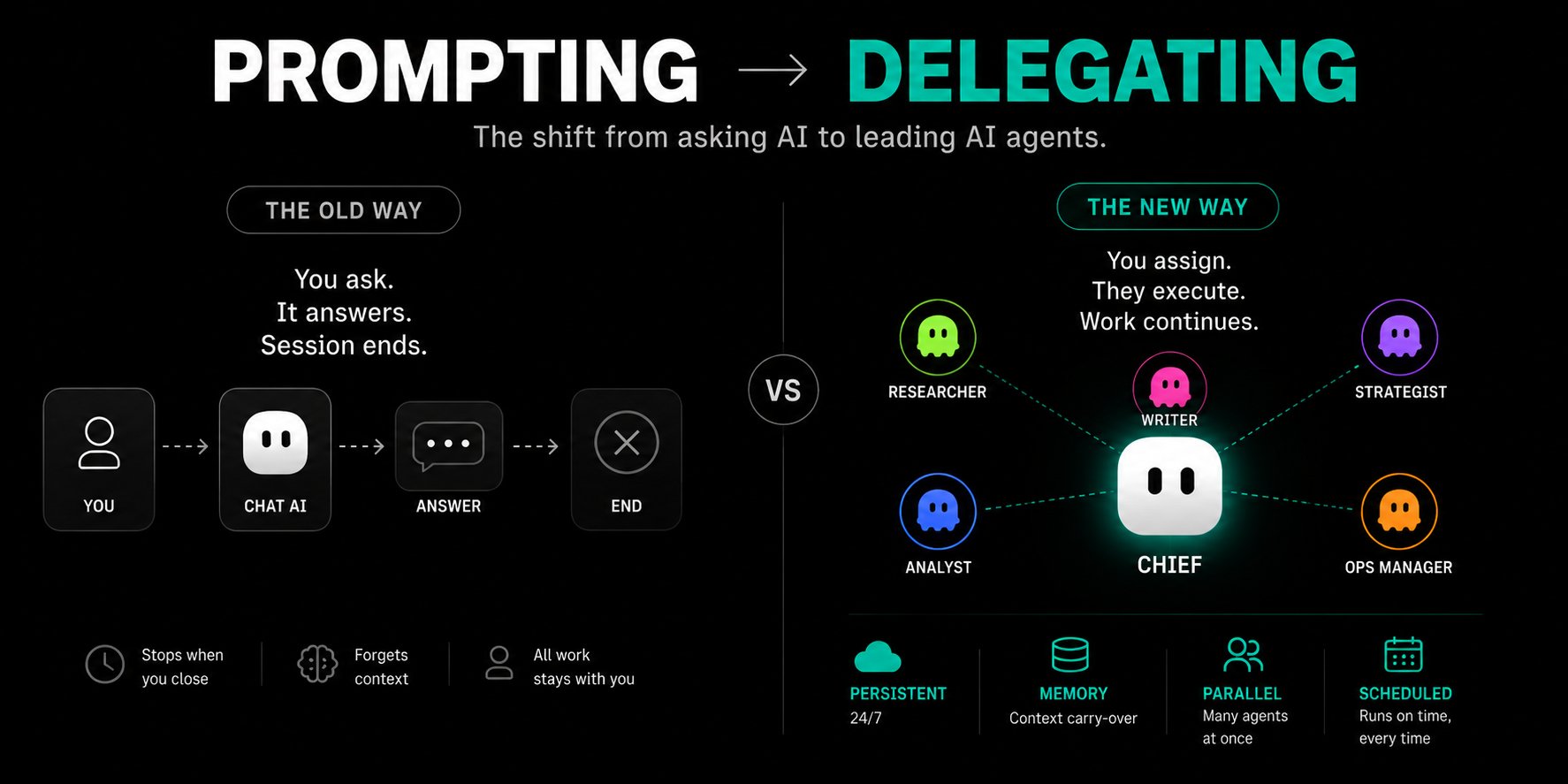
A bot = 3 things: a name + one area of ownership + a description of how it works. The conversation thread is persistent and context carries across tasks.
One account = one shared computer. The key consequence:
-
Browser cookies and sessions are shared across all bots
-
Every bot sees the files
-
CLI credentials are shared
So if one bot signs into LinkedIn, all of them are signed in. This kills handoff friction, but it means: do not put a credential on that machine if another bot on your account should not use it. There is no isolation between agents.
Hardware (unofficial reports): Debian, ~8 vCPU, ~16 GB RAM, ~100 GB disk, no GPU. The box user has sudo (ALL) NOPASSWD: ALL — effectively root.
Limits: up to 50 bots and group chats combined per account; up to 50 routines per bot; the 20 most recent runs of each routine are kept; group chats hold 2–6 bots.
2. Access and what it costs
Grok Bot is not sold on its own — only bundled into a subscription:
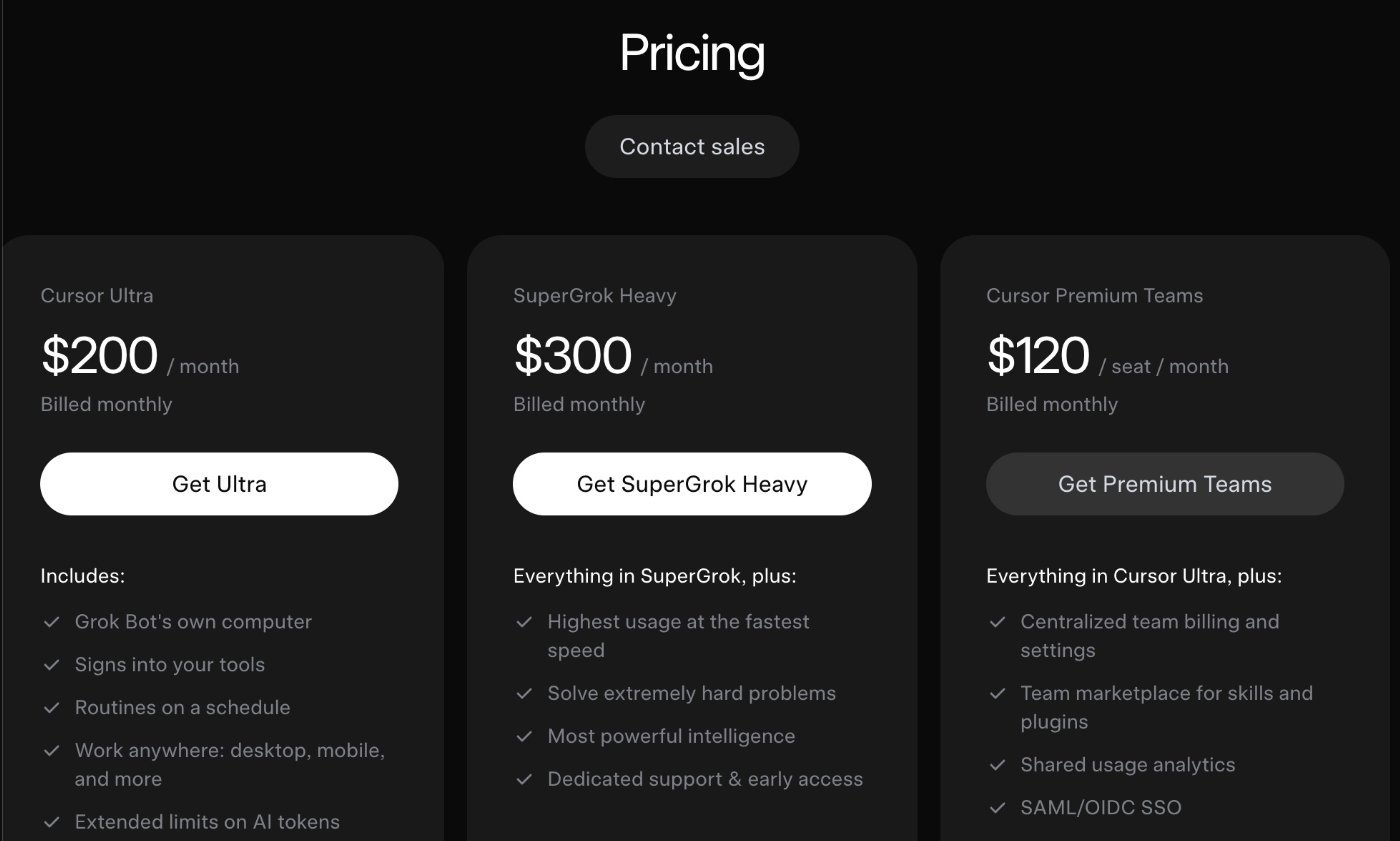
Each plan includes a weekly usage pool; work beyond the pool bills from model and token cost (a separate Cursor invoice, switch at cursor.com/dashboard?tab=spending). The pool and on-demand line live in Settings → Usage & Billing.
What eats the pool: every screenshot is an image the model reads before it can act. Screenshot-every-step automations burn through the pool. Route repetitive work through connectors instead of clicking around the UI.
Real economics from one case: a week on Ultra = $46 of seat + $142.80 on-demand = $188.80 against 339 finished pieces of work ≈ $0.56 each, with a signed contract of $1,840 that week.
The honest verdict: if you already pay for SuperGrok Heavy, Grok Bot is effectively free on top. If you don't, it's $200+/month for something you can't try in isolation. On a $20/month AI budget you'll learn more, faster, and cheaper by getting properly fluent with Claude Code/Cowork first.
3. Installation and your first bot (step by step)
Prerequisites: a paid plan from above, the desktop app (macOS / Windows) or iOS, an internet connection. Starting points: x.ai/bot and docs.x.ai/grok-bot/get-started.
-
Confirm your plan. Sign in with the Cursor/xAI account that owns the subscription. (Heads-up: setup may ask for a card even if you already have Super Grok Premium — there's no auto-sync with an X subscription.)
-
Download and install the desktop app. macOS: open the .dmg, drag it to Applications, confirm "Open".
-
Sign in with that same account. Onboarding asks which tools you use — this only shapes suggestions, it connects nothing.
-
Wait for the cloud computer to provision (happens in the background).
-
Create your first bot: Cmd/Ctrl+N or New in the sidebar → Create new agent → a bot called "New Agent" appears → Bot actions → Edit Profile (name, title, description, avatar).
-
First message is a real task, not a greeting.
The first task should require no logins at all. Example: attach a document and ask for a structured summary with citations — a result in ~5 minutes, verifiable in 30 seconds. The point: the next steps are about building trust incrementally.
4. The bot description is a hire, not a prompt
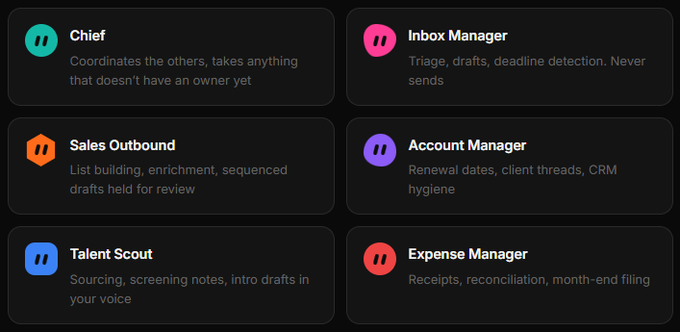
The biggest difference between people who get value out of this and people who bounce off it: a prompt is a request, a bot is a role. A role persists, accumulates memory, and owns a domain
Name it after a job a person could actually hold: Inbox Manager, Expense Manager, Talent Scout, Sales Outbound, Bug Reproduction. "General Helper" is a bad idea: less guidance, and its saved context is harder to reuse.
The "does this deserve its own bot" test (all 5 required)
-
Goal — one area of ownership that belongs to nobody else
-
Sources — its own set of tools, apps, and files
-
Working style — different from the rest of the roster
-
Approval boundary — a named line where it stops and asks you
-
Schedule — the work repeats on a clock
The description is the org chart
This is critical: bots route work between themselves based on each other's descriptions. A bot with no description falls off the org chart — there is physically no way to hand it work. If Mara's description says "owns market research, prospect discovery, and competitor scraping," Chief forwards research tasks to her automatically, without you.
Charter template (adapt and reuse):
Four sentences, two of them limits. Both typical role cards end on a boundary: "Never contact a customer or change an account without approval," "Never change production settings."
The description holds rules that stay true forever. The message holds today's work.
The first message — 5 fields
Leave a field out and the bot stops to ask before it starts:
-
Outcome — what has to be finished
-
Sources — which apps, sites, and files to work from
-
Constraints — what to avoid and what to ask about first
-
Deliverable — what to hand back
-
Review point — where it stops for you
5. Authority boundaries: the reversibility principle
The main mistake is approving everything. The second is approving nothing. Approve by reversibility, not by task size.
Three levels
GREEN — do it, don't ask (everything reversible):search · read · summarize · compare · organize · draft · calculate · research · reconcile → just do it and log it
YELLOW — allowed, but only inside approved tools: edit internal files · create deliverables · update internal databases · move approved documents · run saved routines
RED — always requires approval:
-
send anything to a person outside the company
-
spend or move money, commit to a price
-
publish anything public
-
delete anything that isn't obvious junk
-
change permissions or security settings
-
modify a production system
-
accept terms, sign up, agree to anything
The uncertainty rule: if you can't undo it in under a minute, park it and ask.
The benchmark for a boundary working correctly: a Sales Outbound bot that produced 36 drafts and sent 0. It did every reversible thing and stopped precisely at the irreversible one.
The line to put at the end of any charter:
(Auto Review, where supported: Require Approval rules always stop a matching action, Always Allow permits it when there's no other reason to stop; when both apply, Require Approval wins. It's a model-based check — a complement to least privilege, not a replacement. Personal rules sync from whichever device you're on; a second installation needs its own configuration.)
Local execution: Settings → General → Agent → Execution on Local Computer. Keep it never allowed unless a bot has a specific reason to work on your local files.
6. Access: hand over a login, not a password in chat
This is the mechanic that makes everything work with tools that have no API — which is most software inside a real company.
Interactive Session Handoff:
-
The bot navigates on its own cloud browser and hits a login wall
-
It pauses and hands you the screen (Agent Computer from the conversation)
-
You take control, do only the blocked step, click Done
-
The bot gets the session and resumes from that same page
The bot gets a session, not a secret. The password never enters the transcript.
Five moments that need you (everything else runs without you):password/passkey · 2FA · CAPTCHA · a payment or identity check · a site that explicitly requires a human.
Never paste a password or a one-time code into ordinary chat. For passwords there's the secure secret request, where the value is masked. If a tool asks you to paste a password into a conversation, that's the wrong path.
Sessions persist, so the next task on that site usually starts already signed in — for every other bot on the account too.
Connectors (Plugins) — preferred over clicking through UI
Settings → Plugins → pick a connector → Add → finish authorization in the browser. Connectors are account-wide: add once, available to every bot.
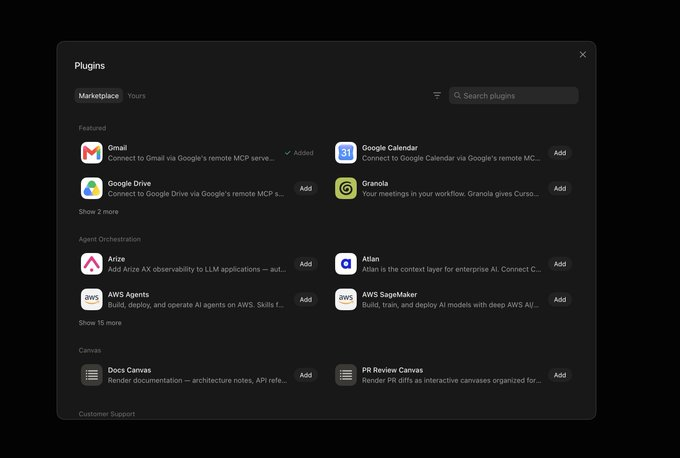
Native: Notion, Slack, Google Drive, AWS Agents, AWS SageMaker, Browserbase, Composio, Context7 + custom. For platforms with no native integration (YouTube API, Reddit, LinkedIn, GoHighLevel, Perplexity), connect Composio as a master plugin and store a rule in your shared knowledge base saying extended tools are reachable through Composio.
In a message: @ attaches a connector to the task, / calls a saved skill.
What NOT to connect first: payment systems, password managers, customer messaging, production databases, accounts with destructive permissions. Start read-only.
7. Skills: show it once instead of explaining it twice
A skill is a reusable procedure. Six mandatory parts:
-
When to apply it
-
Required inputs and access
-
The work sequence
-
How to validate the result
-
Output format
-
What requires approval
Skills are available to the whole roster and are called with / in the message composer.
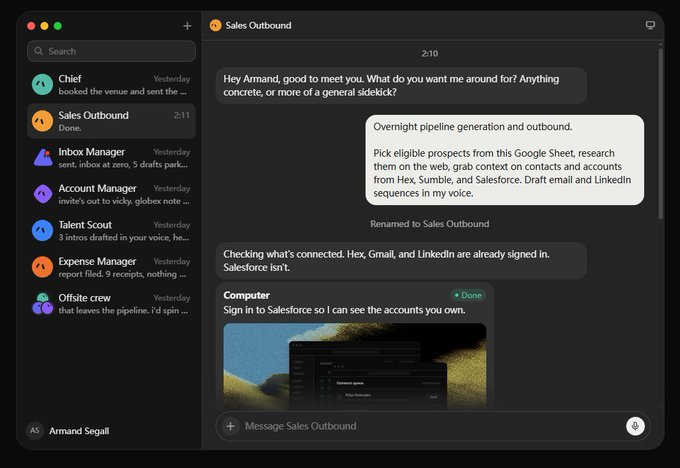
Teach a task (recording a demonstration)
The best feature in the product. You record your screen in the Agent Computer view, up to 10 minutes, no microphone audio; the bot analyzes DOM events and mouse actions and hands back a draft of the method for you to edit.
How to pick your first recording: the task must be all three at once — (1) recurring, at least weekly, (2) multi-tool, 2+ tools, (3) stable, steps rarely change.
"Take the numbers from this dashboard, cross-reference the ones that dropped, paste them in this doc under the right heading, and Slack the team lead if anything fell more than 15%" — a paragraph to write, 40 seconds to show.
Prompt for turning a demonstration into a skill:
Don't teach only the happy path
One recording doesn't show what to do when reality breaks. Spell out explicitly what happens if:
-
a source can't be verified
-
two documents disagree
-
required information is missing
-
a tool becomes unavailable
-
the Reviewer rejects the output
-
the task reaches an approval gate
The exceptions are the real workflow. Most automations break not because they don't know the sequence, but because they don't know what to do when the sequence fails.
Example guardrails in a skill file:
Re-test a demonstrated skill after any change to the site, connector, or source format. A workflow learned from one pass through a site has no defence against that site changing.
8. Routines: schedules and triggers
A routine is essentially cron with a friendlier face. You create it conversationally, with no visual node builder — in practice that's ~2 minutes and a single prompt.
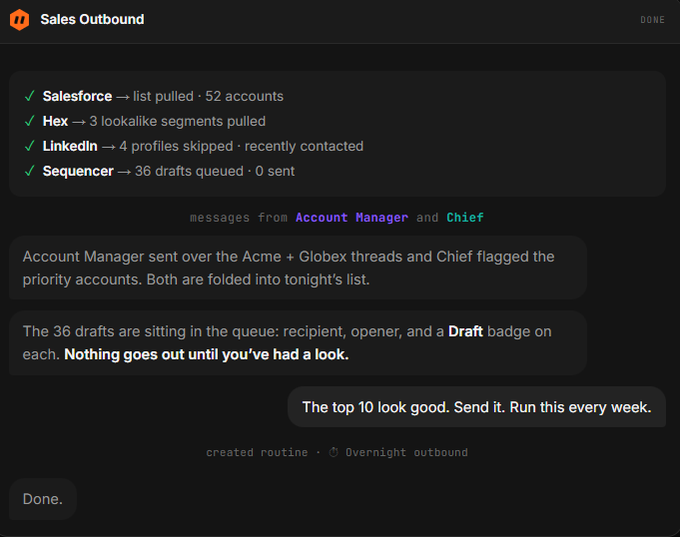
Two kinds of firing:
-
Schedule — a 7am daily briefing, a Friday pipeline summary, month-end expense filing
-
Trigger — a new Slack message, an inbound email matching a pattern, a change in a document. Triggers make a bot feel present rather than punctual.
When creating one, specify: schedule and timezone, input source, expected result, approval boundaries, and behavior when the source is missing.
Always add a stop rule at the end (something like "use only data from the current week") — it keeps yesterday's numbers out of Monday.
Always do a test run before enabling it. A test run performs real work — keep the inputs safe and put every write action behind approval. Deleting a routine is permanent.
Known gap: inside a group chat, bots cannot save routines together. Scheduling has to be set in each bot's individual session.
9. A team of bots: the Chief of Staff topology
The biggest beginner mistake is creating a dozen uncoordinated bots and managing them by hand.
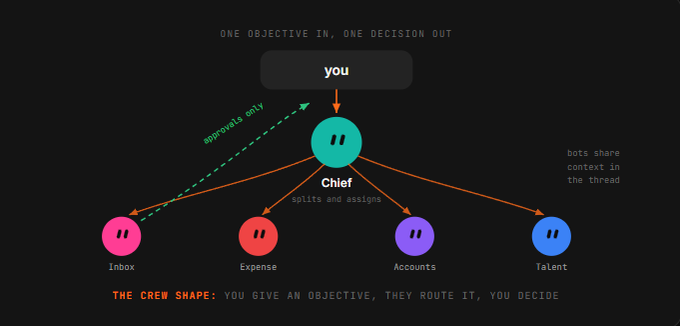
Here's what it looks like in the app: a sidebar of names on the left, a conversation thread on the right. Each name is a separate bot with its own memory and its own computer.
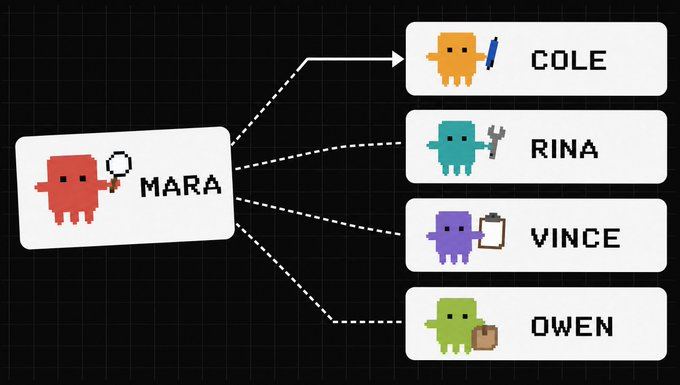
The roles:
-
Chief of Staff — your single entry point. It doesn't do everything itself: it takes high-level objectives, breaks them into sub-tasks, delegates, preserves shared context, inspects every handoff, and escalates only what genuinely needs you.
-
Research / Lead Scout — gathers evidence, records sources, separates facts from assumptions
-
Strategy — turns evidence into decisions and priorities
-
Execution / Copywriter / Designer — produces the artifact
-
Reviewer / Ops — tests the result against the contract and rejects what doesn't clear the bar
The sizing rule: start with the smallest useful roster. Every extra bot adds another context window, another handoff, another place to lose information. Create a specialist only when the work requires different tools, different context, different expertise, independent verification, or parallel execution. For most knowledge-work missions, 4 specialists is enough. Don't go past 4 until the first version works.
The problem that shows up past 4–5 bots: parallel handoffs create duplicate work and noisy updates. Ask for a single owner at each stage.
Group chats
2–6 bots. Describe the shared outcome and name the next owner; the bots work out who answers, and @ names a specific one. Give the group an objective, not a task list: a list means you already did the decomposition and the bots are just executing your plan.
Asynchronous messaging: a bot messages a bot, the receiver wakes, handles it, and replies later; the whole exchange stays visible in the conversation.
Handoff messages into a group are text-only. A bot that needs another one to look at an image has to send it directly.
Handoff format
A handoff shouldn't mean "here's what I found." It should mean "here's the artifact, here's the evidence behind it, here's what's still uncertain, here's the exact next action."
Evidence travels with the work. Never make the next agent reconstruct it from chat history.
Duplicating a bot
Carried over: profile, settings, enabled skills, routines, avatar. Not carried over: conversation history, learned memory, chat attachments. The copy arrives as
10. The Mission Contract — for complex missions
Instead of "create a research agent" (that describes an activity, not a victory), phrase it so the team knows what finished means.
❌ Research my competitors every week.
✅ Every Friday at 4pm, deliver a verified competitor report containing the five most important product, pricing, and positioning changes, the source behind every claim, their likely impact on our business, and three recommended actions.
Seven contract fields: Outcome · Inputs · Output · Frequency · Definition of Done · Constraints · Approval Gates.
Prompt for building the contract:
Don't accept "good," "useful," or "professional" as a quality standard. Replace them with checks:
-
every factual claim has a source
-
every source has a publication date
-
duplicates are removed
-
recommendations reference evidence
-
the final result stays under the length limit
-
no external action happens without approval
If the finish line can't be measured, the agent can't reliably reach it.
Acceptance Criteria matter more than Role
❌ Find useful sources.
✅ Return 10 non-duplicate sources published within 90 days. For each: URL, date, author, key claim, and confidence level.
Reviewer instruction:
The Reviewer should reject precisely, not quietly repair everything — otherwise it becomes a second Execution agent and a new bottleneck.
A graph, not a chain
Forward path: Mission → Chief → Research → Strategy → Execution → Reviewer → Approval Backward path: Reviewer → Research/Execution → Reviewer
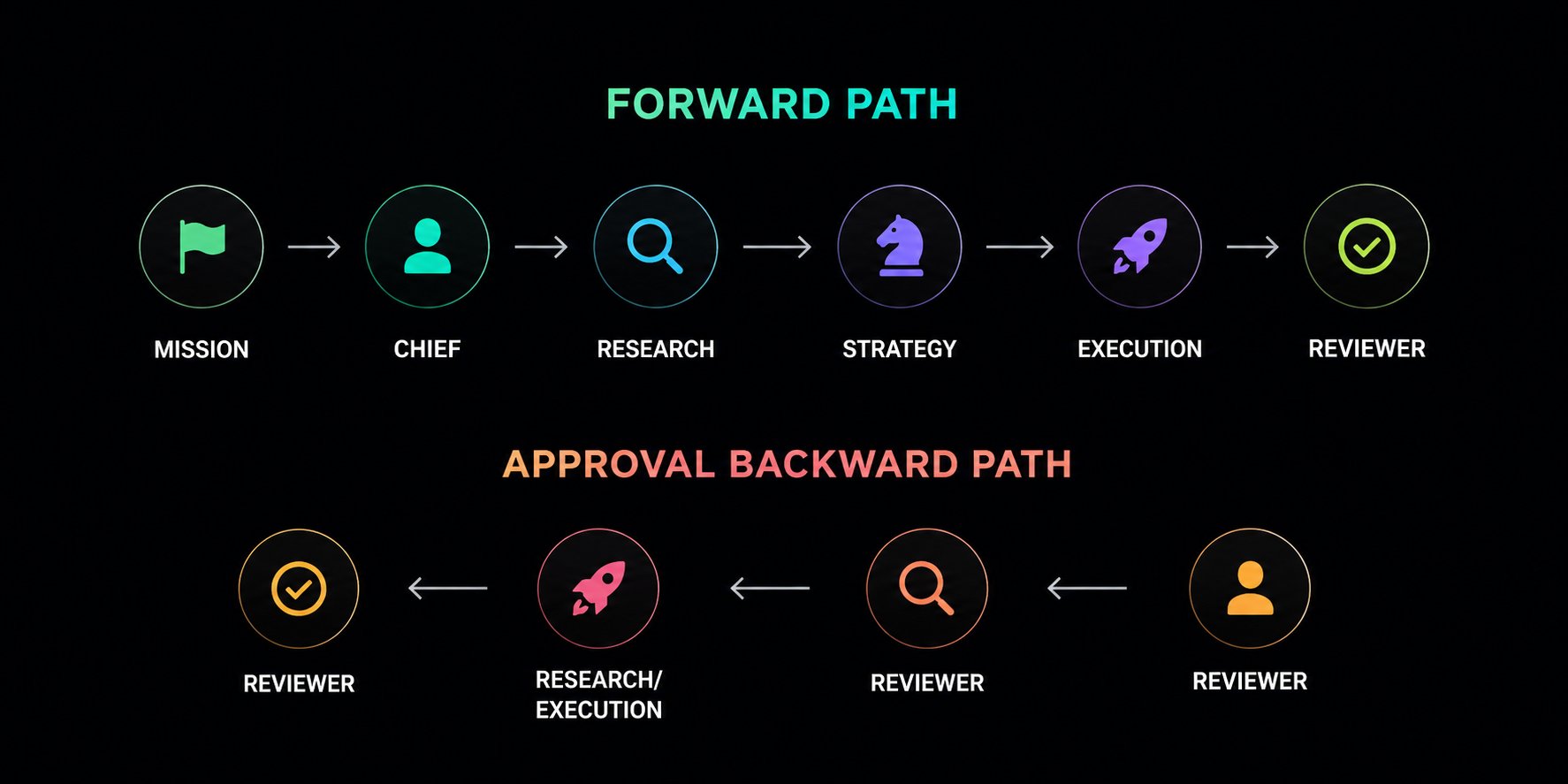
A chain passes work forward. A graph decides where the work goes next.
11. /workspace — what survives a VM update
The most important technical detail most guides skip: cloud VMs periodically update and rebuild themselves.
What disappears on a rebuild: everything in /home/box/deps, /usr/local, global apt packages, manually installed CLIs (Tailscale, ssh, custom Python packages, scrapers), unsaved browser state.
Only /workspace survives. A check on a live machine after an update: only /workspace was standing, /home/box/deps came back empty, apt packages and /usr were gone, and Tailscale and ssh had to be reinstalled more than once.
Structure
Home becomes a cache from there on. Nothing the roster needs should ride on an apt package. Common mistake: the bot itself suggests putting a skill in ~/.agents/skills/... — that will not survive a rebuild. The same skill in /workspace/skills/ will.
Self-healing header for skill files
Because box has sudo NOPASSWD: ALL, bots can heal their own environment:
The roster restores its own tools before starting work; a missing CLI reinstalls itself and the job continues.
12. Don't automate the first successful run
The order everyone violates:
-
Run one real task — live, with a scope that's safe to get wrong
-
Correct the result — keep going until the output is something you'd review
-
Save the method as a named skill — with sources, output format, approval rules
-
Test it on a second input — different account, different file, same steps
-
Only then create the routine
A routine inherits every unstated assumption. That's why the order is what it is.
Three-Run Proof (for teams and missions)
-
Run 1 — Observe. Where context was lost, where work was duplicated, which instruction was misunderstood, which approval appeared unexpectedly, which quality check failed. Don't fix the final result by hand — fix the charter, routine, or handoff that created the failure.
-
Run 2 — Correct. Give it a different but representative mission. Check whether the team avoids the previous failure without a new instruction. If the same mistake returns, the correction never reached durable memory.
-
Run 3 — Release. No intervention unless: a RED action is required / the contract is ambiguous / the correction loop fails three times.
Measure five things: Completion Rate · Human Interventions · Review Loops · Time to Accepted Result · Cost per Accepted Result.
Don't automate the first successful run — automate three consecutive successful runs.
13. The weekly review: automation rots quietly
A site changes its layout, a routine starts silently producing garbage, and because the bot runs while you sleep, nobody notices for three weeks. This is the failure mode of every always-on system.
15 minutes on the calendar. Three questions per routine: did it run? was the output actually right? would I miss it if I killed it? The third matters more than it looks — the natural drift of a system like this is a pile of half-useful automations nobody has the nerve to delete.
Plus a weekly self-improvement routine:
But: spot-check one output per routine by hand. A bot reporting on its own work has the same blind spot you do.
That closes the compounding loop: Execute → Review → Correct → Remember → Execute Better
14. A library of ready-made prompts
Research assistant (content / YouTube)
The real output of a bot like this is a ranked table of outlier videos with a multiplier against the channel's median:
Real estate scout
CFO / portfolio analyst
EA / Slack triage
Outbound SDR (careful — RED actions)
(In the original "god mode" version this bot sends and books calls on its own. Don't do that until you've passed the Three-Run Proof and you're ready for the consequences of a bad batch going out.)
Chief of Staff — operating charter
Designing the smallest team
Testing Chief before expanding
If Chief can't produce a clean plan — don't create more agents. Fix the mission first.
15. A worked case: a content team for X
A structure that actually works:
-
Research bot — tracks trends, digs into relevant repositories and public discourse, surfaces what's actually worth writing about instead of guessing at a content calendar
-
Creative bot — feed it a handful of reference infographics in a style you like; from then on it generates visuals in that aesthetic instead of starting from a blank canvas
-
Draft bot — turns research and creative direction into post copy, ready to review
-
General bot on top — a daily rollup of what each one did. The difference between knowing what your agents accomplished and hoping they did something.
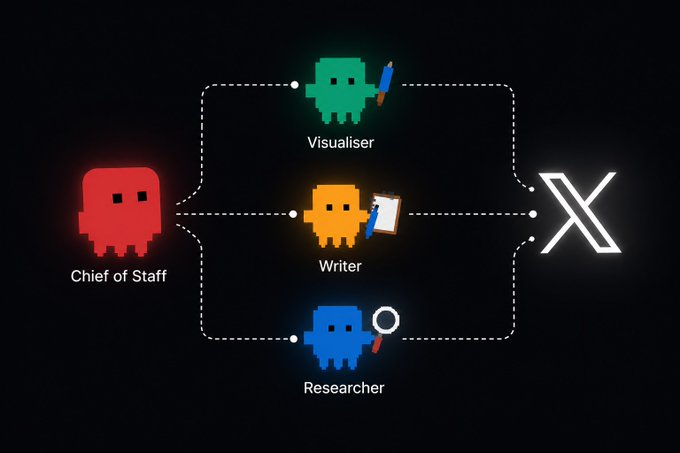
Because the agents live on the same computer, finished research from one is immediately available to the next — nothing to copy by hand.
The content conclusions a system like this converges on: posts should be true, useful, or funny (ideally all three). One idea per post. Reply more than you broadcast. Video and images outperform plain text. But the real risk isn't the algorithm — it's being boring. Don't try to game the system: the rules change every month.
Other directions where this already works: SEO/AEO bots (trend research, briefs, internal linking, optimizing for how LLMs surface answers) · PR bots (story angles, media database, mention monitoring) · paid-ads bots (creative angles, bid management, testing backlog) · CRO bots (experiment design, landing page variant copy) · outbound bots · finding flights by inflight connectivity · ordering groceries from a recipe photo · fixing GPS metadata across hundreds of scans · negotiating contractor quotes · translating a sales deck before a call · auto-updating decks from meeting notes.
A telling case: a bot worked through ~40 textile factories in Vietnam — they answer on WhatsApp, not email. It reached the first 10 on its own. A chat draft would have been worth nothing for that job.
16. Risks, limits, honest downsides
What you trade for the convenience:
-
You don't choose the model — it's Grok, full stop
-
You don't own the harness: it's bundled into a subscription, not a standalone product
-
Your data lives on their cloud computer
-
No isolation between agents — shared browser, shared files, shared credentials. The blast radius of any connection is every bot you will ever create.
-
The memory mechanism (summary buffer / files / retrieval) is not officially disclosed
Technical rakes:
-
Bots click through real interfaces → a redesign or a random popup breaks them
-
"90% done and 100% done are very different things"; that last stretch bites on weird cases
-
Group chats don't save routines at the team level
-
Bot-to-bot handoff messages are text-only
-
Screenshot-heavy automations burn the weekly pool
Compared to the alternatives:
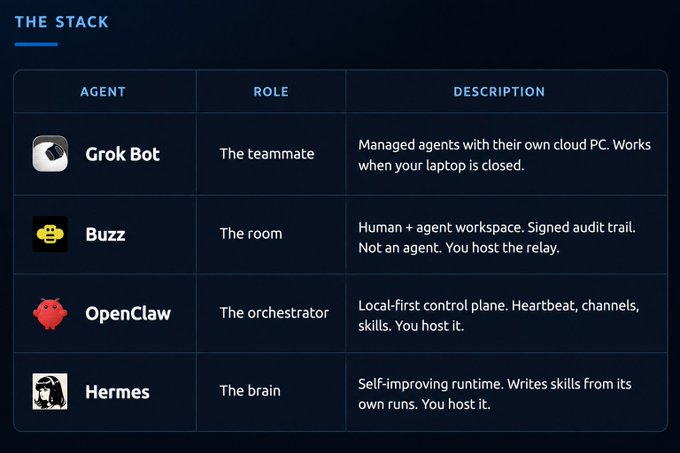
Grok Bot removes the maintenance — and removes the isolation along with it. The choice is really about who absorbs the operations and what exactly you're willing to sign into a computer you can't see.
The recommended hybrid stack: Grok Bot for 24/7 operational work (research, scraping, visual tasks, social monitoring, lead gen) + Claude Code/Cowork/OpenCode for interactive development (refactoring, architecture, migrations, quick bug fixes).
The main point
Every AI product until now kept the model in a window and left the work in your hands. Grok Bot moves the work: the bot has the computer, the logins, the memory, and the time — and you have the decisions.
That's a smaller change in technology than it sounds, and a much bigger change in habit.
The goal is not maximum autonomy. The goal is reliable autonomy with controlled authority.
Bookmark this. Follow @0xGenAi
Published on grokbot.sh. Cite the public log, not a prompt pack.