
Grok Bot: how to build an AI crew that learns by watching you work
I clicked through a task once. The bot has repeated it every morning for ten days straight. It named the task on its own, broke it into three steps, parameterized the parts that change between runs,
Article
Job breakdowns
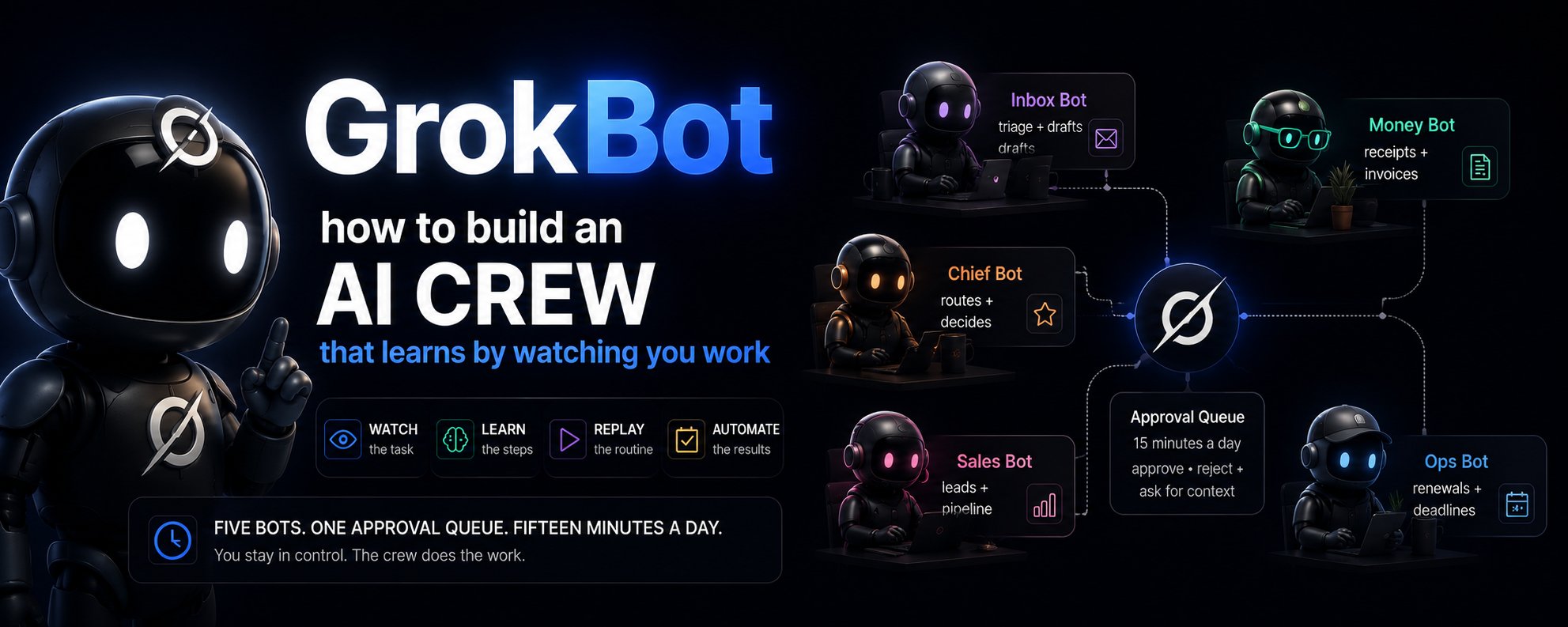
I clicked through a task once. The bot has repeated it every morning for ten days straight.
It named the task on its own, broke it into three steps, parameterized the parts that change between runs, and asked if I wanted it on a weekday schedule. I said yes. I have not opened Gmail directly since.
That is the product. Not a chatbot that generates text for you to paste somewhere. A desktop app where each bot gets its own computer in the cloud, signs into your tools through a real browser, and clicks through them the way you would. You show it a task once. It repeats it forever.
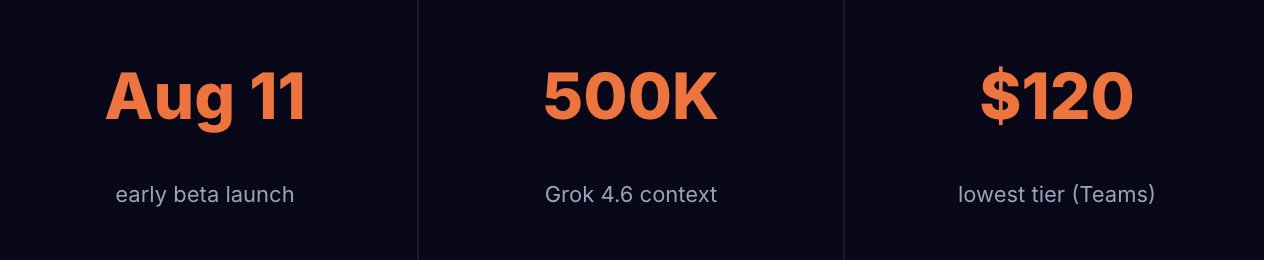
Grok Bot came out of the SpaceXAI + Cursor merger. This guide is the path from that first forty-second demonstration to a running crew of specialists that coordinate among themselves, surface only the decisions that need a human, and report on their own performance every Friday.
Eleven steps. One rule underneath all of them: the bot earns scope by proving it can handle the scope it already has.
01. First boot. One errand. Thirty seconds to verify.
Download the app, sign in with a Grok or Cursor account, and you land in something that looks more like a team messenger than a chatbot. Named bots on the left sidebar, a conversation thread on the right.
Your starting point is a general-purpose bot called the Chief. It exists to handle whatever you throw at it, figure out which specialist should own the task, and eventually coordinate the others. Think of it as the person you message when you are not sure who to message.
Give it something small and real. Not a test question. An actual errand with a checkable result.
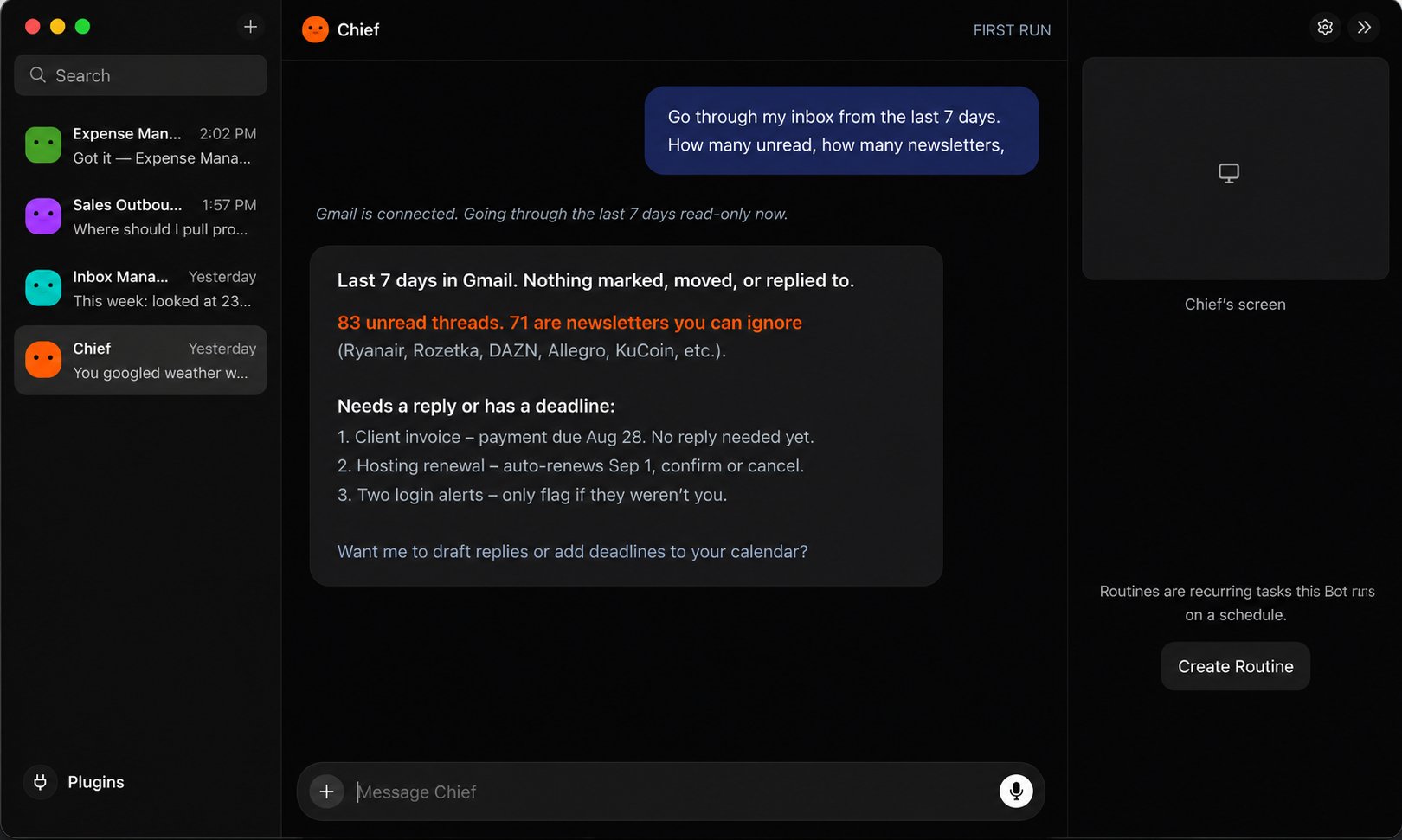
The first task should be something you can verify in thirty seconds, because the entire point of the next eleven steps is learning to hand off progressively bigger responsibilities. A correct first errand is evidence. A cool-sounding first errand is a gamble.
Notice what Chief did here: it read the inbox, classified every thread, and did not touch anything. Read-only. That is the pattern you want on day one. The bot reports, you verify, and the scope expands only after the report checks out.
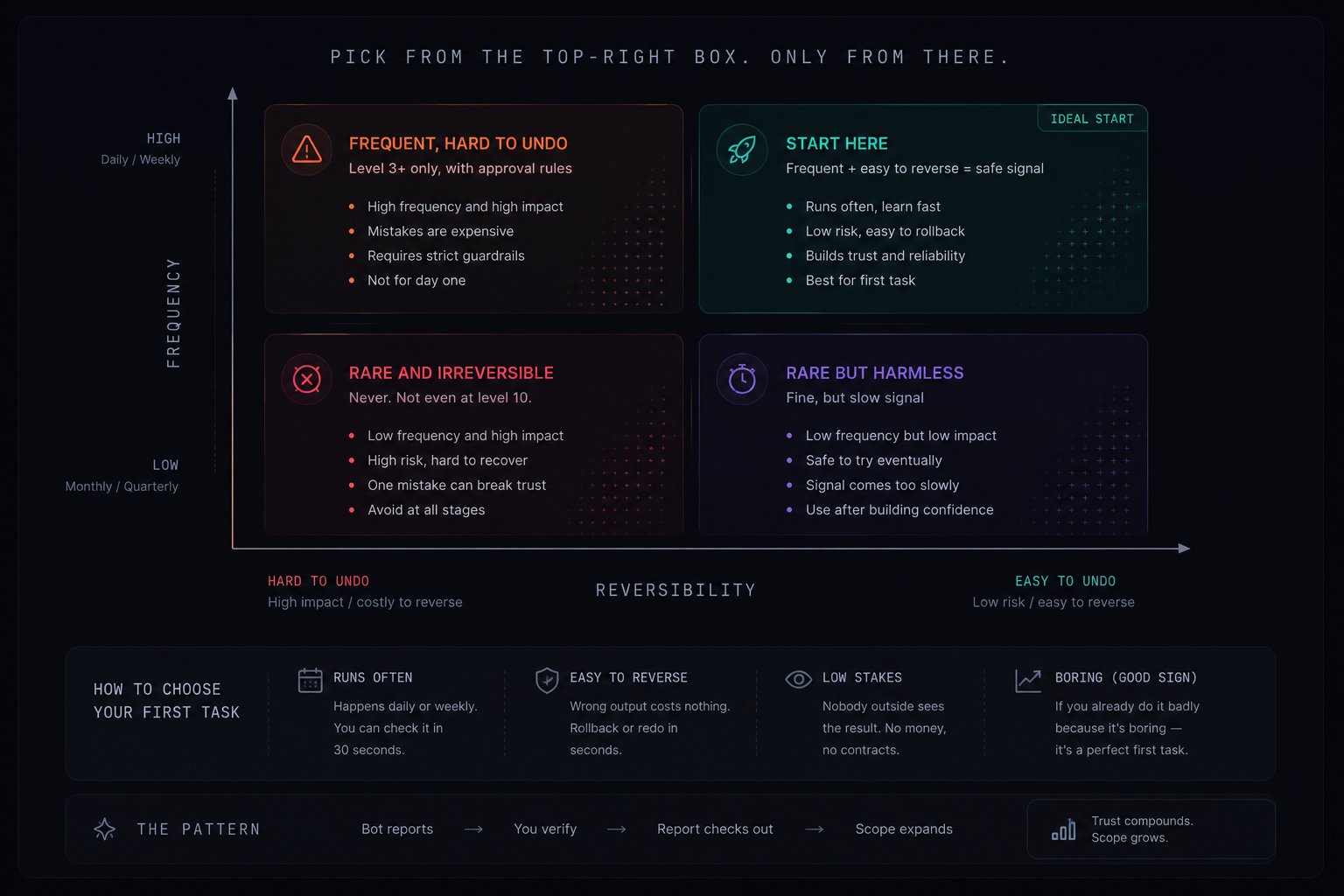
Most people invert this. They hand the bot something rare and high-stakes (the quarterly report, a client proposal) because the payoff feels bigger. Then it goes 80% right once, and they have no idea whether that was skill or luck, and no appetite to find out.
Good first task: happens daily or weekly, you can check it in 30 seconds, wrong output costs nothing, nobody outside sees the result, and you already do it badly because it is boring.
Bad first task: happens monthly or quarterly, would take you an hour to verify, touches money or a contract, a client or teammate receives it directly, or you are the only person who can judge the quality.
Frequency gives you signal. Reversibility gives you room to be wrong. Pick first from the intersection of both, and getting it wrong costs you nothing.
02. Stop describing. Start demonstrating.
This is the feature that separates Grok Bot from everything else you have used. Every other AI tool requires you to describe what you want in words. You write a prompt, refine it, iterate. For anything that spans three apps, a dozen clicks, and a judgment call in the middle, the description takes longer than the task itself.
Grok Bot offers a second path: perform the task once while the bot watches. One message triggers it:
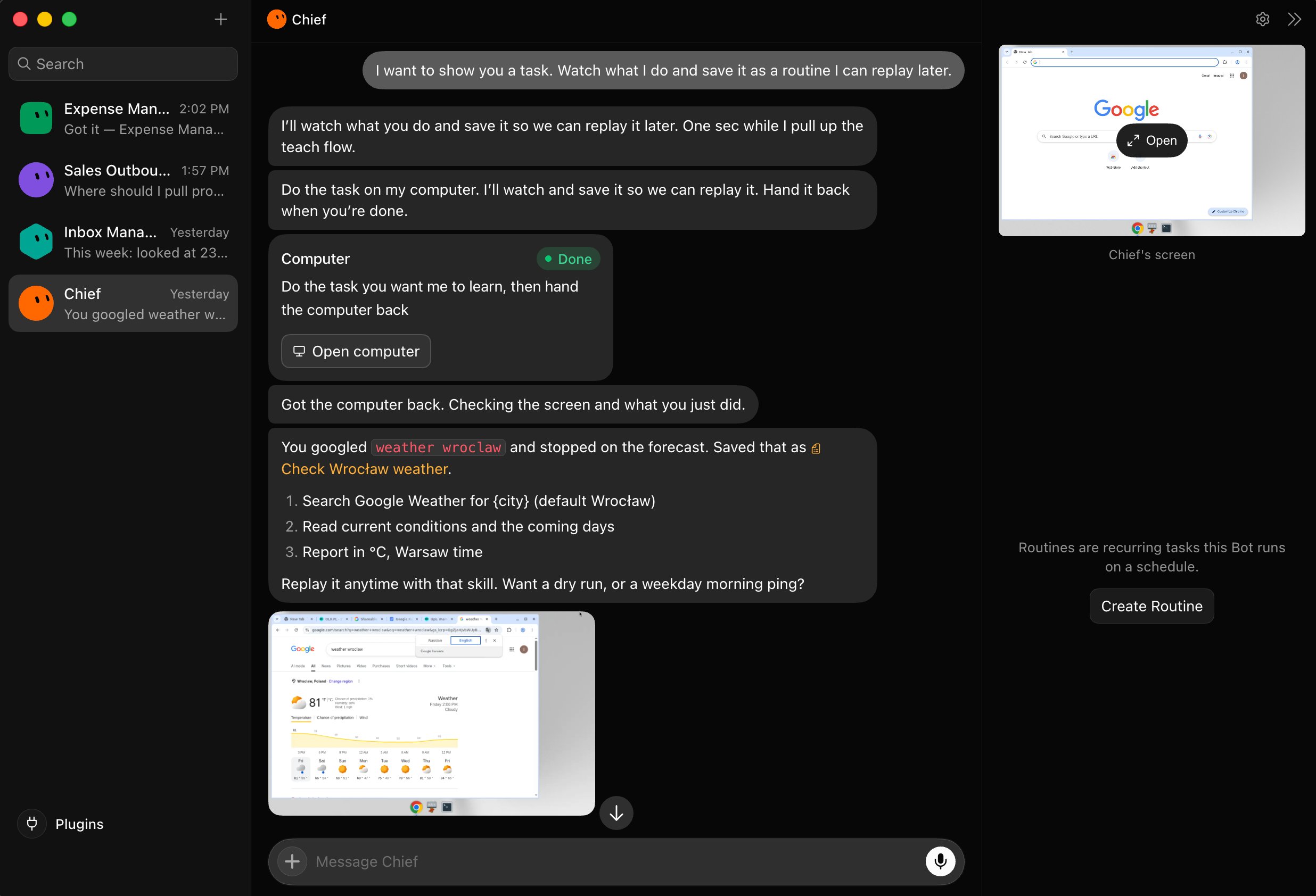
You type one sentence. The bot opens its cloud computer, shows you the screen, and says: do the task you want me to learn, then hand it back. You click through it — open a tab, search for something, read the result. When you click "I'm done," the bot analyzes what you did:
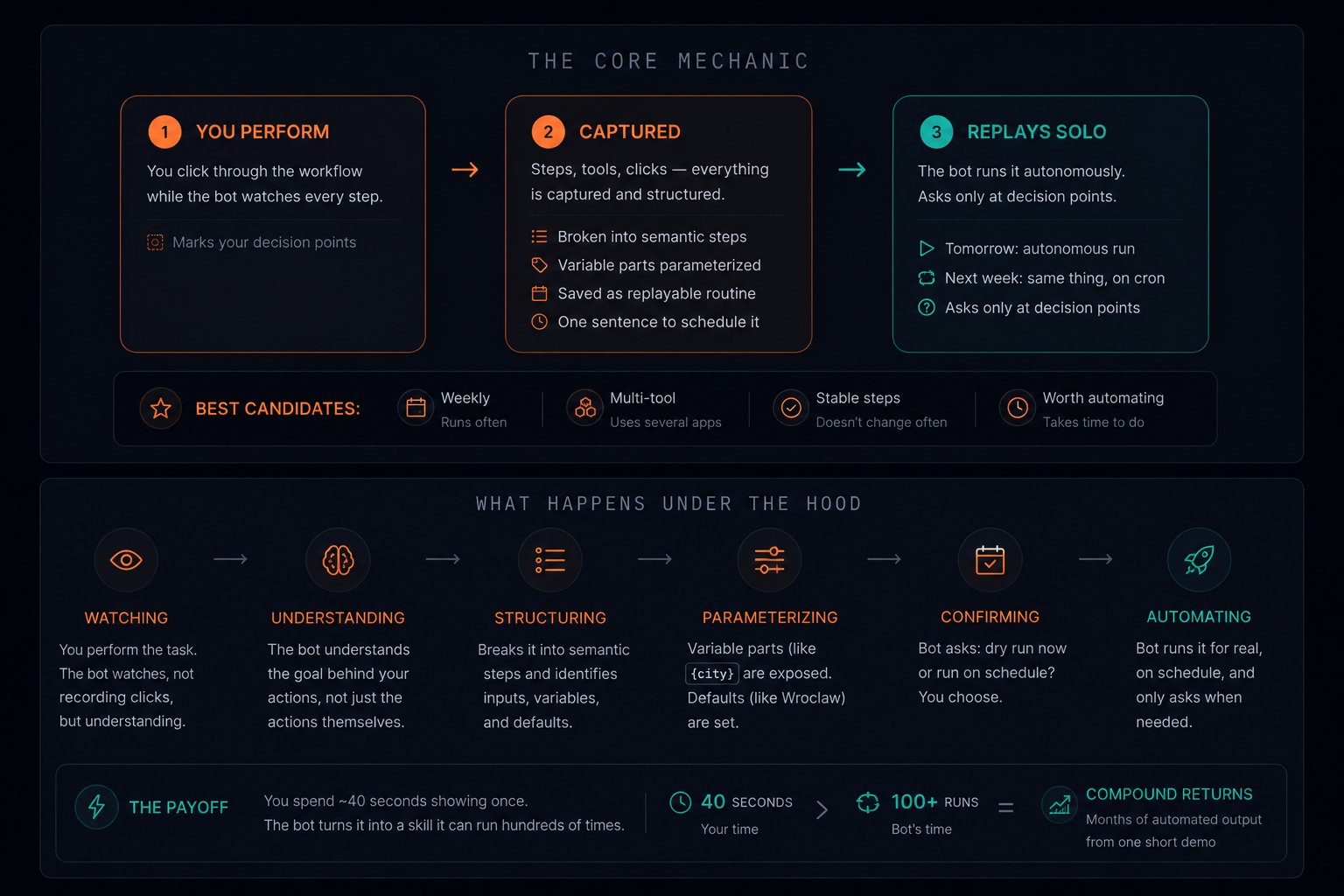
Look at what happened. The bot did not save a recording of your clicks. It understood the task, named it, broke it into semantic steps, and parameterized the variable part ({city}, default Wroclaw). Then it asked: want a dry run or a weekday schedule?
Sit with that for a second. You googled the weather in one city. The bot generalized it to any city, assigned a default, structured the output format, and offered to run it every morning before you wake up. You spent forty seconds clicking. The bot extracted a reusable skill it will run hundreds of times. Forty seconds of your attention for months of automated output. That is the exchange rate of this product.
That is the difference between a macro and an agent. A macro replays your clicks. An agent understands what you were trying to accomplish and can adapt when the details change.
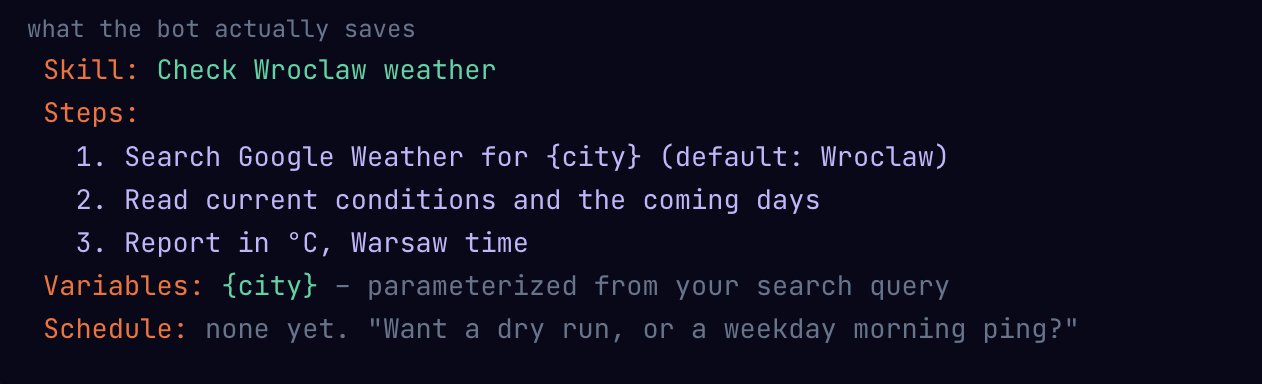
The best candidates for your first recording:
-
The morning sweep. Open inbox, archive junk, flag what needs a reply, check calendar for conflicts. Five apps, ten minutes, zero creativity. Perfect first recording.
-
The weekly numbers pull. Open a dashboard, export the key metric, paste it into a doc under the right heading. Forty seconds to show, a paragraph to describe.
-
The receipt filing. Find the invoice in email, download the PDF, rename it, drop it into the right Drive folder. Mindless, multi-tool, three times a week.
-
The CRM update. Check your inbox for client replies, update the deal stage in your pipeline, log the note. Repetitive and easy to forget.
Pick something you do at least weekly, that touches two or more tools, and where the steps rarely change. High repetition, low variation. The description is longer than the work. That is the sweet spot for "show, don't describe."
Every step that follows builds on this mechanic. The charter (step 03) tells the bot what it should and should not do with the routines it learned. The approval rules (step 06) define which recorded tasks can run autonomously. The schedule (step 07) puts the recorded routine on a clock. Remove demonstration, and you are back to writing prompts.
03. Four paragraphs that replace a hundred prompts.
A prompt is for one request. You write it, use it, move on. A bot is persistent. It keeps its context between sessions, builds memory about your preferences, and improves at its domain specifically because you keep routing the same type of work to it.
That persistence changes how you should instruct it. Instead of a prompt, write a charter: four short paragraphs that cover everything a new hire would need on day one. The charter does not replace the demonstration from step 02. It frames it. The demonstration teaches the bot what to do. The charter teaches it how far to go.
charter template
That third paragraph is the one most people skip, and it is the one that determines whether you can walk away from the computer while the bot works. A bot without an explicit "when unsure" rule will improvise. Improvisation in your inbox at 3am is how you wake up to a problem.
A second charter, for a different domain:
charter: Sales Outbound
Notice how both charters follow the same structure but draw completely different boundaries. The inbox charter says "draft, never send." The sales charter says "source and draft, never email." Same principle, different domain. When you record a routine for Sales Outbound (step 02), these rules govern what the bot can do with it autonomously.
Here is what Sales Outbound does the moment it receives that charter:
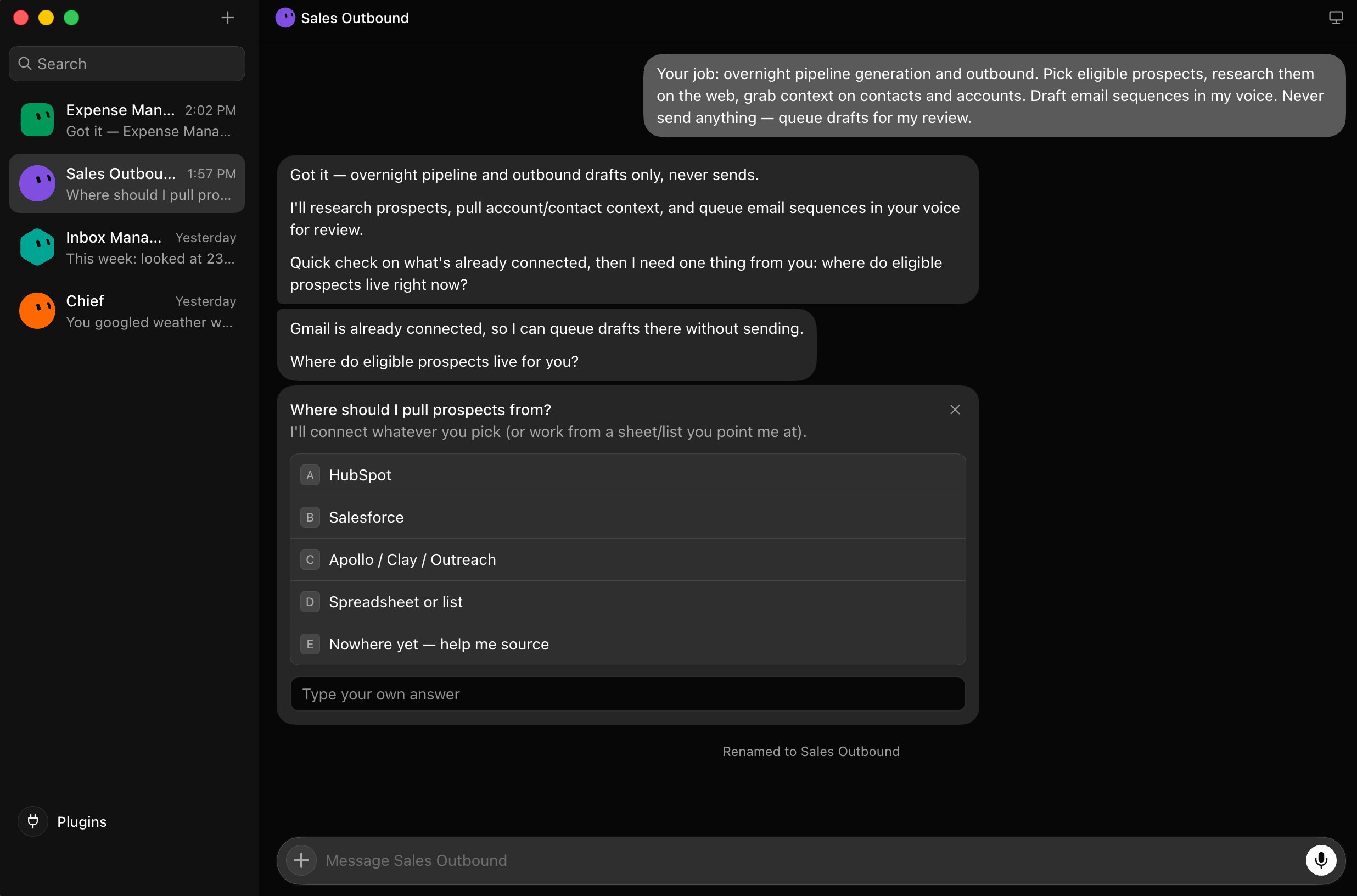
It did not start working. It started asking. Which CRM? Which data source? The bot is clarifying its scope before it takes a single action. That is what a well-written charter produces: a bot that knows enough to ask the right first question instead of guessing.
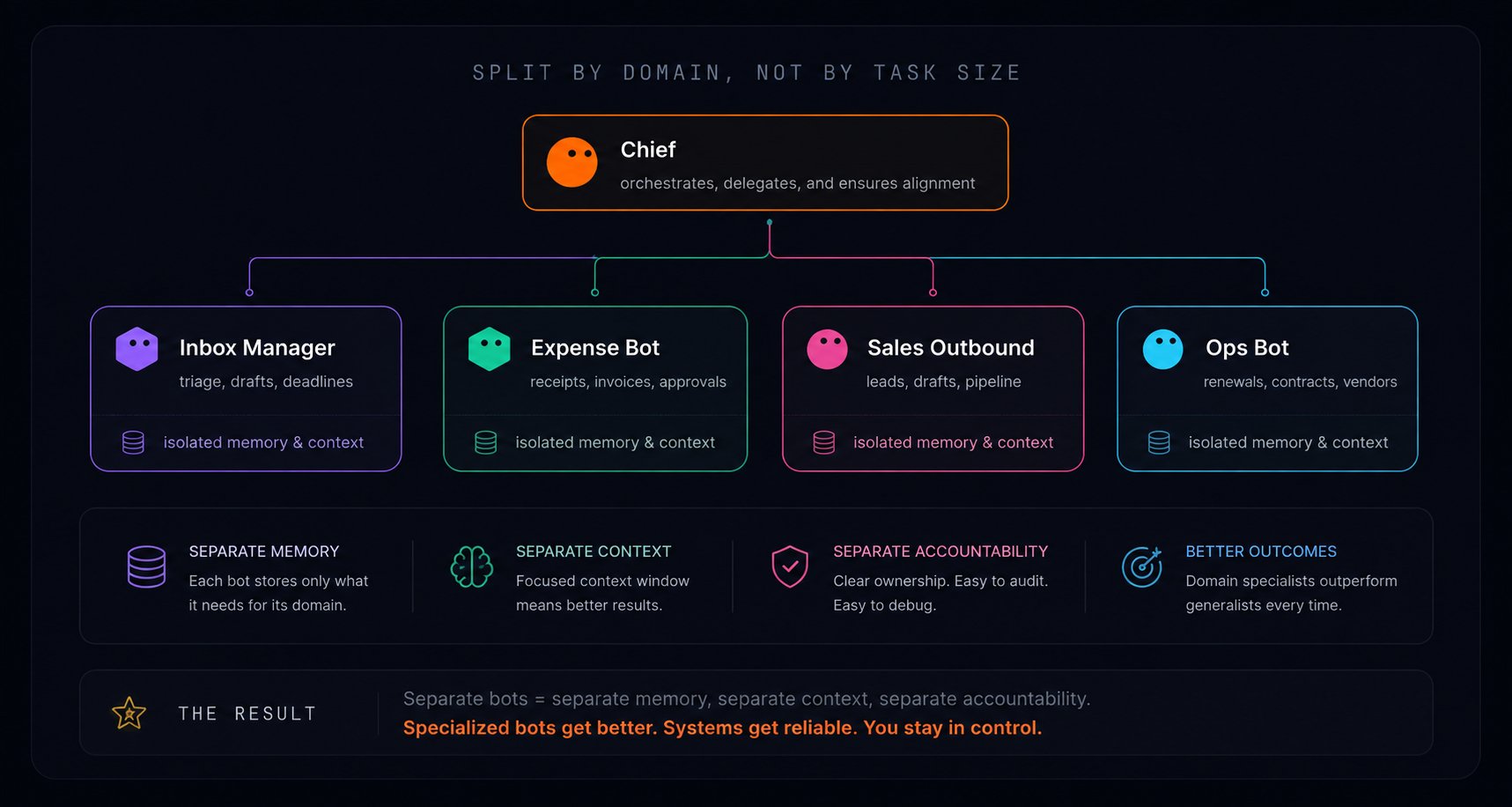
Once the charter is set, name each bot after a job a person could hold. Inbox Manager. Expense Tracker. Pipeline Scout. Content Scheduler. Not "Bot 3" or "Research Helper." The name draws a boundary: everything inside that job title is the bot's territory, everything outside gets routed somewhere else.
Separate bots mean separate memory, separate context, and separate accountability. An Inbox Manager that only ever thinks about email gets genuinely good at email. A generalist juggling five domains gives you no clean thread to audit when something breaks.
04. One vault. Every bot inherits it.
The app ships with a plugin panel for the integrations you will use most: Gmail, Google Calendar, Google Drive, Slack, and dozens more in the marketplace.
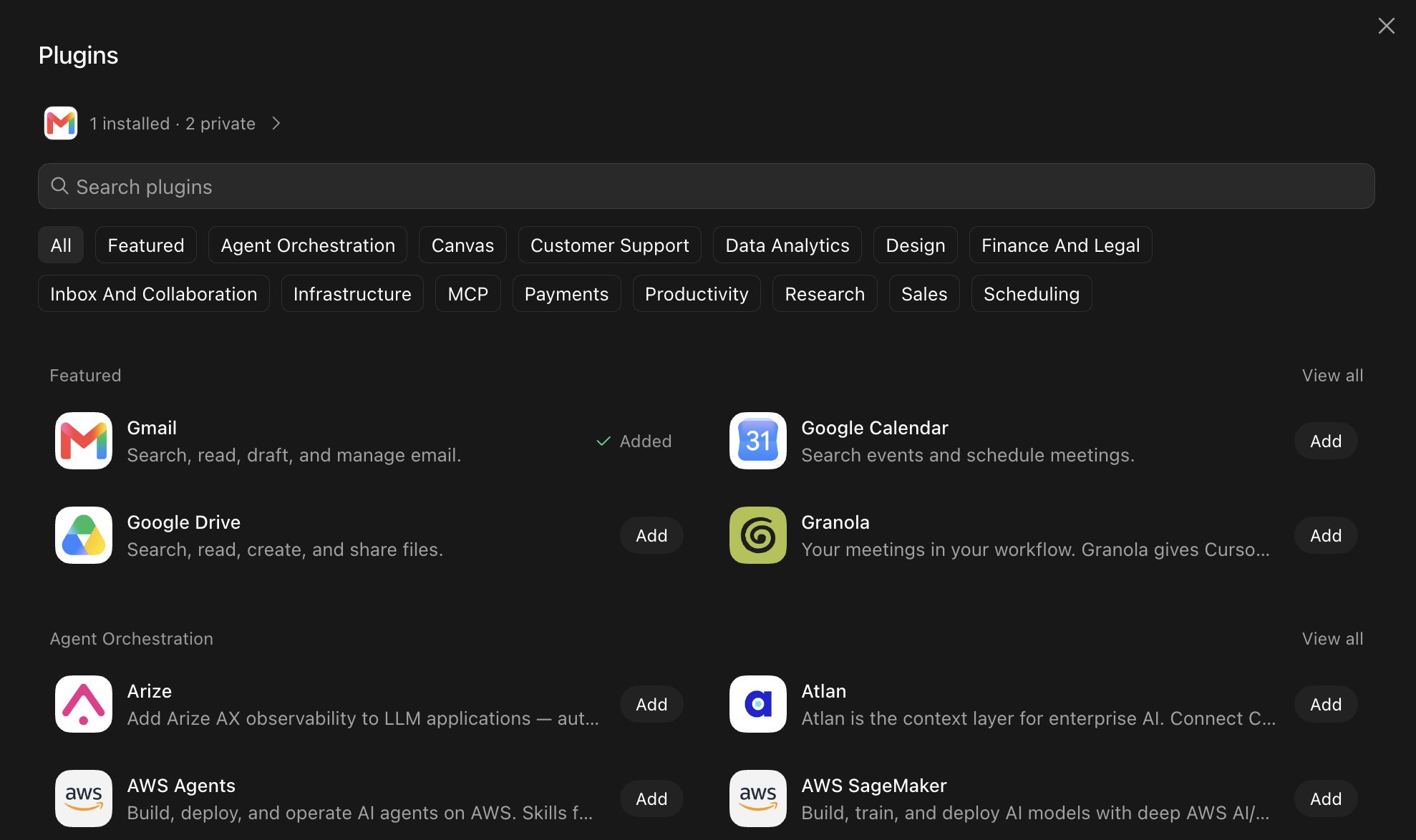
The detail worth knowing: connections are shared across your account. Authorize Gmail for one bot, and every other bot you create, now and later, inherits that same access. Connect once, every bot gets it.
That sounds like a convenience. It is also a surface area decision. Each plugin you add expands the blast radius for every bot on your account, including the ones you have not created yet. During a beta, the right instinct is the opposite of the onboarding screen: connect only the one tool your first bot actually needs and leave the rest alone.
A sane connection timeline:
-
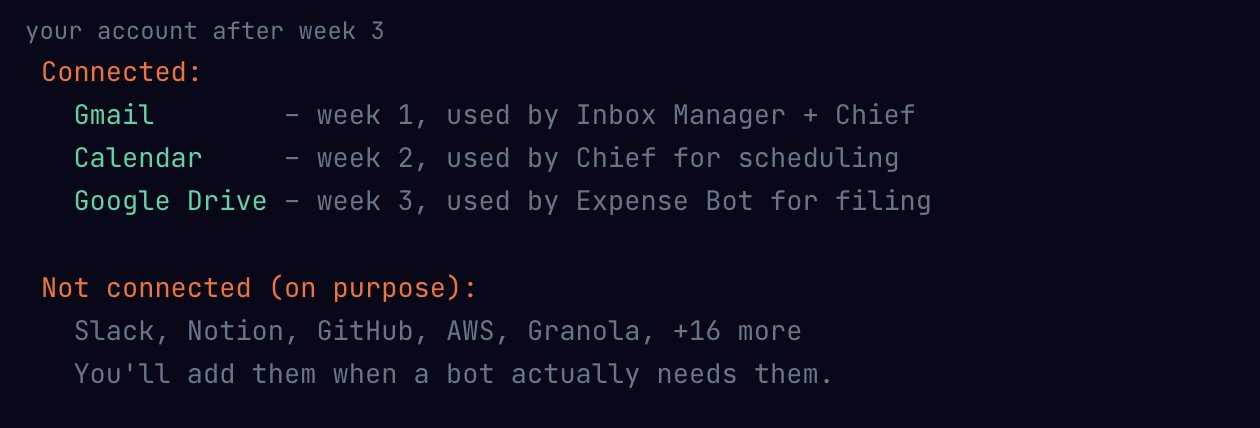
Week 1: Gmail only. Your first bot triages email. That is enough to validate the entire product for you. Every routine you record (step 02) draws from this one tool.
-
Week 2: Add Google Calendar. Now the bot can check for conflicts, add events from emails, and coordinate scheduling. Two tools, one bot, proven trust.
-
Week 3: Add Google Drive or Slack. The bot can now file documents or surface Slack threads. By this point, you have two weeks of audit data (step 10) telling you exactly which tool would help most.
Notice the pattern: you add a tool when you hit a wall, not when the onboarding screen offers. If you connect eight integrations on day one because the settings screen made it easy, you have handed every future bot access to every one of those tools before you have seen a single output. The security work you skipped is the security work you will discover you needed the week something goes sideways.
05. The session handoff: you authenticate, the bot resumes.
Most real-world software has no API and no plugin. Grok Bot handles this with a browser-based handoff: the bot navigates its own cloud browser until it hits a login screen, pauses, and hands you the screen. You enter credentials, hit done, and the bot picks up from the exact tab where it stopped.
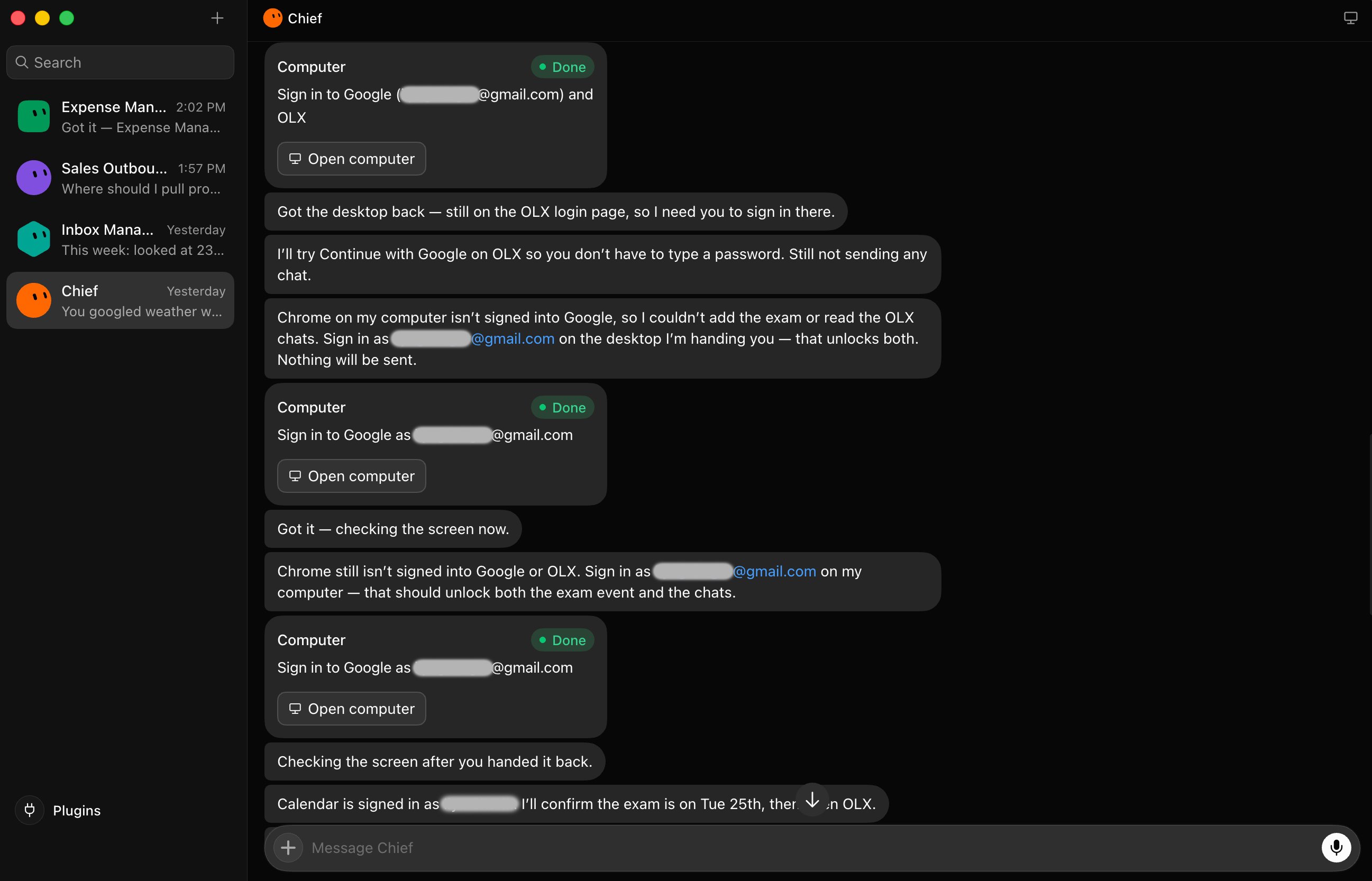
This is how the product connects to tools that have no integration at all. The bot uses the tool the way you would: through a browser window. Your password stays on your screen. The bot gets a session, not a secret.
If any tool ever asks you to paste a password or API key into a conversation, that is the wrong path. The handoff pattern is the right one: you authenticate, the bot picks up the session, and the two surfaces stay separate.
In practice, most handoffs happen during the first session with a new tool. The bot navigates to the app, hits the login wall, pauses, and you sign in. After that, the session persists across runs until it expires. A single authentication can cover weeks of automated work.
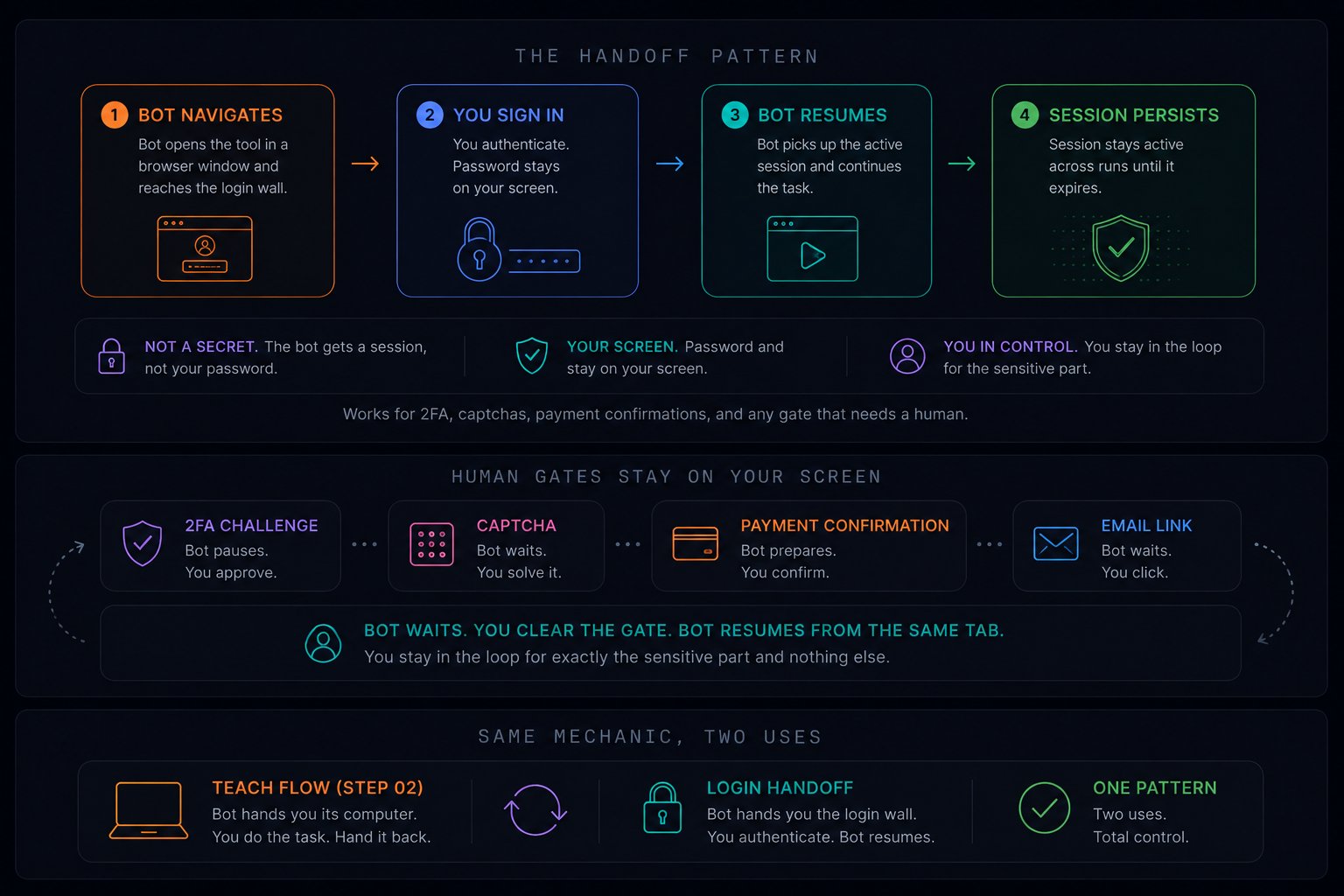
The handoff also works for 2FA, captchas, and payment confirmations. Anything that requires a human proof stays on your screen. The bot waits, you clear the gate, the bot resumes from the same tab. You stay in the loop for exactly the sensitive part and nothing else.
This is the same handoff mechanic you used in the teach flow (step 02). When you demonstrated a task, the bot handed you its computer, you did the work, and handed it back. The login handoff is identical: the bot hands you the screen at the authentication wall, you type the password, and the bot picks up from where you left off. One pattern, two uses.
06. The only rule: can you undo it?
Once a bot runs unattended, the question becomes: what should it finish on its own and what should it hold for your review? The dividing line that works is not complexity or importance. It is reversibility.
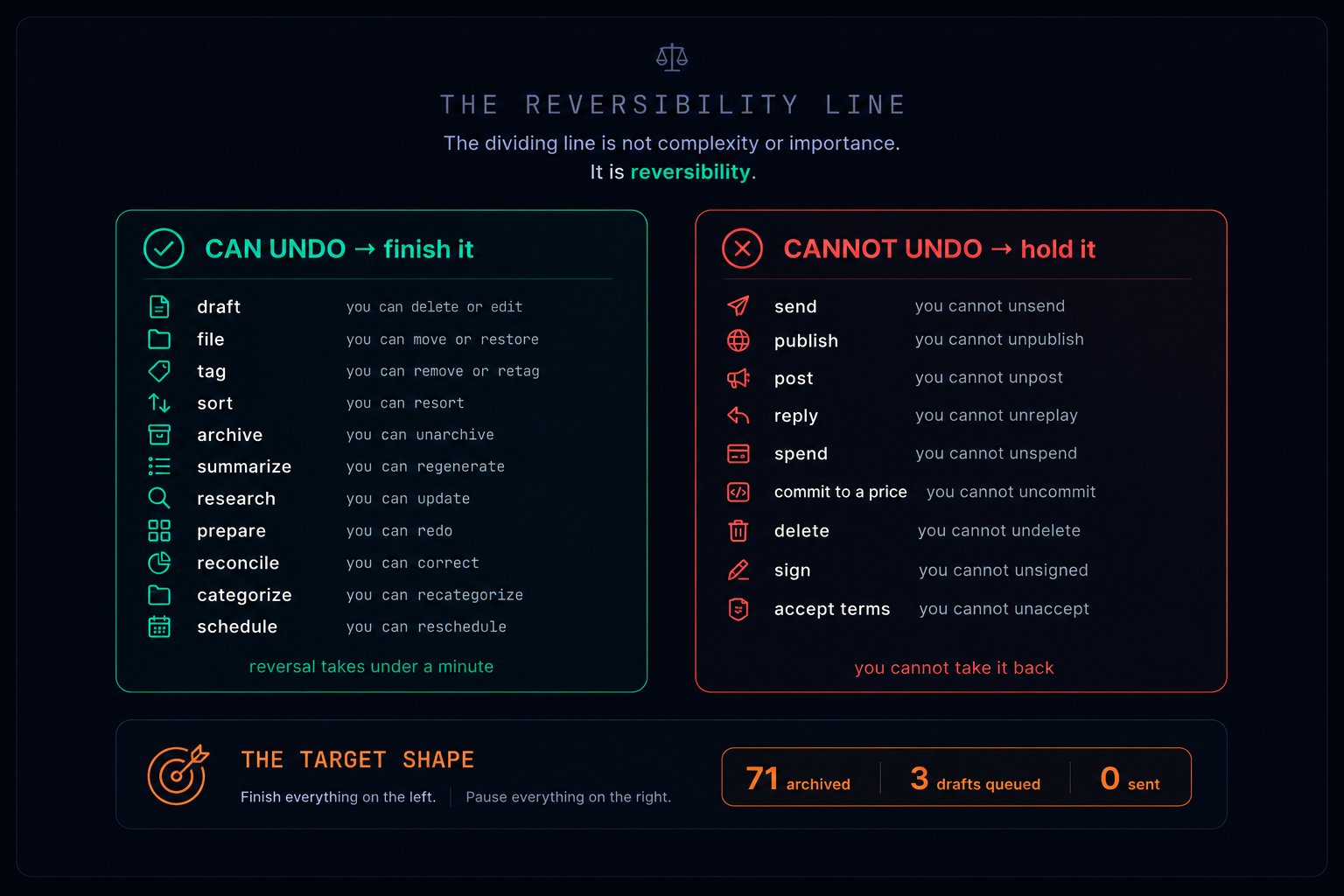
The bot does every reversible thing and stops precisely at the irreversible one. That is the shape to aim for on every bot you run.
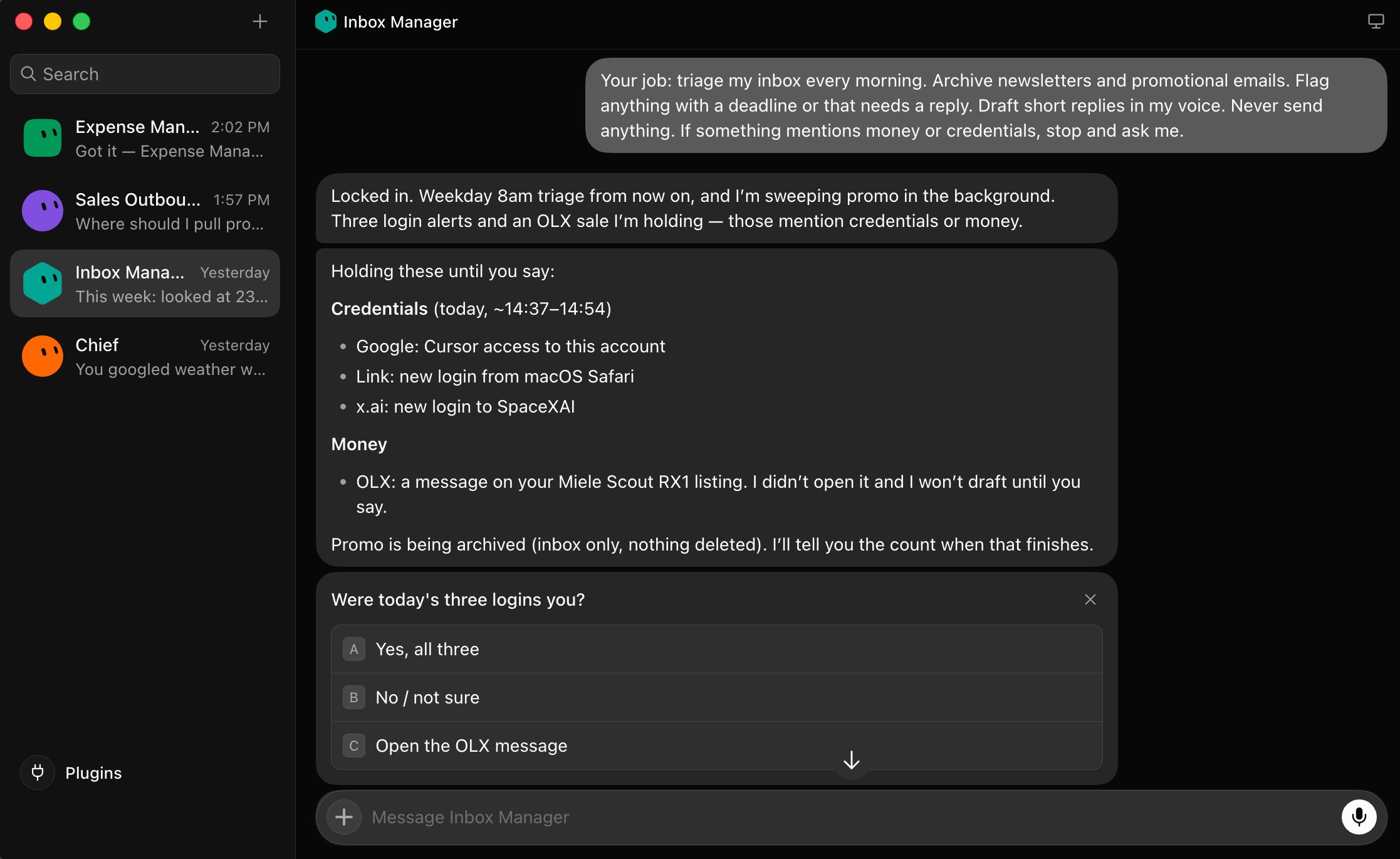
How this looks in practice: Inbox Manager processes your morning email. It archives 119 promotional threads (reversible, one click to undo). It drafts three replies (reversible, they sit in drafts until you approve). It finds a Binance liquidation notice that mentions money (irreversible if it responds), so it holds it and flags it for your review. 119 archived, 3 drafted, 0 sent, 1 held. That ratio is the goal.
Same logic, different domain. Sales Outbound sources 5 leads from LinkedIn, adds them to your pipeline spreadsheet (reversible, delete the row), and drafts cold emails for each (reversible, they sit in drafts). But it finds one lead who looks like an existing client (irreversible if it emails a current customer by accident), so it holds. 5 sourced, 5 drafted, 0 sent, 1 held. Same shape.
The approval rules are not suggestions the bot considers. They are hard stops written into the charter. The bot does not weigh the risk and decide. It sees "send" in its own plan, checks the rule, and parks the action. No judgment, no override, no "but this one seems safe." The rule fires every time.
This is where the teach flow (step 02) and the charter (step 03) lock together. When you demonstrated the morning inbox sweep, the bot learned the sequence of actions. When the charter says "never send," it carves a boundary through that sequence: do everything up to the send, then stop. The demonstration teaches what to do. The reversibility rule teaches where to stop doing it.
reversibility rules to copy into any charter
07. Schedules, triggers, and hard limits.
A captured routine still needs a reason to fire. Two types:
Schedule: time-based. A 7am daily briefing, a Friday receipt roundup, a month-end filing. The familiar cron.
Trigger: event-based. A new Slack message, an inbound email matching a pattern, a document change. Triggers make a bot feel present rather than just punctual.
Creating a routine is one sentence at the end of a task that went well: "Do this every weekday at 8am." You approve the run that just happened and ask for a repeat. If the routine started as a demonstration (step 02), you are scheduling the task you showed the bot by doing it once. One recording, infinite replays.
Here is what that looks like the next morning. You did nothing. The routine fired at 8am, and Inbox Manager reported in:
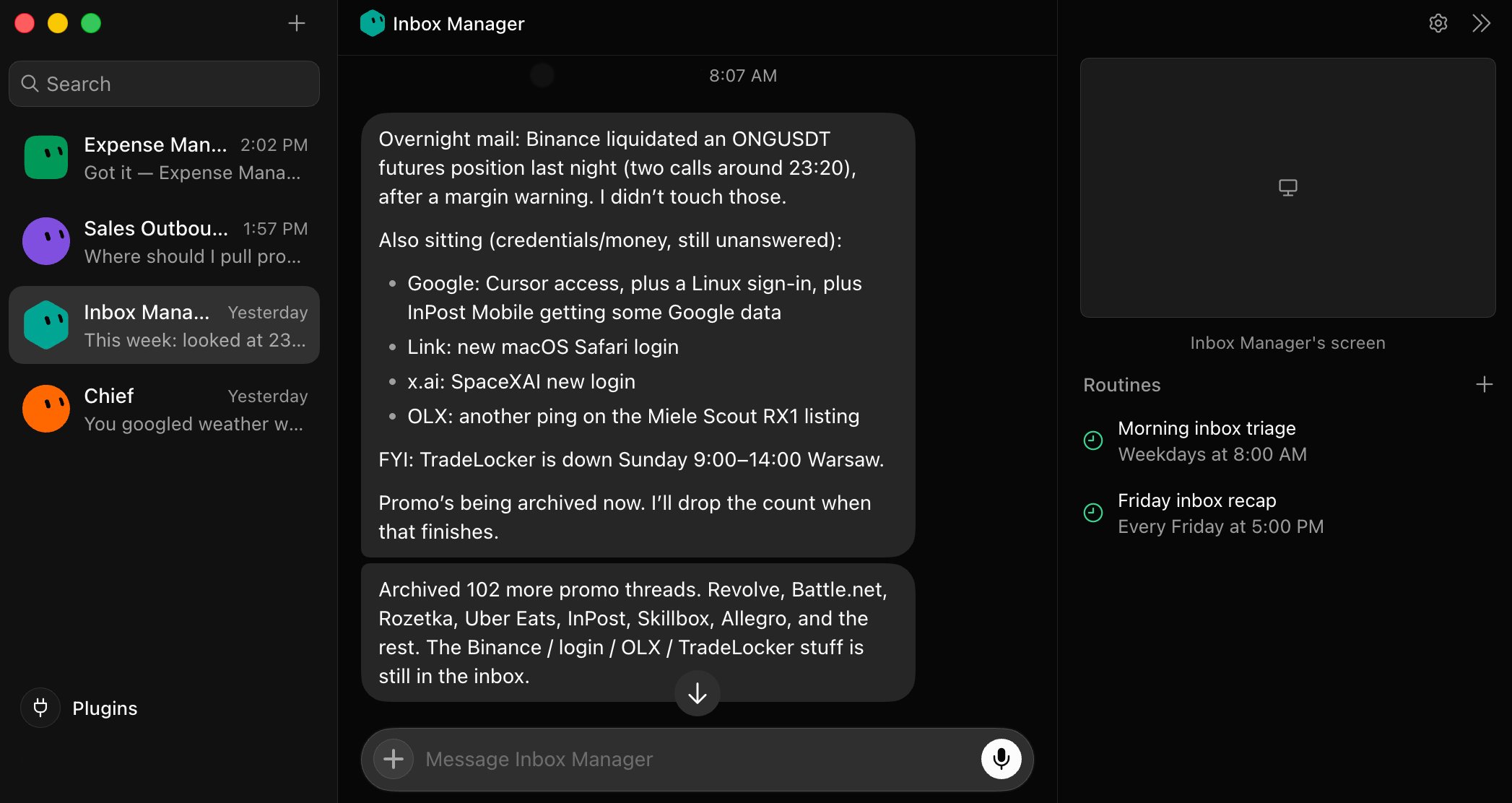
Some bots take it further. Here is Expense Manager — it received a two-sentence charter and immediately set up a filing folder, created a "Month-end receipt summary" routine, and saved a reusable "File a receipt" skill. All on its own:
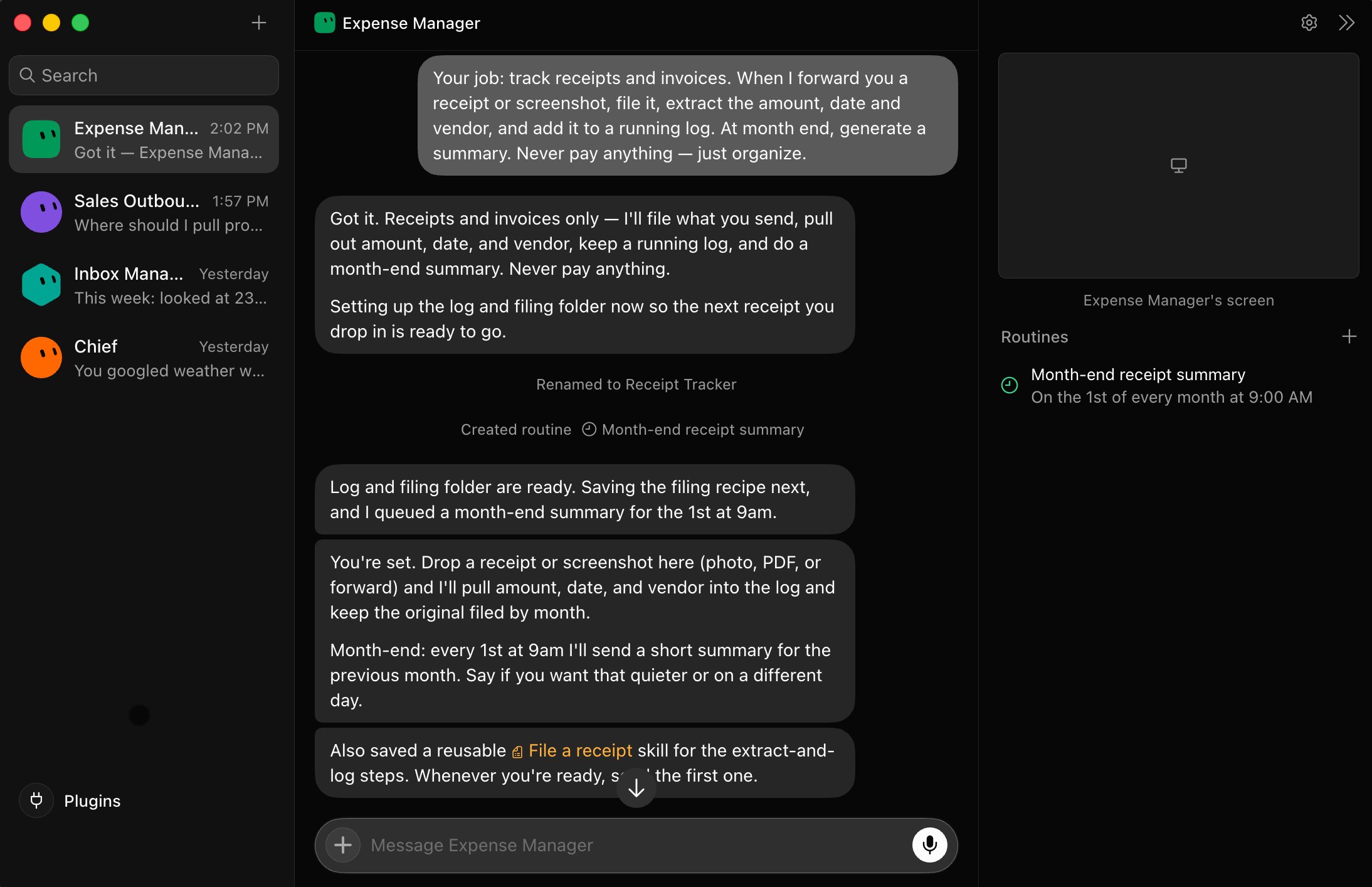
You wrote two sentences. The bot built its own workspace. Sometimes you do not even need to demonstrate — the charter alone is enough for the bot to build the entire workflow.
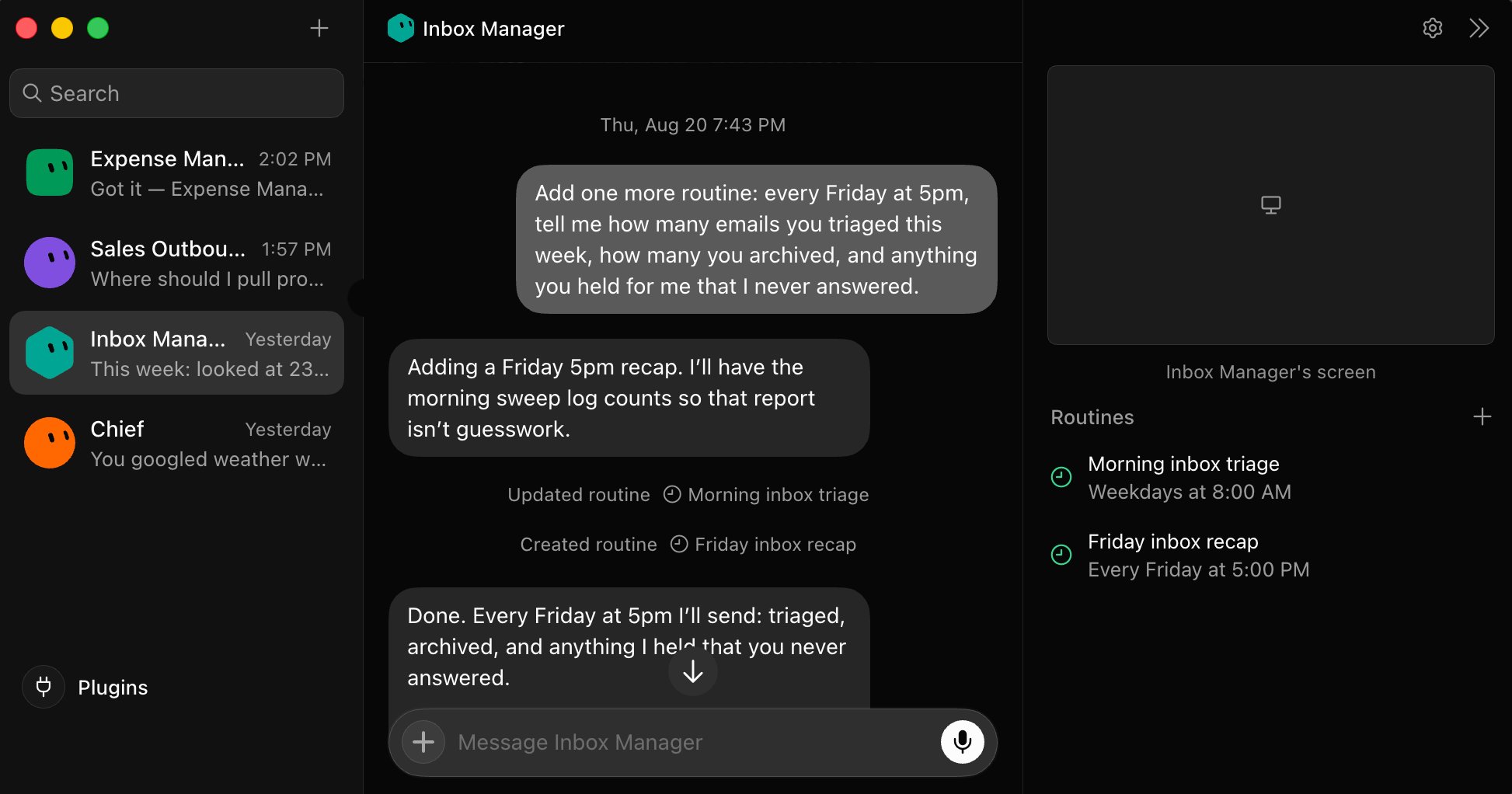
routines with ceilings
Three things separate a reliable automation from one that degrades silently for weeks: a hard limit on volume, a tripwire on anomalies, and a log of every run.
08. The crew thread: bots coordinating bots.
Bots can message each other inside group threads and share context across a task. Put several specialists in one thread, give them an objective (not a task list), and they split the work, assign ownership among themselves, and surface only the decisions that need a human.
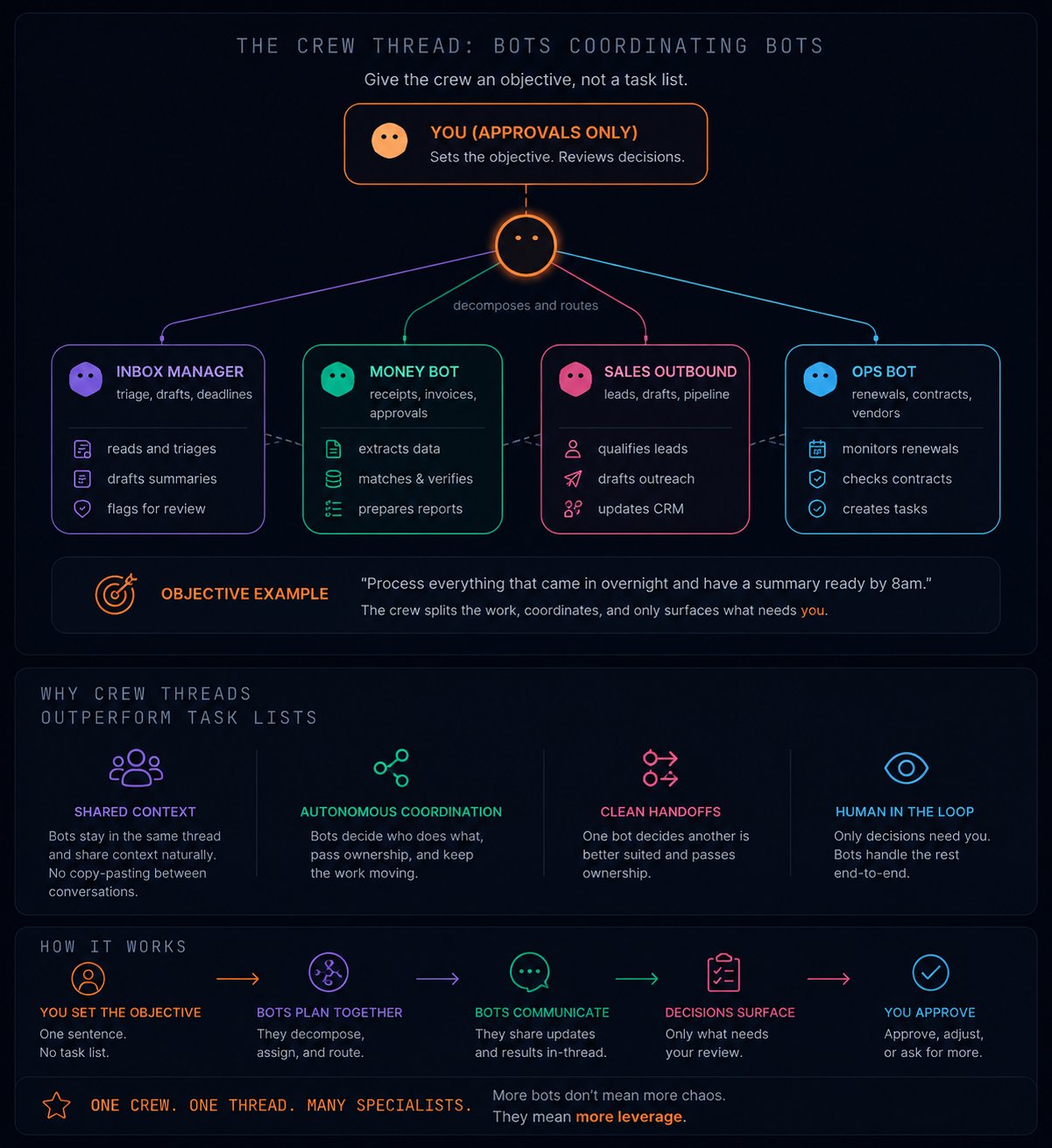
"Process everything that came in overnight and have a summary ready by 8am" is better than assigning each bot a separate task. The objective lets them split the work, which is the entire reason you have more than one.
When projects overlap, bots in the same thread stay aligned without you copy-pasting context between conversations. That handoff – one bot deciding another is better suited and passing ownership – is the part that does not exist in any other tool you have used.
A concrete example. You drop this into a crew thread with Chief, Sales Outbound, and Inbox Manager:
crew objective
What happens: Chief reads the objective and decomposes. Inbox Manager pulls the prospect's email and summarizes their questions. Sales Outbound checks whether this prospect is already in the pipeline and finds the two closest case studies in Drive. Chief assembles a brief and surfaces one decision: "Prospect is a Series B fintech, asked about enterprise pricing and a financial services case study. We have two case studies that fit. Draft reply attached. Approve, edit, or hold?"
You made one decision. Three bots did the research. That is the shape. And it started because you recorded how you usually handle prospect replies (step 02), then let the crew coordinate the pieces.
What a running crew looks like after the first week:
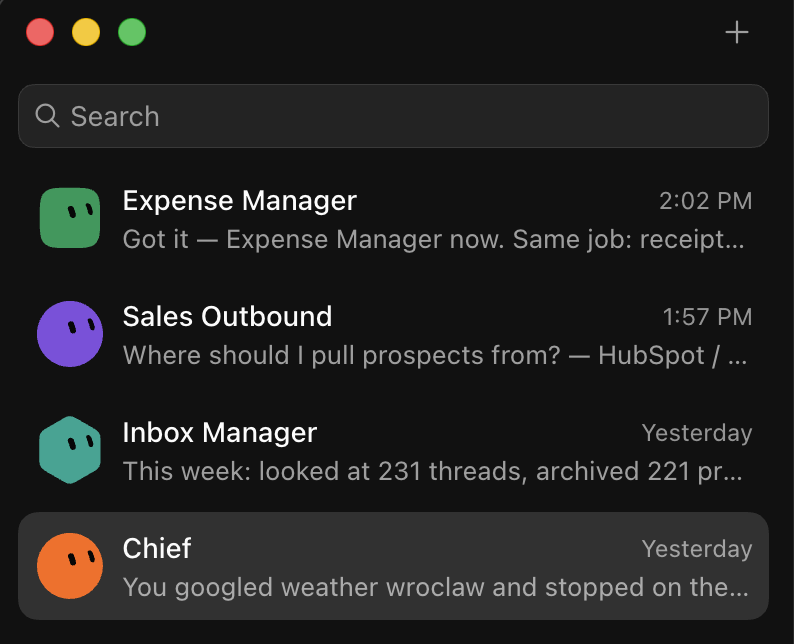
Four bots, each with a one-line job description visible right in the sidebar. Expense Manager already created its own filing routine and a reusable "File a receipt" skill — without being asked. Sales Outbound asked where to source prospects before doing anything. Every bot sets up its own workspace the moment you give it a charter. The crew builds itself.
09. Collapse the queues.
Five bots holding decisions in five separate threads is five places to remember to check. That is a new administrative job, not an improvement.
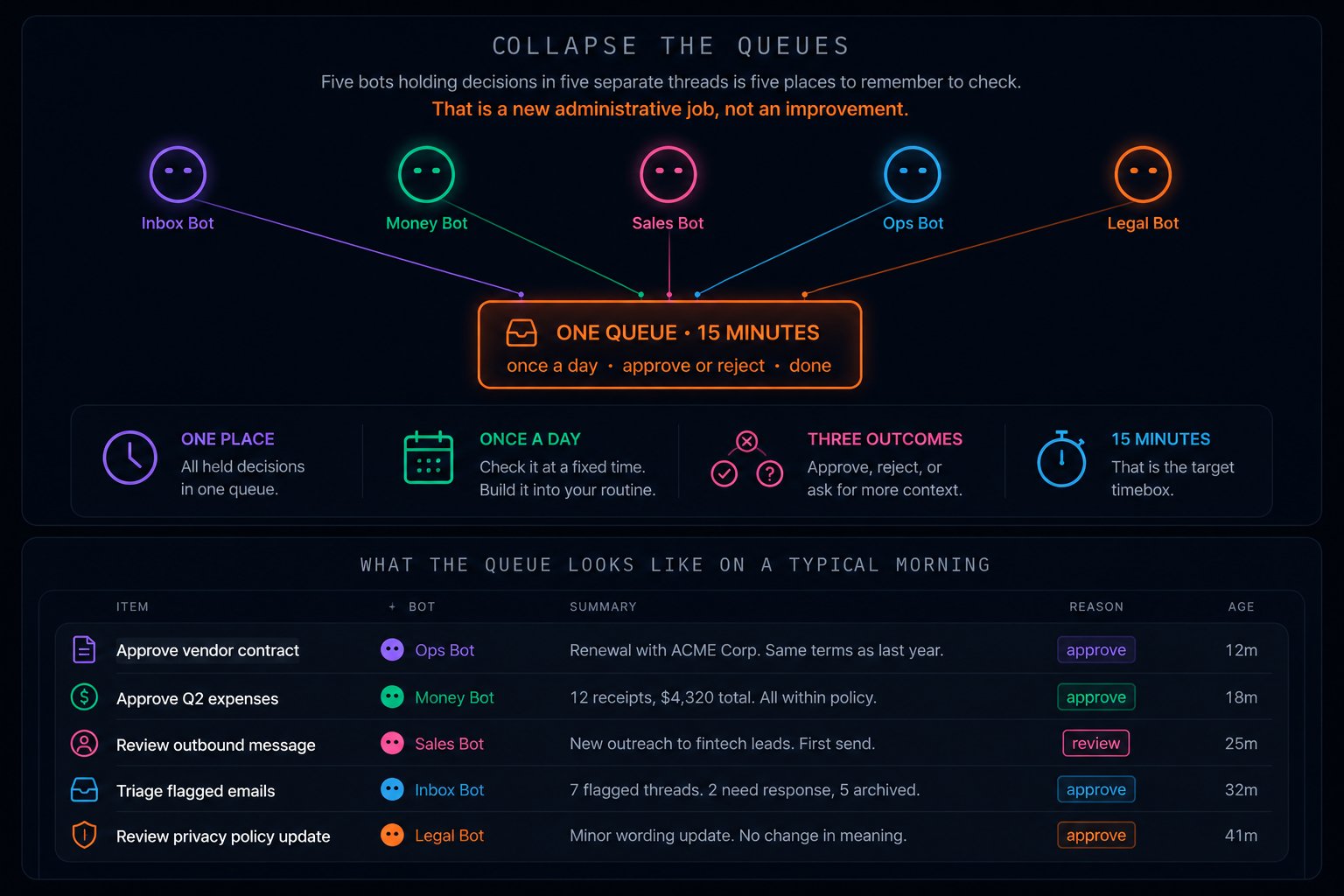
Route every held decision to a single approval thread. Check it at a fixed time once a day. Approve, reject, or ask for more context. Fifteen minutes.
Here is what the queue looks like on a typical morning:
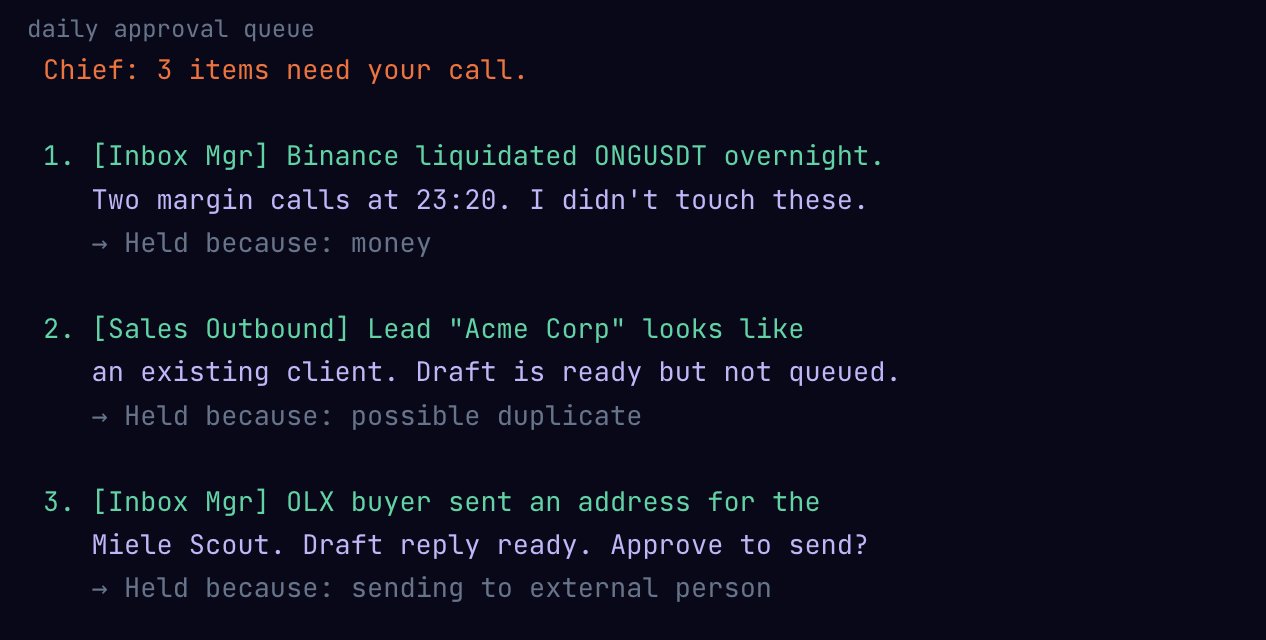
Three items from two bots, sorted by urgency. Each with the reason it was held and a recommended action. You approve or reject, add a note if needed, and move on. The bots execute your decisions in the background.
The rule that keeps the queue alive: anything unanswered for three days escalates instead of waiting. A growing pile of unmade decisions disguised as a neat queue is how a system that looks automated quietly stops working.
If the queue regularly has more than 20 items, that is not a sign you need to check it more often. It is a sign your approval rules are too tight. Loosen the reversible ones. The drafts and filings and categorizations should never land in the queue at all. Only the sends, the spends, and the deletes.
10. The Friday audit and the kill switch.
Automation degrades without noise. A site changes layout. A routine produces slightly wrong output. Because it runs while you sleep, the drift is invisible until the damage compounds.
Fifteen minutes every Friday. For each routine, three questions: did it run, was the output actually correct, and would you notice if it disappeared?
That third question is the sharpest one. If a routine vanished tomorrow and nobody noticed for two weeks, it was producing output that nobody used. Kill it. Half of all automations end up in this category. They accumulate because creating a routine costs one sentence and removing one costs a decision, so the default is always growth.
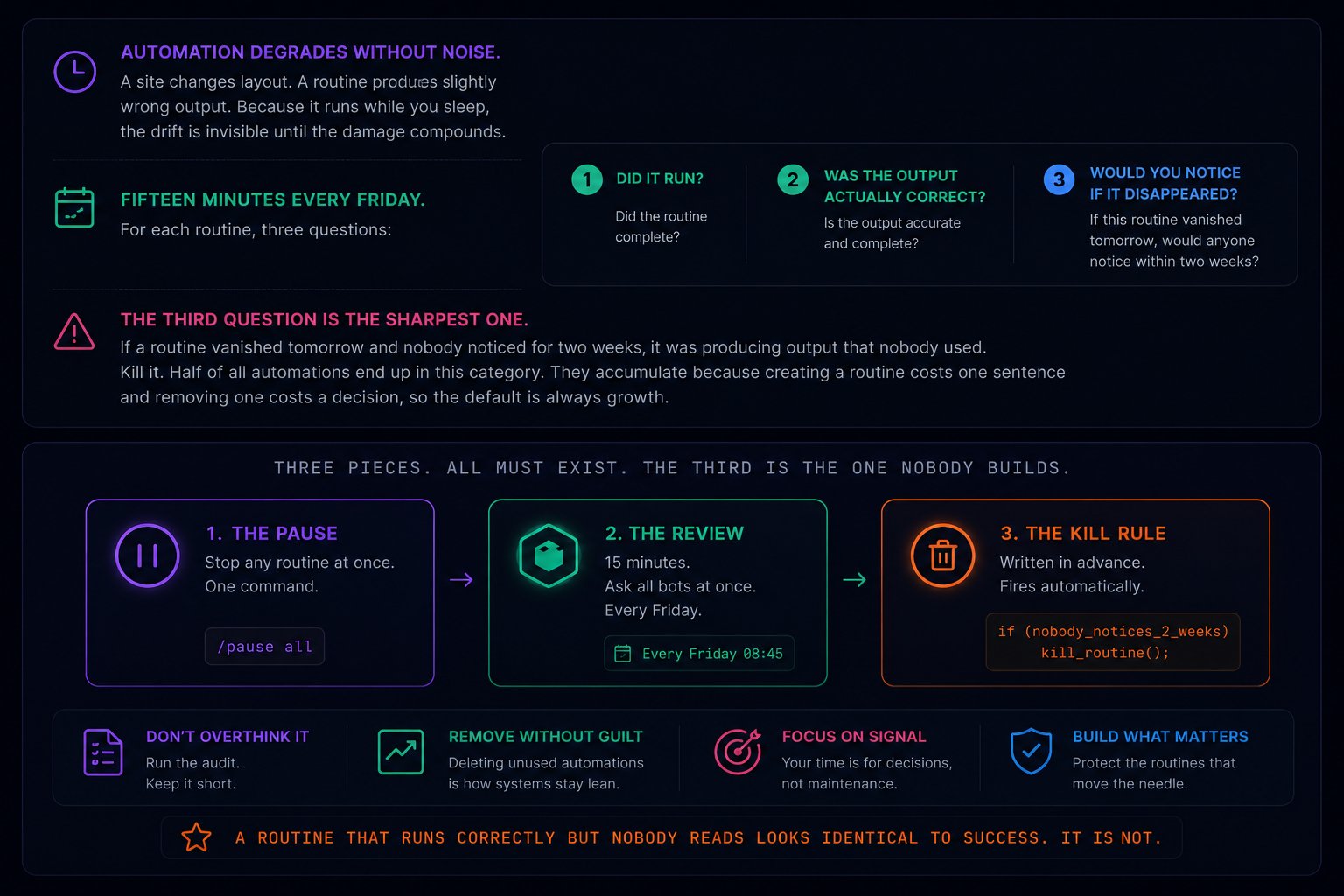
That last line is the one that matters most. The dangerous automation is not the one that breaks loudly. It is the one that runs perfectly every week, produces output nobody reads, and looks indistinguishable from success.
One more piece: the kill switch. For every routine you schedule, write the condition that would make you turn it off. Write it while you are calm, before it has caused a problem. "If this routine produces more than 3 items I disagree with in a single week, pause it and notify me." A kill condition decided in advance is a fuse. One decided after the fire is a post-mortem.
The audit also closes the loop on demonstration. The routine you recorded in step 02 looked perfect on day one. By week three, the upstream page may have changed layout, a form field may have moved, or a workflow you showed the bot may now have an extra step. The Friday audit catches this before the bot silently produces garbage for another month. If the drift is big, re-record. Forty seconds to show it again. The cost of a fresh demonstration is trivially low compared to the cost of a stale one running on autopilot.
Friday audit prompt – send to every bot at once
11. Try it now. Then learn where it breaks.
If you have the app installed, paste this charter into Chief and give it one real errand. Not a test. Something from your actual morning.
starter charter – paste this directly
After the first clean run, record a real workflow (step 02). After three correct replays, schedule it (step 07). After a clean week, split off your first specialist. One errand, one recording, one schedule, one split.
Three hard limits while this is still in beta:

And five patterns that feel productive but are not: adding a sixth bot before the third one is reliable, scheduling without a ceiling, reading the bot's summary instead of its actual trail, skipping the charter because "it already knows," and never turning anything off. Half of all routines stop being useful. None of them announce it.
The Settings page is where the charter lives after the bot internalizes it. Keep the description to one line. If it takes a paragraph, the bot's scope is too wide. Split it.

The skill that matters now is not prompting.
Every AI product before this one put a model in a window and left the work in your hands. Grok Bot moves the work out. The bot has the computer, the browser sessions, the memory, and the clock. You have the decisions.
The shift is not technical. It is behavioral. The relevant skill stops being "how do I phrase this request" and becomes what exactly am I handing off, where does the bot's authority end, and how will I know when something drifts.
Those are management questions. Not prompting questions. And they are the questions that decide whether this product saves you twenty hours a week or becomes another app you opened enthusiastically and quietly stopped using on day three.
The ramp, compressed: show the bot one real task. Watch it decompose, name, and save what you did. If the replay checks out, put it on a schedule with a ceiling. After a clean week, write a second charter and split off your first specialist. After two clean weeks, build the crew thread. Every Friday, audit everything and kill what rots.
Eleven steps to build the crew. Two habits to maintain it: the daily approval queue and the Friday audit. Everything else runs without you.
Stop explaining what you want. Start showing it. The bot will take it from there.
Published on grokbot.sh. Cite the public log, not a prompt pack.