
How to turn Grok Bot into a money printer (prompts + skills included)
24 hours after I downloaded Grok Bot, it closed a $999 deal out of my inbox. It fielded the lead, drafted 2 replies, sent a Stripe link, and made sure the lead paid while I was working on something
Article
Job breakdowns

24 hours after I downloaded Grok Bot, it closed a $999 deal out of my inbox.
It fielded the lead, drafted 2 replies, sent a Stripe link, and made sure the lead paid while I was working on something else entirely.
I've spent the last year selling AI services to small businesses, and in this article I'm handing you the exact bot that did it: the full system prompt, the three skills it runs, and the three routines that keep it working around the clock. Every piece is copy-paste.
Table of Contents
I: Why leads die in your inbox
II: What Grok Bot actually is (60-second version)
III: The Role, Skills, Routines stack
IV: The three skills
V: The three routines
VI: The $999 close, play by play
VII: Guardrails, and who should build this
Everyone is posting Grok Bot demos right now. Almost nobody has published a working revenue system you can copy.
That's what this is.
Before we get into it, I bundled the complete Revenue Closer setup, including the full system prompt, all three skills, and the routine schedules, into one copy-paste doc.
You can grab it (free) here.
Let's get into it.
I: Why leads die in your inbox
Here's the uncomfortable math of running a service business: the lead you answer in 10 minutes closes, and the lead you answer in 2 days ghosts.
I know this because I sell AI assessments and retainers, and my pipeline lives in Gmail. Warm yeses come in while I'm on client calls, recording podcasts, or at the gym. By the time I see them, the buying energy has cooled.
I tried the standard fixes. A follow-up label system I stopped maintaining after a week. Todoist reminders that told me a lead existed but did nothing about it.
The problem was never knowing I should follow up. The problem was that following up required me.
So when Grok Bot launched, I didn't build a research assistant or a content bot first. I built the thing that touches money: a Revenue Closer whose only job is turning warm yeses and live pipeline into booked calls and paid deals.
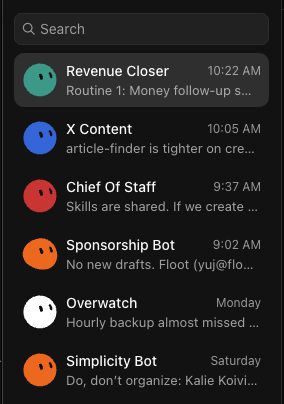
II: What Grok Bot actually is (60-second version)
Quick context if you missed the launch. On August 11th, xAI released Grok Bot in early beta: always-on AI agents that each get their own computer in the cloud. Per xAI's announcement, they sign into the tools you already use, work across apps and inboxes, and only come back to you when something needs approval.
A normal AI chat stops when you close the window. A Grok Bot keeps running on its own machine, on a schedule, whether your laptop is open or not.
Two practical notes before you copy my setup:
Access. Grok Bot isn't sold standalone. It comes with SuperGrok, SuperGrok Plus, and SuperGrok Heavy plans, plus Cursor Pro, Pro+, Ultra, and Cursor Teams plans, with its own separate usage allowance. If you're already on one of those plans, this bot costs you nothing extra to try. If you're not, factor the subscription into your math before you build.
Connections. The Revenue Closer needs Gmail, Google Calendar, Todoist, and Google Docs connected. It works your real pipeline, so it needs your real tools.
My bot paid for its subscription multiple times over in its first day.
III: The Role, Skills, Routines stack
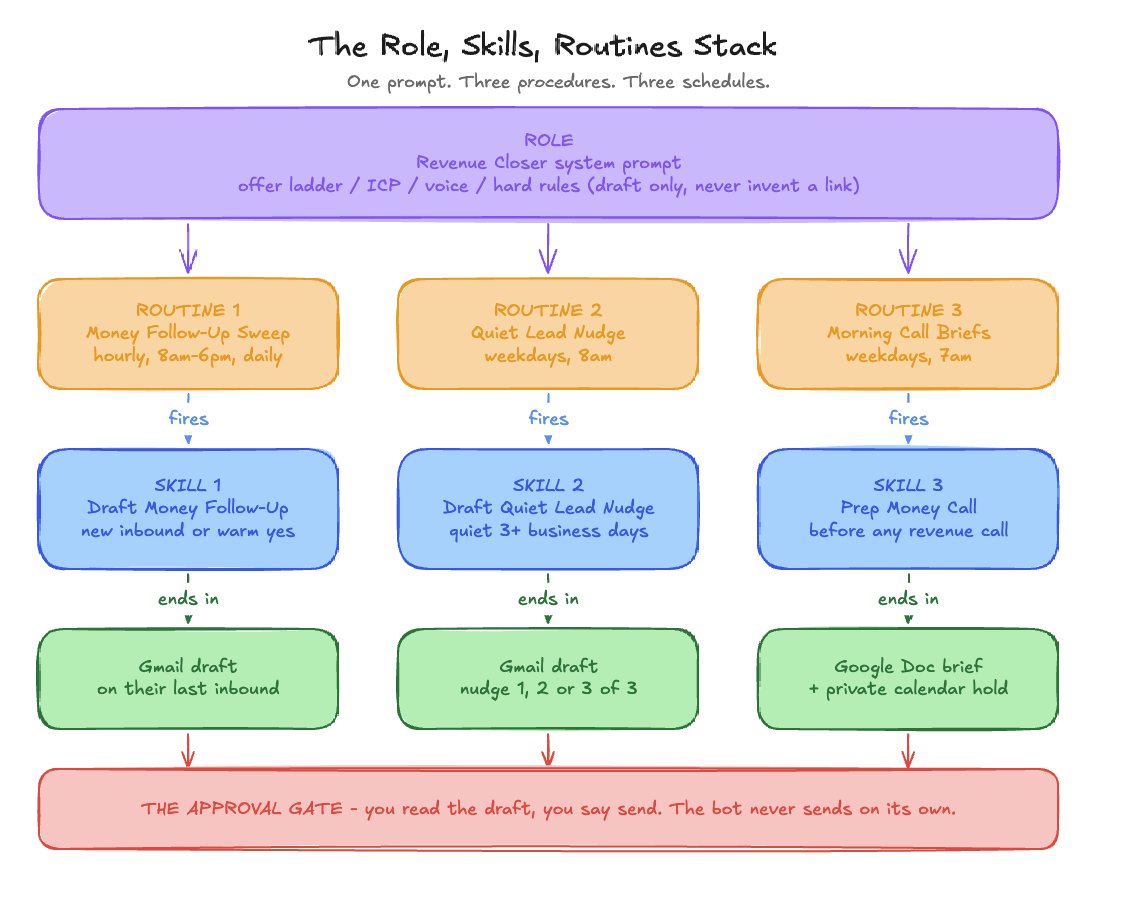
Here's the framework behind every bot I build now, and the reason this one worked on day one. I call it the Role, Skills, Routines stack:
-
Role: one system prompt that defines what the bot owns, what it sells, and what it's forbidden to do
-
Skills: reusable procedures the bot runs the same way every time
-
Routines: scheduled tasks that fire those skills without you asking
Most people write a vague "you are my sales assistant" prompt and wonder why the bot freelances. The Role layer is where you prevent that. Here's mine, templatized so you can drop in your own business:
REVENUE CLOSER SYSTEM PROMPT
A few of those lines are scar tissue worth explaining:
"Reply to their last inbound, never your last outbound." Gmail will bounce the To: field back to you if the bot replies to your own message. I learned that one the annoying way.
"Never invent a pay link." An AI that fabricates a Stripe URL in a money thread is a liability. The bot reuses links only if they already appeared in the thread or are the current public signup URL.
"Stay quiet when there is nothing new." A bot that pings you hourly with "no updates" trains you to ignore it. Silence is a feature.
IV: The three skills
Skills are where the bot stops being a chatbot and starts being an employee. Each one is a fixed procedure with a fixed stopping point.
Note: The skill prompts below are abbreviated to keep this article from being 3,000+ words. The full skill prompts, system prompt, and 3 routine prompts can be found in the Revenue Bot Playbook (free).
SKILL 1: DRAFT MONEY FOLLOW-UP
SKILL 2: DRAFT QUIET LEAD FOLLOW-UP
SKILL 3: PREP MONEY CALL
Notice the pattern across all three: every skill ends in a draft or a doc, never a send. And every skill has explicit skip conditions, because knowing when NOT to act is most of what makes an assistant trustworthy.
V: The three routines
Routines are what make this a closer instead of a tool you have to remember to use. Mine run on three schedules:
ROUTINE SCHEDULES
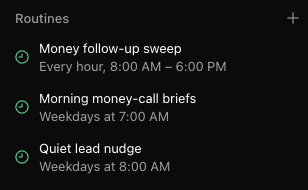
The hourly sweep is the one that made me $999. A warm lead landing at 2:14pm gets a drafted response by 3pm at the latest, not whenever I next open my inbox.
The division of labor matters too. The sweep owns fresh opportunities. The nudge routine owns silence. Neither touches the other's lane, so you never get duplicate drafts on the same thread.
VI: The $999 close, play by play
Here's exactly what happened in the first 24 hours.
An inbound lead hit my inbox asking about my $999 AI assessment. I was heads-down on other work and didn't see it.
The hourly sweep caught it. The bot read the thread, recognized it matched offer #1 on the ladder, and ran the Draft Money Follow-up skill. It pulled voice samples from my recent sent mail, wrote a reply in my voice with one clear ask, and pinged me: who, what they wanted, draft sitting in Gmail unsent.
I read the draft, made zero edits, and told it to send.
The prospect replied with a question. The bot drafted reply number two, this time including the Stripe link for the assessment, since the fee was already named in-thread. I approved. It sent.
He paid immediately.
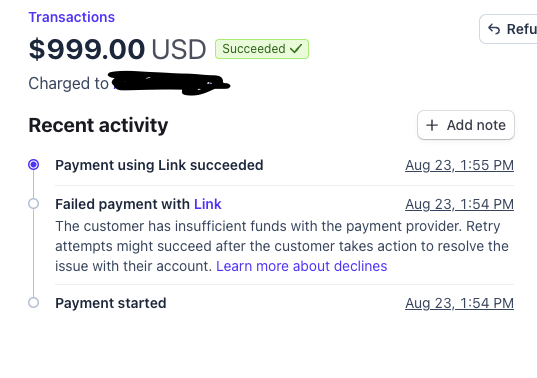
Total human time on my side: maybe 4 minutes across two approvals.
Now the honest framing, because this is where most AI content lies to you:
-
The bot didn't generate this lead. My content and referrals did. A Revenue Closer multiplies inbound. It doesn't create it.
-
The win was speed, not persuasion. The draft was good, but the reason he paid is that he got a sharp, personal response while he was still in buying mode.
That last point is the entire thesis. You need your existing pipeline worked within the hour, every hour.
VII: Guardrails, and who should build this
Quick recap of the full system before you build:
One Role prompt that defines the offers, the voice, and the hard rules. Three Skills that always end in a draft or a doc. Three Routines that fire them on a schedule and stay silent when there's nothing to say.
Two guardrails I won't compromise on, and you shouldn't either:
The draft-only rule. The bot never sends without my explicit approval. Ever. It's tempting to remove the approval gate once the drafts get good. Don't. One hallucinated price or wrong-recipient email in a money thread costs you more trust than the gate costs you in seconds.
Access honesty. This bot reads my real inbox and calendar. If you're not comfortable being accountable for what an agent can touch, scope its access down or don't build it yet. Non-technical doesn't mean unaccountable.
And who this is actually for:
Build this if you're a service business owner with real inbound flow: leads from content, referrals, or past clients that currently sit in your inbox for hours or days.
Skip this if you have no inbound yet. A closer bot with an empty pipeline closes nothing. Go do the outreach and content work first, then come back. Also skip it if you'd need a new $200+ subscription just to access Grok Bot and you're not already getting value from those plans. The math should work before the bot does.
The first 10 actions I would take
Starting from zero today:
-
Confirm you're on a plan that includes Grok Bot, and install the desktop app.
-
Connect Gmail, Google Calendar, Todoist, and Google Docs.
-
Write your offer ladder: 2-3 offers, in order, with real prices.
-
Fill in the Revenue Closer system prompt template with your offers, ICP, and disqualifiers.
-
Add the hard rules verbatim. Especially draft-only and never-invent-a-link.
-
Create the three skills as written above.
-
Set the three routines: hourly sweep 8am-6pm, weekday 8am nudges, weekday 7am briefs.
-
Feed it 3-5 of your best sent emails as voice samples.
-
Run it for one week approving every draft before send. Edit the prompt every time a draft misses your voice.
-
Only after a clean week, let it run without daily babysitting. Keep the approval gate forever.
Final thoughts
The Revenue Closer works because it's narrow. It doesn't do content, ops, or admin. It does one job: make sure no warm dollar dies of neglect in my inbox.
Grok Bot made the always-on part easy. The Role, Skills, Routines stack made it safe. And the first $999 showed up before I'd owned the thing for a full day.
If you want the complete Revenue Closer setup as one copy-paste doc, with the full unabridged system prompt, all three skills, and the routine schedules, grab it free here.
If you want to build systems like this alongside other non-technical operators, join AI Operator Academy.
And follow me @coreyganim for daily posts on growing an AI services business. If this playbook was useful, repost it so other operators can see it.
- Corey
Published on grokbot.sh. Cite the public log, not a prompt pack.