
Grok Bot + Opus 5.5: Build a 24/7 AI Engineering Team in 12 Steps
One Chief, four specialists, Cursor cloud agents, shared memory, automated testing and a review loop that keeps working while your laptop is closed. Most people are going to use the Grok Bot + Opus
Article
Job breakdowns
One Chief, four specialists, Cursor cloud agents, shared memory, automated testing and a review loop that keeps working while your laptop is closed.
Most people are going to use the Grok Bot + Opus 5.5 upgrade wrong.
They will create one Bot, ask it to build an app, watch it write code for twenty minutes and call that an autonomous AI engineer.
The interesting part isn't having another chatbot that can code.
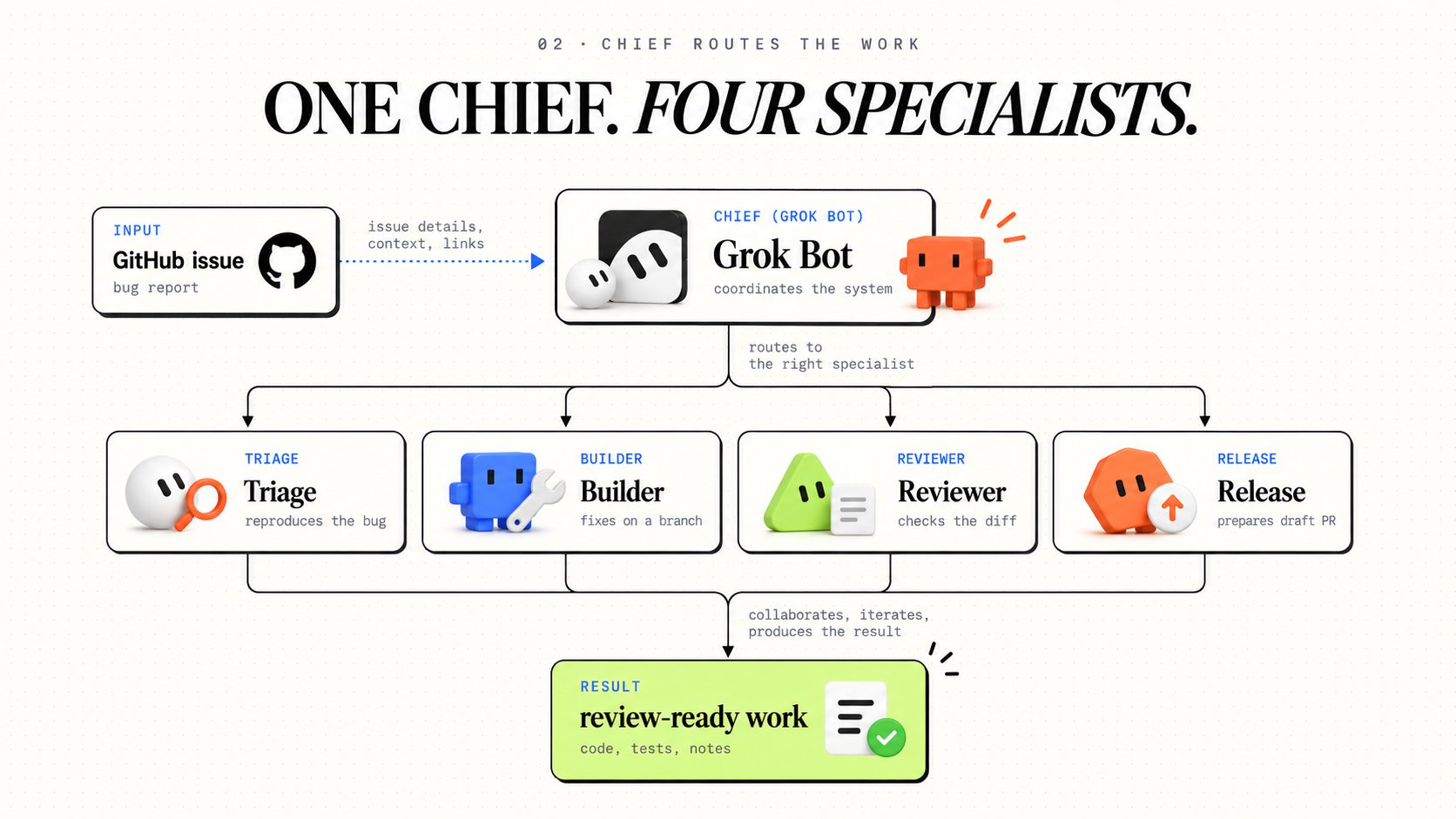
It's building a team that can receive a GitHub issue at midnight, reproduce the bug, delegate the fix, test the result, review the code and leave a pull request waiting for you in the morning.
On October 7, Elon Musk announced that Grok Bot would use the best backend model for each task, including Claude Opus 5.5.
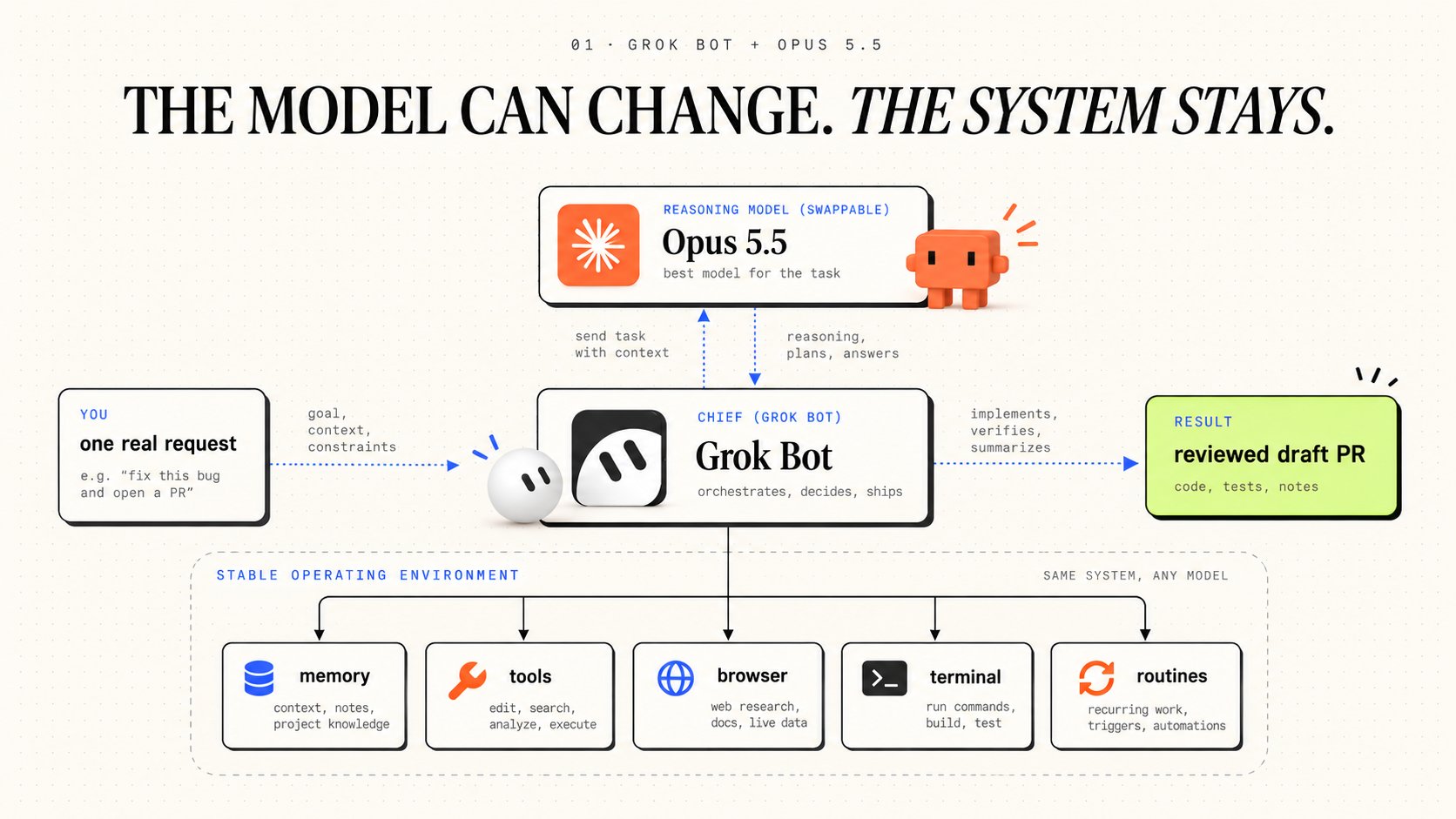
That changes the architecture.
Grok Bot brings the computer, browser, terminal, persistent context, tools and routines. Opus 5.5 adds powerful reasoning capability to a system that can keep working after you close your laptop.
And Cursor cloud agents can handle coding tasks on separate machines.
There is one important limitation: Grok Bot manages model selection automatically. You cannot force every request to use Opus 5.5, and the platform does not expose a per-request model picker.
So the smarter way to build this is not to rely on a specific model being selected. It is to build a system that works regardless of which backend handles the task.
This is the full 12-step setup.
By the end, you'll have one Chief coordinating four specialists, a shared task ledger, reusable skills, automated checks, recovery rules and a workflow that turns GitHub issues into reviewed pull requests.
Not merged code. Not production deployments.
Review-ready work, with evidence.
I publish practical guides to AI agents, automation and engineering workflows on Substack.
I publish practical guides to AI agents, automation and engineering workflows on Substack.
1. Understand what Opus 5.5 changes
The October 7 announcement sounds like a model update, but the important change is the separation between the agent's reasoning and the environment it operates.
Grok Bot already has the infrastructure for persistent work. It can use a cloud computer, interact with applications, preserve files and browser sessions, and hand tasks between named Bots.
Opus 5.5 becomes one of the reasoning backends available to that system.
You do not need to configure a separate Claude subscription inside Grok Bot or add an Opus API key to make its automatic routing work.
The setup is simpler than that.
The model routing is managed by the platform. Grok Bot's documentation does not guarantee that a specific backend will serve every request.
This actually makes the operating system around the model more important.
A good agent should be able to inherit a task, read the project state, understand its permissions and continue toward the same acceptance criteria even if the underlying model changes.
The model is responsible for reasoning.
The workflow is responsible for making reasoning useful.
2. Understand the computer you're working with
Before creating five Bots, understand the environment they share.
Every Bot on your Grok Bot account uses the same persistent cloud computer. The files, browser sessions and command-line credentials are shared.
Bots can use different screens and separate conversations, but they are not separate security environments.
That is useful for collaboration. It also means two Bots can interfere with each other if they work on the same files without a clear ownership system.
Cursor cloud agents are different. They can run coding tasks in separate cloud development environments.
For our engineering team, we will use both.
The cloud computer keeps the operation moving. Cursor cloud agents can handle appropriate independent coding jobs without fighting over one working directory.
Do not assume your Grok Bot computer has a GPU or a fixed amount of RAM. Inspect the actual machine before designing resource-heavy workflows.
Prompt 1. Check the environment
Save important project files in /workspace, which is the documented shared workspace. Keep an external copy of critical results and use Git for durable code history.
3. BUILD THE TEAM
Choose one workflow before creating the roster
We are building an autonomous engineering team, but the first assignment should be small enough to check.
Start with this:
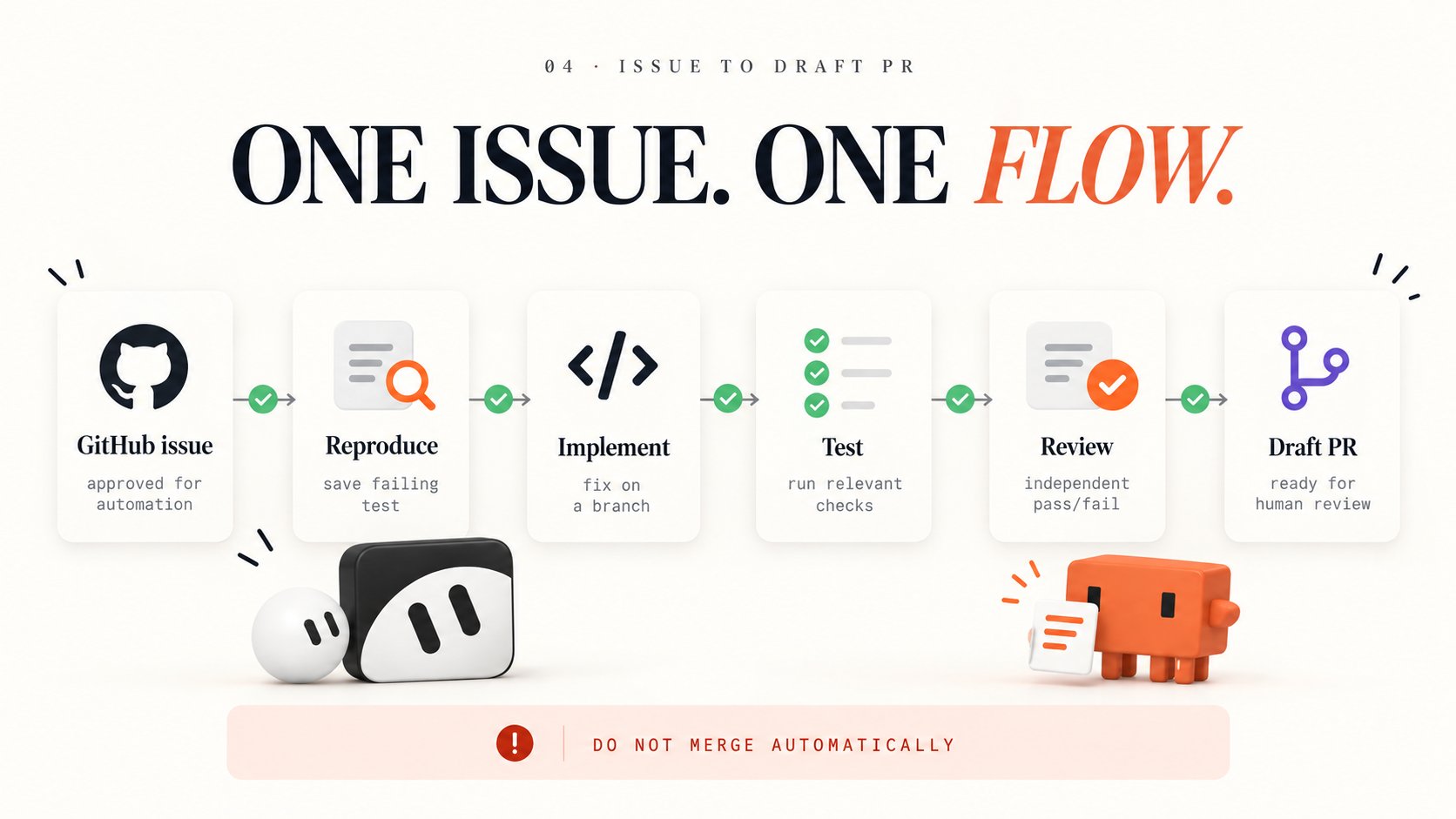
Given one labeled GitHub bug, reproduce it, prepare a fix on a separate branch, verify the change and open a draft PR.
That is the whole first workflow.
Do not start with "maintain my entire repository." Do not give the team production deployment permissions. Do not activate unattended execution before the first manual test passes.
The goal needs a measurable finish line.
Prompt 2. Define the mission
This is what makes the assignment executable.
Without a definition of done, the agent can write some plausible code and report success.
With one, it has to produce a result that can be inspected.
Create the shared workspace
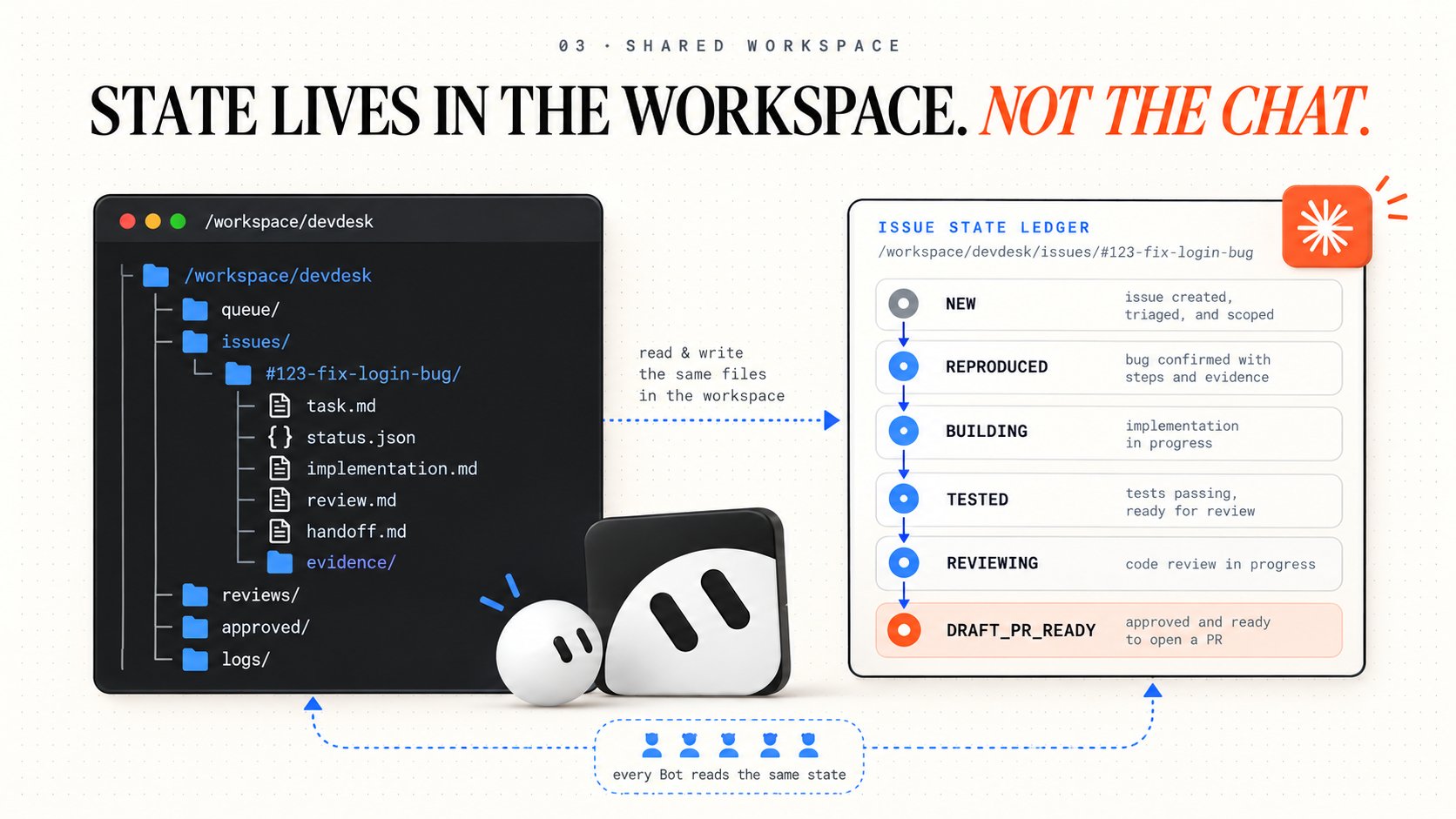
The team needs one place where work survives individual conversations.
Create a workspace with separate folders for incoming tasks, active issues, reviews and completed deliverables.
Prompt 3. Bootstrap the engineering workspace
This is a workspace convention we are creating, not a special Grok Bot file format.
It gives every Bot a predictable location for artifacts and state.
A model can forget an earlier conversation. It should not need to guess where the failing test, PR link or review report was saved.
Create the Chief and four specialists
Now build the roster.
You need five Bots, but not five Bots doing the same job.
The Chief is the only Bot you need to message for normal work.
It should know which issue is active, who owns the next step, which artifacts exist and what is blocking completion.
Prompt 4. Chief
Prompt 5. Triage
Prompt 6. Builder
Prompt 7. Reviewer
Prompt 8. Release
The team now has separate responsibilities.
The next step is making those responsibilities enforceable.
4. MAKE THE SYSTEM RELIABLE
Turn the workflow into a state machine
A group chat is useful for collaboration, but it should not be the source of truth.
The source of truth should be the issue record.
Every issue moves through known states, and every transition needs an artifact.
Create a state contract and store it in the workspace.
Prompt 9. Save the state rules
These are workflow rules, not a guarantee of enforcement by themselves. The Bots must follow them, and important transitions should be backed by scripts, repository checks or approval controls.
The important part is that every Bot can inspect the current state without asking the previous Bot to retell the conversation.
Connect GitHub and Cursor cloud agents
This is where the architecture becomes more interesting.
Grok Bot can coordinate the work, while Cursor cloud agents can perform coding tasks in separate environments.
Before enabling delegation, connect the repository to Cursor Cloud Agents and configure its environment so dependencies, tests and required development services are available.
Do not assume cloud agents can use your Grok Bot computer's files or credentials. Their execution environments are separate.
For the first issue, let Triage reproduce the bug and create a failing test before Builder delegates the fix.
Then send Builder the implementation contract.
Prompt 10. Delegate the fix
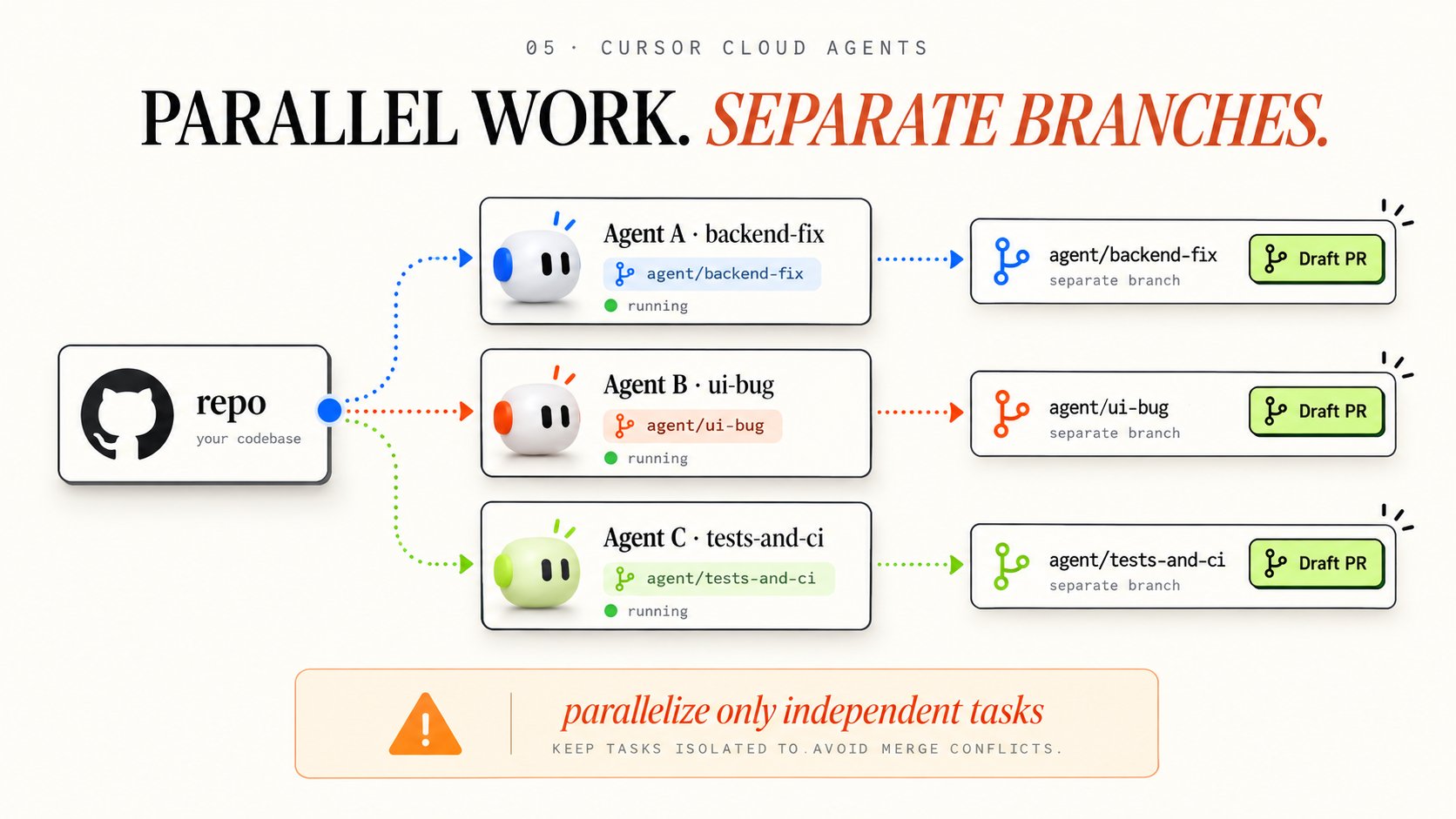
This avoids a common problem with parallel coding agents: several workers touching the same files and creating conflicting changes.
Parallelize only independent tasks.
One agent can work on a backend bug while another handles an unrelated frontend issue. Sending three agents to rewrite the same function is usually a coordination problem disguised as productivity.
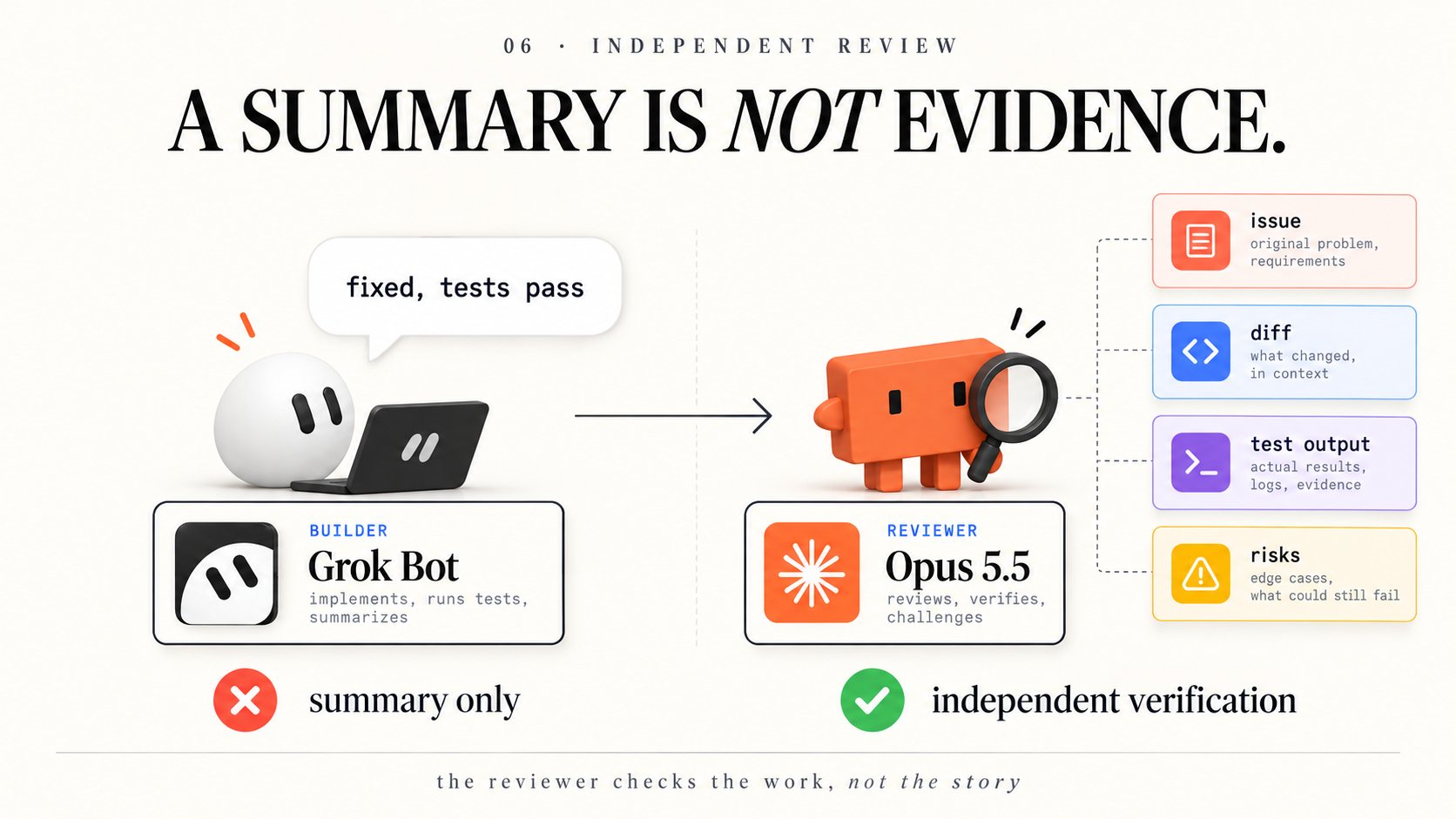
Give the Reviewer evidence, not a success message
Builder finishes the change.
What happens next?
In a weak setup, it sends:
"Fixed. Tests pass."
Chief accepts it. Release prepares the handoff. The issue appears complete.
But nobody has checked whether the test actually covered the original failure.
The stronger setup requires an independent review artifact.
Prompt 11. Review the pull request
The Reviewer should be trying to find a reason to reject the work.
A second agent repeating the first agent's summary is not verification.
A reviewer that opens the diff, runs or inspects the tests and connects findings to the original requirements is.
The system should not treat a passing test suite as absolute proof either. Tests can be incomplete. A difficult change may require additional integration, security or human review.
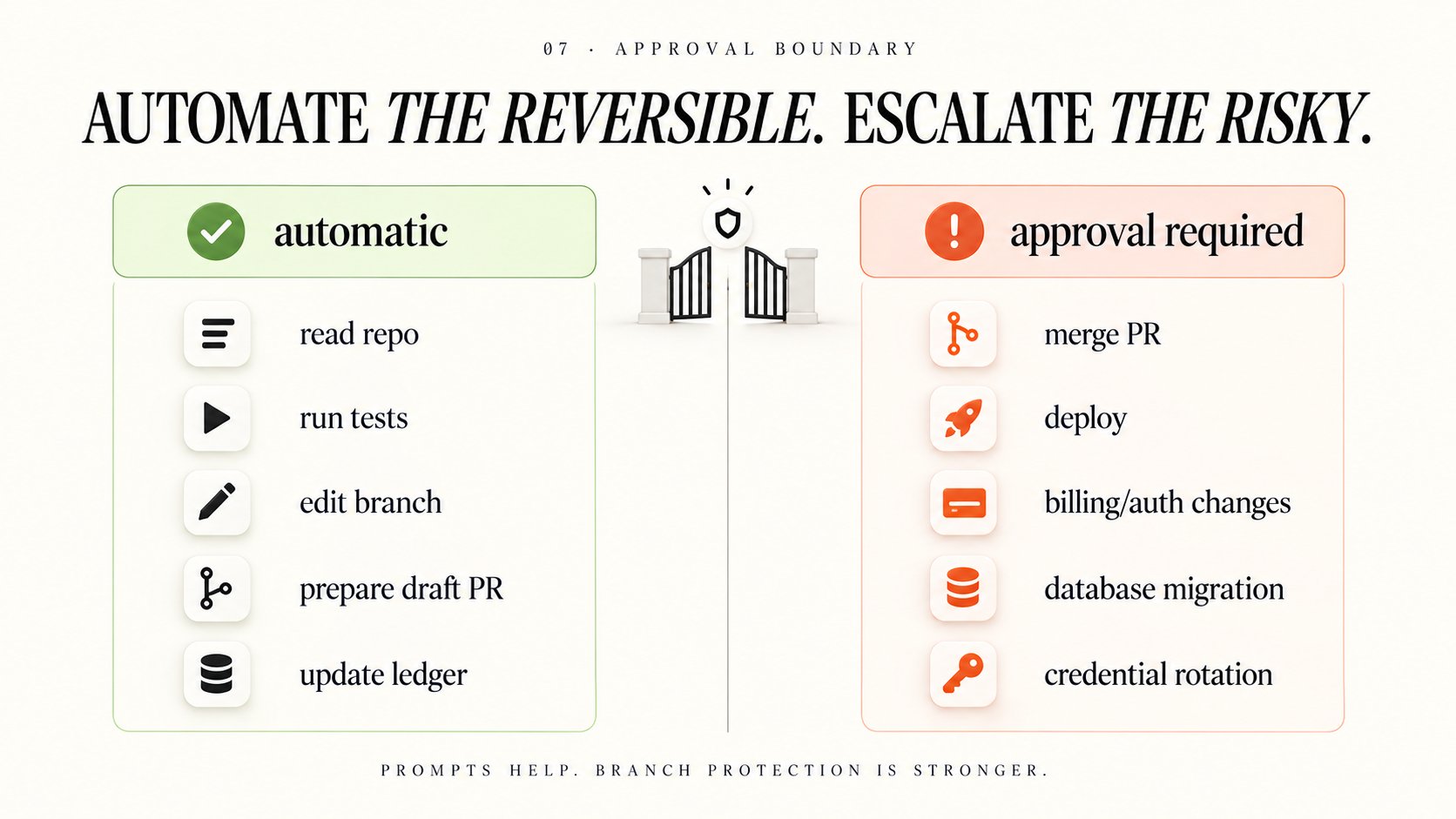
Put permissions outside the prompts
A stronger reasoning model does not need broader authority.
In fact, better agents make clear approval boundaries more important because they can get further into a workflow before stopping.
For this engineering team, routine reversible development work can proceed automatically inside its authorized workspace.
External or consequential actions require approval.
These instructions should also be reflected in Grok Bot Auto-review settings, repository branch protection, CI checks and cloud-agent controls.
A prompt saying "never merge" is helpful. A protected default branch is stronger.
Grok Bot also shares credentials across Bots on the same user's computer. Giving one Bot a different name does not isolate its access.
For sensitive applications, use narrowly scoped integrations and separate environments where required. Complete login and 2FA steps through the secure handoff rather than pasting secrets into chat.
The goal is to automate preparation, not eliminate accountability.
5. TURN THE TEAM INTO A SYSTEM
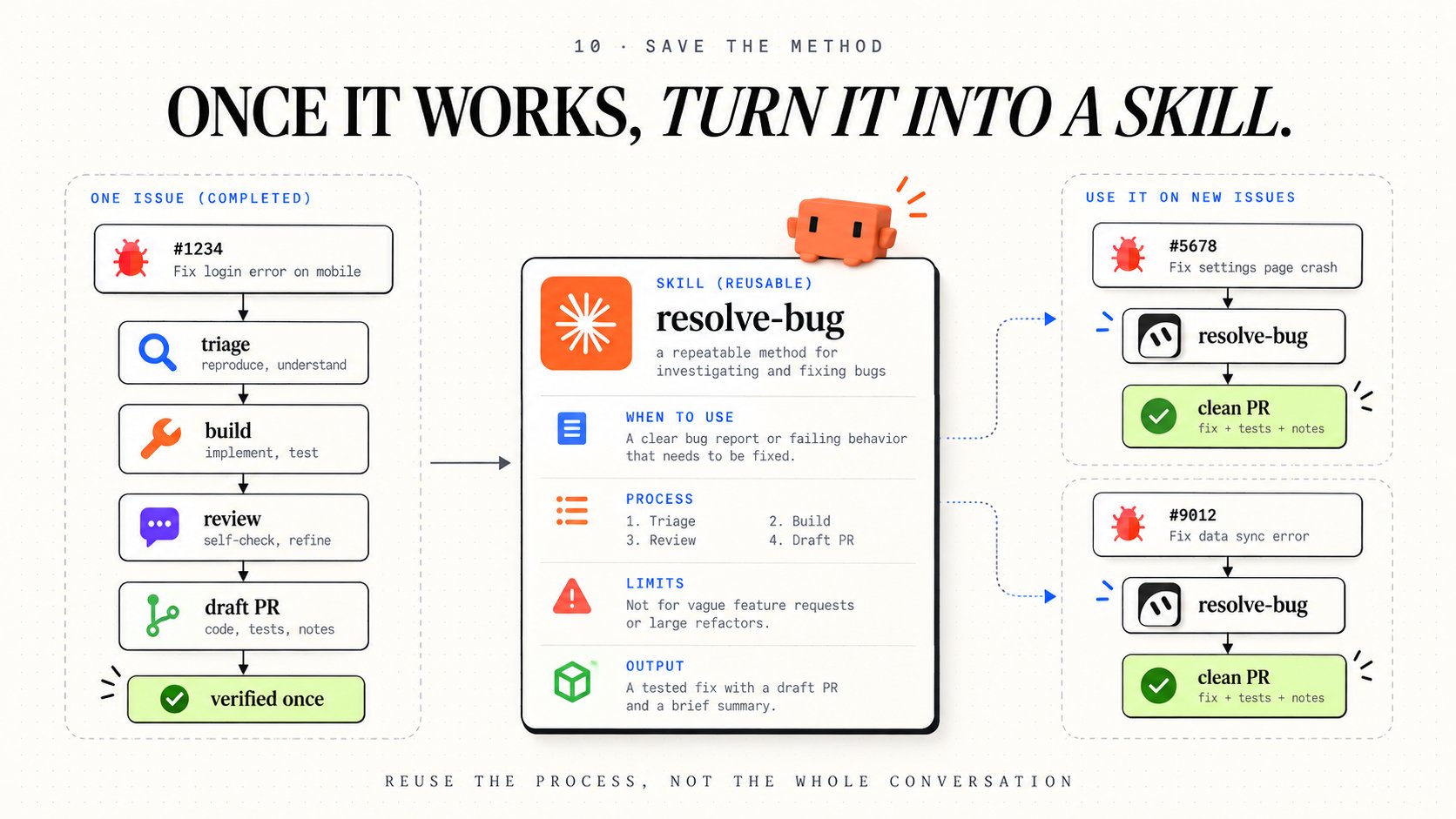
Save the process as a reusable skill
By this point, you have a working sequence:
Triage reproduces the bug, Builder prepares the fix, Reviewer checks it and Release creates the handoff.
Do not rewrite that process for every issue.
Save it as a Grok Bot skill.
Skills preserve reusable procedures, decision rules, validation requirements and approval boundaries.
Prompt 12. Create the engineering skill
A skill is the method. It is not the schedule.
That distinction matters because you want to be able to invoke the exact same procedure manually, from a GitHub event or as part of a larger engineering routine.
Run the skill on another harmless issue before automating it.
If the second run fails in the same way as the first, improve the procedure or add a mechanical check.
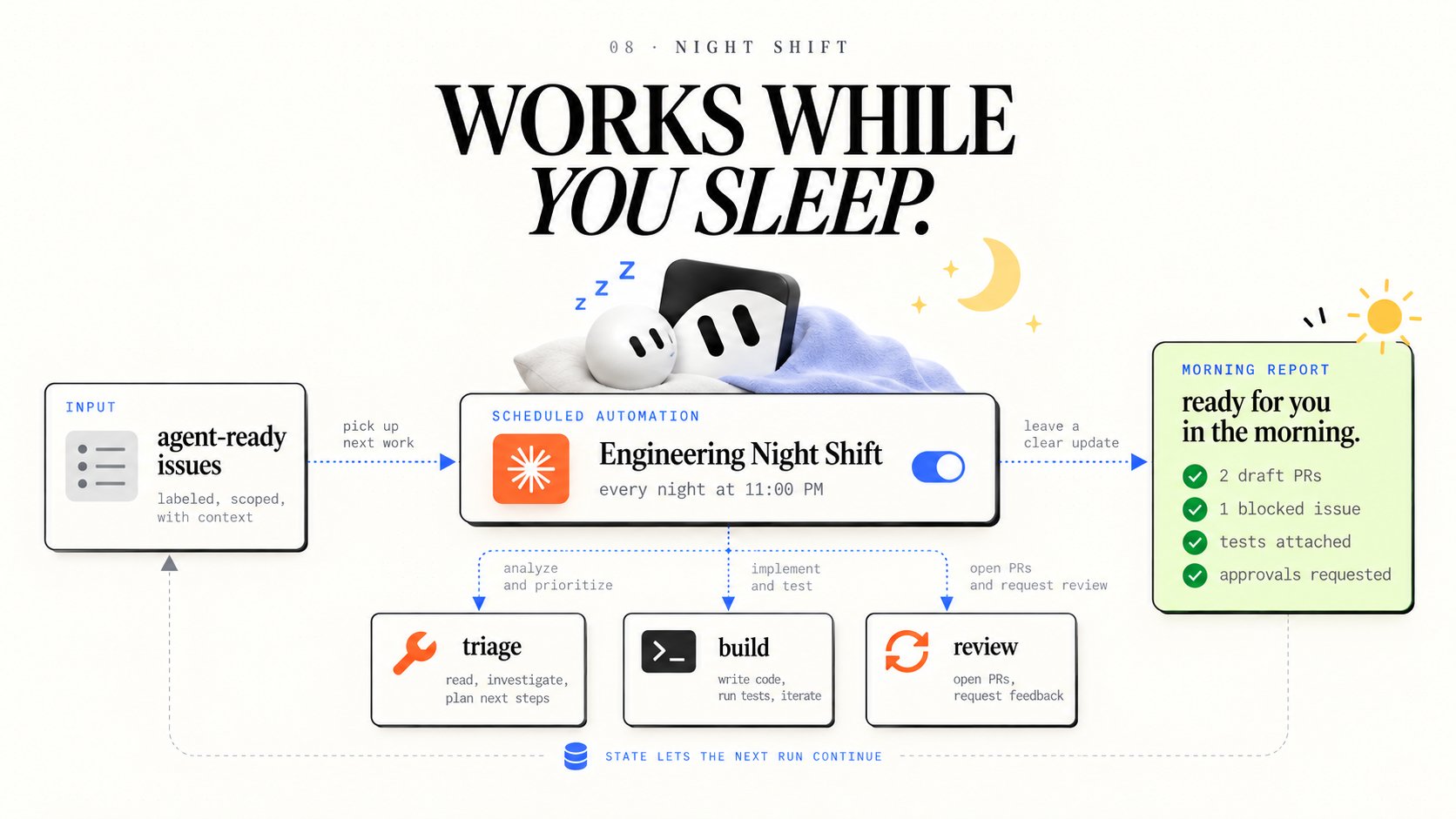
Add a routine that runs while you sleep
Now the workflow is ready for background operation.
Grok Bot supports scheduled routines and supported event triggers, including GitHub-related events through connected integrations.
Keep the trigger narrow. You do not want every comment on every issue to wake up five Bots.
For the first unattended setup, use the agent-ready label and a small limit on new issues.
Prompt 13. Create the night shift
Test this routine with a harmless issue before allowing it to run unattended.
A Grok Bot test run performs real work, including tool calls and potentially file modifications. Use safe test inputs and enforce the same approval boundaries as production.
There is another important limit: a scheduled routine is not an unlimited continuous process. Usage allowances, failures, computer recovery and pauses can interrupt work.
The point of persistent state is that the next run knows where to continue.
Make the system recover and report honestly
The most valuable engineering agent is not the one that never fails.
It is the one that fails in a way you can inspect and recover.
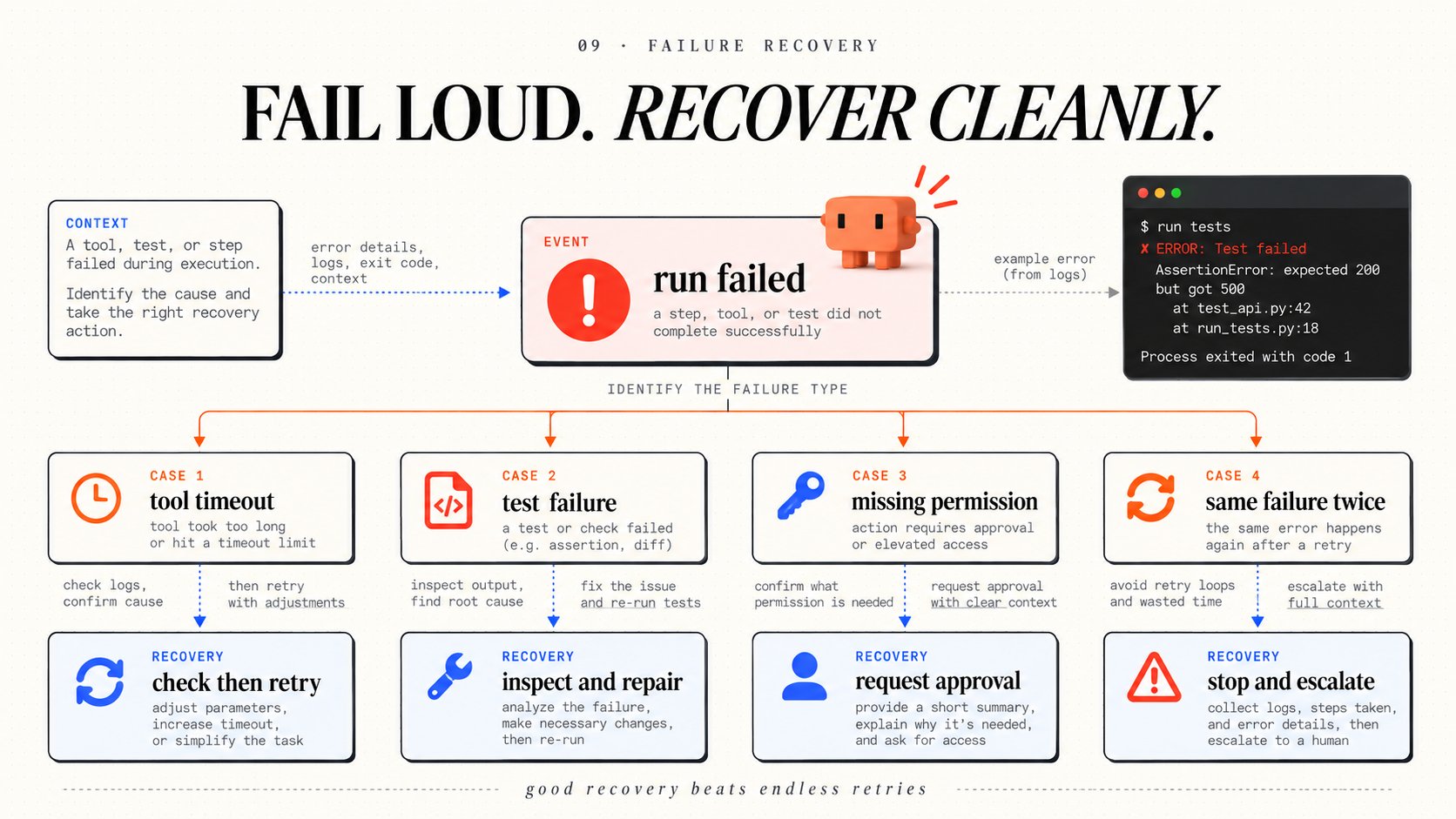
Imagine Triage successfully reproduces a bug. Builder creates a fix. Tests fail. Builder tries again, but the same test fails for the same reason.
Without a limit, the team can burn time and usage indefinitely.
Give failures explicit recovery paths.
The morning report should distinguish completed work from attempted work.
Prompt 14. Generate the morning handoff
That report is the product of the night shift.
You should be able to open it in the morning, inspect the PRs and decide what to approve without reconstructing hours of Bot conversations.
6. WHAT BREAKS
A system like this is useful, but the first version will encounter problems.
The model changes. Grok Bot manages model routing, and the model that serves a task is not guaranteed. Keep your task contracts and validation rules independent of a specific model. If a stage requires guaranteed Opus 5.5 execution, use a separately configured Claude API or Claude Code workflow.
Two Bots work on the same issue. Give each issue a unique ID and one current owner. Check the ledger before dispatch. Keep coding branches separate and do not share mutable working files without coordination.
The cloud computer is rebuilt. Project files in /workspace are designed to persist through normal updates, but installed packages may need to be restored and very recent changes may be lost during recovery. Keep setup commands reproducible, and preserve code changes in Git.
The review loop never ends. Limit repair rounds and ask for help when the same failure repeats. A failed test is evidence, not an invitation to edit the test until it turns green.
Usage runs out. Grok Bot has plan-based usage and optional additional spending controls. Cursor's current documentation says underlying model selection does not change the usage charge per token. Measure the cost of completed workflows rather than assuming that every issue takes the same amount of compute.
Sensitive data crosses a boundary. Both the shared computer and model-provider routing matter. Review connected accounts, credentials, source-code sensitivity and organizational data policies before delegating work.
Do not enable all of these moving parts at once.
Start with one safe bug.
Then one successful handoff.
Then one independently reviewed fix.
Then one reusable skill.
Only after that should you activate the night shift.
THE FIRST RUN
You do not need twelve days to start.
Open Grok Bot, create Chief and paste this:
When the first issue reaches a clean draft PR, the next step is obvious.
Save the process.
Run it again.
Fix whatever made the second run difficult.
Then automate the version that actually worked.
THE REAL SHIFT
Opus 5.5 makes the Grok Bot story much more interesting, but the model alone is not the product.
Grok Bot provides the persistent work environment. Cursor cloud agents provide independent coding environments. Skills preserve procedures. Routines start the work. Reviewers check the result. Approval controls decide what the system can do without you.
Together, those components can turn a GitHub issue into a review-ready change without requiring you to manually route every step.
The value is not that five Bots are running.
The value is that you can stop watching them.
You define the outcome, the boundaries and the evidence required for completion. The team handles the reversible work and returns when a meaningful decision needs you.
The strongest AI engineering team is not the one that writes the most code overnight. It is the one that leaves you the least uncertain about what happened.
That is the system worth building.
Bookmark this guide before creating another agent with no owner, no task state and no definition of done.
Follow me on X: x.com/0xjmori
Subscribe to my Substack: substack.com/@lunarresearcher
Subscribe to my Substack: substack.com/@lunarresearcher
Let the Bots do the work. Keep the merge button.
Sources and verification
For implementation details, the key references are Grok Bot's working guide, Cursor Cloud Agents and Grok Bot model selection.
The official documentation confirms the shared computer, Bots, skills, routines and cloud-agent workflow. It also clarifies that users cannot choose or inspect the underlying model for individual Grok Bot requests.
Published on grokbot.sh. Cite the public log, not a prompt pack.